Elegir entre NovaStar NS060-5A vs NS060-10A (or stepping up to the 30 m NS060-30A) comes down to one practical field measurement: the cable path from your NovaStar controller or MFN300 multifunction card to an unshaded spot on top of the sign frame. All three waterproof, UV-resistant sensors measure 0 a 65,535 lux on 5 V DC power with zero external adapter. Pick the NovaStar NS060-5A (5 m / 16.4 ft cable) when your sending box sits inside the cabinet; pick the NovaStar NS060-10A (10 m / 32.8 ft) for taller pylons and rooftop mounts; and pick the NS060-30A (30 m / 98.4 ft) when the control rack sits indoors away from the facade.
Nothing draws an angry municipal citation faster than a 6,000-nit (cd/m²) outdoor billboard blinding drivers at 9:00 PM because nobody hooked up automatic dimming. On the flip side, running a sign at 100% brightness on overcast winter afternoons wastes electricity and ages LED diodes twice as fast. A fifty-dollar ambient light sensor pays for itself in the first quarter—provided you order the right cable length, plug it into a controller that actually has a sensor jack, and don’t mount the probe right underneath a streetlamp.
Comparemos NovaStar NS060-5A vs NS060-10A and NS060-30A side by side, clarify how they replace the discontinued NS048C-1, pair them with the MTH310 IP65 temperature sensor and MFN300 multifunction card, and walk through NovaLCT brightness-curve setup.
1. Hardware split: NovaStar NS060-5A vs NS060-10A, NS060-30A & NS048C-1
Hold all three probes next to each other on a tailgate and a NovaStar NS060-5A vs NS060-10A inspection is refreshingly simple: the waterproof UV-resistant optical head, 5 V DC power draw, and 0–65,535 lux sensing range are identical across the NS060 series. What changes is the factory-molded cable length—5 m (16.4 ft), 10 m (32.8 ft), or 30 m (98.4 ft)—so you don’t have to cut, splice, and heat-shrink low-voltage sensor wire out in the rain.

01. Why factory cable length beats field splicing
Installers occasionally buy the shorter NS060-5A to save a few dollars, realize it falls 4 m (13.1 ft) short of the billboard roof cap, and splice scrap alarm wire in the middle. Six months later, moisture wicks into the tape joint, lux readings freeze at 0, and the billboard locks down to 15% nighttime brightness at high noon.
Ordenar el NS060-10A (10 m / 32.8 ft) or NS060-30A (30 m / 98.4 ft) keeps the factory sealed jacket intact all the way from the probe head into your weatherproof electrical box. Measure your actual conduit route—including vertical drops and drip loops—before picking between 5 m, 10 m, and 30 m.

02. Replacing the discontinued NovaStar NS048C-1
Servicing an older highway sign built five or six years ago? You’ll likely pull a weathered NovaStar NS048C-1 off the top rail. The NS048C-1 is no longer in production, and NovaStar’s direct official replacement is the NS060-5A (or NS060-10A / NS060-30A if you need extra reach). It plugs straight into the exact same sensor connector on MCTRL300 boxes, Taurus players, and MFN300 multifunction cards without changing wiring pinouts.

| Modelo de sensor | Measurement Type & Range | Factory Cable Length | Energía y protección | Lifecycle & Pairing Note |
|---|---|---|---|---|
| NovaStar NS060-5A | Ambient light (0–65,535 lux) | 5 m (16.4 pies) | 5 V DC (from controller/MFN300); waterproof & UV-resistant | Active standard; official replacement for NS048C-1 |
| NovaStar NS060-10A | Ambient light (0–65,535 lux) | 10 m (32.8 pies) | 5 V DC; waterproof & UV-resistant | Active; works with MFN300, MFN300-B & sensor-equipped senders |
| NovaStar NS060-30A | Ambient light (0–65,535 lux) | 30 m (98.4 pies) | 5 V DC; waterproof & UV-resistant | Active; built for tall pylons & indoor-to-outdoor conduit runs |
| NovaStar NS048C-1 | Ambient light (legacy) | 5 m (16.4 pies) | 5 V DC; outdoor housing | Discontinued; replace directly with NS060-5A |
| NovaStar MTH310 | Temperature (-20 °C to +75 °C / -4 °F to +167 °F) | Factory lead to MFN300 | IP65 waterproof; powered directly by MFN300 | Active; pairs with MFN300 for thermal cabinet alarms |

2. Which NovaStar controllers accept direct sensors vs needing MFN300
Before ordering either probe in a NovaStar NS060-5A vs NS060-10A plan, flip your sending controller around and check whether a dedicated light-sensor jack actually sits on the backplate. Skipping that five-second check leaves installers holding a sensor with nowhere to plug it in.
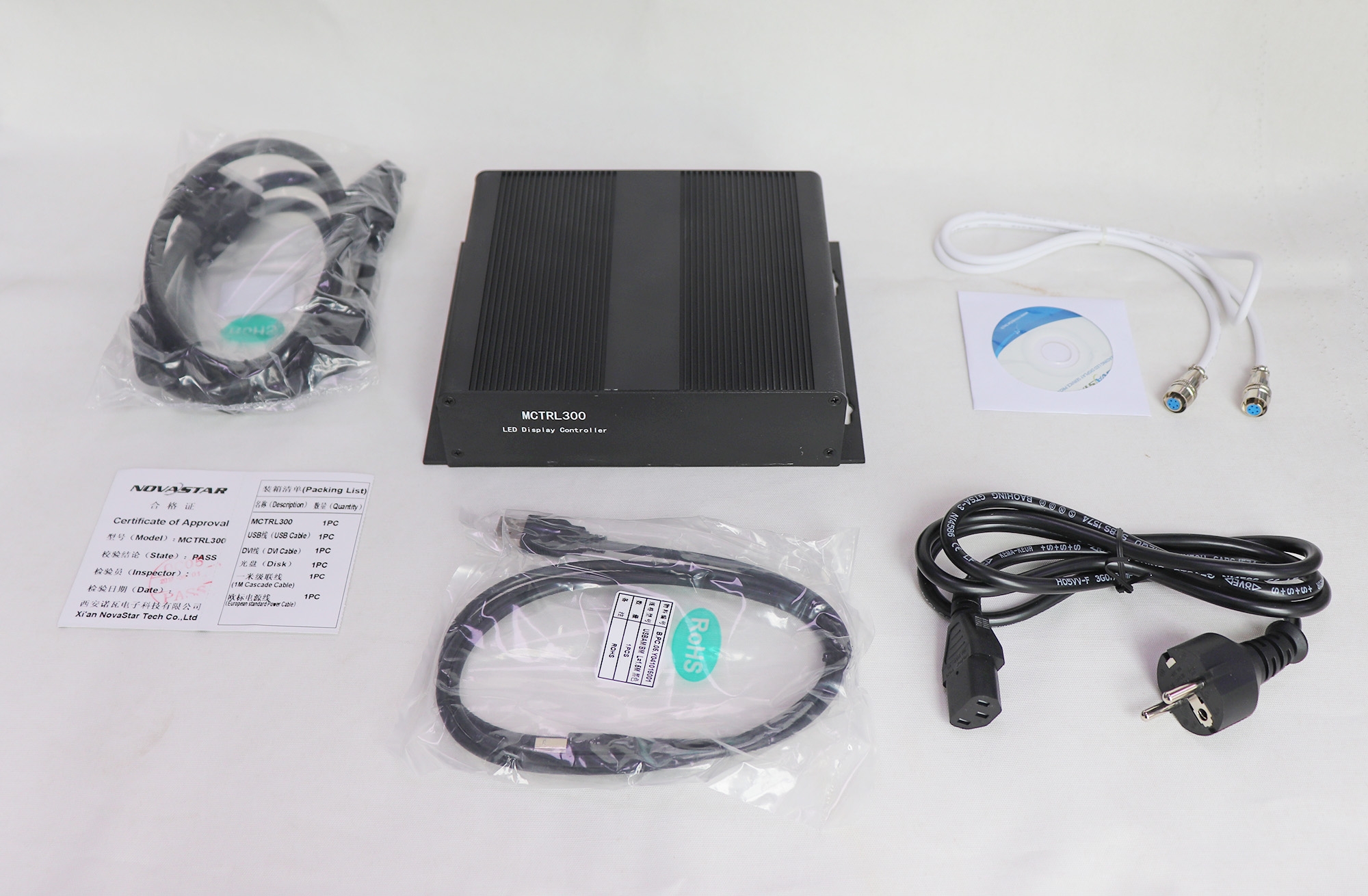
01. Controllers with direct onboard sensor jacks
Several popular NovaStar boxes let you plug an NS060-5A or NS060-10A straight into the chassis with zero extra hardware:
- NovaStar MCTRL300 & standard MCTRL660: Include a direct light-sensor connector onboard for quick outdoor dimming.
- NovaStar MBOX600 Pro: Features two dedicated sensor connectors right on its industrial enclosure for unmanned billboards.
- Taurus TB players (TB20, TB40, TB60): Include onboard sensor ports so standalone signs dim automatically without a control PC (compare models in our Guía de NovaStar TB40 vs TB60 vs TB20).
02. Controllers that require an MFN300 / MFN300-B multifunction card
Many flagship rack controllers—including the NovaStar MCTRL660 Pro (which explicitly lists light sensor interface as not supported) and large VX Pro scalers parked in an indoor control room 60 m (197 ft) away from the sign—don’t take a direct sensor plug on the rack chassis. On those builds, mount a NovaStar MFN300 or MFN300-B multifunction card right inside the outdoor cabinet on the same Gigabit Ethernet chain, then plug your NS060-5A or NS060-10A into the MFN300’s sensor port. For more on how MCTRL660 Pro differs from MBOX600 Pro, see our MBOX600 Pro vs MCTRL660 Pro guide.
3. Adding the MTH310 IP65 temperature sensor & MFN300 power relays
Once an MFN300 multifunction card sits inside your outdoor electrical box, you don’t just gain a port for a NovaStar NS060-5A vs NS060-10A light probe—you unlock thermal protection and staged power sequencing across the whole billboard.
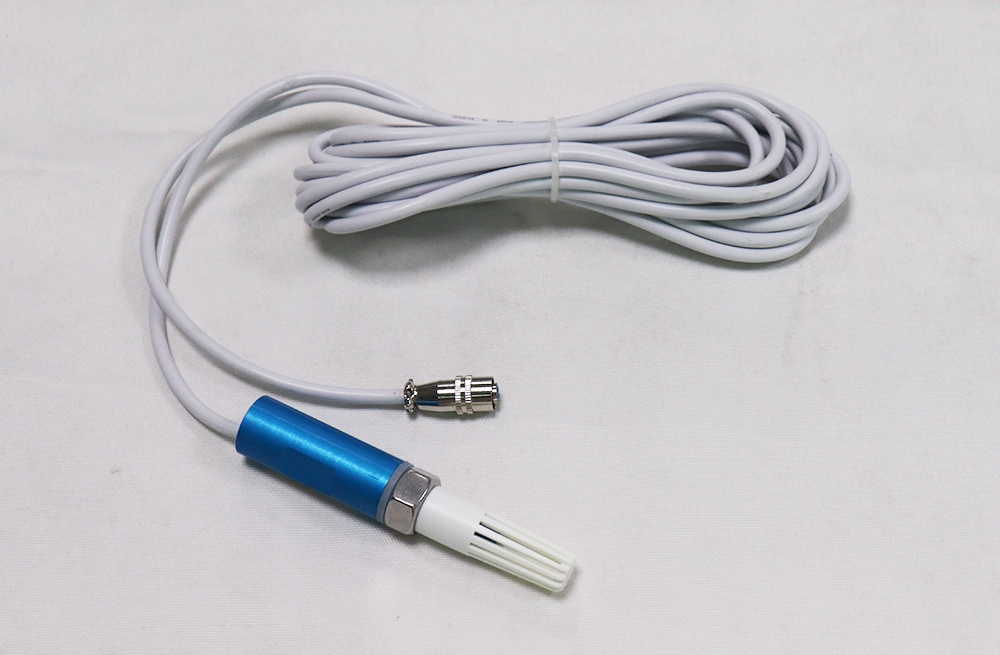
01. Monitoring cabinet heat with the MTH310
Sealed outdoor steel cabinets baking in direct afternoon sun easily hit 55 to 65 °C (131 to 149 °F)—right where 5 V switching power supplies start derating output wattage. Plugging a Sensor de temperatura NovaStar MTH310 (IP65 waterproof, -20 °C to +75 °C / -4 °F to +167 °F, powered directly off the MFN300) into the top bay of the cabinet lets NovaLCT log real-time cabinet heat, trigger exhaust fans, or cut screen brightness automatically before power bricks trip thermal shutdown.
02. Staged AC contactor sequencing via MFN300 relays
Energizing forty 300 W switching power supplies on one breaker simultaneously creates a massive cold-start inrush spike that trips standard breakers. Wiring the MFN300’s onboard relay outputs to staged AC contactors (turning Bank 1 on, pausing 2 seconds, then Bank 2, then Bank 3) protects breakers and lets you schedule overnight deep-sleep power-offs automatically.
03. Wiring an MFN300-B onto your existing Ethernet chain
One reason techs love adding an MFN300-B when comparing NovaStar NS060-5A vs NS060-10A runs is how cleanly it drops into existing cabling. You don’t need to pull a brand-new RS232 serial wire 80 m (262 ft) back to the control room: simply insert the MFN300-B anywhere inline on a Gigabit Ethernet port (either right after the sending box or at the tail end of a cabinet daisy chain). Both RJ45 ports on the MFN300-B pass LED video data straight through to your receiving cards while letting NovaLCT poll your NS060 light sensor and MTH310 temperature probe over the exact same Cat6 cable.
Before closing the waterproof junction box, verify the MFN300-B’s dedicated 5 V DC power feed (or 100–240 V AC input on enclosed MFN300 boxes) stays wired to an always-on auxiliary circuit—not behind one of the switched LED cabinet contactors! If you accidentally power the MFN300 off the same contactor it controls, the card shuts itself off the moment it opens Relay 1 and can’t wake the billboard back up at sunrise.
It’s also worth checking your controller’s firmware version before leaving the warehouse. Older MCTRL300 or MFN300 firmware builds occasionally need a quick NovaLCT refresh before recognizing live lux updates reliably on newer NS060 hardware batches. Test the sensor on your shop bench for five minutes—covering the probe and watching brightness step down on a single test cabinet—so you don’t spend an hour troubleshooting in a bucket truck thirty feet above traffic.
| Tipo de instalación | Controller / Interface | Distance to Unshaded Roof | Sensor recomendado | Extra Accessory to Consider |
|---|---|---|---|---|
| Compact storefront sign (3 x 2 m / 9.8 x 6.6 ft) | Taurus TB40 or MBOX600 Pro inside sign | 2–4 m (6.6–13.1 pies) | NS060-5A (5 m) | Direct plug-in; no MFN300 required |
| Mid-height street pylon (6 x 3 m / 19.7 x 9.8 ft) | MCTRL300 or MFN300-B in lower bay | 6–9 m (19.7–29.5 pies) | NS060-10A (10 m) | Agregar MTH310 if summer ambient exceeds 40 °C |
| Rooftop billboard with indoor AV closet | MCTRL660 Pro / VX1000 Pro + MFN300-B | 15–28 m (49–92 pies) | NS060-30A (30 m) | MFN300-B relays for staged AC contactor startup |
| Legacy sign with dead NS048C-1 | Existing MCTRL300 / MFN300 | Matches original 5 m run | NS060-5A (5 m) | Direct drop-in replacement; check NovaLCT lux table |
4. Outdoor mounting rules: avoiding headlight flicker & shadow traps
Even a brand-new probe from our NovaStar NS060-5A vs NS060-10A lineup will drive a client crazy if mounted lazily on the wrong side of the sign frame. Four quick mechanical rules prevent yo-yo dimming:
- Keep the optical dome out of the LED wall’s own glow: Never mount an NS060 probe flush on the front bezel where white video ads bounce light straight back into the sensor—otherwise a bright white commercial tricks the sensor into thinking the sun came out at midnight!
- Avoid passing truck headlights and overhead streetlamps: Point the waterproof head upward toward open sky on the top cap of the sign, shielded from direct sodium/LED streetlights and highway high-beams.
- Watch seasonal building shadows: Mounting a probe tucked behind a roof parapet that falls into deep shadow at 2:00 PM makes the sign dim prematurely while the front face still sits in blazing afternoon sun.
- Form a downward drip loop before the cable gland: Loop the NS060 jacket downward before entering your cabinet grommet so rainwater drips off the bend instead of following the sheath onto your MFN300 PCB.
5. Programming auto-brightness lux curves in NovaLCT & ViPlex
Plugging in a NovaStar NS060-5A vs NS060-10A sensor is only half the job—you still have to map lux readings to percentage brightness inside software. Grab the current build from our Biblioteca de software NovaStar NovaLCT y VMP.
01. Detecting the sensor & setting lux-to-brightness steps
Open NovaLCT, log in as advanced user, and go to Brightness → Auto Adjustment → Wizard / Hardware Settings. Haga clic en Refrescar to confirm the live lux readout moves when you cup your hand over the dome. Next, map 4 to 6 clean lux breakpoints instead of leaving factory defaults alone:
- Nighttime (0–50 lux): Set 12% to 18% brightness (~700–1,000 nits on a 6,000-nit wall) so text stays crisp without glaring at drivers.
- Dawn / Dusk (100–1,000 lux): Ramp smoothly to 35%–45% brightness.
- Overcast Day (3,000–10,000 lux): Hold 65%–75% brightness—saving substantial AC power on cloudy days.
- Direct Sunlight (25,000–65,535 lux): Open up to 95%–100% peak brightness.
02. Setting polling intervals so passing clouds don’t strobe the sign
Set NovaLCT’s detection interval to 60 segundos (with a 3-to-5-reading average filter) so a passing cloud or bird shadow doesn’t make the billboard step brightness up and down every few seconds. Finally, set an offline fallback brightness (for instance 60% daytime / 20% timed night) so even if hail damages the dome years later, the wall stays readable until a tech swaps the probe.
03. Field diagnostics: fixing stuck 0-lux or 65,535-lux readings
When a site manager calls complaining that an outdoor wall won’t dim at night or stays dark at noon, you can diagnose a NovaStar NS060-5A vs NS060-10A fault in five minutes without guessing. Open NovaLCT’s auto-brightness hardware monitor and watch the live lux number while covering the dome with black electrical tape, then shining a phone flashlight straight onto it:
- Stuck at 0 lux even in direct sun: Check for a broken 5 V wire, water inside a field splice, or a dead sensor port on the MCTRL300/MFN300. If you’re running a long conduit path, upgrading a spliced 5 m lead to a factory-sealed 10 m NS060-10A or 30 m NS060-30A fixes moisture dropouts permanently.
- Stuck at 65,535 lux at midnight: Usually points to a shorted signal line or a sensor mounted too close to a floodlight or sign wash fixture. Unplug the probe and check whether the software reports “sensor offline” cleanly.
- Sensor reads live lux accurately, yet screen brightness never changes: Nine times out of ten, someone left NovaLCT set to Brillo Manual en lugar de Ajuste automático, or forgot to click Guardar en el hardware on a Taurus TB40/TB60 or MBOX600 Pro after editing the lux table in ViPlex Express.
Also keep seasonal weather in mind across northern North America and Europe: wet winter snow piled on top of a flat roof-mounted dome can mimic twilight at 11:00 AM. Tilting the mounting bracket at a slight 15-degree angle sheds rain and snow naturally while keeping the UV-resistant lens clear all winter long. Treating cable length, mounting angle, and NovaLCT polling filters as one complete package makes any NovaStar NS060-5A vs NS060-10A install virtually maintenance-free—and keeps both local zoning inspectors and power bills happy year-round. If you’re standardizing spare kits across a fleet of billboards, stocking two NS060-5A probes and two NS060-10A probes covers nearly every NovaStar NS060-5A vs NS060-10A service call without waiting on express freight.
Preguntas frecuentes
What is the difference in a NovaStar NS060-5A vs NS060-10A comparison?
Ambos NS060-5A y NS060-10A use the exact same waterproof, UV-resistant 0–65,535 lux optical sensor running on 5 V DC. The only difference is factory cable length: 5 m (16.4 pies) on the NS060-5A versus 10 m (32.8 pies) on the NS060-10A (with the NS060-30A extending to 30 m / 98.4 ft).
Can I replace my old discontinued NovaStar NS048C-1 with an NS060-5A?
Yes. NovaStar retired the NS048C-1 and lists the NS060-5A as its direct replacement. Plug it into the same sensor port, refresh the sensor list inside NovaLCT or ViPlex, and verify your lux-to-brightness curve.
Do I need an MFN300 multifunction card to use an NS060-5A or NS060-10A?
Only if your sending controller lacks a built-in light-sensor jack (such as the MCTRL660 Pro or a rack-mounted VX Pro controller sitting far from the outdoor screen). Controllers like the MCTRL300, MBOX600 Pro, and Taurus TB players accept the NS060 sensor directly.
Does the NovaStar NS060 or MTH310 sensor need a separate 5V power adapter?
No. Both the NS060 light sensors and the MTH310 IP65 temperature sensor draw low-current 5 V DC power directly through their signal cable from the NovaStar sending box or MFN300 multifunction card.
Why is my NovaStar outdoor sign stuck at minimum brightness during the day?
Usually one of three things happened: the sensor cable was spliced and took on water, a roof overhang or dirt buildup is blocking the dome (reading near 0 lux), or NovaLCT’s lux curve wasn’t saved after a firmware update. Check the live lux reading in NovaLCT first to isolate hardware vs software.
Before you order NovaStar outdoor sensors: field checklist
Before ordering parts after checking NovaStar NS060-5A vs NS060-10A (and NS060-30A) specs, verify five quick details: measured conduit length from controller/MFN300 to an unshaded roof cap (5 m, 10 m, or 30 m), whether your NovaStar sender has an onboard sensor port or needs an MFN300-B card, whether you’re adding an MTH310 thermal probe for hot summer enclosures, local municipal nighttime nit caps, and whether you’re replacing a retired NS048C-1.
Unsure whether your NovaStar controller takes a direct sensor plug or needs an MFN300-B alongside an NS060-5A, NS060-10A, or NS060-30A? Send your controller model and sign mounting height through our contact page so our bench techs confirm compatibility before dispatch. And if your outdoor project needs complete IP65 weatherproof LED cabinets rather than individual sensors, you can browse factory-tested outdoor screens over at EagerLED.