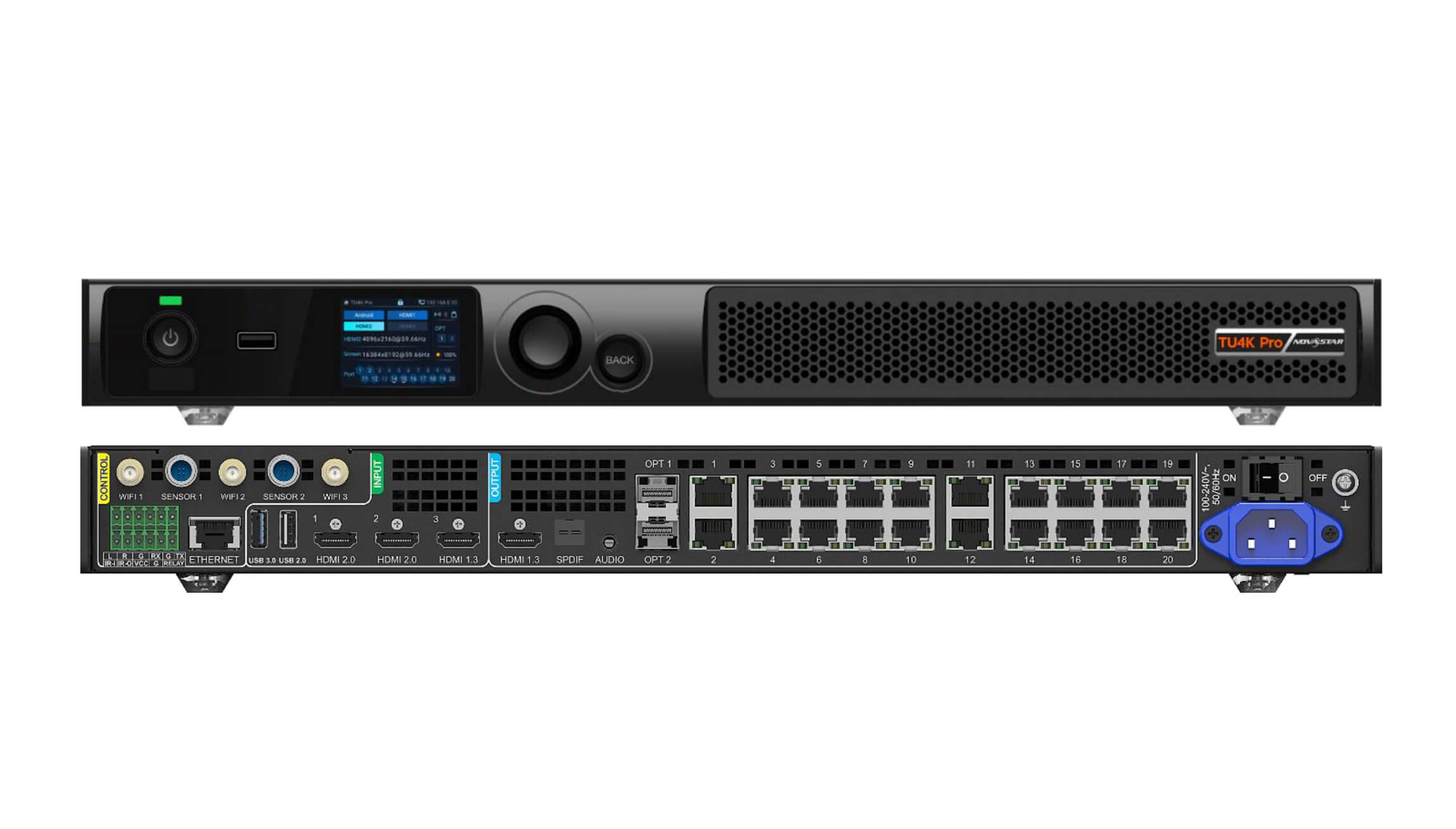
比較するとき NovaStar TU4K Pro vs TU20 Pro (alongside the compact ノヴァスター TU15 プロ), the deciding factors are total pixel capacity, Gigabit Ethernet output port count, and 4K HDMI input bandwidth. Choose the TU15プロ for small meeting-room LED walls up to 2.6万画素 (4 Ethernet ports); choose the ノヴァスター TU20 プロ for standard Full HD and ultra-wide corporate conference screens up to 3.9万画素 (6 Ethernet ports); and choose the ノヴァスター TU4K プロ (または TU40プロ) for large 4K auditoriums, executive boardrooms, and interactive all-in-one displays up to 13万画素 (20 Ethernet ports + 2 x 10G optical fiber outputs + HDMI 2.0).
This procurement and engineering guide is written for corporate AV integrators, higher-education technology managers, and commercial display buyers specifying all-in-one conference LED walls. Unlike traditional rack-mounted synchronous controllers that require an external playback PC or separate wireless presentation gateway, NovaStar’s TU series integrates an Android media player, multi-platform wireless screen mirroring (Windows, macOS, iOS, Android), HDMI synchronous inputs, and LED sending ports into one chassis.
Below, we compare the hardware specifications in a NovaStar TU4K Pro vs TU20 Pro and TU15 Pro evaluation, walk through wireless collaboration and mobile app control via ViPlex Handy, calculate port-loading limits for 16:9 and 21:9 conference walls, and clarify how the TU series differs from outdoor Taurus (TB) players and staging VX Pro controllers.
1. What is a NovaStar TU playback control processor and how does it differ from TB and VX series?
When corporate and education buyers browse the ノヴァスター catalog, three product families appear capable of driving a fixed indoor LED wall: the VX Pro series Taurus TB series Taurus TU series. Understanding why NovaStar created the TU playback control processor line prevents integrators from specifying an outdoor billboard player in an executive conference room—or cluttering a credenza with three separate boxes.
- Versus the Taurus TB series (TB20 / TB40 / TB60): 当社の NovaStar TB40 vs TB60 vs TB20 guide, TB units are compact asynchronous boxes built for unmanned retail signs, street poles, and outdoor billboards. They lack multi-user wireless screen casting for conference laptops, offer limited local audio/Bluetooth integration, and stop at 2.3 million pixels (4 ports).
- Versus the VX Pro series (VX400 Pro / VX600 Pro / VX1000 Pro / VX2000 Pro): 詳細については、 NovaStar VX Pro series guide, VX controllers are pure synchronous video processors and sending units. They have no internal Android operating system, no local USB/internal storage media player, and no built-in Wi-Fi screen mirroring hotspot.
- Where the TU series (TU15 Pro, TU20 Pro, TU40 Pro, TU4K Pro) fits: The TU series merges an Android smart media player + wireless presentation switcher + multi-input HDMI video scaler + LED sending controller into a single device purpose-built for corporate meeting rooms, lecture halls, hotel lobbies, and exhibition spaces.
2. Complete specification comparison: NovaStar TU4K Pro vs TU20 Pro vs TU15 Pro
いずれかで NovaStar TU4K Pro vs TU20 Pro or TU15 Pro bid evaluation, start by verifying pixel loading ceiling, Ethernet/fiber outputs, HDMI input revisions, and internal Android system capabilities. The table below contrasts all three primary models side by side.
| 製品仕様 | ノヴァスター TU15 プロ | ノヴァスター TU20 プロ | ノヴァスター TU4K プロ |
|---|---|---|---|
| Max pixel loading capacity (8-bit @ 60 Hz) | 2.6万画素 | 3.9万画素 | 13.0万画素 |
| Gigabit Ethernet RJ45 outputs | 4ポート | 6ポート | 20ポート |
| 10G SFP+ optical fiber outputs | None (copper RJ45 only) | None (copper RJ45 only) | 2 x 10G OPT (OPT 1 ports 1–10; OPT 2 ports 11–20) |
| Max output width / height | Up to 4,096 px width / 1,920 px height | Up to 4,096 px width / 1,920 px height | Up to 16,384 px width / 8,192 px height |
| HDMIビデオ入力 | 2 x HDMI 1.3 | 2 x HDMI 1.3 | 1 x HDMI 2.0 (4K@60Hz) + 2 x HDMI 1.3 |
| HDMI loop / monitor output | 1 x HDMI 1.3 output | 1 x HDMI 1.3 output | 1 x HDMI 2.0 loop + 1 x HDMI 1.3 monitor out |
| USB & peripheral ports | 1のx USB 2.0、1のx USB 3.0 | 1のx USB 2.0、1のx USB 3.0 | USB 3.0, USB 2.0, Type-C / RS232 / Ethernet LAN |
| オーディオ出力 | 3.5 mm analog + SPDIF digital + Bluetooth | 3.5 mm analog + SPDIF digital + Bluetooth | 3.5 mm analog + SPDIF optical/coax + HDMI eARC/audio |
| Wireless & network architecture | Dual Wi-Fi (AP + STA simultaneous) + Gigabit LAN | Dual Wi-Fi (AP + STA simultaneous) + Gigabit LAN | Dual/Tri Wi-Fi antennas (AP + STA) + Gigabit LAN |
| Target room & screen scale | Small huddle & meeting rooms (Full HD 1080p) | Medium boardrooms & 21:9 ultra-wide walls | Large 4K auditoriums, lecture halls & command centers |
3. NovaStar TU4K Pro deep dive: 13M-pixel 4K flagship for auditoriums and boardrooms
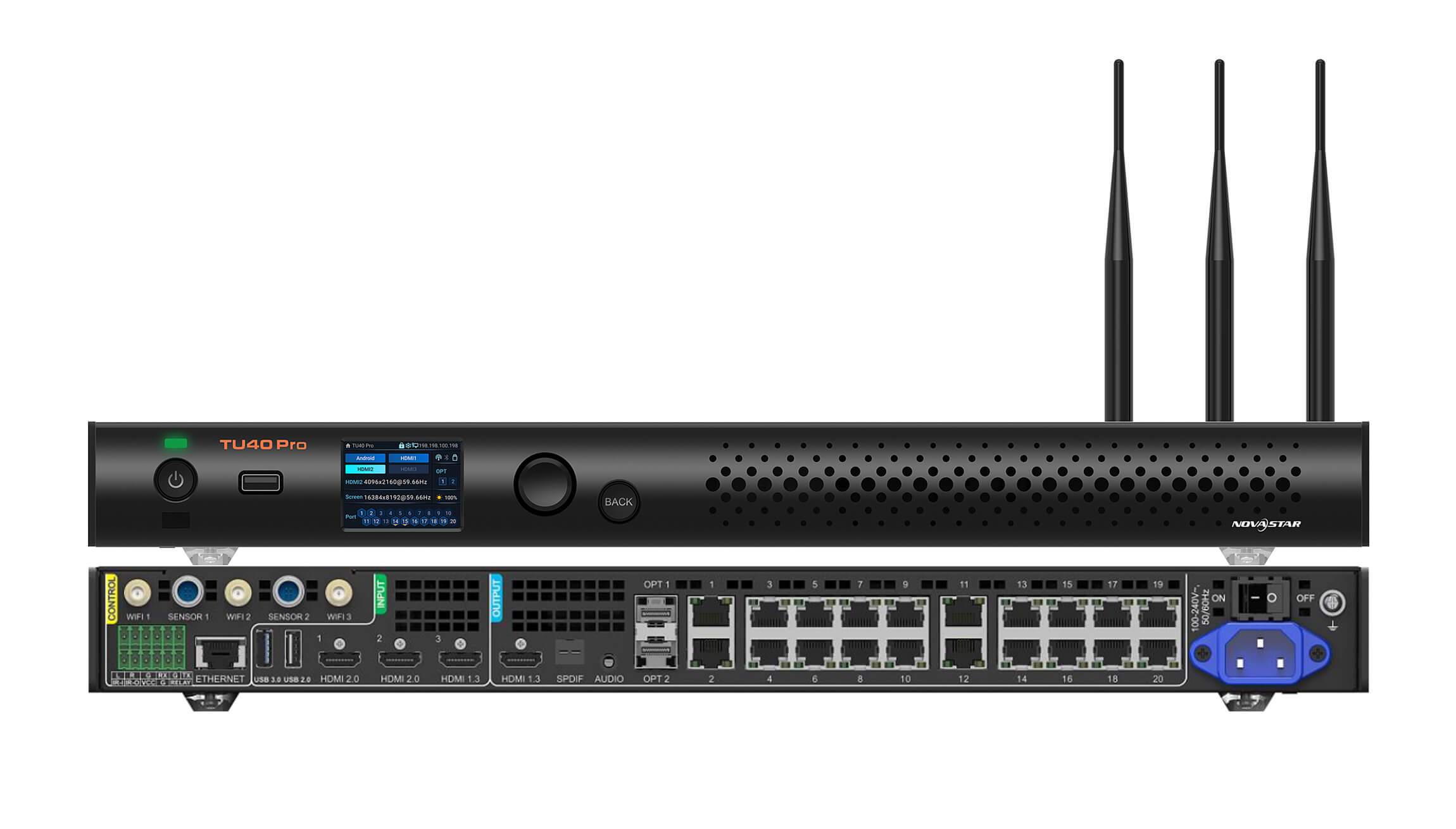
その ノヴァスター TU4K プロ sits at the top of the Taurus playback control processor lineup. While smaller conference processors top out at Full HD (1,920 x 1,080 = 2.07M pixels) or 2.5K resolutions, modern fine-pitch P0.9, P1.25, and P1.56 boardroom and auditorium walls frequently demand true 4K UHD (3,840 x 2,160 = 8,294,400 pixels) or ultra-wide 5K canvases.
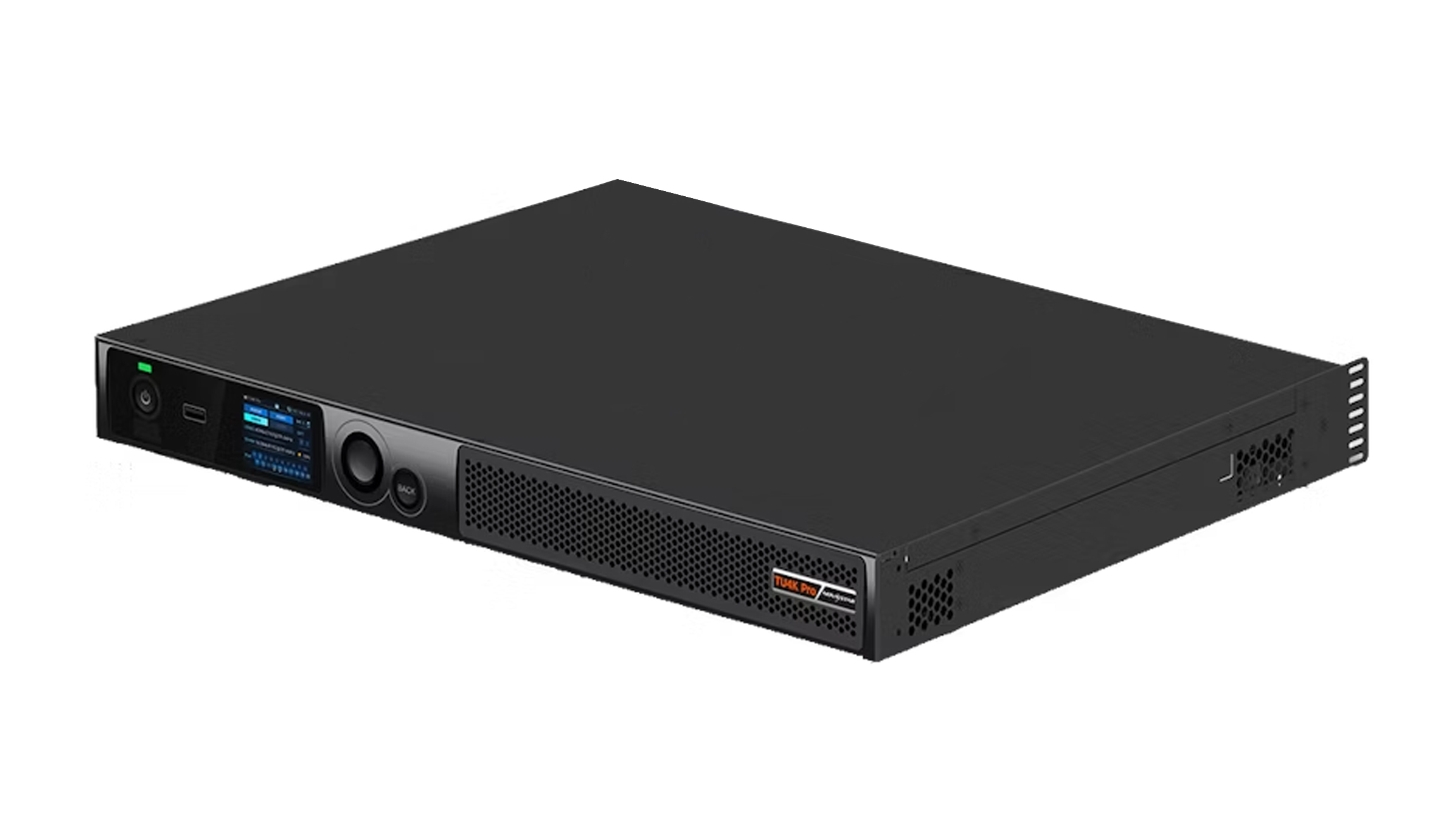
01. 20 Gigabit Ethernet ports plus 2 x 10G optical fiber outputs
で NovaStar TU4K Pro vs TU20 Pro comparison, the single largest architectural jump is output density. The TU4K Pro provides 20 physical Gigabit Ethernet RJ45 ports capable of driving up to 13万画素 at 8-bit 60 Hz—more than enough to drive a full 3,840 x 2,160 4K wall (8.29M pixels across 13 to 14 ports) with spare ports left over, or a 6.5M-pixel wall with 10 primary ports and 10 backup ports inside one 19-inch (482.6 mm) rack unit.
Just as important for large university lecture halls, hotel ballrooms, and corporate town-hall auditoriums, the TU4K Pro includes 2 x 10G SFP+ optical fiber ports (OPT 1 carries Ethernet ports 1–10; OPT 2 carries Ethernet ports 11–20). When the AV rack sits more than 80 to 100 m (262 to 328 ft) from the LED wall, you can insert NovaStar 10G SFPシングルモード光モジュール and run two thin duplex LC fiber cables to two ノヴァスター CVT10-S fiber converters mounted behind the screen—eliminating 20 long copper Cat6 runs.
02. True 4K@60Hz HDMI 2.0 input and multi-window collaboration
While the TU15 Pro and TU20 Pro use HDMI 1.3 inputs (focused on 1080p60 sources), the TU4K Pro adds a true HDMI 2.0 input (with HDMI 2.0 loop-out) alongside two HDMI 1.3 inputs. That allows an executive boardroom to connect a 4K@60Hz video-conferencing codec (such as a Cisco Room Bar Pro, Poly Studio, or Microsoft Teams Room compute unit) at native 3,840 x 2,160 resolution without downscaling at the input stage, while simultaneously supporting multi-window picture-in-picture (PIP) and multi-screen wireless casting. If your project requires a mid-tier 4K step between the TU20 Pro and TU4K Pro, you can also inspect the ノヴァスター TU40 プロ.
4. NovaStar TU20 Pro and TU15 Pro: compact smart control for 2K and ultra-wide meeting rooms
For the vast majority of corporate meeting rooms, classrooms, and retail showrooms—where the LED wall measures between 2.4 x 1.35 m (7.9 x 4.4 ft) and 4.8 x 2.7 m (15.7 x 8.9 ft) at Full HD (1,920 x 1,080) or 21:9 ultra-wide resolution—a 20-port 4K chassis is unnecessary. That is where the ノヴァスター TU20 プロ (NAIST) と ノヴァスター TU15 プロ deliver compact, whisper-quiet integration.
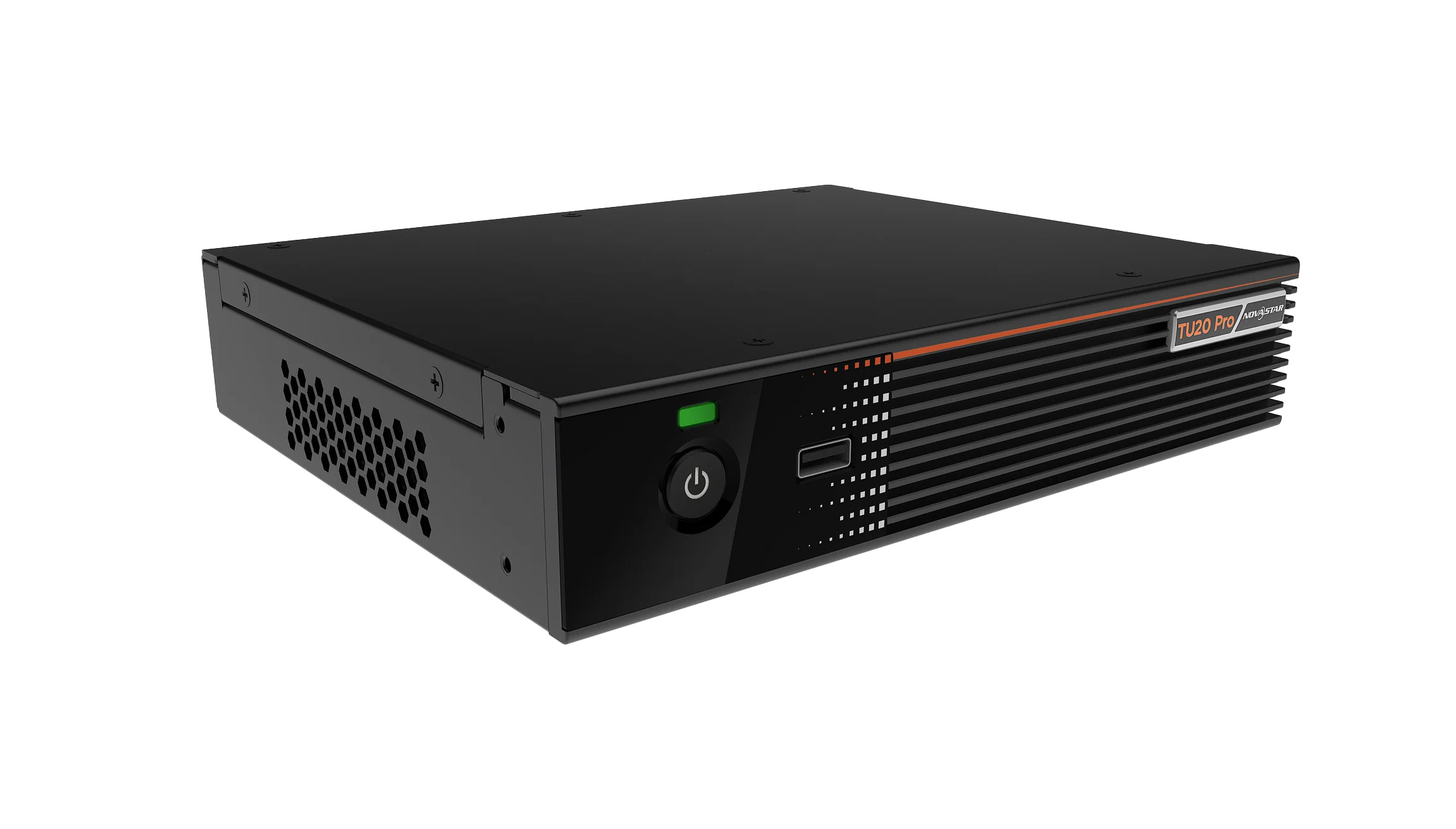
01. NovaStar TU20 Pro: 6 Ethernet ports (3.9M pixels) for Full HD and 21:9 Front-Row rooms
で NovaStar TU4K Pro vs TU20 Pro evaluation for medium-sized boardrooms, the TU20 Pro is the go-to choice whenever total resolution stays at or below 3.9万画素 (6 Gigabit Ethernet ports). A standard 1,920 x 1,080 Full HD LED wall contains 2,073,600 pixels—requiring 4 Ethernet ports at 650,000 pixels per port. By providing 6イーサネットポート, the TU20 Pro gives integrators two valuable options:
- Clean cabinet-column wiring on 1080p walls: Many 16:9 LED walls are built 6, 8, or 10 cabinets wide. Having 6 physical RJ45 ports lets you distribute cabinets symmetrically across 4, 5, or 6 ports without hitting the 650,000-pixel per-port ceiling on an awkward daisy-chain wrap.
- Native support for 21:9 Microsoft Teams Front Row & Zoom ultra-wide displays: Corporate AV increasingly specifies 21:9 ultra-wide LED walls (such as 2,560 x 1,080 = 2,764,800 pixels or 2,880 x 1,215 = 3,499,200 pixels) so remote participants, shared slides, and chat panels appear side by side. Those resolutions exceed a 4-port 2.6M-pixel limit but fit comfortably inside the TU20 Pro’s 3.9M-pixel (6-port) budget.
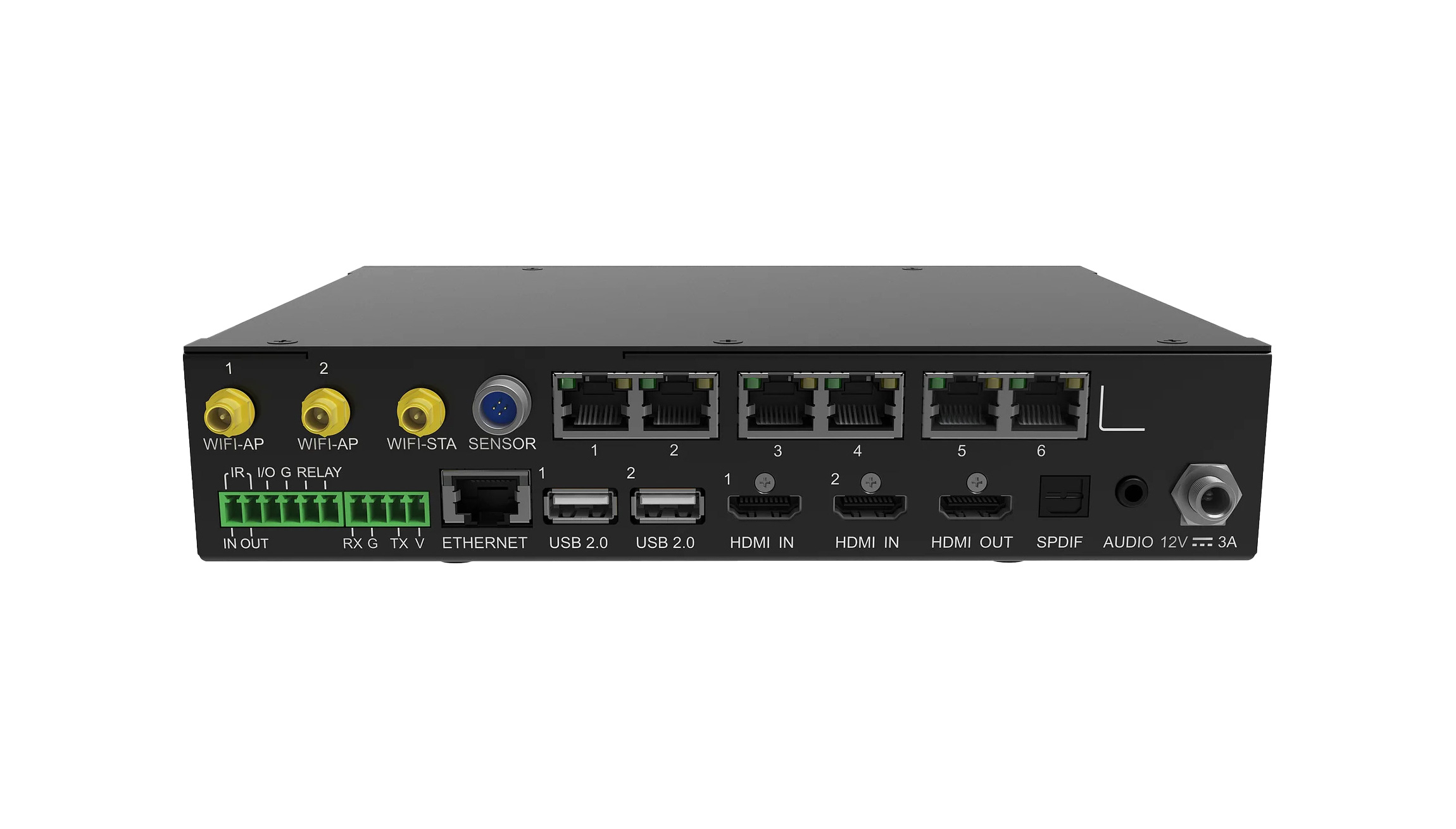
02. NovaStar TU15 Pro: 4 Ethernet ports (2.6M pixels) for standard 1080p meeting spaces
When your screen is a standard 1,920 x 1,080 (2,073,600 pixels) or 1,280 x 720 (921,600 pixels) display and cabinet layout divides cleanly across 2 to 4 Ethernet lines, the ノヴァスター TU15 プロ provides the exact same quad-core Android media engine, dual-Wi-Fi wireless screen mirroring, dual HDMI 1.3 inputs, and ViPlex Handy mobile app control as the TU20 Pro in a 4-port (2.6M-pixel) configuration.
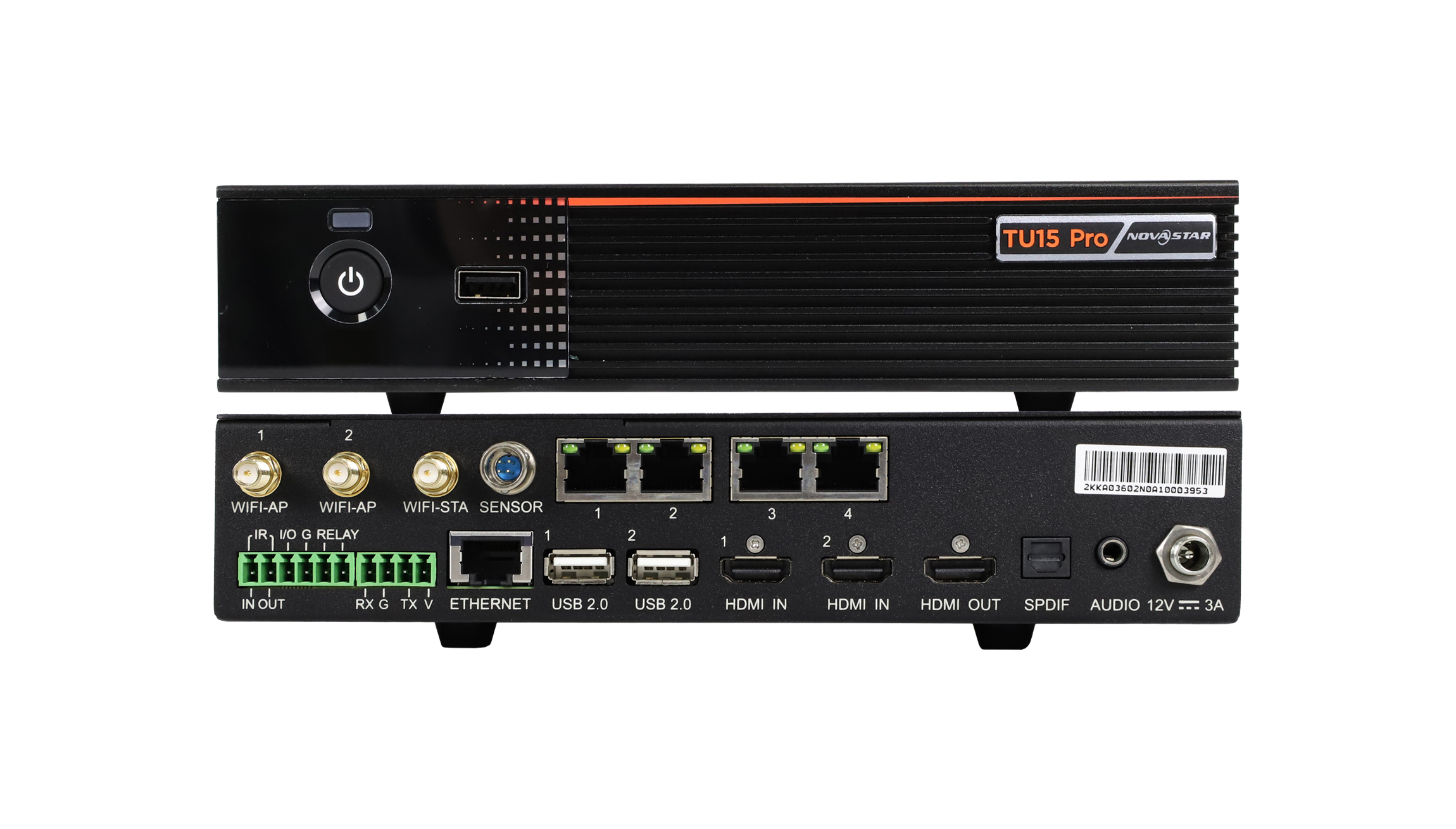
Because both the TU15 Pro and TU20 Pro share a compact form factor that can be mounted directly inside an all-in-one conference LED cabinet frame or placed on a credenza shelf, they eliminate the noisy equipment rack often rejected by corporate interior architects. When weighing NovaStar TU4K Pro vs TU20 Pro for multi-room corporate rollouts, many AV consultants standardize on the TU20 Pro for 4-to-12-person conference rooms and reserve the 20-port TU4K Pro for the main executive boardroom and town-hall auditorium. That hybrid approach keeps every room on the exact same wireless screen-mirroring workflow and ViPlex Handy mobile interface while aligning hardware spend with actual room pixel density. Furthermore, in a NovaStar TU4K Pro vs TU20 Pro thermal and acoustic review, the compact 6-port TU20 Pro draws significantly less idle power inside shallow wall enclosures than a 20-port rack processor.
5. Wireless screen mirroring, audio outputs, and dynamic image enhancement
What elevates every model in a NovaStar TU4K Pro vs TU20 Pro or TU15 Pro deployment above a basic sending box is the integrated meeting-room software and peripheral stack. Understanding how the dual-Wi-Fi architecture, audio routing, and receiving-card pairing work together helps AV integrators deliver a turnkey user experience.
- Dual-Wi-Fi architecture (AP + STA running simultaneously): A frequent frustration with basic wireless presentation boxes is that connecting to the screen’s Wi-Fi hotspot disconnects the presenter’s laptop from corporate internet. The TU15 Pro, TU20 Pro, and TU4K Pro include separate Wi-Fi AP (Access Point) and Wi-Fi STA (Station) antennas plus Gigabit Ethernet LAN—allowing guests to cast their screens over the local hotspot while the processor and guest devices retain internet access.
- Cross-platform casting & ViPlex Handy mobile control: Presenters can cast wirelessly from Windows, macOS, iOS (AirPlay), and Android devices without installing proprietary dongles, or use wireless casting dongles where corporate security policy restricts guest Wi-Fi. Meeting hosts can also use the free ViPlexハンディ app (iOS / Android) to turn a smartphone into a trackpad, remote pointer, brightness controller, and instant source switcher.
- Flexible room audio extraction (SPDIF, 3.5 mm, and Bluetooth): Unlike industrial sending cards that strip or ignore audio, the TU series extracts embedded audio from HDMI inputs or internal media files and outputs it via SPDIFデジタルオーディオ, 3.5 mm stereo line-outまたは Bluetooth 5.1 directly to the conference room’s DSP, soundbar, or ceiling amplifier.
- Pairing with NovaStar receiving cards: Every TU processor transmits standard NovaStar Gigabit Ethernet data and must be paired with genuine NovaStar LED受信カード など ノヴァスター A10s プラス or A10s プロ. Initial cabinet mapping and `.rcfgx` loading are performed using tools from our NovaStarソフトウェアダウンロードセンター (or review our LED受信カードと送信カードの比較ガイド).
6. Conference room sizing matrix: matching pixel pitch and aspect ratio to the right TU processor
にするには NovaStar TU4K Pro vs TU20 Pro and TU15 Pro selection effortless during project estimation, match your target conference screen size, pixel pitch, and aspect ratio against the common indoor configurations below (calculated at 8-bit 60 Hz using standard 600 x 337.5 mm / 23.6 x 13.3 in 16:9 die-cast cabinets).
| Screen Diagonal & Physical Size | Typical Pixel Pitch & Cabinet Grid | Native Resolution & Total Pixels | Min 1G Ports (8-Bit 60 Hz) | Recommended TU Processor |
|---|---|---|---|---|
| 108-inch (2.4 x 1.35 m / 7.9 x 4.4 ft) | P1.25 (4 x 4 grid of 600 x 337.5 mm cabinets) | 1,920 x 1,080 px (2,073,600 px) | 4ポート | ノヴァスター TU15 プロ (or TU20 Pro for 2 spare ports) |
| 135-inch (3.0 x 1.69 m / 9.8 x 5.5 ft) | P1.56 (5 x 5 grid of 600 x 337.5 mm cabinets) | 1,920 x 1,080 px (2,073,600 px) | 4–5 ports (by row/column) | ノヴァスター TU20 プロ (5 ports = 1 port per row/column) |
| 163-inch (3.6 x 2.025 m / 11.8 x 6.6 ft) | P1.875 (6 x 6 grid of 600 x 337.5 mm cabinets) | 1,920 x 1,080 px (2,073,600 px) | 4–6 ports (1 port per column of 6) | ノヴァスター TU20 プロ (6 ports match 6 columns cleanly) |
| 21:9 Ultra-Wide Teams Room (4.2 x 1.69 m / 13.8 x 5.5 ft) | P1.25 (7 x 5 grid of 600 x 337.5 mm cabinets) | 3,360 x 1,350 px (4,536,000 px) or 2,560 x 1,080 px (2.76M px) | 5 ports (at 2.76M px) or 8 ports (at 4.53M px) | TU20プロ (up to 3.9M px) or TU40プロ / TU4Kプロ (> 3.9M px) |
| 216-inch 4K UHD Auditorium (4.8 x 2.7 m / 15.7 x 8.9 ft) | P1.25 (8 x 8 grid of 600 x 337.5 mm cabinets) | 3,840 x 2,160 px (8,294,400 px) | 14~16ポート | ノヴァスター TU4K プロ (20 ports + HDMI 2.0 4K@60Hz + 10G OPT) |
Notice why the 135-inch (5 x 5 cabinet grid) and 163-inch (6 x 6 cabinet grid) 1080p walls highlight a practical wiring advantage in the NovaStar TU4K Pro vs TU20 Pro and TU15 Pro comparison: even though 2,073,600 total pixels mathematically fit inside the TU15 Pro’s 2.6M-pixel rating, a 6-column cabinet grid wires far more cleanly when you assign 1 Ethernet port per column across the TU20 Pro’s 6 outputs (345,600 pixels per port) rather than snaking one port across 1.5 columns.
7. Video walkthrough: switching HDMI and onboard sources on TU15 Pro and TU20 Pro
The video tutorial above demonstrates how meeting-room operators switch seamlessly between the internal Android media interface (used for wireless screen casting, digital welcome signage, and USB media playback) and external wired HDMI 1 / HDMI 2 sources such as a conference table laptop connection or room video-conferencing bar.
よくある質問
What is the main difference in a NovaStar TU4K Pro vs TU20 Pro comparison?
The primary differences are total pixel capacity, output port count, optical fiber support, and 4K HDMI bandwidth. The ノヴァスター TU20 プロ drives up to 3.9万画素 via 6 Gigabit Ethernet ports with dual HDMI 1.3 inputs (ideal for 1080p and 21:9 medium meeting rooms). The ノヴァスター TU4K プロ drives up to 13万画素 via 20 Gigabit Ethernet ports, adds 10G光ファイバー出力×2 for long runs via CVT10 converters, and includes a true 4K@60Hz HDMI 2.0 input for large auditoriums and 4K boardrooms.
Do NovaStar TU15 Pro, TU20 Pro, and TU4K Pro still require receiving cards inside the LED cabinets?
Yes. Just like NovaStar VX controllers and TB media players, all TU series playback control processors output Gigabit Ethernet data packets and must be connected to compatible NovaStar LED受信カード (such as the A10s Plus, A8s, A5s Plus, or MRV series) installed inside your LED cabinets.
Can I integrate a TU15 Pro, TU20 Pro, or TU4K Pro with Crestron, Extron, or Q-SYS room control systems?
Yes. The TU series includes RS232 serial control and Ethernet LAN TCP/UDP central control protocols, allowing corporate AV programmers to trigger power standby/wake, HDMI source switching, volume adjustment, and screen brightness presets directly from a tabletop Crestron, Extron, AMX, or Q-SYS touch panel.
How many laptops or mobile devices can cast wirelessly to a TU20 Pro or TU4K Pro at the same time?
While dozens of guest devices can stay connected to the processor’s built-in Wi-Fi hotspot simultaneously, the TU series supports multi-screen split display (typically up to 2 or 4 simultaneous wireless screen-mirroring windows on the LED canvas, depending on model and firmware mode) so colleagues can compare spreadsheets or slides side by side during a meeting.
Can I use a NovaStar TU20 Pro or TU4K Pro with Colorlight or Huidu カードを受け取りますか?
No. NovaStar TU playback control processors use NovaStar’s proprietary Ethernet protocol and only communicate with NovaStar receiving cards. If you are comparing control ecosystems before purchasing your cabinets, see our NovaStar vs Colorlight vs Huidu ガイド.
AV integration checklist before ordering a NovaStar TU processor
最終決定する前に NovaStar TU4K Pro vs TU20 Pro or TU15 Pro specification for your meeting room or auditorium, verify six integration details: your LED wall’s native pixel resolution (width x height), the cabinet grid layout (rows x columns) to ensure clean per-port wiring, whether your video-conferencing codec outputs 1080p60 (HDMI 1.3) or 4K60 (requiring the TU4K Pro’s HDMI 2.0 input), how room audio will connect (SPDIF optical/coax, 3.5 mm analog, or Bluetooth), cable distance from the AV rack to the screen (using 10G fiber + CVT10 on the TU4K Pro if over 80 m / 262 ft), and the exact NovaStar receiving card model inside your cabinets.
If you want our engineering team to review your conference room cabinet drawing or confirm port-loading and central-control compatibility before you place an order, send your screen resolution and AV requirements through our contact page. For complete all-in-one conference LED walls and fine-pitch indoor cabinet assemblies, you can also explore display solutions at EagerLED.