VDWALL Rêbernameya Pêvajoya Vîdyoya LED: LVP100M, LVP615S li hember A63, A65 û D6000 (2026)
Rast hilbijêrin VDWALL Pêvajoya vîdyoyê LED comes down to three practical boundaries: whether your screen runs on 2K HD or true 4K60 sources, how many live PIP/POP windows you need on screen at once, and whether you’re feeding one sending card or splicing across up to 16 DVI outputs on an irregular video wall. For single-wall churches, conference rooms, and retail screens, an HD unit like the LVP100M, LVP100U, or LVP615S handles clean scaling and source switching without blowing the rack budget. Once you step up to fine-pitch 4K walls or multi-section mosaic installations, the A63, A65, and D6000 give you native HDMI 2.0 / DP 1.2 inputs, multi-window layering, and synchronized multi-card splicing.
1. Çawa VDWALL splits its HD and 4K video processor lines
A fedakar VDWALL Pêvajoya vîdyoyê LED sits right between your video sources—laptops, broadcast cameras, media players, or switchers—and your LED sending cards. Unlike an all-in-one controller that locks you into one control-card ecosystem, a standalone VDWALL processor scales, crops, switches, and composites your inputs, then hands clean DVI or HDMI video off to NovaStar, Colorlight, or Linsn sending cards.
In the field, VDWALL’s current catalog breaks cleanly into two tiers:
- 2K HD LVP Series (LVP100M, LVP100U, LVP615S): Built for standard 1080p/WUXGA walls up to roughly 2.3 million pixels per sending card. They shine in auditoriums, houses of worship, banquet halls, and retail signage where operators want front-panel push-button switching, fade transitions, and optional internal sending-card slots.
- 4K Multi-Window & Splicing Series (A63, A65, D6000): Built for fine-pitch indoor walls, command centers, and multi-section creative stages. They accept true 4K60 inputs (HDMI 2.0 / DisplayPort 1.2), layer multiple 4K and 2K windows simultaneously, and drive multiple synchronized outputs without tearing.
01. Why standalone processors still matter in 2026
You might wonder why integrators still spec a standalone VDWALL Pêvajoya vîdyoyê LED when all-in-one controllers exist. Two reasons come up on almost every commercial bid. First, decoupling video processing from the LED sending card lets you upgrade or swap sending cards (say, moving from Linsn to NovaStar) without re-wiring your entire AV rack or retraining operators. Second, on multi-section irregular walls that need 8 to 16 synchronized DVI feeds, a dedicated mosaic processor like the D6000 handles custom cropping and multi-window overlays far more cleanly than chaining multiple small boxes together.
2. VDWALL LED video processor model comparison
Before you size an AV rack, compare the six core VDWALL models side by side across input tier, window composition, and output architecture.
| model | Resolution Tier | Keyanên Key | Window / Splicing Capability | Best-Fit Installation |
|---|---|---|---|---|
| VDWALL LVP100M | 2K HD | HDMI, DVI, VGA, CVBS | Dual-picture Pa/Pb (PIP, POP, tiled, overlapping) | Conference rooms & dual-source HD walls |
| VDWALL LVP100U | 2K HD | HDMI, DVI, VGA, CVBS + Front/Rear USB | Single/USB playback, front USB priority, DVI EDID | Retail, lobbies, standalone USB-playback walls |
| VDWALL YE615S | 2K HD + Splicing | SDI, HDMI, DVI, VGA, CVBS + WiFi | Multi-unit splicing + internal sending card slots | Churches, stages, broadcast camera feeds |
| VDWALL A63 | 4K UHD | Mixed SD, HD, and 4K UHD | Up to 4 windows / 6 pictures (two 4K + two 2K PIP/POP) | Small-pitch boardrooms & live preview/program |
| VDWALL A65 | 4K60 UHD | Five 4K60 inputs (3× HDMI 2.0 + 2× DP 1.2) | 3840×2160 synchronized splicing, custom cropping | Large 4K60 LED walls & flexible screen geometry |
| VDWALL D6000 | 4K Mosaic | 4K + 2K multi-source | 16 DVI outputs, 2× 4K + 2× 2K windows across 8 units | Control rooms, irregular multi-section mosaic walls |
3. LVP100M vs LVP100U: dual-picture PIP/POP vs USB playback
The entry-level LVP100 family is where many small-to-medium indoor LED projects start. Both models share a compact 1U-style footprint and straightforward front-panel controls, yet they solve two very different operational needs.
01. VDWALL LVP100M: Pa/Pb dual-picture composition
Ew VDWALL LVP100M is built for operators who need two live sources on screen simultaneously—for example, a speaker’s PowerPoint deck alongside a live camera feed. Its Pa and Pb channels support PIP (Picture-in-Picture), POP (Picture-outside-Picture), tiled, and overlapping layouts with adjustable size and position inside your chosen output resolution. Once you dial in your layouts, you can save and recall presets with a single button press during a live event.

02. VDWALL LVP100U: built-in front and rear USB media playback
Ew VDWALL LVP100U trades dual-picture layering for standalone convenience. Alongside its HDMI, DVI, VGA, and CVBS inputs for digital and analog sources, it includes both front and rear USB playback ports. When both USB slots carry a valid drive, the front USB port automatically takes priority—handy when a store manager walks up with a fresh promo thumb drive and doesn’t want to reach behind the rack. You can also adjust DVI EDID right from the menu to match non-standard LED screen aspect ratios.

4. LVP615S: SDI inputs, WiFi control, and internal sending cards
Whenever a church, broadcast studio, or live-staging venue runs long coaxial camera cables—50 m to 100 m (164 ft to 328 ft)—HDMI cables drop out without fiber extenders. That’s where the VDWALL YE615S earns its keep as a workhorse VDWALL Pêvajoya vîdyoyê LED.
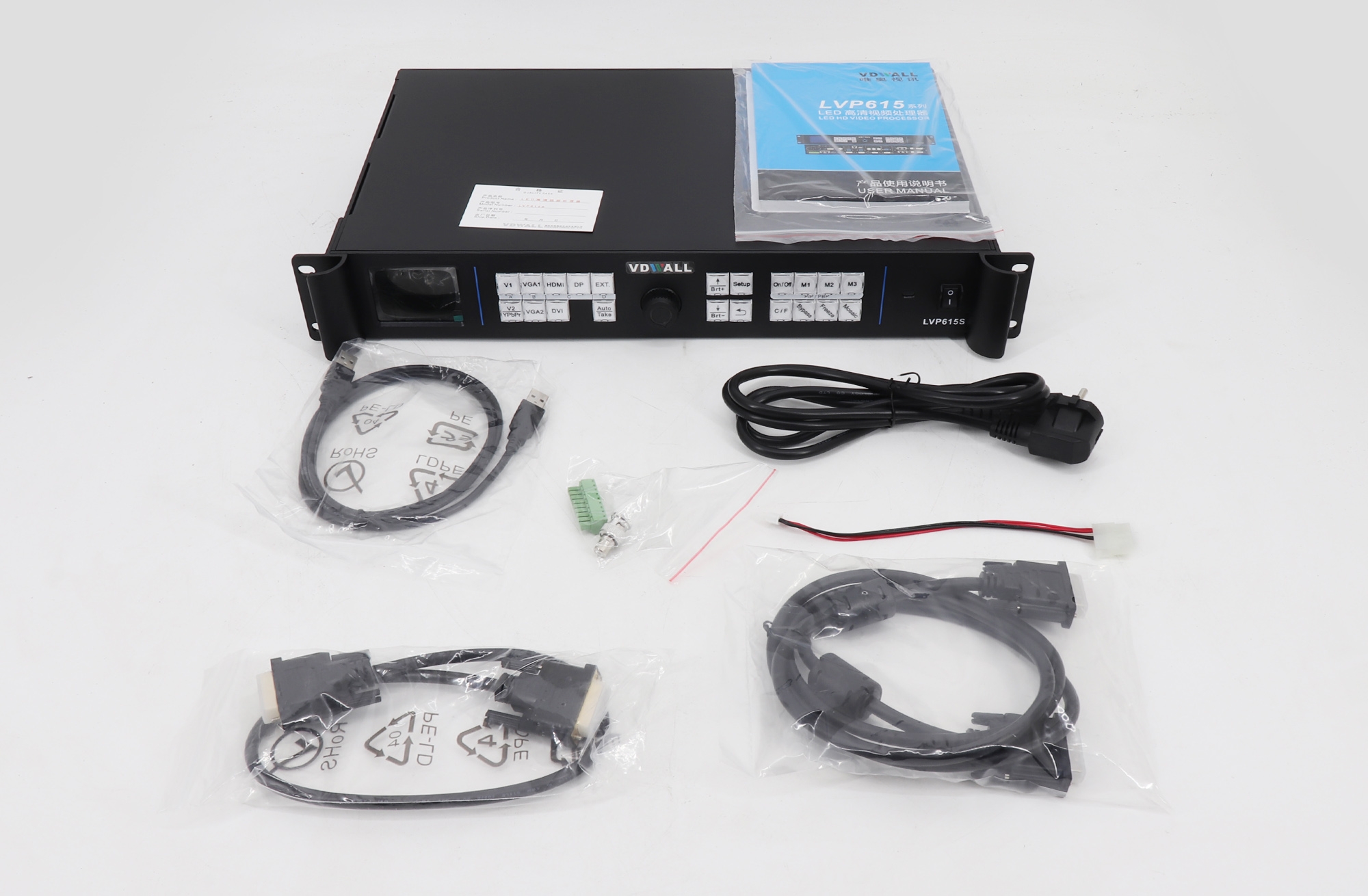
The LVP615S adds SDI input support and WiFi control on top of the classic LVP615 chassis, plus internal mounting bays that let you install LED sending cards (such as a NovaStar MSD300) right inside the processor enclosure. Mounting the sending card internally cuts down rack height, eliminates external DVI patch cords that can vibrate loose in rolling flight cases, and gives you a single power switch for both processing and LED output. If you’re planning that exact build, we have a step-by-step walkthrough on installing a NovaStar MSD300 sending card inside a VDWALL YE615S.
5. A63 vs A65: 4K multi-window vs 4K60 splicing
Once your fine-pitch indoor LED wall passes 2.3 million pixels—or your client demands true 3840×2160 4K60 playback from a workstation or media server—you need to step out of the 2K LVP line and into VDWALL’s 4K A-series.
01. VDWALL A63: four windows, six pictures, and live preview
Ew VDWALL A63 is built for mixed SD, HD, and UHD environments where operators juggle multiple live feeds on a small-pitch wall. Its multi-window mode displays up to four windows and six pictures simultaneously—combining two 4K windows with two 2K windows that support PIP/POP. It also offers dedicated operating modes for previewing the next scene before taking it live, which is a lifesaver in corporate town halls and live broadcast studios.

02. VDWALL A65: five 4K60 inputs and synchronized 3840×2160 splicing
Ew VDWALL A65 focuses on high-bandwidth 4K60 source handling and clean multi-screen splicing. It gives you five native 4K60 inputs—three HDMI 2.0 ports and two DisplayPort 1.2 ports—so you can hook up high-frame-rate media servers, 4K switchers, and graphics workstations without downscaling to 30Hz. You can configure individual output image size, position, and input cropping across a 3840×2160 LED screen arrangement with synchronized frame timing.

6. D6000: 16 DVI outputs for irregular mosaic LED walls
Control rooms, museum feature walls, and architectural lobbies rarely stick to a tidy 16:9 rectangle. When a wall is assembled from eight separate screen sections—or wrapped around corners at odd aspect ratios—standard 4-output processors run out of channels fast. That’s the exact job of the VDWALL D6000.
The D6000 provides 16 derketinên DVI with individual image cropping and placement, backed by automatic splicing calculations that map a source cleanly across an irregular mosaic display. On the composition side, you can scale, overlay, and position two 4K windows and two 2K windows (with PIP/POP on the 2K windows) across eight screen units. Because every DVI output stays frame-locked, fast-moving video tickers and full-wall backgrounds cross section boundaries without visible shear.

01. Hevberdanê VDWALL processors with sending cards and all-in-one alternatives
Bînin bîra xwe ku a VDWALL Pêvajoya vîdyoyê LED outputs video signals (DVI or HDMI)—it doesn’t output RJ45 Ethernet directly to LED cabinets unless you install an internal sending card (as on the LVP615S) or patch it into external sending boxes. If you’re pairing a VDWALL A65 or D6000 with NovaStar sending boxes, check our NovaStar MBOX600 Pro vs MCTRL660 Pro guide to size your sending-card pixel capacity. Conversely, if you’d rather combine processing and Ethernet output in a single 1U/2U chassis for a simpler rental rack, compare our Huidu HD-VP series video processor guide.
02. EDID management, frame sync, and rack cabling best practices
Most commissioning headaches on a VDWALL Pêvajoya vîdyoyê LED aren’t hardware faults—they’re EDID and cable-length mistakes. When a laptop or media server connects to an LVP100U, A63, or A65, it reads the processor’s EDID table to decide what resolution and refresh rate to output. If your LED wall is an ultra-wide 3840×1080 ribbon or a vertical 1080×1920 totem, don’t leave the input on generic 1920×1080 auto-scaling. Program a custom EDID matching your exact active pixel canvas so the source renders native 1:1 pixels without blurry text or stretched logos.
Keep passive copper HDMI 2.0 and DisplayPort 1.2 runs into the A65 or A63 under 5 m (16.4 ft) for 4K60 4:4:4 signals. For longer runs from a front-of-house control desk to a backstage rack—say 20 m to 50 m (65 ft to 164 ft)—use active optical HDMI/DP cables or switch to 3G/12G-SDI where supported (such as on the LVP615S). Between the processor’s DVI/HDMI outputs and your LED sending cards, use short 0.5 m to 1.0 m (1.6 ft to 3.3 ft) locked, shielded patch cables inside the rack and strain-relieve every bundle so rack doors don’t tug on the connectors.
03. Pre-show preset backup and hot-spare rack planning
On live corporate events, broadcast studios, and touring stages, never walk away from a commissioned VDWALL Pêvajoya vîdyoyê LED without saving your working scene layouts and input mappings to internal presets (and backing up the configuration file to a USB stick or control laptop on A-series and D6000 racks). Label every rear input cable with both the source name and the processor port number—for instance, “CAM 1 -> SDI 1” or “MAIN DECK -> HDMI 2.0 IN 1″—so a relief operator can trace a dead feed in ten seconds during a live show.
For mission-critical control rooms and mainstage walls, pair your primary processor with a cold or hot standby unit wired through an HDMI/SDI distribution amplifier, or use the preview/program workflow on the A63 to verify every source transition on a local confidence monitor before taking it live to the main LED wall. Taking ten minutes to lock down EDID, cable strain relief, and preset backups turns any VDWALL Pêvajoya vîdyoyê LED rack into a set-and-forget workhorse.
04. Quick field fixes for common VDWALL display issues
If an LED wall shows a black strip along the right or bottom edge right after you power up an LVP100M, LVP615S, or A65, check the processor’s output resolution against your sending card’s input resolution first. Nine times out of ten, the processor is outputting 1920×1080 while the wall’s active width is 2048 pixels, or the output crop window is offset by a few dozen pixels from X=0, Y=0. Reset the output window origin to (0, 0) and match the exact pixel width and height of your cabinet map.
When a 4K60 source plugged into an A65 drops to 30Hz or flickers intermittently, inspect the cable spec before blaming the processor. Standard older HDMI 1.4 cables can’t carry 18 Gbps 4K60 4:4:4 bandwidth reliably over 3 m (10 ft). Swapping to a certified 18 Gbps HDMI 2.0 lead or switching that source over to one of the A65’s DisplayPort 1.2 inputs usually locks the signal immediately. On multi-section D6000 mosaic walls, if two adjacent screen sections show a split-second motion tear during fast pans, confirm that all DVI outputs are running at the exact same refresh rate (60Hz) and that your sending cards aren’t introducing extra frame buffering on one branch of the wall.
Finally, if front-panel buttons stop responding on a shared auditorium rack, check whether the front-panel keypad lock was accidentally toggled—a common safety feature on VDWALL racks to keep passersby from changing inputs mid-event—or verify the WiFi/LAN control IP on the LVP615S before power-cycling the unit. Keeping a laminated one-page preset cheat sheet taped inside the rack door saves your crew from guessing button sequences under show pressure.
| Senaryoya Projeyê | Baştir e VDWALL model | Çima Ew Fits |
|---|---|---|
| Retail lobby with thumb-drive promo loops | LVP100U | Front-priority USB playback + DVI EDID tuning |
| Conference room showing slides + camera PIP | LVP100M | Pa/Pb dual-picture PIP/POP with saved presets |
| Church or live stage with SDI cameras | YE615S | Native SDI input, WiFi control, internal sending-card bay |
| Small-pitch boardroom needing 4–6 live feeds | A63 | Up to 4 windows / 6 pictures + preview/program modes |
| True 4K60 workstation or media-server wall | A65 | Five 4K60 inputs (3× HDMI 2.0 + 2× DP 1.2) |
| Irregular 8-section museum or control-room wall | D6000 | 16 synchronized DVI outputs + auto mosaic splicing |
If you’re sourcing a complete indoor or outdoor LED wall package with pre-configured rack processing and cabinets, you can also browse turnkey display systems on EagerLED’s LED display portfolio.
Pirsên pir pirsî
An dike VDWALL LED video processor replace an LED sending card?
No. A standalone VDWALL LED video processor handles video scaling, input switching, cropping, and multi-window layout, then sends DVI or HDMI video to your LED sending cards (NovaStar, Colorlight, or Linsn). Some models like the LVP615S let you mount a sending card directly inside the processor chassis so both share one box.
Cûdahiya di navbera çi ye VDWALL LVP100M and LVP100U?
The LVP100M is designed for dual-picture composition (Pa/Pb PIP, POP, tiled, and overlapping layouts with saved presets). The LVP100U focuses on standalone convenience by adding front and rear USB media playback ports (with front USB priority) alongside its HDMI, DVI, VGA, and CVBS inputs.
How many 4K60 inputs does the VDWALL A65 support?
Ew VDWALL A65 supports five 4K60 source inputs: three HDMI 2.0 inputs and two DisplayPort 1.2 inputs, paired with synchronized multi-screen splicing for 3840×2160 LED screen arrangements.
When do I need the VDWALL D6000 instead of the A63 or A65?
Choose the D6000 when your LED wall is built from multiple separate screen sections or irregular mosaic shapes that require more than four output channels. Its 16 DVI outputs and automatic splicing calculations map two 4K windows and two 2K windows across up to eight screen units.
Ez dikarim bikar bînim a VDWALL LED video processor with NovaStar or Colorlight receiving cards?
Belê. Ji ber ku VDWALL processors output standard DVI or HDMI video, they are brand-agnostic—just connect the processor’s outputs to your NovaStar, Colorlight, Linsn, an Huidu sending cards, and those sending cards will drive your receiving cards over Gigabit Ethernet.
VDWALL processor selection checklist
Before you finalize your AV rack BOM, run through these five quick checks:
- Total wall resolution: Stay in the LVP100/LVP615S family for standard 2K HD walls; move to A63, A65, or D6000 for 4K walls or multi-window layouts.
- Source connectors: Count your HDMI 2.0, DisplayPort 1.2, SDI, VGA, and USB playback sources—don’t forget camera SDI runs over 15 m (50 ft).
- Pencereyên hevdem: Confirm whether you need single-screen switching (LVP100U), dual-picture PIP/POP (LVP100M), or four-window/six-picture 4K layering (A63/D6000).
- Output channel count: Match your DVI/HDMI output count to the number of external or internal sending cards your wall requires.
- Spare rack cabling: Keep short, shielded DVI-D dual-link or certified HDMI 2.0 patch cables between the processor and your sending cards to prevent sparkle or sync drops.
Nizanim kîjan VDWALL Pêvajoya vîdyoyê LED matches your screen’s exact pixel map and sending-card count? Send your wall resolution, input list, and layout goals through the ledcontrollercard.com contact page and our team will recommend the exact processor and sending-card pairing.