
Kort svar: NovaStar TB50, VX16s og H9 betjener tre forskjellige arbeidsflyter for LED-skjermer. Velg TB50 for planlagt digital skilting og fjernstyring av innhold, VX16s for live-arrangementer som trenger videobehandling og LED-kontroll i én enhet, og H9 for store videovegger med flere kilder som krever modulær signalskjøting og utvidelse.
De er ikke bare små, mellomstore og store versjoner av samme produkt. TB50 er en multimediaspiller, VX16s er en alt-i-ett-kontroller, og H9 er en modulær videoveggsplissingsplattform. Å forstå denne forskjellen er den raskeste måten å velge riktig enhet på.
NovaStar TB50 vs VX16s vs H9 – et overblikk
| Modell | Produkttype | Kjernestyrke | Typisk skala | Beste applikasjoner |
|---|---|---|---|---|
| TB50 | Asynkron multimediaspiller | Avspilling av lagret innhold, planlegging og ekstern publisering | Opptil omtrent 1.3 millioner piksler med 2 Ethernet-utganger | Detaljhandelsskilting, informasjonsskjermer, veiskilt og distribuerte skjermnettverk |
| VX16-er | Alt-i-ett-videoprosessor og LED-kontroller | Live-inngangsbytte, skalering, lagdeling og LED-utgang med høy kapasitet | Opptil omtrent 10.4 millioner piksler med 16 Ethernet-utganger | Konserter, konferanser, utleiescener, gudshus og store live-skjermer |
| H9 | Modulær videoveggspliser | Store lerret med flere kilder, fleksibel ruting, vindusdeling og modulær utvidelse | Kapasiteten avhenger av de installerte inngangs- og utgangskortene | Kontrollrom, kringkasting, kommandosentraler, utstillingsområder og komplekse permanente installasjoner |
Viktig: Publiserte spesifikasjoner kan variere avhengig av maskinvarerevisjon, fastvare, tilleggskort og systemkonfigurasjon. Bekreft den offisielle håndboken og den nøyaktige materiallisten før du bestiller eller designer en kritisk installasjon.
Hva er hovedforskjellen?
Hovedforskjellen er innholdsarbeidsflyten:
- TB50 spiller av og administrerer innhold. Den kan lagre media, følge tidsplaner og motta oppdateringer over et nettverk. Den er designet for skjermer som skal kjøre uten en dedikert videokilde tilkoblet til enhver tid.
- VX16s behandler en levende kilde og driver LED-veggen. Den kombinerer videobehandling med sendekortfunksjonalitet, noe som reduserer antallet enheter som kreves i et rack for liveproduksjon.
- H9 bygger et stort visuelt lerret fra mange kilder. Det modulære kabinettet aksepterer forskjellige inngangs- og utgangskort, slik at systemdesignere kan lage komplekse videovegger med flere vinduer.
Derfor avhenger det beste valget mindre av hvilket produkt som er «kraftigere» og mer av hvordan innhold kommer inn, beveger seg gjennom og vises på LED-skjermen.
NovaStar TB50: Best for planlagt og eksternt innhold
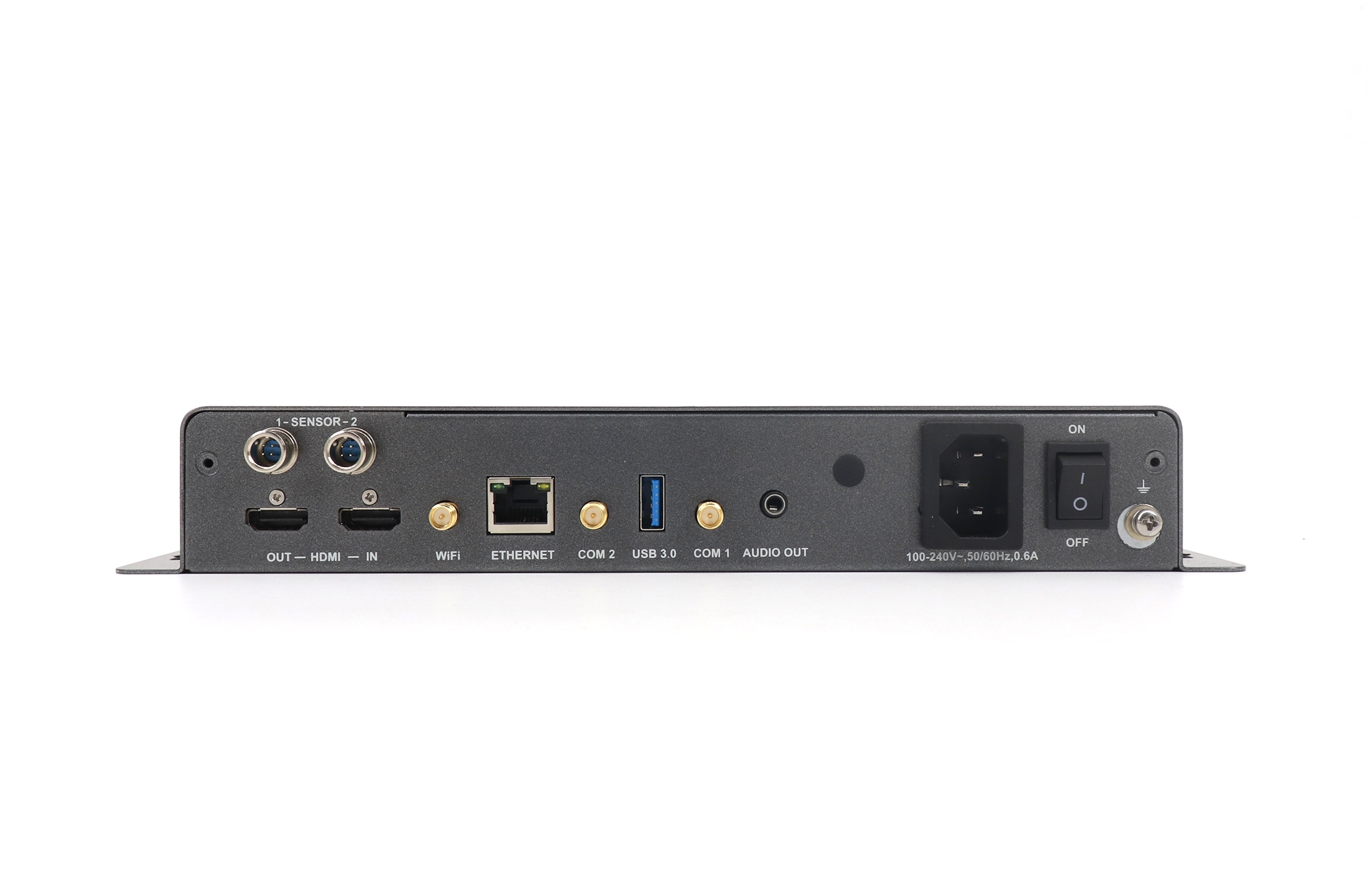
NovaStar TB50 tilhører Taurus multimediaspillerfamilie. Den er primært en asynkron løsning, som betyr at innhold kan lastes opp til spilleren og vises fra lokal lagring i henhold til en spilleliste eller tidsplan. Dette gjør den svært forskjellig fra en konvensjonell videoprosessor for live-events.
Viktige TB50-funksjoner
- Lastekapasitet på opptil omtrent 1.3 millioner piksler
- To Gigabit Ethernet-utganger for tilkobling av LED-mottakskortnettverk
- Lokal medielagring for uovervåket avspilling
- Arbeidsflyter for spillelister, planlegging og fjernpublisering
- Nettverkstilkobling for sentralisert enhets- og innholdsadministrasjon
- Støtte for synkronisert avspilling på tvers av flere skjermer når hele systemet er riktig konfigurert
Når bør du velge TB50?
Velg TB50 når en skjerm trenger å vise reklame, kunngjøringer, menyer, veivisning eller offentlig informasjonsinnhold uten en kontinuerlig tilkoblet datamaskin. Vanlige eksempler inkluderer kjedebutikker, transportskjermer, utendørs reklameskjermer, campuser og grupper av skjermer som administreres fra ett sted.
TB50 er spesielt nyttig når det er viktig å sette fokus på enkel betjening. Når media og tidsplaner er publisert, kan spilleren fortsette normal avspilling fra lokal lagring. Pikselkapasiteten og designet med to utganger betyr imidlertid at den ikke er det riktige valget for et veldig stort LED-lerret.
Utforsk relaterte produkter i kategorien LED-mediespiller.
NovaStar VX16s: Best for live-arrangementer og store LED-vegger
NovaStar VX16s kombinerer en videoprosessor og en LED-sendekontroller med høy kapasitet. Den aksepterer profesjonelle live-videokilder, skalerer og posisjonerer bilder, og sender det ferdige lerretet til LED-mottakskortene via 16 Gigabit Ethernet-utganger.
Viktige VX16-funksjoner
- Lastekapasitet på opptil omtrent 10.4 millioner piksler
- Seksten Gigabit Ethernet-utganger
- Profesjonelle innganger, inkludert HDMI 2.0, DVI og 3G-SDI
- Flere bildelag for et hovedbilde og bilde-i-bilde-oppsett
- Inngangsskalering, kildebytte og utgangskartlegging
- Genlock- og sikkerhetskopieringsorienterte funksjoner for krevende live-arbeidsflyter, avhengig av systemkonfigurasjon
For detaljert informasjon om koblinger og oppsett, se den offisielle brukerhåndboken for NovaStar VX16.
Når bør du velge VX16?
Velg VX16s når en liveproduksjon trenger én rackmontert enhet for å håndtere videoprosessering og LED-kontroll. Den er godt egnet for konserter, turnésystemer, bedriftsarrangementer, store konferanserom, gudstjenester og utleiescener.
VX16s reduserer kabling og kompleksitet i oppsettet fordi kildebytte, skalering, lagdeling og LED-datautgang er integrert. Likevel må LED-lerretet fortsatt passe til den totale lastekapasiteten, maksimale dimensjoner og grenser per port. Kabinettruting bør planlegges før arrangementet.
Bla gjennom nettstedets kategorier for LED-videokontroller og LED-videoprosessor for relaterte systemkomponenter.
NovaStar H9: Best for modulære videovegger med flere kilder
NovaStar H9 er en modulær videoveggspliser i stedet for en mediespiller med faste porter eller en konvensjonell alt-i-ett-kontroller. Chassiset kan utrustes med kompatible inngangs- og utgangskort for å matche antall kilder, skjermutganger, signalformater og LED-sendingskrav for et prosjekt.
Viktige H9-funksjoner
- Modulær inngangs- og utgangsarkitektur
- Store lerret med flere vinduer og fleksibel plassering av kilder
- Signalruting, skalering, beskjæring og skjøting på tvers av flere visningsområder
- Støtte for profesjonelle arbeidsflyter i høy oppløsning og 4K med kompatible kort
- Utvidelsesalternativer for systemer som trenger flere kilder eller utganger over tid
- Sentralisert kontroll for komplekse permanente installasjoner
Når bør du velge H9?
Velg H9 når et prosjekt har mange kilder, flere visningssoner eller et veldig stort lerret som ikke kan administreres effektivt av en kontroller med fast konfigurasjon. Typiske bruksområder inkluderer nettverksdriftssentraler, nødkommandorom, kringkastingsanlegg, sikkerhetsovervåkingsvegger, museer og flaggskiputstillingsområder.
Et H9-system må spesifiseres som en komplett konfigurasjon. Kabinettet alene definerer ikke det endelige antall innganger, utganger, pikselkapasitet eller kontaktmiks. Disse verdiene avhenger av de installerte kortene og den tiltenkte signalveien.
Hvordan de tre enhetene passer inn i et LED-system
TB50 Arbeidsflyt
- Innholdet utarbeides i den relevante NovaStar-publiseringsplattformen.
- Media og tidsplaner sendes til TB50 via et lokalt eller eksternt nettverk.
- TB50 lagrer og spiller av innholdet.
- Pikseldata beveger seg gjennom Ethernet-utgangene til LED-mottakskortene.
VX16s arbeidsflyt
- Live-kilder som kameraer, medieservere, presentasjonsdatamaskiner eller svitsjere kobles til VX16-ene.
- Enheten skalerer, bytter og lagdeler disse kildene.
- Det behandlede lerretet er tilordnet 16 Ethernet-utganger.
- Mottakerkort fordeler riktig bildeområde til hvert LED-skap.
H9 Arbeidsflyt
- Flere videokilder går inn i de installerte H9-inngangskortene.
- Skjøteren lager vinduer og arrangerer dem på et stort logisk lerret.
- Utdatakort ruter lerretsseksjoner til nedstrøms skjermer eller LED-sendingsmaskinvare.
- Operatører henter frem oppsett og administrerer kildeendringer fra kontrollgrensesnittet.
Hvordan velge riktig NovaStar-løsning
1. Definer innholdskilden
Hvis innholdet er en planlagt spilleliste, start med TB50. Hvis det er et livekamera, en presentasjon eller en medieserver-feed, bør du vurdere VX16s. Hvis mange livekilder må vises i flere vinduer, er H9 den mest passende arkitekturen.
2. Beregn LED-pikselbelastningen
Multipliser den totale aktive pikselbredden med den totale aktive pikselhøyden. Bekreft deretter både enhetens totale kapasitet og belastningen på hver Ethernet-utgang. Fysiske skjermdimensjoner alene bestemmer ikke kontrollerkravene.
3. Tell innganger, utganger og lag
List opp alle nødvendige kildeformater, sikkerhetskopikilder, visningssoner, bilde-i-bilde-lag og utgangstilkoblinger. VX16s tilbyr et definert sett med kontakter og lag, mens H9 kan konfigureres mer fleksibelt via kort.
4. Avgjør om fjernpublisering er nødvendig
For reklamenettverk og uovervåkede skjermer kan ekstern innholdspublisering være viktigere enn live-bytte. I så fall er TB50s spillerbaserte arbeidsflyt vanligvis en bedre driftsmessig løsning.
5. Planpålitelighet og utvidelse
Vurder backup-signalveier, ekstra porter, margin for kabinettruting, fremtidige kilder, ekstra skjermer, nettverkssikkerhet og tilgang for vedlikehold. Store permanente systemer bør utformes rundt hele arbeidsflyten i stedet for ett enkelt spesifikasjonsnummer.
Vanlige utvalgsfeil
- Kaller alle tre enhetene videoprosessorer: De tilhører forskjellige produktklasser og løser forskjellige problemer.
- Velge kun etter skjermstørrelse: Pikselavstand, total oppløsning, portbelastning og kabinettopologi er viktigere.
- Ignorerer kildearbeidsflyten: En planlagt reklameskjerm og en vegg for livekonserter trenger forskjellige kontrollarkitekturer.
- Behandling av H9-chassiset som en komplett spesifikasjon: Dens virkelige kapasitet avhenger av de valgte kortene.
- Bruk av teoretiske maksimumsverdier uten margin: Gi praktisk rom for ruteendringer, redundans og fremtidig utvidelse.
Ofte Stilte Spørsmål
Er NovaStar TB50 en videoprosessor?
Nei. TB50 er primært en asynkron multimediespiller og LED-kontrollenhet. Hovedstyrkene er avspilling av lagret innhold, planlegging og fjernadministrasjon.
Kan VX16-ene spille av lagret innhold uten kilde?
VX16s er hovedsakelig designet for å behandle live-innganger og kontrollere en LED-vegg. For autonome spillelister og planlagt avspilling er en dedikert multimediaspiller som TB50 vanligvis det bedre valget.
Erstatter H9 VX16-ene direkte?
Ikke i alle prosjekter. H9 er en modulær skjøteplattform for større, mer komplekse systemer. Avhengig av valgte utgangskort og arkitektur, kan ytterligere LED-sendeutstyr fortsatt være en del av signalkjeden.
Hvilken modell er best for en konsert-LED-skjerm?
VX16s er vanligvis den mest passende av disse tre for én stor live-skjerm fordi den kombinerer profesjonell videobehandling med 16 LED-datautganger. Et komplekst show med mange uavhengige lerret og kilder kan kreve et H9-basert system.
Hvilken modell er best for digital skilting?
TB50 er best egnet for digital skilting som bruker spillelister, tidsplaner, fjernpublisering og uovervåket avspilling. Kontroller alltid at skjermens totale piksler passer til kapasiteten.
Endelig anbefaling
Velg NovaStar TB50 for distribuert digital skilting, NovaStar VX16s for prosessering av live-hendelser og LED-kontroll med høy kapasitet, og NovaStar H9 for modulære videoveggsystemer med flere kilder. Den riktige avgjørelsen kommer fra å matche innholdsflyten, pikselbelastningen, kildeantall, lagkrav og utvidelsesplanen til utstyret.
Hvis du trenger hjelp med å beregne et LED-lerret eller definere signalveien, kan du oppgi total skjermoppløsning, kabinettoppsett, kildeformater og nødvendig avspillingsmetode via kontaktsiden.

