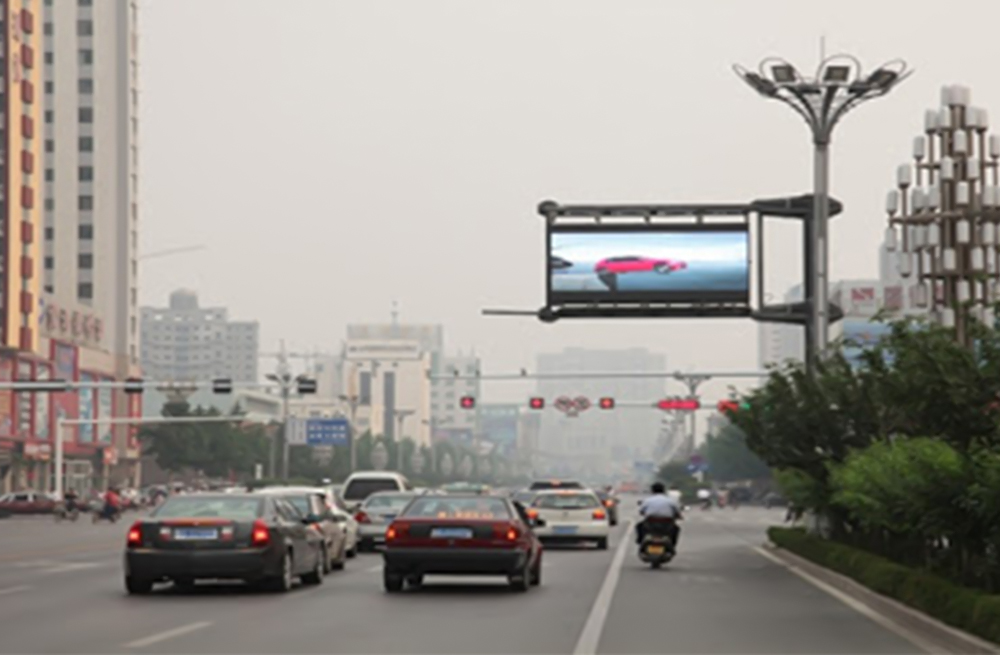
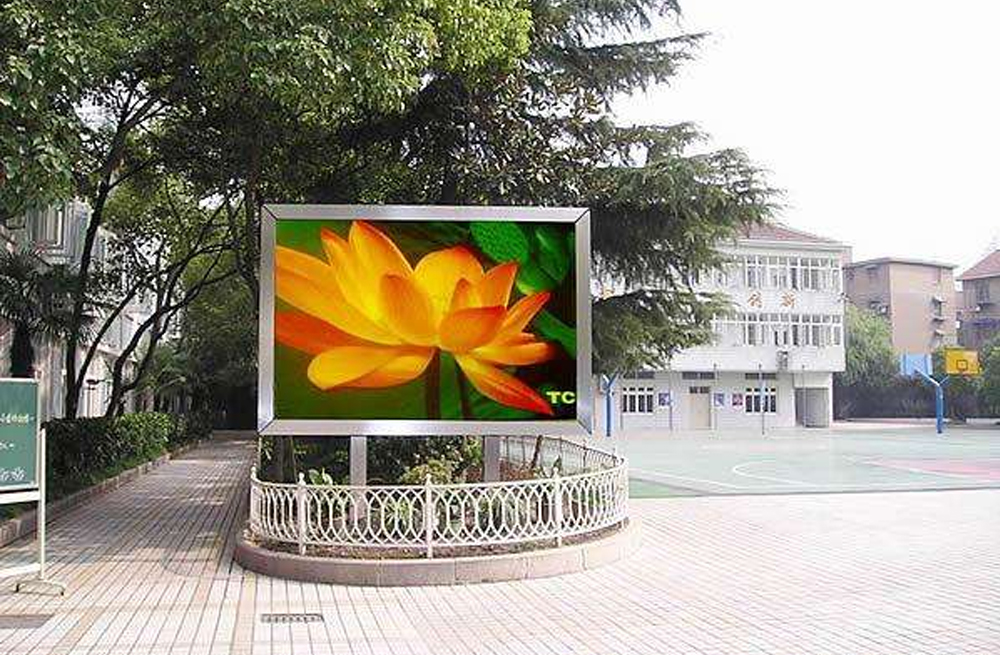
Birajući desno Huidu asinhroni LED kontroler comes down to one physical question: are you plugging ribbon cables straight from the controller into your LED modules, or are you running Cat6 cable out to cabinet receiving cards? For small door-lintel and window signs under 64,000 pixels, grab a D-series board kao Huidu HD D16 or HD D05 and drive your modules directly over onboard HUB75E headers. For mid-sized storefront signs up to 120,000–200,000 pixels (or up to 650,000 pixels over Ethernet), the C-serija (HD-C16L i HD-C36C) gives you both onboard HUB75E headers and a Gigabit Ethernet output port. And once your screen needs live HDMI switching alongside scheduled offline playback—up to 650,000 pixels—step up to an A-series multimedia box kao Huidu HD-A3L or HD-A3 uparen sa HD-R512T primanje kartica.
If you run a sign shop building custom storefront cabinets or double-sided gas-price monuments, you’ve probably seen installers burn half an afternoon plugging a Cat6 cable into the wrong RJ45 jack on a Huidu asinhroni LED kontroler. Part of the confusion is that a Huidu D-series card, a C-series card, and an A-series box all have Ethernet ports on the PCB—but they don’t do the same thing. One jack only talks to your office router; another outputs raw pixel packets to receiving cards.
Let’s walk through how the D, C, and A families actually wire up on the bench, where each Huidu asinhroni LED kontroler hits its horizontal width wall, and how to pair them with Huidu receiving cards without ending up with a dark cabinet.
1. D-Series vs C-Series vs A-Series: how Huidu’s three async families split up the job
Hodati kroz Huidu’s catalog and you’ll notice dozens of part numbers starting with D, C, B, or A. Ignore the marketing labels for a minute. Every Huidu asinhroni LED kontroler falls into one of three hardware architectures based on how pixel data leaves the board and whether the board accepts an HDMI video cable.
| Model & Series | Direct Onboard HUB75E Load | Gigabit Ethernet Output (to Receiving Cards) | HDMI Live Video Input | Onboard HUB75E Headers | Typical Sign Shop Build |
|---|---|---|---|---|---|
| Huidu HD D05 (D-Series) | Up to ~20,480 px (e.g., 640 x 32 or 320 x 64) | None (100M RJ45 is LAN input only) | No (Async only) | 2 x HUB75E ports | 1-row or 2-row full-color door lintel signs, pharmacy crosses |
| Huidu HD D16 (D-Series) | Up to 65,000 px (e.g., 1,024 x 64 or 512 x 128) | None (100M RJ45 is LAN input only) | No (Async only) | 4 x HUB75E ports | Taxi-top screens, gas price boards, 4-row shop headers |
| Huidu HD-C16L (C-Series) | Up to 200,000 px direct (typically 122,880 px recommended on ribbon headers) | 1 x Gigabit RJ45 output (up to 650,000 px with HD-R512T) | No (Async only) | 8 x HUB75E ports | Medium storefront video signs (direct ribbon or 1-cable cabinet chain) |
| Huidu HD-C36C (C-Series) | Up to 122,880 px via onboard HUB75E | 1 x Gigabit RJ45 output (up to 524,288–655,360 px with R-series cards) | No (Async only) | 8 x HUB75E ports | Roadside municipal signs and pole displays with optional 4G |
| Huidu HD-A3L / HD-A3 (A-Series) | None (no ribbon headers on chassis) | 1 x Gigabit RJ45 output (up to 655,360 px via HD-R512T / R512) | Yes (HDMI sync/async dual mode) | None (requires receiving cards) | Retail window video walls, hotel signage, small outdoor billboards |
01. Why pixel total alone will fool you on long ribbon signs
Here’s a classic shop-floor trap. Suppose a restaurant owner orders a long, narrow indoor P2.5 menu ticker measuring 3.84 m wide by 0.32 m tall (12.6 x 1.05 ft)—that’s 12 modules wide by 2 modules high (each 320 x 160 mm / 12.6 x 6.3 in, 128 x 64 pixels). Total resolution is 1,536 x 128 = 196,608 piksela.
Look only at the headline 200,000-pixel rating on an HD-C16L and you’d think you can just plug ribbon cables straight from the card’s 8 onboard HUB75E headers into the modules. You can’t. Running flat 16-pin HUB75 ribbon cable across 3.84 m (12.6 ft) of chained modules introduces clock skew, ghosting, and random colored sparkles after the fifth or sixth module—usually past 800 to 1,000 mm (31.5 to 39.4 in) of ribbon length. Worse, onboard HUB75E mode often caps horizontal width lower than the Gigabit Ethernet output mode. Once a sign gets physically wide, you stop using long ribbon cables and instead drop Huidu HD-R512T receiving cards along the frame connected by shielded Cat5e/Cat6 jumpers.
2. The RJ45 port trap: which Ethernet jacks talk to a router and which drive receiving cards
If there’s one support ticket our technicians answer every single week about a Huidu asinhroni LED kontroler, it’s this: “I plugged a Cat6 cable from my Huidu card into an HD-R512T receiving card, and the receiving card green data light won’t blink.”
Nine times out of ten, the installer plugged the receiving card into a 100M LAN input jack umesto a 1000M (Gigabit) LED output jack. Before you crimp a single RJ45 plug, check which class of Huidu board is sitting on your workbench:
- On D-Series boards (HD-D05, HD-D16, HD-D36): Postoji samo one RJ45 port, and it is a 100 Mbps LAN network port for connecting your PC or router to upload programs. It nikada outputs pixel data to receiving cards. We wrote a separate troubleshooting breakdown on this exact mistake in Da li se HD-D16 Ethernet port povezuje sa prijemnim karticama?
- On C-Series boards (HD-C16L, HD-C16C, HD-C36C): Možete dobiti two RJ45 ports. The 100M port labeled
LAN / INconnects to your computer or local network. The Gigabit port labeledOUT / Gigabit Ethernetsends pixel data out to Huidu Prijemne kartice R-serije. - On A-Series player boxes (HD-A3L, HD-A3, HD-A4, HD-A6): Just like the C-series, one RJ45 port is
LAN IN(for network control) and the Gigabit RJ45 port(s) labeledOUTdrive your cabinet receiving cards.
3. D-Series on the bench (HD-D05 and HD-D16) for compact storefront and taxi signs
When you’re building a compact sign that fits inside a single extruded aluminum cabinet—say, a 1.28 x 0.32 m (4.2 x 1.05 ft) P5 outdoor header above a convenience store or a double-sided rooftop taxi display—buying separate receiving cards is a waste of money and cabinet space. A D-series Huidu asinhroni LED kontroler bolts right behind the first module and drives the panels directly through short 200 to 600 mm (7.9 to 23.6 in) HUB75E flat ribbons.
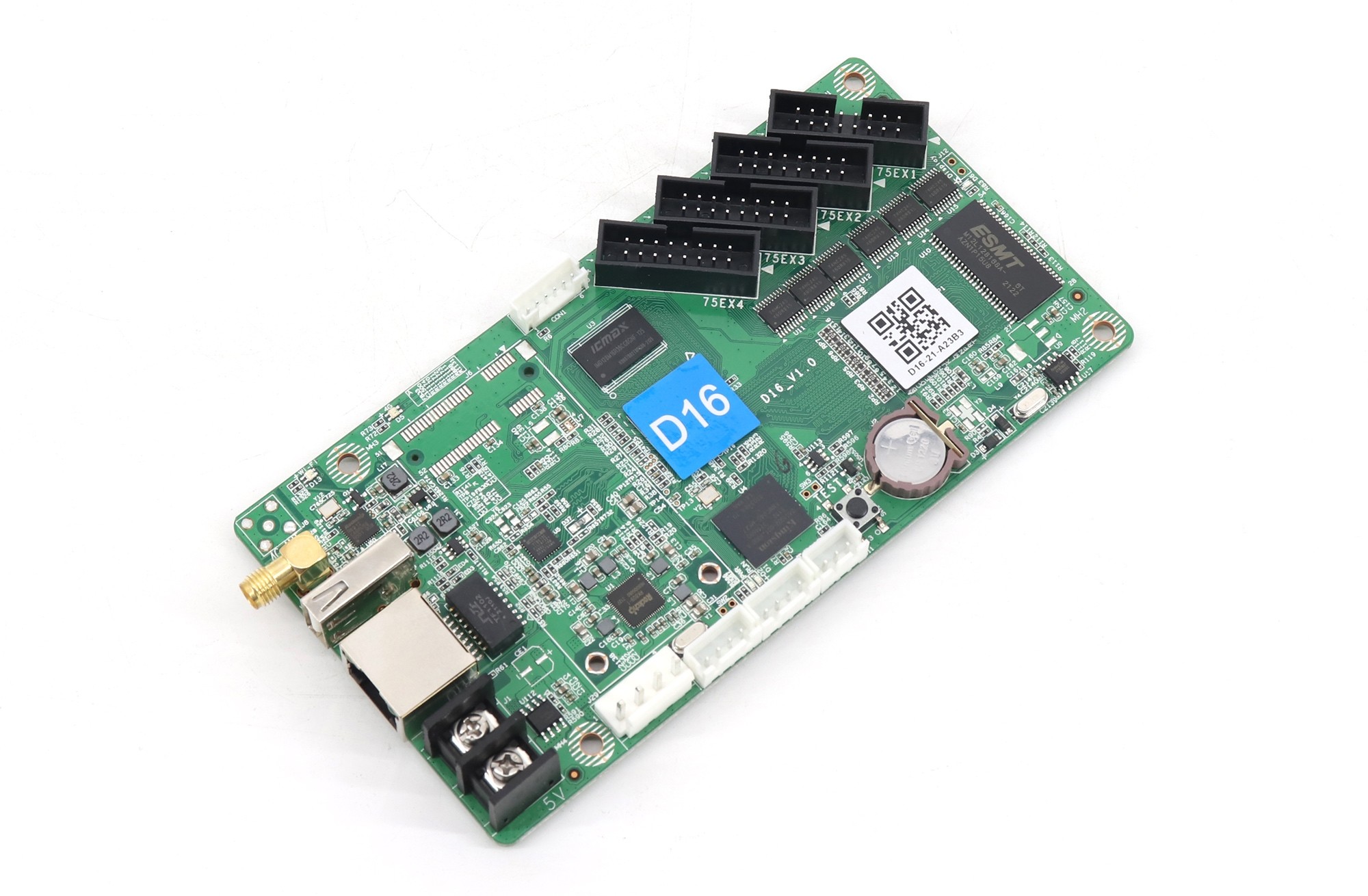
01. Huidu HD-D16: the 4-port HUB75E workhorse for 65,000-pixel signs
The Huidu HD D16 carries four HUB75E headers on the right edge of the PCB and loads up to 65,000 piksela (configurable up to 1,024 pixels wide or up to 128/256 pixels high within the 65K total pixel envelope). With built-in Wi-Fi and 4 GB of onboard flash storage, a shop owner can stand on the sidewalk below the sign, connect their phone to the card’s Wi-Fi hotspot, open the LedArt mobile app, and push a new MP4 video or price graphic in thirty seconds.
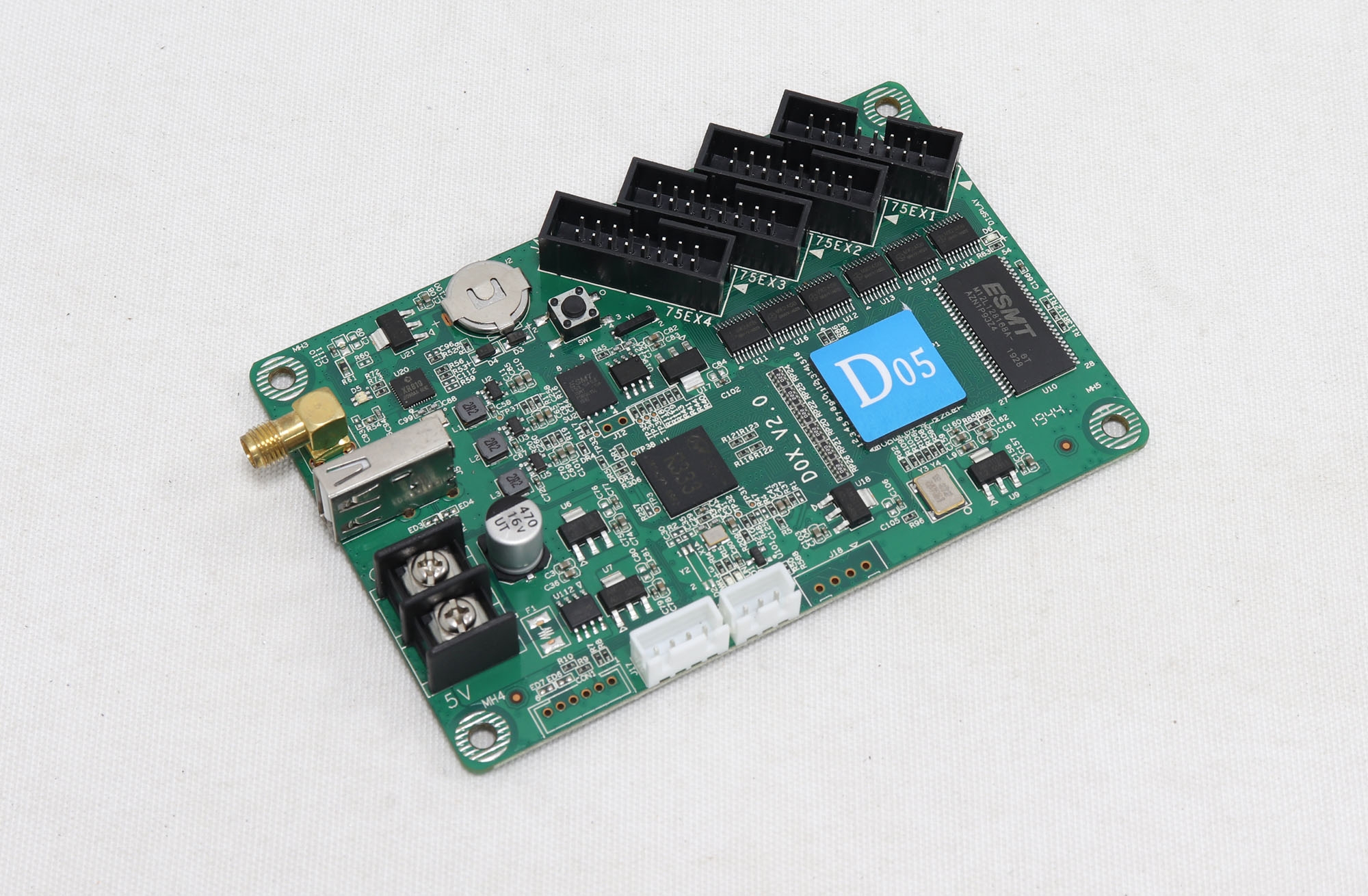
02. Huidu HD-D05 (and D06): ultra-slim cards for 1-row and 2-row headers
If your frame is only one or two modules tall—like a 32-pixel or 64-pixel high scrolling full-color text and logo lintel—the two-port Huidu HD D05 (and its sibling D06 series) tucks neatly into ultra-thin extrusions where even a 4-port card is wide. Both the HD-D05 and HD-D16 run off the same 5 V DC rail as your LED modules (wire them cleanly from one of your 5 V 40 A or 60 A LED power supplies using the green 2-pin Phoenix terminal block—never feed 12 V or 24 V into a 5 V Huidu ploča).
4. C-Series hybrid boards (HD-C16L and HD-C36C): direct HUB75E load vs Ethernet expansion
What if your sign outgrows 65,000 pixels—say, an indoor P3 or outdoor P4 commercial screen running 384 x 256 (98,304 pixels) or 640 x 384 (245,760 pixels)—but the customer still refuses to pay for a synchronous PC or high-end media box? That’s the exact gap covered by a C-series Huidu asinhroni LED kontroler.
01. When to use the HD-C16L’s 8 onboard HUB75E headers vs its Gigabit RJ45 port
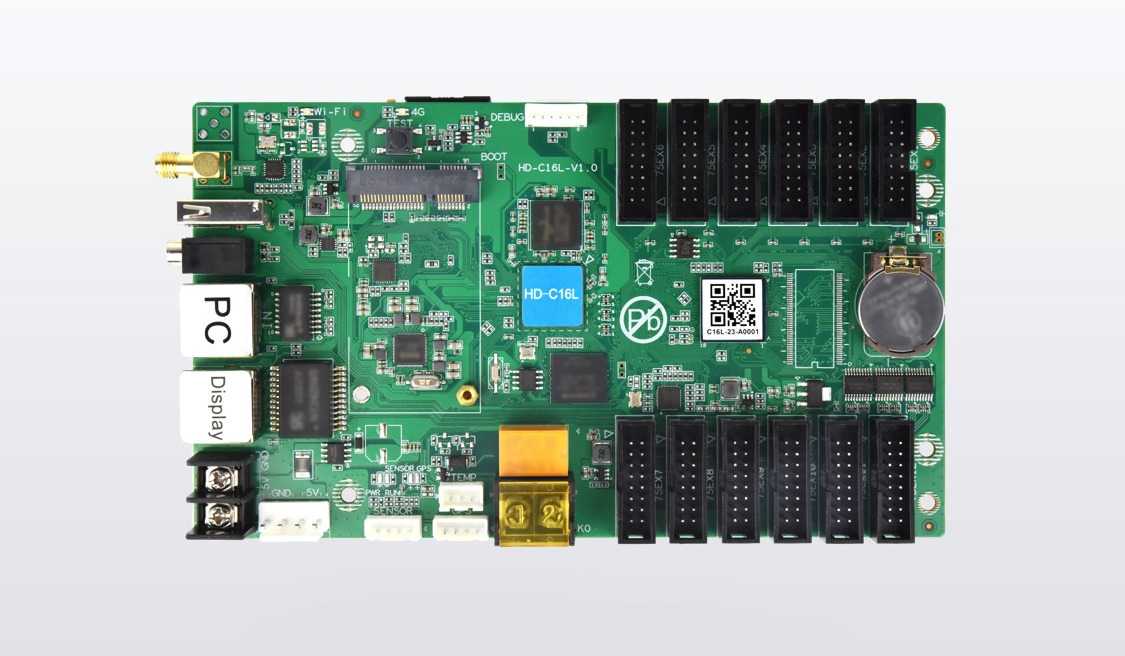
Pažljivo pogledajte Huidu HD-C16L (i Huidu HD-C36 / HD-C36C). Along the right edge sit 8 x HUB75E headers; along the left/bottom edge sit two RJ45 jacks (one 100M LAN input, one 1000M Gigabit output). You can wire a C-series board in two completely different ways:
- Mode A — Direct HUB75E ribbon drive (no receiving cards needed): For a self-contained cabinet up to 8 module rows high (or 16 rows when each HUB75E port splits across 2 rows via a short ribbon daisy chain) and staying within roughly 120,000 to 200,000 pixels and under ~1.2 to 1.6 m (3.9 to 5.2 ft) in physical width, mount the HD-C16L in the center of the cabinet and run HUB75E ribbons straight to the modules. (We break down the exact pixel and ribbon-length cutoffs in HD-C16L Direktno učitavanje: Kada su vam potrebne prijemne kartice?)
- Mode B — Gigabit Ethernet cascade to Huidu receiving cards (up to 650,000 pixels): Once your display spans multiple separate steel or die-cast cabinets—or exceeds safe flat-ribbon cable distance—leave the onboard HUB75E ports empty. Instead, run a Cat5e/Cat6 cable from the HD-C16L’s Gigabit Output RJ45 jack to a chain of Huidu HD-R512T receiving cards, unlocking up to 650,000 piksela on that single Ethernet port.
If you’re building tall vertical LED posters that need multiple posters cascaded together over HDMI, skip the C-series and use the dedicated poster controller—the Huidu HD-B6L (vidi takođe Da li B6L HDMI izlaz zamjenjuje prijemne kartice?). On the other hand, when an outdoor roadside pole project requires 4G cellular cloud management across ten or twenty locations, installing a C-series or A-series Huidu asinhroni LED kontroler with an optional 4G module lets you push playlists remotely through XiaoHui Cloud without sending a bucket truck to each pole. Many municipal contractors also connect an ambient brightness sensor or multi-function relay sensor to their Huidu asinhroni LED kontroler so street-facing signs automatically dim from 5,500 nits (cd/m²) at noon down to 800 nits after dusk.
5. A-Series dual-mode boxes (HD-A3L and HD-A3) + HD-R512T receiving card wiring
Bare green PCB cards like the HD-D16 and HD-C16L belong bolted inside a weatherproof LED cabinet. When a retail chain, school, or corporate lobby wants a finished black metal media box that can sit in an indoor equipment closet—or mount inside a clean service compartment—and switch between scheduled internal MP4 playlists and a live HDMI video feed, you move up to an A-series Huidu asinhroni LED kontroler.
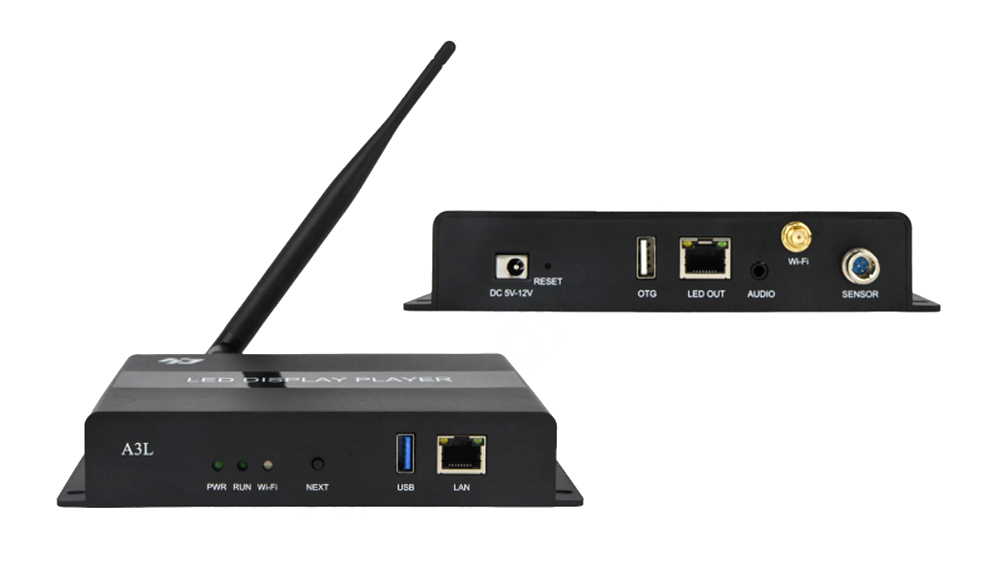
01. Huidu HD-A3L vs HD-A3: what you get in the A-series box
Oba Huidu HD-A3L a Huidu HD-A3 drive up to 655,360 piksela over a single Gigabit Ethernet RJ45 output port, run on an enclosed 12 V DC power adapter (unlike bare 5 V D/C cards!), and include an HDMI input jack for synchronous playback alongside 8 GB (or model-specific) internal storage for standalone playlist looping.
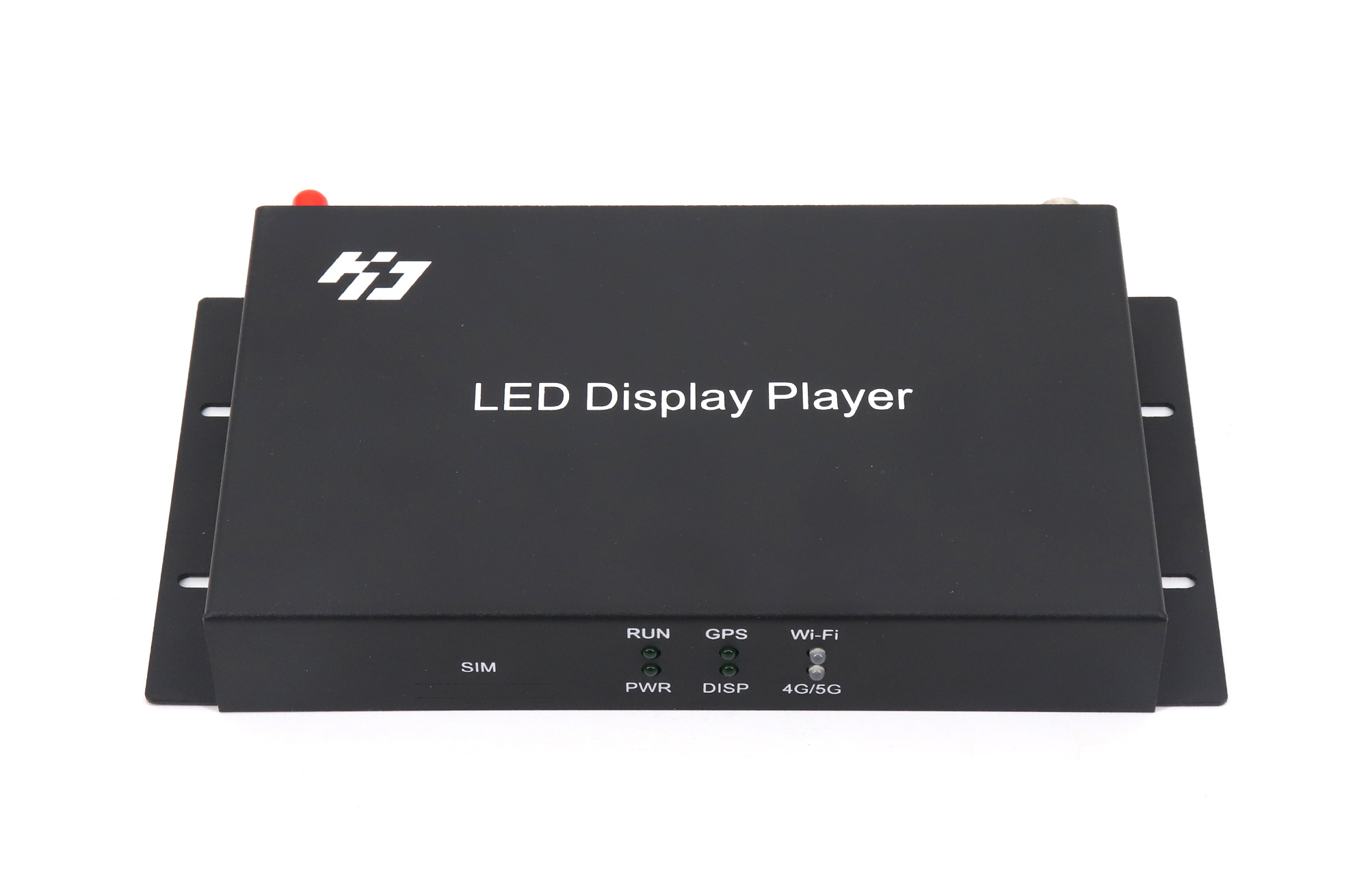
Think of the HD-A3L / HD-A3 as Huidu’s direct answer to the NovaStar TB20 and TB40 (which we compared in our NovaStar TB40 vs TB60 vs TB20 Taurus guide). Because the HD-A3L and HD-A3 have no HUB75 ribbon pins on their housing, you morati pair them with Huidu LED prijemne kartice mounted inside your display cabinets.
02. Pairing with Huidu HD-R512T, HD-R512, and HD-R501S receiving cards
Inside each cabinet driven by an HD-A3L, HD-A3, HD-C16L (in Ethernet mode), or HD-C36C, install a Huidu R-series receiving card:
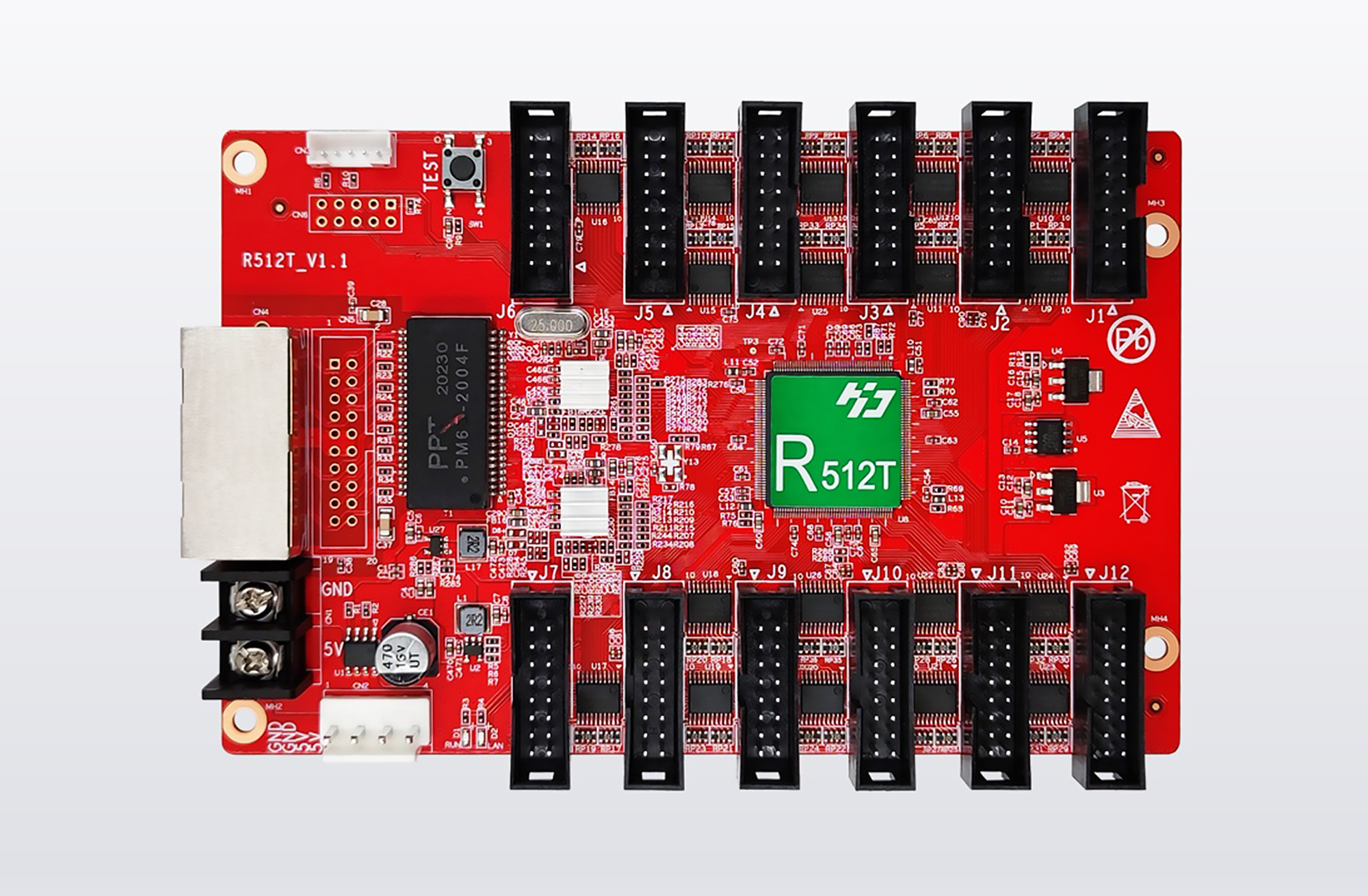
- Huidu HD-R512T & HD-R512: Opremljen sa 12 x HUB75E ports, making them the standard choice for 960 x 960 mm (37.8 x 37.8 in) outdoor steel/aluminum cabinets or 640 x 640 mm (25.2 x 25.2 in) indoor cabinets up to 6 or 12 module rows high without needing a separate hub board.
- Huidu HD-R501S / HD-R501: Designed for legacy pinouts or cabinets that use an external LED hub card (like HUB75B/E adapter boards).
Never mix a Huidu HD-A3L or HD-C16L with NovaStar, Colorlight, or Linsn receiving cards—each brand speaks a closed Ethernet protocol (see our NovaStar protiv Colorlighta Huidu poređenje i Vodič za prijemne kartice LED u odnosu na kartice za slanje).
6. Software cheat sheet: when to open HDPlayer, HDSet, LedArt, or XiaoHui Cloud
New technicians often install the wrong Huidu program on their laptop and wonder why the screen mapping buttons are missing. Huidu splits initial hardware setup and daily ad publishing across four tools—use the table below so you open the right software for your Huidu asinhroni LED kontroler on the first try.
| Software / App | platforma | kompatibilan Huidu hardver | What You Actually Use It For |
|---|---|---|---|
| HDPlayer | Windows PC | D-Series (HD-D05, HD-D16), C-Series (HD-C16L, HD-C36C), A-Series (HD-A3L, HD-A3) | Both smart module screen setup (on D/C/A async cards) AND building/sending video, text, clock, and sensor programs over LAN, Wi-Fi, or USB drive |
| HDSet | Windows PC | Huidu synchronous senders (HD-T901, VP processors) & R-series receiving cards (HD-R512T) | Low-level receiving-card Smart Setting, cabinet connection mapping, gamma tuning, and R-series receiving card firmware upgrades |
| LedArt | iOS & Android mobile app | All Wi-Fi-enabled D-Series, C-Series, B-Series, and A-Series controllers | Point-to-point Wi-Fi hotspot connection from a smartphone to edit programs, switch playlists, adjust brightness, and run basic screen parameter setup on site |
| XiaoHui Cloud | Web browser (Cloud PMS) | C-Series, B-Series, and A-Series connected via LAN, Wi-Fi STA, or 4G module | Remote multi-store ad publishing, GPS/NTP synchronized playback across street-pole networks, and remote online/offline status monitoring |
01. Default passwords that save you a phone call on site
When you connect to a factory-fresh Huidu asinhroni LED kontroler over Wi-Fi or open the advanced Hardware Settings menu inside HDPlayer / HDSet, keep two factory defaults taped inside your tool bag: the default Wi-Fi hotspot password on a Huidu card is 88888888 (eight eights), and the default hardware configuration unlock password inside HDPlayer and HDSet is 168 (ili 888 on select newer firmware menus).
7. Video s klupe: Huidu HD-A3 ports and USB program updates
In the bench video above, you can see how the enclosed A-series player separates its 12 V DC power barrel, LAN input, Gigabit LED output, HDMI input, and USB port, making it easy for an end user to plug in a FAT32 USB flash drive exported from HDPlayer when Wi-Fi or LAN isn’t available at the sign location.
Često Postavljena Pitanja
Zašto ne bi moj Huidu HD-C16L or HD-A3L detect my HD-R512T receiving card?
First, check which RJ45 jack you plugged the Cat5e/Cat6 cable into. On both the HD-C16L i HD-A3L, one RJ45 jack is a 100M LAN input (for your PC/router) and the other is the 1000M Gigabit output that drives the HD-R512T. Second, verify the receiving card has clean 5 V DC power (green power LED solid, green data LED blinking fast) and that your Ethernet cable is a working 8-wire Gigabit patch cable—a 4-wire 100M cable will not carry Gigabit LED pixel data.
Can I power a Huidu HD-A3L or HD-A3 from the 5V LED module power supply inside my cabinet?
No—pay close attention to the voltage printed next to the power jack. Bare PCB cards like the HD-D05, HD-D16, HD-C16L, and HD-C36C trči dalje 5 V DC and wire directly to your cabinet’s 5 V switching power supply. Enclosed A-series boxes like the HD-A3 and HD-A3L typically use a 12 V DC barrel adapter (verify the exact 12 V / 5 V silkscreen label on your specific revision before wiring). Feeding 12 V into a 5 V C/D card will fry the board immediately, while feeding 5 V into a 12 V A-series box will prevent it from booting.
When should I stop using the HD-C16L’s onboard HUB75E headers and add an HD-R512T receiving card instead?
Stop using direct onboard HUB75E ribbon cables whenever your flat ribbon run from the HD-C16L to the farthest module exceeds roughly 0.8 to 1.2 m (2.6 to 3.9 ft), when your screen needs more than 8 HUB75E port rows, or when your total pixel count pushes past the card’s direct-ribbon rating toward its 650,000-pixel Gigabit Ethernet ceiling. Adding an HD-R512T per cabinet keeps ribbon cables short and lets you link cabinets over 80 m (262 ft) of Cat6 cable.
How do I update a Huidu sign with a USB flash drive if the shop owner forgot the Wi-Fi password?
Format a standard USB flash drive to FAT32 (not exFAT or NTFS on older firmware), build your screen program inside HDPlayer on a Windows PC, click Export to U-Disk, and plug the USB drive into the Huidu controller’s USB port. The screen will display a copy prompt and begin playing the new program automatically. You can also check the “Export Parameters” box during U-Disk export if you need to overwrite the controller’s resolution or Wi-Fi password on site.
Može li Huidu asynchronous LED controller drive NovaStar MRV or Colorlight i5A receiving cards?
Ne Huidu asynchronous LED controller only talks to Huidu R-series receiving cards (such as the HD-R512T, HD-R512, or HD-R501S). If your existing cabinet already has NovaStar receiving cards inside and you want an asynchronous player without swapping every cabinet card, order a NovaStar TB20, TB40, or TB60 instead.
Sign-shop checklist before ordering Huidu control boards
Before you order a Huidu asinhroni LED kontroler for an upcoming sign build or field repair, jot down five numbers from your cabinet layout: total pixel width and pixel height of the display, how many rows of modules sit vertically in the cabinet (to match 2, 4, 8, or 12 HUB75E ports), total physical width of the sign in meters or feet (to decide between direct ribbon drive and Cat6 + HD-R512T receiving cards), whether the client ever needs live HDMI video input (which requires an A-series box like the HD-A3L or HD-A3), and how they plan to update ads (local LedArt Wi-Fi, USB stick, LAN cable, or 4G XiaoHui Cloud).
If you’d like one of our bench technicians to double-check whether your sign resolution fits on a single HD-D16 or HD-C16L—or help count out how many HD-R512T receiving cards your cabinets need—send your module pitch and cabinet dimensions through our contact page. And if you’re quoting a complete turnkey outdoor or storefront LED sign rather than loose control boards, you can check full cabinet assemblies over at EagerLED.