
Risposta rapida: the NovaStar VX400 vs VX400 Pro comparison comes down to input and processing headroom, not screen size, because both are all-in-one controllers with 4 Gigabit Ethernet outputs, a 2.6 million-pixel loading capacity, a maximum canvas of 10,240 × 8,192 pixels and a 1U rack chassis. The difference is what happens before the Ethernet ports. The VX400 tops out at 1920×1200@60Hz on HDMI 1.3 and DVI, opens two layers and stores 10 presets. The VX400 Pro (first released 6 January 2025) accepts 4K×2K@60Hz on HDMI 2.0, opens up to six 2K×1K layer resources, stores 256 presets, plays media from USB, adds 3.5 mm audio input and output, and reaches 0-frame delay in ByPass mode.
Choose the VX400 for existing systems with 1080p-class sources and one or two layers. Choose the VX400 Pro if your video chain is native 4K, if operators switch between many layouts, if you need USB playback or zero-frame ByPass, or if you are buying a controller for a new build.
Table of contents
- Comparazione di specificazioni
- What the two controllers share
- Difference 1: 4K input and connector set
- Difference 2: two layers vs six layer resources
- Difference 3: 10 presets vs 256 presets
- Difference 4: 20-line delay vs 0-frame ByPass
- Difference 5: USB media playback
- Difference 6: audio, 3D, control and monitoring
- Pixel load and canvas: the limit both models share
- Chì controller duvete cumprà?
- Upgrading from VX400 to VX400 Pro
- VX400 vs VX400s vs VX400s-N vs VX4S
- Lista di cuntrollu prima di l'acquistu
- Fonti è metudu di verificazione
- dumandò Spissu e dumande
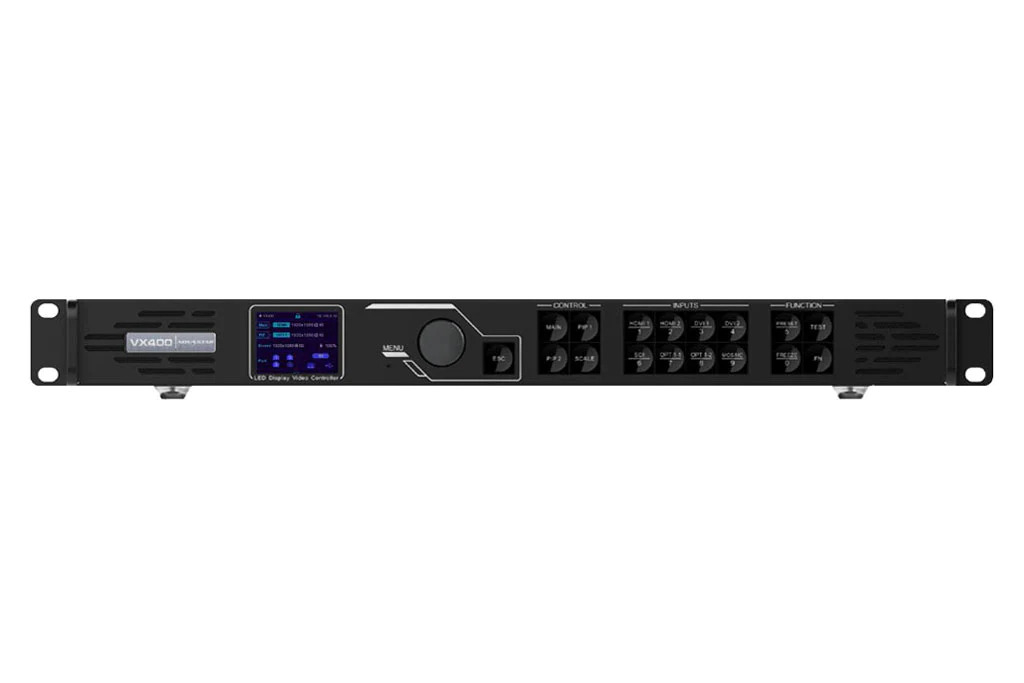
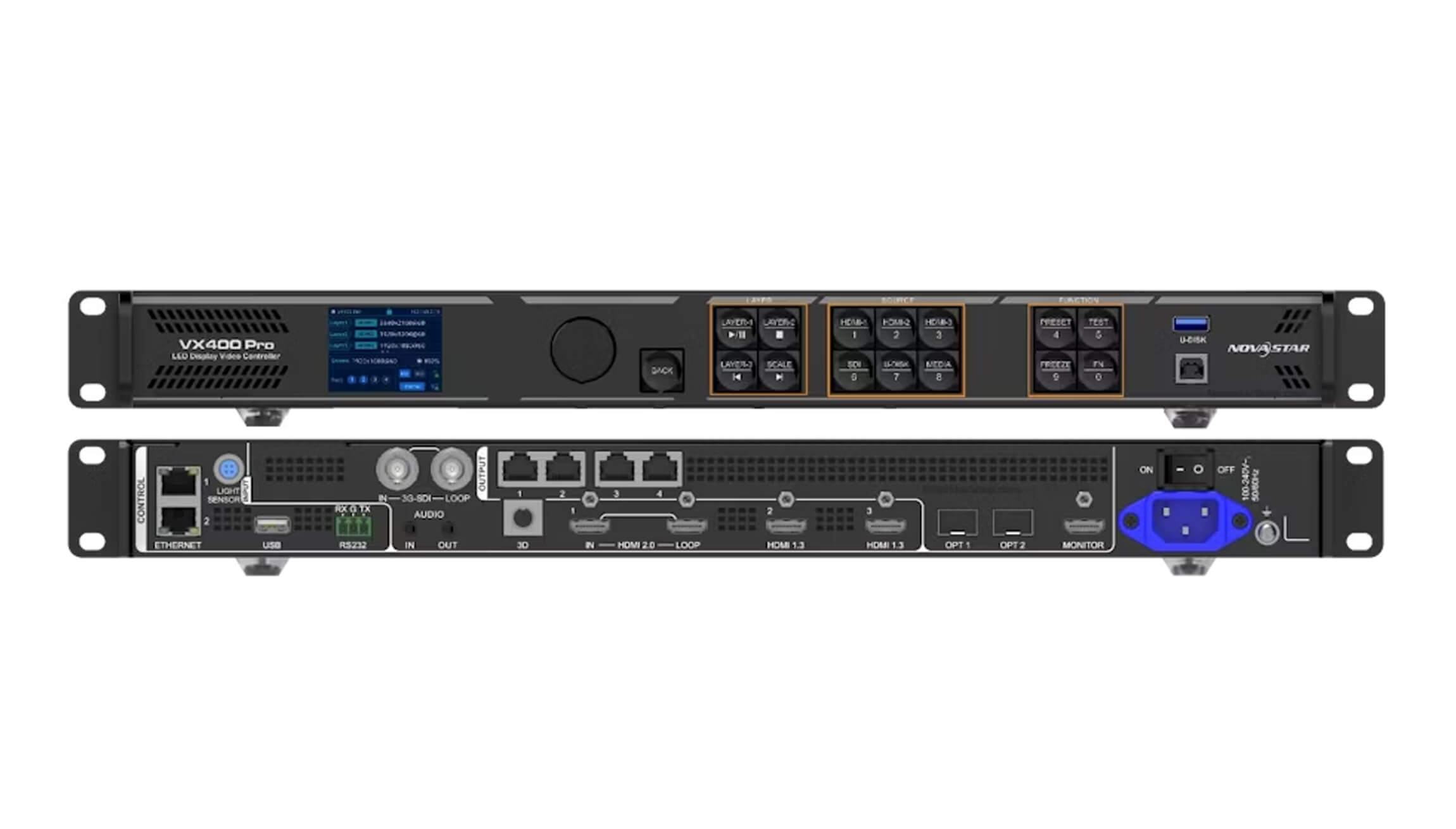
NovaStar VX400 vs VX400 Pro: specification comparison
The table below uses the manufacturer’s published figures: the NovaStar VX400 All-in-One Controller Specifications (document V1.0.0, 30 August 2022) and the NovaStar VX400 Pro All-in-One Controller Specifications (document V1.1.1, 15 August 2025), cross-checked against NovaStar’s current VX Pro Series product page.
| spicifichi | NovaStar VX400 | NovaStar VX400 Pro |
|---|---|---|
| Tipu di dispositivu | Controller video è processore tuttu in unu | Controller video è processore tuttu in unu |
| Capacità di carrica | 2.6 milioni di pixel | 2.6 milioni di pixel |
| Uscite Ethernet | 4 × GigabitEthernet | 4 × GigabitEthernet |
| Tela massima | 10,240 pixels wide × 8,192 pixels high | 10,240 pixels wide × 8,192 pixels high |
| Published single-port limit | Not published as a separate figure | 650,000 pixels per port at 8-bit output depth |
| Capelli | 2 layers (1 × MAIN + 1 × PIP) | 6 × 2K×1K layer resources; layers can be opened as 4K×2K (4 resources), 4K×1K (2 resources) or 2K×1K (1 resource) |
| Presets | Finu à 10 presets definiti da l'utilizatore | Finu à 256 presets definiti da l'utilizatore |
| Input video massimu | 1920×1200@60Hz on HDMI 1.3 and DVI; 1920×1080@60Hz on 3G-SDI; 1 × 4K×1K@60Hz or 2 × 2K×1K@60Hz through the OPT 1 fiber port | 4096×2160@60Hz (4K×2K) on HDMI 2.0; 1920×1080@60Hz on the two HDMI 1.3 inputs and 3G-SDI |
| Connettori d'entrata video | 1 × HDMI 1.3 (IN & LOOP), 1 × HDMI 1.3, 1 × DVI (IN & LOOP), 1 × 3G-SDI (IN & LOOP), 1 × OPT 1 self-adaptive fiber port | 1 × HDMI 2.0 (IN & LOOP), 2 × HDMI 1.3, 1 × 3G-SDI (IN & LOOP), 1 × 10G OPT 1 self-adaptive fiber port, 1 × USB 3.0 playback port |
| Uscite di loop | HDMI 1.3-1, DVI and 3G-SDI loop outputs | HDMI 2.0 and 3G-SDI loop outputs |
| Monitore u output | 1 × HDMI 1.3, adjustable output resolution | 1 × HDMI 1.3, fixed at 1920×1080@60Hz |
| Porti di fibra ottica | 2 ports: OPT 1 self-adaptive input or output; OPT 2 output only, with copy and backup modes | 2 × 10G ports: OPT 1 self-adaptive input or output; OPT 2 output with copy, backup or loop modes |
| Modi di travagliu | Cuntrollu video, cunvertitore di fibra, ByPass | Cuntrollu video, cunvertitore di fibra, ByPass |
| Latenza | Down to 20 lines of delay from input to receiving card with Low Latency and ByPass enabled | 0 frames with Low Latency and ByPass; 1–2 frames in video controller mode with low latency (2–3 frames standard) |
| Riproduzione di media USB | No. The two USB ports are used for control and device cascading (Type-B input, Type-A output) | Yes. USB 3.0 playback for images and videos; the USB source resolution is fixed at 1920×1080@60Hz |
| Supported media files | Inapplichevule | mp4, mkv, mov, avi, flv, m4v, mpg, mpeg, ts; H.264, H.265, MPEG-2 and MPEG-4; up to 3840×2160 (H.264 at 30fps, H.265 at 60fps) and 100 Mbps |
| Audio | Audio embedded with HDMI input; audio output through a multifunction card connected to Ethernet port 1 or 2, with volume adjustment | 3.5 mm audio input and output connectors, sampling rate up to 48 kHz, plus audio embedded with HDMI sources |
| Supportu 3D | Ùn hè micca listatu in a specificazione ufficiale | 1 × 3D connector for a third-party 3D emitter; output capacity is halved when 3D is enabled with a Side-by-Side or Top-and-Bottom source |
| Opzioni di cuntrollu | Front panel knob and buttons, NovaLCT, V-Can | Front panel knob and buttons, NovaLCT, Unico web page, VICP app |
| Connettori di cuntrollu | 1 × Ethernet, 2 × USB (input and output) | 2 × Ethernet (Unico web control and device cascading), 1 × USB for firmware, logs and EDID |
| Input mosaic and cascading | Input mosaic of two 2K×1K@60Hz sources through OPT 1; up to 4 units cascaded | Cascading supported through the Ethernet control ports |
| U cunsumu energeticu stimatu | 28 W | 42 W |
| temperature rise | 0 ° C à 45 ° C | 0 ° C à 50 ° C |
| Dimensioni è pesu | 483.6 × 301.2 × 50.1 mm; 4 kg net (1U) | 482.6 × 302.2 × 50.1 mm; 3.8 kg net (1U) |
Read this table the right way: the Pro is not a bigger controller. It drives exactly the same 2.6 million pixels through the same four ports. Everything the Pro adds sits upstream of the Ethernet ports — input resolution, layer processing, presets, latency, USB playback and control.
What the two controllers share
- Capacità di uscita: 2.6 million pixels per unit, with a maximum output width of 10,240 pixels and a maximum height of 8,192 pixels — useful for ultra-wide ribbon screens and very tall columns.
- Numeru di porti: four Gigabit Ethernet ports that connect directly to NovaStar receiving cards, with Ethernet port 1 and 2 able to carry audio when a multifunction card is used on the VX400.
- Trè modi di travagliu: video controller, fiber converter and ByPass, so either unit can sit in a long fiber run or act as a pass-through for a downstream processor.
- Funzioni di trasfurmazioni: stepless output scaling, free input cropping, pixel-level brightness and chroma calibration, EDID management and output synchronization across cascaded units.
- Software è ecosistema: both are configured with NovaLCT and are compatible with NovaStar’s calibration workflow; neither ships with optical modules installed.
- Rack format: both are 1U devices about 50 mm high, so a swap inside an existing rack does not change the rack layout.
The six differences that decide a purchase
Difference 1: 4K input and the connector set
The single biggest upgrade in the VX400 Pro is the HDMI 2.0 input, which accepts 4096×2160@60Hz — real 4K×2K at 60Hz with 8-bit, 10-bit and 12-bit support, HDCP 1.4 and HDCP 2.2, and custom resolutions up to 8192 × 1080 or 1080 × 8188.
The VX400 cannot take a 4K signal through its HDMI or DVI ports. Those inputs stop at 1920×1200@60Hz. A 4K source reaches a VX400 only through the OPT 1 fiber port, and even then the port’s capacity is 1 × 4K×1K@60Hz or 2 × 2K×1K@60Hz — enough for a wide 4K×1K canvas, not a full 4K×2K frame without external processing.
There is also a connector swap to plan for. The VX400 provides one DVI input, and DVI loop-through. The VX400 Pro drops DVI and instead provides a second HDMI 1.3 input plus an HDMI 2.0 input with loop. If a legacy source in your rack is DVI-only, budget a DVI-to-HDMI adapter and confirm EDID behaviour during commissioning.
The VX400 Pro’s input connectors also support connector capacity modes — SL, DL and 4K — which change how much of a connector’s capacity a single input consumes. This matters when you feed an ultra-wide source such as 8192 × 1080, because the mode must match the source resolution before the layer can open.
Difference 2: two layers versus six layer resources
The VX400 opens two layers: one MAIN layer and one PIP layer. The VX400 Pro works from a pool of six 2K×1K layer resources, and the layer specification you choose consumes that pool at different rates:
| Layer specification on the VX400 Pro | Layer resources used | Esempiu praticu |
|---|---|---|
| 4K×2K | 4 risorse | One full 4K layer plus two remaining 2K×1K resources |
| 4K×1K | 2 risorse | Up to three wide layers from the pool |
| 2K×1K | 1 resource | Up to six windows for camera, presentation, graphics and lower-thirds |
In practice: a conference or worship system that shows one camera plus one presentation is served by either model. A rental or broadcast desk that composites several sources — a wide camera, a tight camera, a graphics feed, a playback feed and a logo bug — needs the Pro. On the VX400, that job requires an external switcher or additional processing ahead of the controller.
On the VX400, only the main layer can use the mosaic input source, and the PIP layer cannot be opened while the main layer is showing a mosaic source. That limitation is a strong signal that the VX400 is a single-screen controller, not a multi-window processor.
Difference 3: 10 presets versus 256 presets
The VX400 stores up to 10 user-defined presets. The VX400 Pro stores up to 256, and a preset can be recalled with one button press, previewed before it is loaded, and saved, overwritten or deleted.
For fixed installations the difference is small. For touring, rental and multi-purpose venues it is not: 10 presets covers one show with a handful of looks, while 256 covers a season of changeovers, plus the vendor’s saved layouts, and lets an operator verify the stored layer layout before taking it to the screen.
Difference 4: 20-line delay versus 0-frame ByPass
The VX400 reduces the delay from input to receiving card to about 20 lines when Low Latency and ByPass are both enabled. The VX400 Pro goes further: ByPass with low latency is specified at 0 frames of device delay, 1 frame without low latency. In video controller mode, the Pro runs at 1–2 frames with low latency against 2–3 frames standard.
Twenty lines of delay is small, and for most pre-recorded content either controller is invisible to the audience. The difference shows up in image-magnification workflows, in camera-to-screen confidence monitoring for presenters, and in systems where an LED wall sits next to a video wall or a reference monitor that must stay in sync.
Difference 5: USB media playback
The VX400 has no media playback. Its USB ports are control ports: a Type-B input for the control PC and device cascading, and a Type-A output for cascading.
The VX400 Pro adds a USB 3.0 playback port for images and videos, with an on-device USB player screen and layer buttons that play, pause, stop and skip files. Supported video formats are mp4, mkv, mov, avi, flv, m4v, mpg, mpeg and ts, coded as H.264, H.265, MPEG-2 or MPEG-4, with files up to 3840 × 2160 (H.264 at 30fps, H.265 at 60fps) and bit rates up to 100 Mbps.
One detail buyers miss: although the VX400 Pro plays files up to 3840 × 2160, NovaStar specifies that the USB source resolution is fixed at 1920×1080@60Hz. The USB input enters the processing chain as 1080p, so treat playback as a convenience for break-filler, test patterns and signage — not as a replacement for a 4K media server feeding the HDMI 2.0 input.
Difference 6: audio, 3D, control and monitoring
| Area | VX400 | VX400 Pro |
|---|---|---|
| Audio input | Embedded in the HDMI input source | 3.5 mm analog input plus audio embedded with HDMI sources, sampled up to 48 kHz |
| Audio output | Through a multifunction card installed on Ethernet port 1 or 2, with volume adjustment | 3.5 mm analog output, plus volume and audio settings in the control software |
| 3D | Micca prupostu | 3D connector for a third-party emitter and matched 3D glasses |
| Monitore u output | HDMI 1.3 with adjustable resolution | HDMI 1.3 fixed at 1920×1080@60Hz |
| Software di cuntrollu | NovaLCT è V-Can | NovaLCT, Unico web page and VICP app |
| Porti di cuntrollu | 1 × Ethernet plus 2 × USB | 2 × Ethernet plus 1 × USB for firmware, logs and EDID files |
| putenza valutate | 28 W | 42 W |
The control difference is more important than it looks on a datasheet. Unico is a web page hosted by the device, so any phone, tablet or laptop on the same network can adjust the screen without installing NovaLCT; the VICP app covers the same ground on mobile. The VX400 Pro also provides two Ethernet control ports, which lets one port stay on the control network while the other cascades to the next unit.
Two smaller notes from the August 2025 specification revision, both of which are worth knowing before a site visit: the VX400 Pro supports an on-screen display (OSD) function and a remote control, and the analog audio path means you no longer need a multifunction card simply to get audio out of the controller.
Pixel load and canvas: the limit both models share
Because both controllers stop at 2.6 million pixels, the load calculation is identical for either model. Work out the total pixels of the wall first, then check that the widest edge stays within 10,240 pixels and the tallest edge within 8,192 pixels.
| Screen example | Calculu di pixel | Result on a VX400 or VX400 Pro |
|---|---|---|
| P2.5 indoor wall, 5.0 m × 2.8125 m | 2,000 × 1,125 = 2,250,000 pixel | Fits, using about 87% of capacity; roughly 562,500 pixels per Ethernet port if the load is split evenly |
| P3.91 rental wall, 6.0 m × 3.375 m | 1,536 × 864 = 1,327,104 pixel | Fits comfortably with headroom for spare ports |
| P1.86 fine-pitch wall, 4.8 m × 2.7 m | 2,580 × 1,451 = 3,743,580 pixel | Exceeds the 2.6 million-pixel limit; step up to a 6.5 million-pixel controller such as the NovaStar VX1000 Pro |
| P1.5 stage wall, 6.0 m × 3.375 m | 4,000 × 2,250 = 9,000,000 pixel | Well beyond both models; this load needs a 13 million-pixel controller such as the NovaStar VX2000 Pro |
Two practical rules follow from the shared output stage. First, 2.6 million pixels across four ports averages 650,000 pixels per port — exactly the single-port figure NovaStar publishes for the VX400 Pro at 8-bit output depth, so an evenly mapped wall sits at the port limit rather than below it. Leave headroom if the cabinet layout forces an uneven split. Second, if the screen is wider than 10,240 pixels or taller than 8,192 pixels, no amount of spare pixel capacity helps: the canvas limit is absolute, and the fix is a controller with a wider canvas, such as the VX2000 Pro at 16,384 pixels wide.
For a step-by-step method that covers cabinet mapping, port allocation and spare capacity, see our guide to NovaStar LED controller pixel load sizing.
Chì controller duvete cumprà?
Choose the NovaStar VX400 when:
- The screen stays at or below 2.6 million pixels, with a width under 10,240 pixels and a height under 8,192 pixels.
- Your sources are 1080p-class: computers, media players, cameras and switchers delivering up to 1920×1200@60Hz.
- One program plus one picture-in-picture window covers the content, and a handful of presets is enough.
- You are maintaining an existing VX400 system where the control rack, cabling and operator habits are already built around NovaLCT and V-Can.
- You need DVI connectivity natively.
Choose the NovaStar VX400 Pro when:
- Video arrives at 4K×2K@60Hz and you want to keep it in 4K through the HDMI 2.0 input instead of adding a scaler or processor.
- You composite more than two sources, or you need wide 4K×1K layers.
- Operators switch repeatedly between saved looks — touring, rental, multi-purpose halls, studios.
- Zero-frame ByPass or 1–2 frame processing is required for camera-facing work.
- You want USB playback for break-filler content, or 3.5 mm analog audio in and out without a multifunction card.
- You prefer browser-based or mobile control (Unico, VICP) over a PC-only toolchain.
- You are specifying a new build: the VX400 Pro is the current model in NovaStar’s VX Pro series, first released in January 2025, and it is the model with active documentation updates.
If both descriptions apply to different rooms in the same building, the two models can coexist. Both use the same receiving cards and the same pixel budget, so a shared spares kit remains practical.
Upgrading from VX400 to VX400 Pro: what changes on site
- Presets do not transfer. The preset engines and counts differ (10 versus 256), so export your VX400 layouts as documentation and rebuild them on the Pro before the first show.
- The control path changes. NovaLCT remains available, but the Pro adds the Unico web page and the VICP app; the second Ethernet port can be used for cascading instead of USB.
- DVI becomes an adapter question. Replace DVI sources with HDMI where possible, and confirm EDID and HDCP behaviour with the adapter in the chain.
- Audio wiring simplifies. Move audio from a multifunction card on Ethernet port 1 or 2 to the 3.5 mm connectors on the Pro, and re-check level and delay at the amplifiers.
- Monitoring is fixed. The Pro’s HDMI monitor output is locked at 1920×1080@60Hz, so confirm your confidence monitor accepts that mode.
- Fiber stays fiber. OPT 1 remains self-adaptive and OPT 2 still provides copy or backup, so existing optical modules and runs can be reused — check the module type and distance against your link plan.
- Thermal and power headroom. The Pro’s rated consumption is 42 W against 28 W, and its rated operating range extends to 50°C, so verify rack airflow when you swap units in a closed cabinet.
Before a live changeover, run a bench test of the new unit against the actual screen, receiving cards and source devices. Our Lista di cuntrollu di prova di u bancu di cuntrollu di LED sets out the checks worth doing before the rack leaves the workshop.
VX400 vs VX400s vs VX400s-N vs VX4S: don’t mix up the names
Search results and supplier listings mix up several NovaStar families. These are different products with different port counts and connector sets, and the difference matters when you are matching a replacement to an existing screen.
| mudeddu | Ciò chì hè | Ragione tipica per sceglie lu |
|---|---|---|
| VX400 | All-in-one controller, 4 Ethernet ports, 2.6 million pixels, 2 layers, 10 presets | Legacy and existing systems with 1080p-class sources; still listed in our store as NovaStar VX400 |
| VX400 Pro | All-in-one controller, 4 Ethernet ports, 2.6 million pixels, 4K HDMI 2.0 input, 6 layers, 256 presets, USB playback | New builds and 4K workflows; current VX Pro series model, listed as NovaStar VX400 Pro |
| VX400s and VX400s-N | Earlier NovaStar LED display video controllers in the same 4-port class | Replacing an existing VX400s or VX400s-N unit: see the VX400s e VX400s-N listings and match the connector set before ordering |
| VX4S and VX4S-N | Older all-in-one controllers with broad analog and digital input support | Keeping legacy systems running where VGA, CVBS, DVI, HDMI or SDI sources are still in service; compare in our VX400 vs H2 vs VX4S comparison |
| H-series (H2, H5, H9, H15) | Modular video splicing and LED control platform | Control rooms, multi-screen systems and much larger loads; see the VX400 Pro vs H5 vs H2 comparison |
If you are choosing between the VX400 Pro and the larger VX Pro models, our VX1000 Pro vs VX2000 Pro load and input guide applies the same method at 6.5 million and 13 million pixels.
Lista di cuntrollu prima di l'acquistu
- Total pixels and widest edge: wall width × height in pixels, plus the widest single edge, checked against 2.6 million pixels, 10,240 pixels and 8,192 pixels.
- Source resolutions: the highest resolution and frame rate any source will deliver, and whether any of them is genuinely 4K×2K@60Hz.
- Simultaneous windows: the maximum number of sources on screen at once, converted into layer resources.
- Connector inventory: how many HDMI 1.3, HDMI 2.0, DVI, SDI and fiber inputs are needed, including loop-through for confidence monitors.
- Latency requirement: whether the screen is used on camera or next to a reference display.
- Preset workflow: how many saved layouts a show or venue needs.
- Percorsu audio: analog 3.5 mm, HDMI-embedded, or a multifunction card on the Ethernet output.
- Fiber plan: module type, single-mode or multi-mode, and the distance your link actually runs.
- Control and access: who operates the screen, from which device, and whether they need browser or mobile control.
- Receiving cards and firmware: card model, firmware version and Ethernet port mapping for the existing screen.
- Spares and support: spare ports, spare receiving cards, and a plan for firmware updates over the life of the install.
Fonti è metudu di verificazione
Every specification in this comparison is taken from NovaStar’s published technical documentation rather than from reseller summaries:
- NovaStar VX400 All-in-One Controller Specifications, document version V1.0.0, released 30 August 2022.
- NovaStar VX400 All-in-One Controller User Manual, V1.2.0 — used to confirm connector and control behaviour.
- NovaStar VX400 Pro All-in-One Controller Specifications, document version V1.1.1, released 15 August 2025; first release V1.0.0 on 6 January 2025.
- NovaStar VX Pro Series product page and the NovaStar VX400 / VX600 / VX1000 product page — used to cross-check port counts, layer counts, presets and control connectors.
Specifications were verified in September 2026 against the current document revisions. NovaStar updates firmware and documentation during a product’s life — the VX400 Pro specification, for example, gained connector capacity limitations in June 2025 and on-screen display and remote-control documentation in August 2025 — so confirm the exact revision with us before you place an order for a live project. Pixel-load examples above are arithmetic based on cabinet resolution and are provided to show method, not to recommend a specific cabinet.
dumandò Spissu e dumande
What is the main difference between the NovaStar VX400 and VX400 Pro?
Output capability is identical: both drive 2.6 million pixels through four Gigabit Ethernet ports with a 10,240 × 8,192 pixel canvas. The VX400 Pro adds a 4K×2K@60Hz HDMI 2.0 input, six 2K×1K layer resources instead of two layers, 256 presets instead of 10, USB media playback, 3.5 mm audio input and output, 3D support, browser and mobile control, and 0-frame delay in ByPass mode.
Do the VX400 and VX400 Pro load the same number of pixels?
Yes. Both are specified at 2.6 million pixels per unit, with a maximum output width of 10,240 pixels and a maximum height of 8,192 pixels. If your wall needs more than 2.6 million pixels, neither model is sufficient and you should compare the 6.5 million-pixel VX1000 Pro or the 13 million-pixel VX2000 Pro.
Can the VX400 accept 4K video input?
Not through its HDMI or DVI connectors, which are limited to 1920×1200@60Hz. A 4K source can only reach a VX400 through the OPT 1 fiber port, and that port accepts up to 1 × 4K×1K@60Hz or 2 × 2K×1K@60Hz. The VX400 Pro accepts full 4096×2160@60Hz through HDMI 2.0 without external processing.
How many layers does each controller support?
The VX400 supports two layers — one MAIN and one PIP — and the PIP layer cannot be opened while the main layer uses a mosaic input source. The VX400 Pro draws from six 2K×1K layer resources, where a 4K×2K layer consumes four resources, a 4K×1K layer consumes two, and a 2K×1K layer consumes one.
Does the VX400 Pro play video from a USB drive?
Yes. The VX400 Pro has USB 3.0 media playback with an on-screen player and support for mp4, mkv, mov, avi, flv, m4v, mpg, mpeg and ts files coded as H.264, H.265, MPEG-2 or MPEG-4. Note that the USB source resolution is fixed at 1920×1080@60Hz, even though files up to 3840 × 2160 can be played. The VX400 has no media playback function at all.
Which controller should I choose for a 2.5 million-pixel LED wall?
Both models can drive that load, so the decision comes down to the sources and the workflow. If every source is 1080p-class and two layers are enough, the VX400 works. If any source is 4K, if operators need several simultaneous windows or many saved layouts, or if the wall is used on camera, choose the VX400 Pro.
Is the VX400 still supported?
NovaStar still publishes VX400 documentation and firmware, so installed systems remain serviceable, and the VX400 is still listed in our store while stock lasts. For new projects, the VX400 Pro is the current model in NovaStar’s VX Pro series and the one receiving new feature documentation.
Can I use NovaLCT with both controllers?
Yes. NovaLCT configures both models. The VX400 is additionally supported by V-Can, while the VX400 Pro adds the Unico web page and the VICP mobile app for screen setup, brightness and volume adjustment, preset switching, USB playback parameters and layer source switching.
Need help matching a controller to a specific screen? Send us the wall dimensions, pixel pitch, source list and the receiving-card model, and we will confirm whether a VX400 o un VX400 Pro fits, or which Processatore video LED in the VX series does. You can also review the NovaLCT, VMP and firmware files on our Scaricamentu di u software NovaStar page before commissioning.

