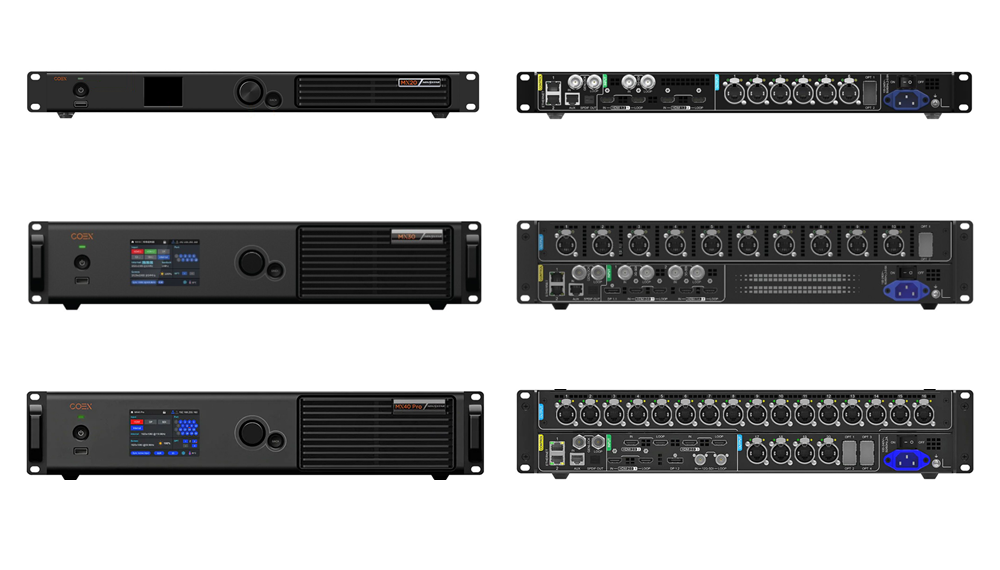
Prelazak na a NovaStar COEX VMP controller— kao što je NovaStar MX40 Pro, MX30, ili MX20—takes your LED wall off old-school NovaLCT workflows onto NovaStar’s Vision Management Platform (VMP). Pick the MX20 for smaller fine-pitch screens up to 3.9 million pixels (6 Ethernet ports), step up to the MX30 for mid-sized 4K rooms up to 6.5 million pixels (10 ports plus 2 x 10G OPT), and specify the MX40Pro for XR stages, broadcast desks, and 10-bit/12-bit HDR canvases up to 9 million pixels (20 ports, 4 x 10G OPT, HDMI 2.1, and 12G-SDI).
You notice the gap immediately the first time a broadcast director asks for 10-bit Rec.709 shading at 15% wall brightness. Pair a COEX controller with outdated receiving-card firmware, forget how 10-bit or 12-bit color halves Gigabit port capacity, or load wrong fiber SFP modules, and a two-hour setup stretches past midnight.
Let’s sort out the real hardware splits across the MX series, check exact 8-bit, 10-bit, and 12-bit Ethernet loading math, see how NovaStar A10s Pro receiving cards unlock Dynamic Booster and full-grayscale calibration, and trace 10G optical paths through CVT10-S i CVT10-M pretvarači.
1. What makes a NovaStar COEX VMP controller different from legacy VX processors
For years, NovaLCT paired with MCTRL boxes or VX processors ran almost every LED wall in service. The NovaStar VX Pro serija still handles everyday 8-bit 60 Hz rental and commercial walls great. Put a wall on a broadcast camera stage or inside a dim 150-to-600-nit (cd/m²) boardroom, though, and 8-bit processing starts showing muddy low-gray blotches, sluggish multi-box edits, and shutter-bar banding.
A NovaStar COEX VMP controller fixes four specific pain points right out of the box:
- Live VMP edits without black-frame flashes: Instead of hunting through nested NovaLCT menus and manually pushing Send to Card, VMP auto-discovers boxes and cabinets on LAN, drops them onto one visual canvas, and adjusts gamma, gamut, and brightness smoothly live on air.
- True 10-bit and 12-bit pipeline with sub-frame delay: Feeding HDMI 2.1, DP 1.4, or 12G-SDI into an MX40 Pro keeps high bit depth intact end to end without blowing out sync latency.
- Low-gray calibration & camera sync (A10s Pro tools): Zajedno s NovaStar A10s Pro receiving cards, COEX runs Dynamic Booster contrast tuning, multi-step full-grayscale calibration (so 15% dim grays stay neutral instead of blotchy pink), and Shutter Fit phase offsets for cinema cameras.
- Headroom up to CX and MX2000 servers: The same platform scales cleanly from compact NovaStar KU20 entry units all the way up to CX40 Pro i MX2000Pro control servers.
01. When to spec COEX VMP vs staying on VX Pro
You don’t need a NovaStar COEX VMP controller on every job. If you’re hanging a roadside sign, an 8-bit house-of-worship wall, or a hotel ballroom screen where crew members already know NovaLCT by heart, a VX600 Pro or VX1000 Pro saves money and setup time. Move up to COEX whenever a spec calls for HDR10/HLG, Rec.709 or DCI-P3 gamut locks, genlock phase offsets, or uniform low-brightness conference rooms.
2. Deep hardware breakdown: MX20 vs MX30 vs MX40 Pro
Our quick reference (NovaStar MX20 vs MX30 vs MX40 Pro comparison) covers basic port counts, whereas real rack drawings require exact input limits, layer rules, and optical trunk behavior. Every NovaStar COEX VMP controller runs VMP natively, yet the three boxes split cleanly by role.
| Inženjerski parametar | NovaStar MX20 | NovaStar MX30 | NovaStar MX40 Pro |
|---|---|---|---|
| Klasa kontrolera | All-in-one scaler + sender | All-in-one scaler + sender | Flagship 4K independent controller |
| Maksimalno opterećenje piksela (8-bitno @ 60 Hz) | 3.9 milijuna piksela | 6.5 milijuna piksela | Up to 9.0 million pixels (via 20 RJ45 / 4 x 10G OPT) |
| Gigabit RJ45 ports | 6 luka | 10 luka | 20 ports (grouped on 2 x 10G optical buses) |
| 10G SFP+ optical ports | 2 x 10G OPT (OPT 1 ports 1–6; OPT 2 backup) | 2 x 10G OPT (OPT 1 ports 1–10; OPT 2 backup) | 4 x 10G OPT (OPT 1/2 primary; OPT 3/4 backup) |
| Video ulazi | 2 x HDMI 1.4, 1 x 3G-SDI (with loop) | 1 x HDMI 2.0, 1 x HDMI 1.4, 1 x DP 1.1, 2 x 3G-SDI | 1 x HDMI 2.1 (or HDMI 2.0 card), 1 x DP 1.4, 2 x 12G-SDI |
| Scaling layers | Up to 3 independent layers + OSD | Up to 3 independent 4K/2K layers + OSD | 1:1 pixel-accurate canvas (external server/switcher) or onboard scaling per firmware |
| Genlock input & loop | Supported (Bi-level / Tri-level sync) | Supported (Bi-level / Tri-level sync) | Supported with phase offset & frame multiplier |
| Supported color bit depth | 8-bitni / 10-bitni | 8-bitni / 10-bitni / 12-bitni | 8-bit / 10-bit / 12-bit with HDR10 & HLG |
01. NovaStar MX40 Pro: the flagship 4K broadcast and XR benchmark
The NovaStar MX40 Pro lives in racks fed directly by Disguise or Pixera media servers or broadcast switchers pushing high-bit-depth 4K signals. Packing HDMI 2.1, DisplayPort 1.4, and dual 12G-SDI inputs, this NovaStar COEX VMP controller puts 20 RJ45 ports alongside 4 x 10G SFP+ slots on the rear panel.

Notice how the MX40 Pro pairs its copper and fiber jacks: OPT 1 mirrors Ethernet ports 1–10, OPT 2 mirrors ports 11–20, and OPT 3/OPT 4 run as hot optical backups for OPT 1 and OPT 2. That lets one 2U rack box feed 20 short-run copper cables inside a studio (under 80 m / 262 ft) or drive two NovaStar CVT10-S converters downstage over armored dual-path fiber.
02. NovaStar MX30: all-in-one 4K scaling and 10-port loading
Need VMP image tools plus multi-layer scaling built into the box so you can skip an external video switcher? The NovaStar MX30 lands right in that pocket. With 10 Gigabit ports and 2 x 10G optical ports, it pushes 6.5 million pixels at 8-bit 60 Hz—handling ultra-wide 3,840 x 1,080 boardroom backdrops cleanly while taking HDMI 2.0, DP 1.1, HDMI 1.4, and two 3G-SDI feeds directly across three scaling layers.

03. NovaStar MX20: compact 6-port entry into the COEX VMP ecosystem
For mid-sized corporate conference rooms, broadcast desk inserts, or showrooms below 3.9 million pixels, the 1U NovaStar MX20 keeps 3-layer scaling, 3G-SDI + dual HDMI 1.4 inputs, and 2 x 10G optical backup ports (OPT 1 mirrors ports 1–6; OPT 2 backs it up) at a compact price point so every room on campus stays in VMP.

3. Port-loading engineering: 8-bit, 10-bit, and 12-bit pixel math
Here’s the costliest spec blunder when quoting a NovaStar COEX VMP controller: figuring Ethernet cable count using 8-bit numbers when the client’s brief specifies 10-bit HDR or 12-bit camera stages. Each 1G RJ45 jack has one hard wire ceiling, so bumping color depth or frame rate shrinks how many pixels ride over a single copper cable.
On a 1G pipeline connected to NovaStar A10s Pro receiving cards, budget pixel load using the table below and always verify exact firmware limits in NovaStar’s COEX sheet before pulling cable.
| Color Depth (@ 60 Hz) | Max Load per 1G RJ45 Port | MX20 Total (6 Ports) | MX30 Total (10 Ports) | MX40 Pro Total (20 Ports) |
|---|---|---|---|---|
| 8-bit RGB (SDR standard) | ~650,000 pixels | Up to 3,900,000 px | Up to 6,500,000 px | Up to 9,000,000 px (input ceiling) |
| 10-bit RGB (HDR10 / HLG) | ~320,000 – 487,500 px (card dependent) | ~1,920,000 – 2,925,000 px | ~3,200,000 – 4,875,000 px | ~6,400,000 – 9,000,000 px |
| 12-bit RGB (Studio grade) | ~320,000 pixels | Not applicable (8/10-bit) | Up to ~3,200,000 px | Up to ~6,400,000 px |
| 8-bit @ 120 Hz (High frame rate) | ~325,000 pixels | Up to ~1,950,000 px | Up to ~3,250,000 px | Up to ~6,500,000 px |
| 8-bit @ 60 Hz with 1:1 Single-Unit Backup | 650,000 px (half used as backup) | 1,950,000 px (3 + 3 ports) | 3,250,000 px (5 + 5 ports) | 6,500,000 px (10 + 10 ports) |
01. Worked sizing calculation: 4K P1.56 indoor broadcast wall
Take a hypothetical 4.8 x 2.7 m (15.7 x 8.9 ft) studio screen made from 600 x 337.5 mm (23.6 x 13.3 in) P1.5625 tiles in an 8 x 8 grid (64 cabinets at 384 x 216 = 82,944 px each, totaling 3,072 x 1,728 = 5,308,416 pixels):
- 8-bit 60 Hz SDR: At 650,000 px/port, loading 6–7 cabinets per drop needs 10 luka—meaning one MX30 without loop backup, or one MX40Pro with 10 primary plus 10 backup ports.
- 10-bit 60 Hz HDR (with A10s Pro): Once per-port load shrinks around 320,000–480,000 pixels, each port handles 4 cabinets (331,776 px). Driving all 64 tiles takes 16 luka, forcing you onto the 20-port MX40Pro.
4. Receiving card pairing: A10s Pro, Armor series, and 5G architecture
Even the sharpest NovaStar COEX VMP controller won’t outrun the LED prijemne kartice mounted inside the panels. COEX works with several Armor-series boards once updated, though unlocking VMP’s signature tools calls for the right card tier and COEX firmware.

01. Why the NovaStar A10s Pro is the default 1G pairing for COEX
Across 1G RJ45 setups (MX20, MX30, MX40 Pro), the tiny 70 x 45 mm (2.76 x 1.77 in) NovaStar A10s Pro (ili veće A10s Plus) drives up to 512 x 512 pixels and unlocks three VMP features clients actually notice on camera:
- Kalibracija u potpunim sivim tonovima: Older single-point calibration tweaks peak white and leaves uneven blotches when rooms dim down to 20%. A10s Pro stores multi-step curves right down to dark shadow levels.
- Dynamic Booster & HDR10 / HLG: Lifts local highlight punch frame by frame while trimming average power on dark backgrounds.
- 1-Frame Low Latency & Shutter Fit: Keeps camera-to-wall delay low and locks refresh phases against cinema camera shutters.
02. Keep 1G and 5G COEX receiving cards straight
COEX documentation covers both 1G ploče (A10s Pro, A8s Pro, A5s Plus over normal 1G ports) and 5G ploče (CA50E, XA50 Pro over 5 Gbps ports on CX80 Pro or MX2000 Pro servers). Don’t mix them up on site: MX20, MX30, and MX40 Pro units run 1G ports and can’t talk directly to 5G-only receiving cards. Equally important, an A10s Pro shipped for an old VX1000 wall arrives running legacy NovaLCT firmware—grab the matching COEX .ncp firmware pack from our NovaStar software download hub before commissioning day.
Here’s a field habit that saves hours during studio swaps: whenever you pull one dead A10s Pro panel out of a calibrated XR stage, don’t wipe calibration memory across the wall. Read the camera calibration coefficients out of neighboring tiles inside VMP first, drop the fresh card in, push the wall’s .ncp pack so firmware versions match down to the minor release, and sync calibration coefficients directly to that single cabinet coordinate. Skip matching the exact COEX firmware version on a replacement card and you’ll watch that single cabinet sit offline in red error inside VMP even though its link LED blinks green.
For broadcast directors worried about moiré and scan-line rolling bars on 24 fps cinema cameras, VMP’s Shutter Fit and Frame Multiplier controls only behave predictably when Genlock locks cleanly across both camera bodies and the MX controller’s BNC sync loop. Always check VMP’s live sync status indicator before running camera tests—if the Genlock badge flashes yellow or shows unlocked, you’re still free-running on internal timing and shutter rolling lines will creep slowly across medium gray backgrounds.
5. Long-distance 10G optical fiber wiring with CVT10-S and CVT10-M
Copper Cat5e or Cat6A links die out past 100 m (328 ft)—and touring crews stay under 80 m (262 ft) around heavy power snakes. Dragging 20 copper lines across an arena off an MX40 Pro turns load-in into a tangle of broken latch clips.

01. How 10G OPT trunks map to CVT10 fiber converters
Every 10G SFP+ cage (OPT 1 and OPT 2) on a NovaStar COEX VMP controller packs up to 10 gigabitna Ethernet priključka onto one duplex LC fiber trunk. Behind the wall, a NovaStar CVT10-S (single-mode up to 10 km / 6.2 miles) or CVT10-M (multi-mode up to 300 m / 984 ft) breaks that optical feed back into 10 short RJ45 jumpers (or step up to rugged Neutrik fiber boxes with the CVT10 Pro-S / Pro-M).
- MX20 (6 RJ45 ports): OPT 1 pushes ports 1–6 to a CVT10 (ports 7–10 stay blank, as explained in Zašto CVT10 portovi 9 i 10 nisu dostupni?); OPT 2 gives hot backup.
- MX30 (10 RJ45 ports): OPT 1 carries all 10 ports onto one CVT10; OPT 2 runs redundant backup fiber.
- MX40 Pro (20 RJ45 ports): OPT 1 (ports 1–10) and OPT 2 (ports 11–20) feed two CVT10 converters while OPT 3 and OPT 4 carry full optical hot backups.
Match optics honestly: plug NovaStar 10G SFP single-mode modules (1310 nm) into both ends of a CVT10-S fiber trunk, or 850 nm multi-mode into CVT10-M trunks—never mix single-mode and multi-mode transceivers across the same jumper. See our CVT10 vs CVT4K fiber guide for bigger rack maps.
6. VMP software workflow vs NovaLCT field operations
Switching a crew onto a NovaStar COEX VMP controller changes daily setup habits cleanly once they drop legacy NovaLCT for VMP:
- ujedinjen
.ncpcabinet packs replace standalone.rcfgxslika: VMP bundles receiving-card firmware, driver timing, and frame presets inside one signed NCP (NovaStar Cabinet Pack) file. - Click-along Ethernet topology: Plug your laptop into LAN, drag cabinet blocks onto the grid, and trace daisy chains visually—VMP picks up optical and copper backups cleanly without manual port-switch clicks.
- Closed ecosystems still apply: Even a top-end NovaStar COEX VMP controller won’t run Colorlight, Huidu, ili Mooncell receiving cards. Compare brands early in our NovaStar vs Colorlight vs Huidu voditi i vodič za primateljsku karticu u odnosu na pošiljateljsku karticu.
Don’t forget management-port IP planning before leaving the bench either. Unlike legacy boxes configured solely over short USB-B cables, VMP lets your tech team park the laptop on the facility’s AV VLAN and tweak brightness curves, check thermal cabinet sensor readouts, or flip backup trunks straight from front-of-house. Just document static IP addresses on the front chassis sticker (192.168.0.x vs DHCP) so nobody spends twenty minutes scanning blind subnets when a backup controller gets pulled from a road case.
7. Video walkthrough: NovaStar MX40 Pro hardware interfaces
Watching the front touchscreen walk-around above makes rear connector spacing clear—you’ll see all 20 RJ45 jacks, 4 x 10G SFP+ optical bays, HDMI 2.1 / DP 1.4 / 12G-SDI inputs, and Genlock BNCs inside a 19-inch (482.6 mm) frame.
Često postavljana pitanja
Can I set up a NovaStar MX40 Pro, MX30, or MX20 inside older NovaLCT software?
Ne. Svaki NovaStar COEX VMP controller configures strictly through NovaStar’s VMP (Vision Management Platform) software on Windows or macOS over Gigabit LAN rather than NovaLCT.
Do existing A8s or A10s Plus cabinets work on an MX40 Pro or MX30?
Yes, several Armor cards (A10s Pro, A10s Plus, A8s Pro, A5s Plus) work on COEX 1G ports once flashed with matching COEX firmware via an NCP pack in VMP. Still, premium features like Dynamic Booster and full-grayscale calibration depend on pairing an A10s Pro and supported module driver ICs.
Why does the MX40 Pro put 20 Ethernet ports on the back if total load stops around 9M pixels?
At 8-bit 60 Hz, 20 ports could carry 13M pixels mathematically, but the MX40 Pro caps around 9M pixels at its 4K input bus (4,096 x 2,160 = 8,847,360 px). You get 20 physical RJ45 ports so you can push a full 4K canvas in 10-bit or 12-bit HDR mode—where each Ethernet line shrinks to ~320,000–450,000 pixels—without running out of physical jacks.
Can I drive 20 copper cabinets PLUS 20 optical cabinets simultaneously on an MX40 Pro for 40 ports total?
No. The 10G optical ports on a NovaStar COEX VMP controller mirror the copper RJ45 ports rather than adding extra pixel count. On an MX40 Pro, OPT 1 carries ports 1–10, OPT 2 carries ports 11–20, and OPT 3/4 act as hot optical backups.
When should I save money with the MX30 instead of buying an MX40 Pro?
Pick the MX30 whenever your screen stays at or under 6.5 million pixels at 8-bit 60 Hz (~3.2M px at 10/12-bit) and you want 3-layer multi-window scaling onboard without buying a separate media server. Grab the MX40 Pro when you need 20 ports for full 4K 10/12-bit HDR, 12G-SDI / HDMI 2.1 studio plugs, or dual-CVT10 fiber backup.
Engineering checklist before ordering COEX hardware
Before signing a PO for a NovaStar COEX VMP controller and spares, verify six site specs cleanly: total screen pixel resolution (width x height), required color depth and frame rate (8-bit vs 10/12-bit, 60 vs 120 Hz), whether built-in scaling (MX20/MX30) or an independent 20-port 4K frame (MX40 Pro) suits the rack, exact cabinet receiving cards and driver ICs, rack-to-stage cable distance (for sizing CVT10-S or CVT10-M fiber converters and 10G SFPs), and whether you already hold the factory .ncp cabinet pack.
Want a second pair of eyes on your 10-bit port count or A10s Pro COEX firmware revision before ordering a NovaStar COEX VMP controller? Send your screen resolution and cabinet model through our contact page so our techs check load compatibility ahead of delivery. And if your build calls for fresh fine-pitch indoor or XR rental cabinets pre-loaded with COEX boards, you can look over turnkey screens over at EagerLED.