A Mooncell एलईडी नियंत्रण प्रणाली runs on locked Mooncell पाठवणारे युनिट्स—जसे की Mooncell MTB200 DVI master controller or Mooncell MVB2S 2-in-1 video processor—paired inside the cabinets with Mooncell receiving boards such as the Mooncell A712. You’ll spot Mooncell rigs inside plenty of commercial malls and indoor fixed LED walls, and neither half talks to outside brands at all.
When a cabinet goes black or throws garbled vertical lines four years after install, ordering the wrong card revision wastes a whole service trip. Verifying physical board print, HUB75E ribbon count, and rack sender type upfront saves hours up on a ladder.
Let’s trace the main boards in a Mooncell एलईडी नियंत्रण प्रणाली, walk through swapping a dead A712 receiving card without leaving mismatched color blocks, and run quick bench checks that separate bad Cat6 cords from dead cards.
1. Mooncell LED control system core hardware lineup
Every synchronous Mooncell एलईडी नियंत्रण प्रणाली splits the signal path cleanly between one sender back at the control computer and a receiving card mounted behind each screen panel. Here are the three Mooncell boards service techs run into most:
| हार्डवेअर प्रकार | मॉडेल | हे काय करते | ते तुम्हाला कुठे मिळेल |
|---|---|---|---|
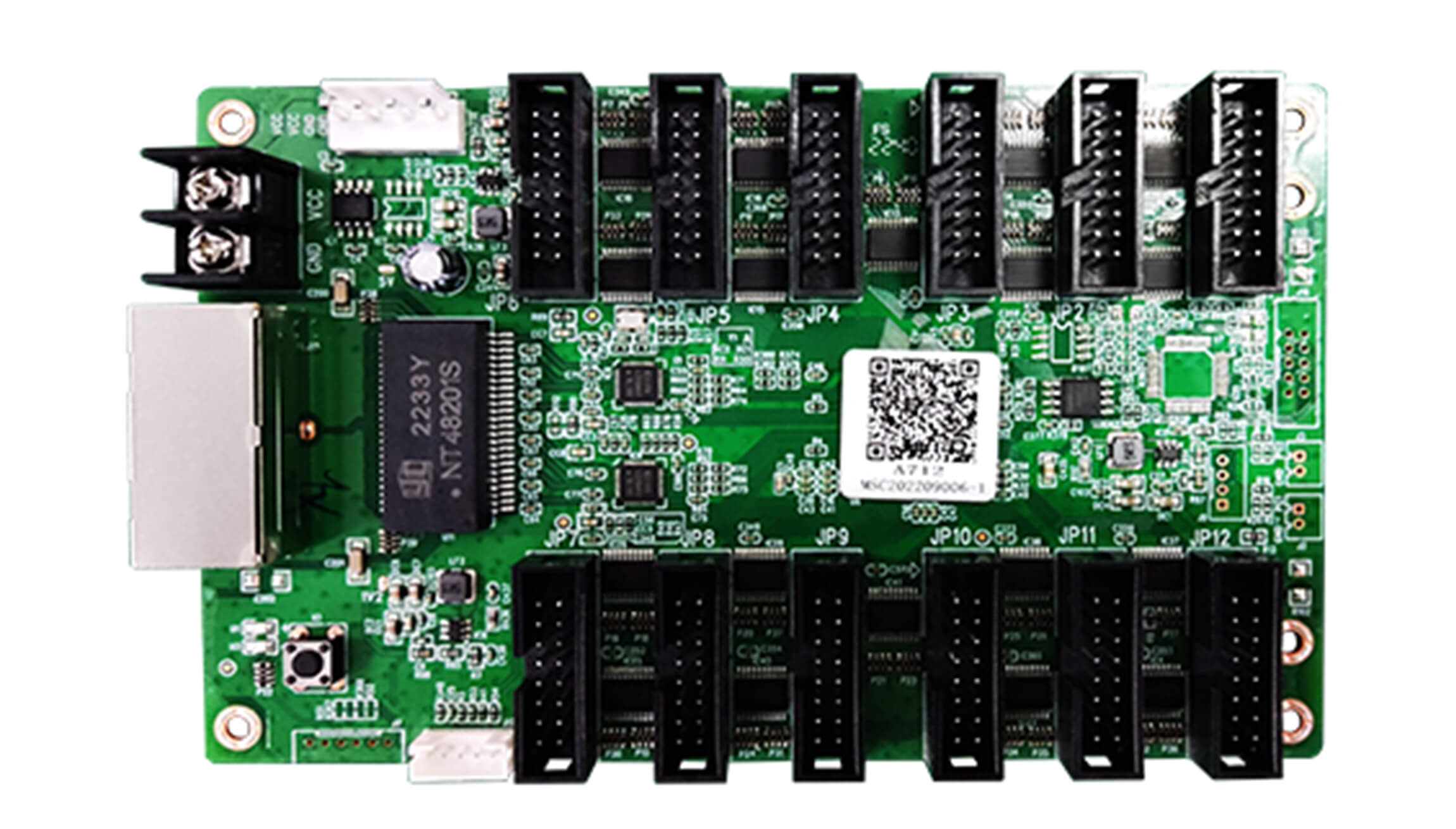
| एलईडी प्राप्त कार्ड | Mooncell A712 | Pulls Ethernet pixel packets inside each frame and feeds modules over 12 HUB75E jacks | Commercial fixed cabinets and maintenance spare drawers |
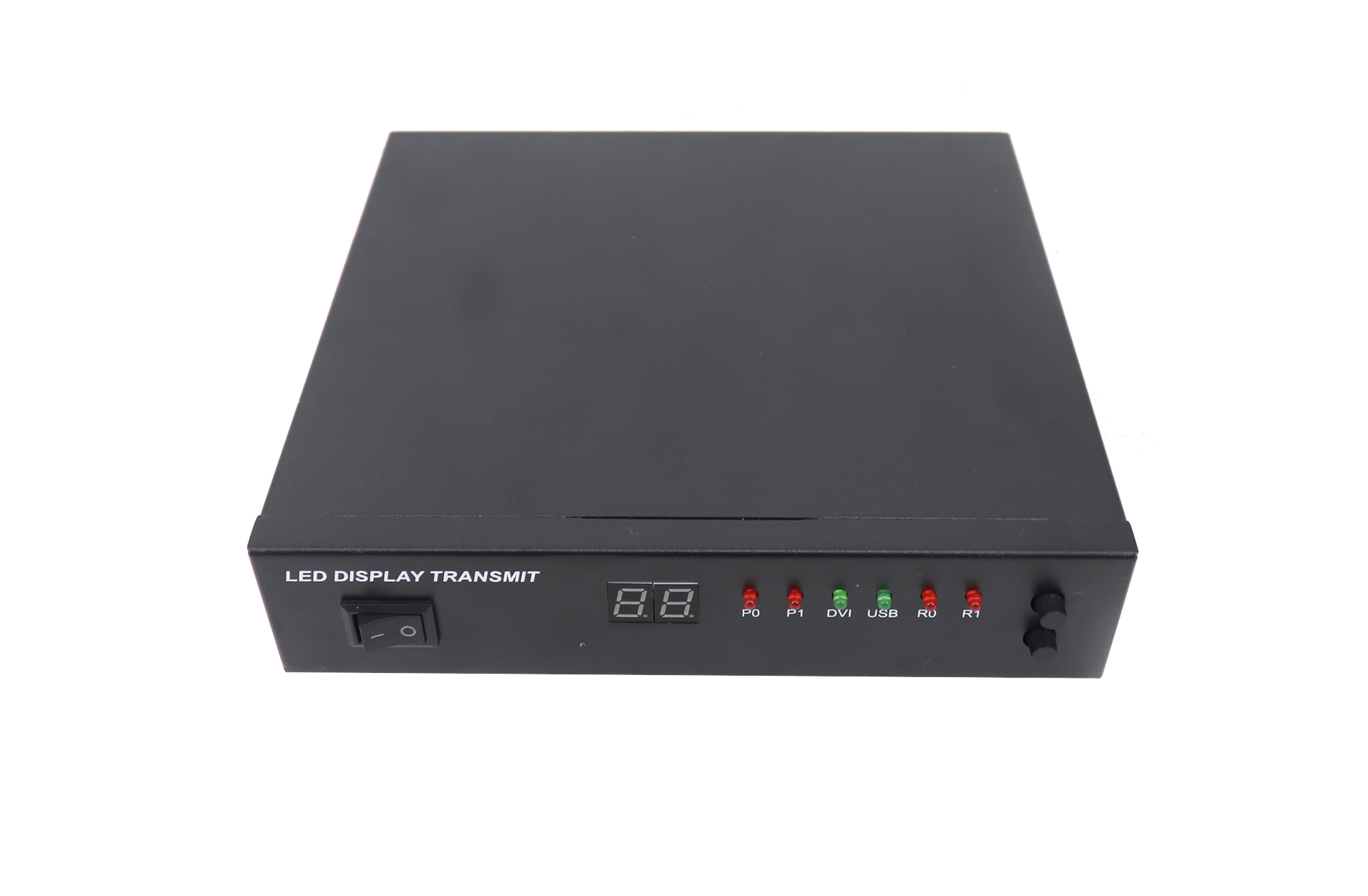
| DVI master controller | Mooncell MTB200 | Turns DVI computer video into dual Gigabit RJ45 outputs (up to 1.3M pixels total) | PC-fed signs or walls behind an external switcher |
| 2-in-1 video processor | Mooncell MVB2S | Puts multi-input switching, scaling, and Ethernet sending ports inside one 1U box | Conference rooms, retail flagship displays, and compact events |
2. Mooncell A712 receiving card overview and replacement
Ask spare-parts desks what breaks first inside a Mooncell एलईडी नियंत्रण प्रणाली and the answer is almost always a cabinet’s Mooncell A712 (usually killed by roof water drips or a bad 5 V power supply rail). Mounted inside standard 500 x 500 mm (19.7 x 19.7 in) or 960 x 960 mm (37.8 x 37.8 in) cabinets, it drives modules over 12 direct HUB75E ribbon connectors and passes Ethernet downstream.
01. Safe cabinet swap order
Never yank out a broken A712 एलईडी प्राप्त कार्ड before pulling parameters off an intact neighbor! Hook your laptop up, read back and save the cabinet parameter file from a working panel right beside it, drop the fresh card onto the standoffs, click all twelve HUB75E latches tight, send the backed-up file straight to that card coordinate, and flash-save it so power cycles don’t wipe the wall.
While the rear panel door sits open, check the 5 V DC power terminal strip with your meter too. A sagging switching power supply below 4.6 V DC under white frames mimics a dying receiving board—making the panel blink magenta or drop random rows right before rebooting. Measuring 4.95 to 5.10 V DC right on the A712 screw block rules out a bad power brick before you even touch software settings.
02. Watching board revisions & dim uniformity
Watch hardware revisions closely on indoor commercial walls running around 400 to 600 nits (cd/m²). Slightly newer A712 firmware builds can tweak low-brightness gamma steps—so test one replacement board first and confirm clean white balance against neighboring tiles before ordering twenty spares. Also check whether both Gigabit RJ45 jacks act as bidirectional pass-throughs cleanly down the row, because a bent RJ45 spring pin on an upstream panel often looks identical to a dead card downstream.
3. Mooncell MTB200 vs MVB2S controllers
Picking between an MTB200 and an MVB2S inside a Mooncell एलईडी नियंत्रण प्रणाली comes down to whether your video PC outputs exact 1:1 pixel dimensions already, or whether presenters plug random laptops straight into the rack.
01. When the MTB200 handles the job
The Mooncell MTB200 is a streamlined 2-port DVI sending controller rated up to 1.3 million pixels. If your booth PC or external एलईडी व्हिडिओ प्रोसेसर already outputs exact wall pixels over DVI, paying for extra built-in scaling makes no sense.
02. When stepping up to the MVB2S saves cabling
The Mooncell MVB2S combines input switching, image scaling, and LED Ethernet outputs inside one chassis. Whenever staff flip between laptops, media boxes, and cameras during meetings, one 2-in-1 box keeps external converter clutter off the shelf.

4. Compatibility checks and fault isolation
When part of a Mooncell एलईडी नियंत्रण प्रणाली drops dark or scrambles rows, spend ten minutes isolating the guilty component before overnighting parts:
| What You See on Screen | Likely Suspect | Quick Field Test |
|---|---|---|
| Whole screen goes dark | MTB200/MVB2S sender, DVI/HDMI lead, or rack power | Look for input lock on the controller LED and swap in a test laptop feed |
| One cabinet dark, plus everything downstream | Bad Cat5e/Cat6 jumper or dead A712 board in the first black cabinet | Swap the incoming Cat6 patch cord first; if still black, trade A712 boards with a live cabinet |
| One panel shows inverted colors or shifted stripes | Loose HUB75E ribbon clip or unsaved parameter load | Reseat all 12 ribbons firmly and re-push the parameter file off an adjacent card |
| Blinking squares past 80 m (262 ft) | Copper Ethernet signal loss over excess distance | Move rack within 80 m (262 ft) or bridge the gap with optical fiber converters |
One strict rule won’t budge: you can’t mix a Mooncell एलईडी नियंत्रण प्रणाली with NovaStar, Colorlight, or Huidu hardware on the same cable chain. If an aging site plans to swap brands entirely rather than buying like-for-like spares, compare ecosystems in our नोव्हास्टार विरुद्ध कलरलाइट विरुद्ध Huidu मार्गदर्शन and check how both halves pair up in our एलईडी रिसीव्हिंग कार्ड विरुद्ध सेंडिंग कार्ड मार्गदर्शक.
5. Mooncell MTB200 hardware walkthrough
The short bench clip above shows the MTB200’s rear plugs—DVI input, USB setup jack, and dual 1G RJ45 outputs rated up to 1.3 million pixels—so you can match jacks before mounting units inside tight credenzas.
सतत विचारले जाणारे प्रश्न
क Mooncell A712 card run off a NovaStar or Colorlight sending controller?
क्रमांक ए Mooncell A712 board only talks to Mooncell senders like the MTB200 or MVB2S. Plugging it into NovaStar or Colorlight ports gives a dark wall because Ethernet packet headers don’t match.
Should I buy another MTB200 or step up to an MVB2S if my sender died?
Replace like-for-like with an MTB200 if an existing booth PC or external scaler already sends exact screen pixels over DVI. Switch to an MVB2S if you’d like to retire an old standalone video processor and cut rack clutter in half.
Do I have to remap the whole screen after changing one dead Mooncell A712?
No. Simply send the saved cabinet file onto the new A712 board, drop it onto its cabinet coordinate in the connection map, and click save to hardware flash before unplugging your laptop.
Is it worth converting a working Mooncell wall to NovaStar or Colorlight?
Usually not—you’d have to rip out both the rack controller and every single Mooncell receiving card inside the cabinets, then rebuild module timing from scratch. On a working screen, buying matching Mooncell spares takes a fraction of the time and money.
सत्यापित करीत आहे Mooncell compatibility before ordering spare parts
Before placing an order inside a Mooncell एलईडी नियंत्रण प्रणाली repair, grab four details from the screen: a clear phone photo of your existing receiving board (showing model print and HUB75E jack count), the exact Mooncell sending model back at the rack, your total pixel width and height, and confirmation of whether a parameter backup file lives on site.
Want our techs to confirm revision compatibility or check stock on A712, MTB200, or MVB2S spares for your Mooncell एलईडी नियंत्रण प्रणाली? Send your board photos and screen dimensions through our contact page. If an older display needs full fresh cabinets rather than individual board swaps, check complete assemblies over at EagerLED.