ਵਿਚਕਾਰ ਚੁਣਨਾ NovaStar TU4K Pro vs TU20 Pro (or dropping down to the compact TU15 ਪ੍ਰੋ) comes down to total screen pixels, RJ45 port count, and whether your conference codec pushes 4K over HDMI 2.0. Grab the TU15 ਪ੍ਰੋ for small huddle rooms up to 2.6 ਮਿਲੀਅਨ ਪਿਕਸਲ (4 Ethernet ports); pick the ਨੋਵਾਸਟਾਰ TU20 ਪ੍ਰੋ for 1080p and 21:9 boardrooms up to 3.9 ਮਿਲੀਅਨ ਪਿਕਸਲ (6 ports); and step up to the ਨੋਵਾਸਟਾਰ TU4K ਪ੍ਰੋ (ਜ TU40 ਪ੍ਰੋ) for 4K auditoriums up to 13 ਮਿਲੀਅਨ ਪਿਕਸਲ (20 ports plus 2 x 10G optical outputs and HDMI 2.0).
Corporate interior designers hate tall noisy equipment racks tucked beside glass-walled boardrooms. That’s the exact gap NovaStar’s TU playback control processors fill: instead of stacking an Android signage box, a wireless BYOD casting gateway, an HDMI scaler, and a sending unit inside a tiny credenza, the TU line drops all four into one sleek housing.
ਪਾ ਦਿਓ NovaStar TU4K Pro vs TU20 Pro and TU15 Pro hardware side by side, check how dual-Wi-Fi screen casting and SPDIF/Bluetooth audio behave in live meetings, run real cabinet port math on 16:9 and 21:9 walls, and clarify where outdoor Taurus (TB) boxes and stage VX Pro controllers split off.
1. What is a NovaStar TU playback control processor and how does it differ from TB and VX series?
ਖੋਲ੍ਹੋ ਨੋਵਾਸਟਾਰ catalog for a corporate office wall and three totally different box lines claim they can drive indoor cabinets: VX Pro controllers, Taurus TB boxes, and Taurus TU processors. Picking the wrong family turns into a nasty surprise when a client tries sharing slides from a MacBook wirelessly on day one:
- Versus Taurus TB boxes (TB20 / TB40 / TB60): ਜਿਵੇਂ ਕਿ ਸਾਡੇ ਵਿੱਚ ਸ਼ਾਮਲ ਹੈ NovaStar TB40 vs TB60 vs TB20 guide, TB units are asynchronous players engineered for pole signs and outdoor storefronts. They cap at 2.3M pixels (4 ports) and aren’t set up for fast multi-guest wireless meeting casting or room soundbar handoffs.
- Versus VX Pro rack controllers (VX400 Pro / VX600 Pro / VX1000 Pro / VX2000 Pro): ਸਾਡਾ NovaStar VX Pro series guide shows why rental crews love VX units—they’re rock-solid synchronous scalers. Still, they carry no internal Android player, no USB document playback, and zero wireless AirPlay/Miracast casting.
- Where TU processors (TU15 Pro, TU20 Pro, TU40 Pro, TU4K Pro) belong: They fuse an Android media engine, multi-user wireless presentation hub, HDMI video switcher, and Gigabit LED sender inside one chassis tuned specifically for meeting rooms, lecture halls, lobbies, and showrooms.
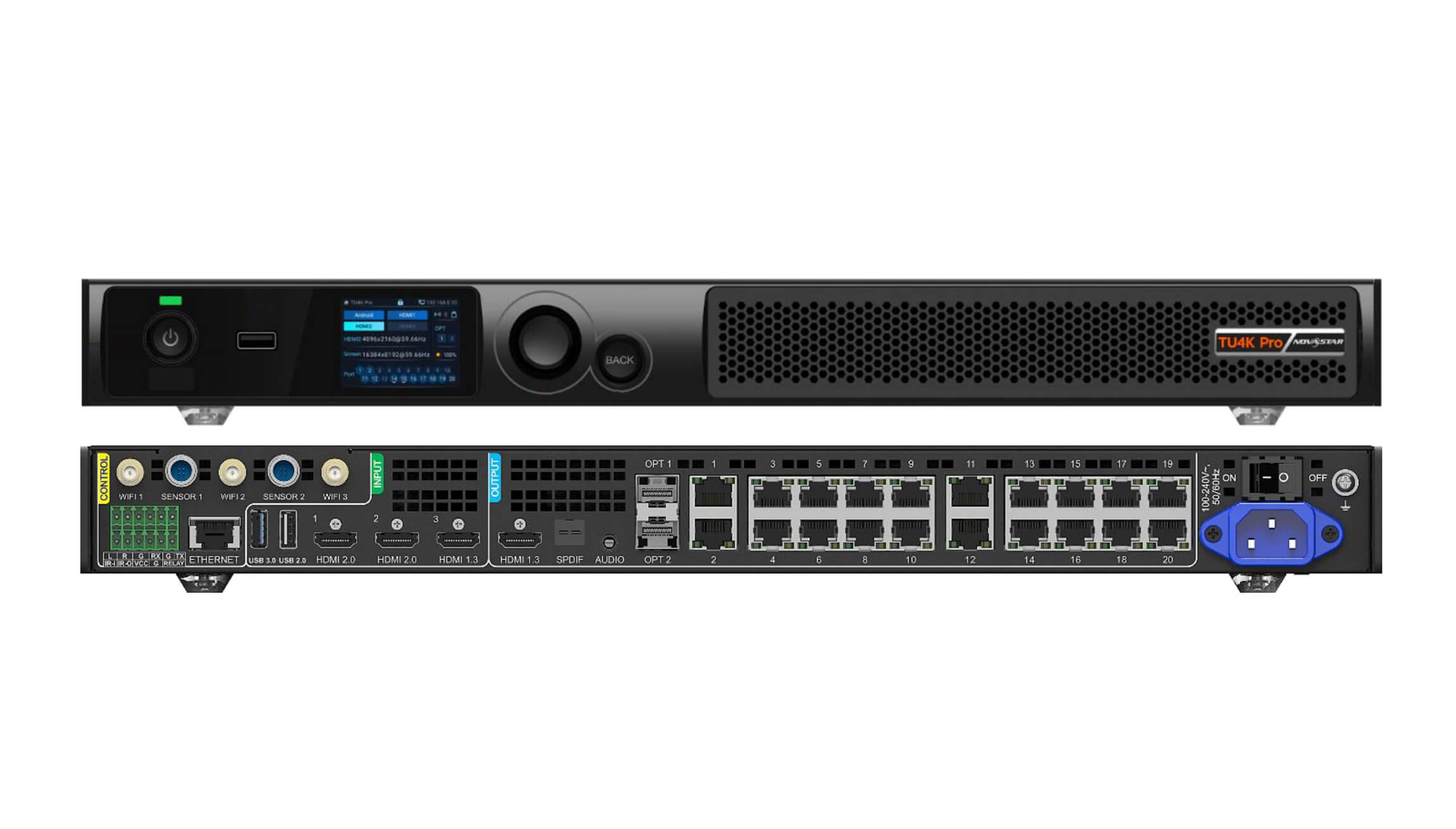
2. Complete specification comparison: NovaStar TU4K Pro vs TU20 Pro vs TU15 Pro
Any practical NovaStar TU4K Pro vs TU20 Pro or TU15 Pro spec check starts with four lines on the sheet: pixel ceiling, Ethernet and optical jacks, HDMI bandwidth, and audio/room-control ports.
| ਨਿਰਧਾਰਨ | ਨੋਵਾਸਟਾਰ TU15 ਪ੍ਰੋ | ਨੋਵਾਸਟਾਰ TU20 ਪ੍ਰੋ | ਨੋਵਾਸਟਾਰ TU4K ਪ੍ਰੋ |
|---|---|---|---|
| Max pixel load (8-bit @ 60 Hz) | 2.6 ਮਿਲੀਅਨ ਪਿਕਸਲ | 3.9 ਮਿਲੀਅਨ ਪਿਕਸਲ | 13.0 ਮਿਲੀਅਨ ਪਿਕਸਲ |
| Gigabit RJ45 outputs | 4 ਪੋਰਟਾਂ | 6 ਪੋਰਟਾਂ | 20 ਪੋਰਟਾਂ |
| 10G SFP+ optical outputs | None (copper RJ45 only) | None (copper RJ45 only) | 2 x 10G OPT (OPT 1 ports 1–10; OPT 2 ports 11–20) |
| Max width / height | Up to 4,096 px wide / 1,920 px tall | Up to 4,096 px wide / 1,920 px tall | Up to 16,384 px wide / 8,192 px tall |
| HDMI ਇਨਪੁਟਸ | 2 x HDMI 1.3 | 2 x HDMI 1.3 | 1 x HDMI 2.0 (4K@60Hz) + 2 x HDMI 1.3 |
| HDMI loop / monitor out | 1 x HDMI 1.3 output | 1 x HDMI 1.3 output | 1 x HDMI 2.0 loop + 1 x HDMI 1.3 monitor out |
| USB & control ports | 1 x ਯੂ.ਐੱਸ.ਬੀ 2.0, 1 ਐਕਸ ਯੂ.ਐੱਸ.ਬੀ. 3.0 | 1 x ਯੂ.ਐੱਸ.ਬੀ 2.0, 1 ਐਕਸ ਯੂ.ਐੱਸ.ਬੀ. 3.0 | USB 3.0, USB 2.0, Type-C, RS232, Gigabit LAN |
| ਆਡੀਓ ਆਉਟਪੁੱਟ | 3.5 mm analog + SPDIF digital + Bluetooth | 3.5 mm analog + SPDIF digital + Bluetooth | 3.5 mm analog + SPDIF optical/coax + HDMI audio |
| Wireless & network | Dual Wi-Fi (AP + STA) + Gigabit LAN | Dual Wi-Fi (AP + STA) + Gigabit LAN | Dual/Tri Wi-Fi antennas (AP + STA) + Gigabit LAN |
| Room scale | Small huddle & 1080p meeting rooms | Medium boardrooms & 21:9 ultra-wide walls | 4K auditoriums, lecture halls & command rooms |
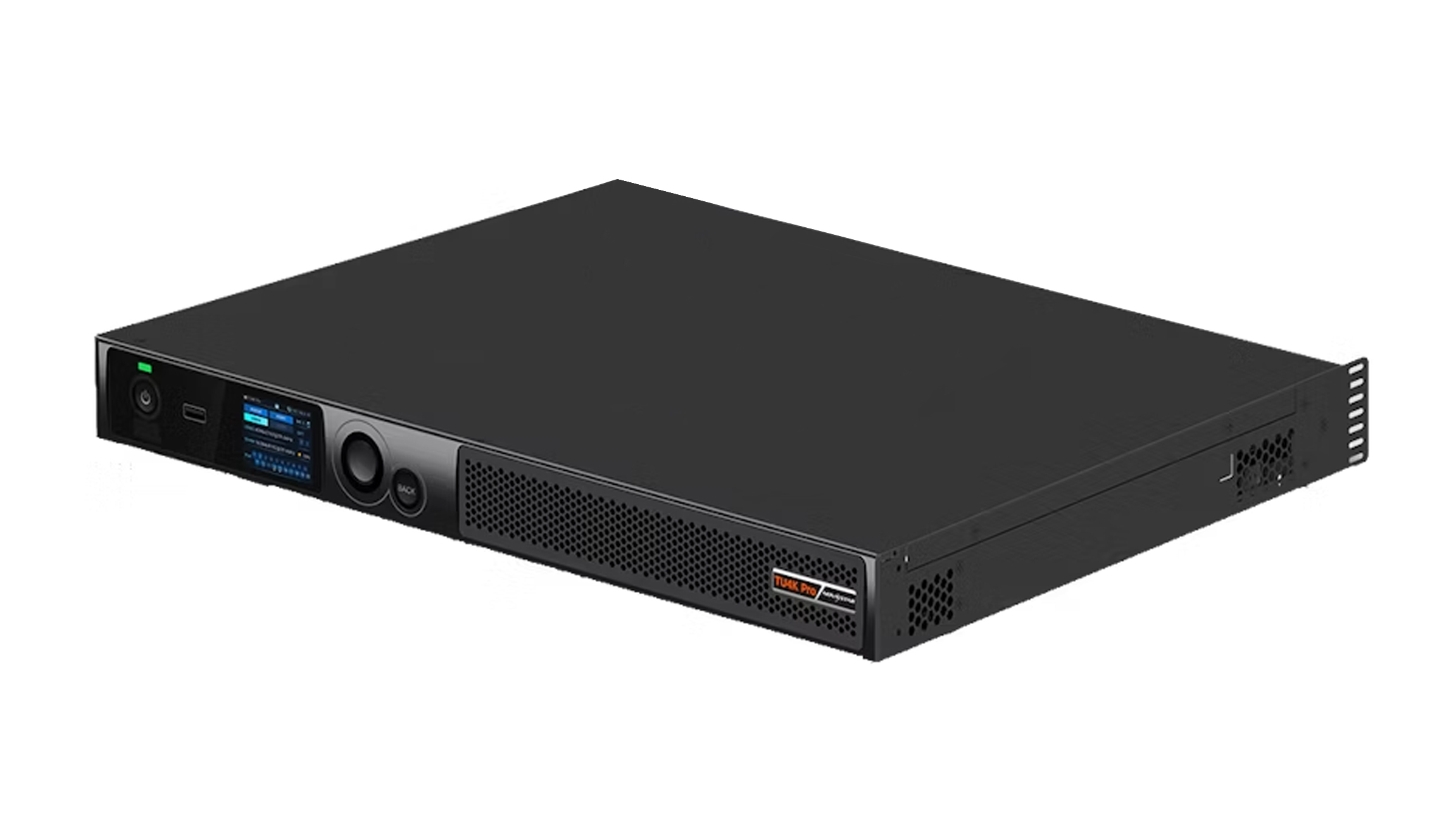
3. NovaStar TU4K Pro deep dive: 13M-pixel 4K flagship for auditoriums and boardrooms
The ਨੋਵਾਸਟਾਰ TU4K ਪ੍ਰੋ anchors the top of the TU series. Once conference integrators drop pixel pitch down to P0.9, P1.25, or P1.56 across a 160-inch to 220-inch auditorium wall, native canvas resolution shoots right past 1080p up to true 4K UHD (3,840 x 2,160 = 8,294,400 pixels) or wide 5K displays.
01. 20 Gigabit Ethernet ports plus 2 x 10G optical fiber outputs
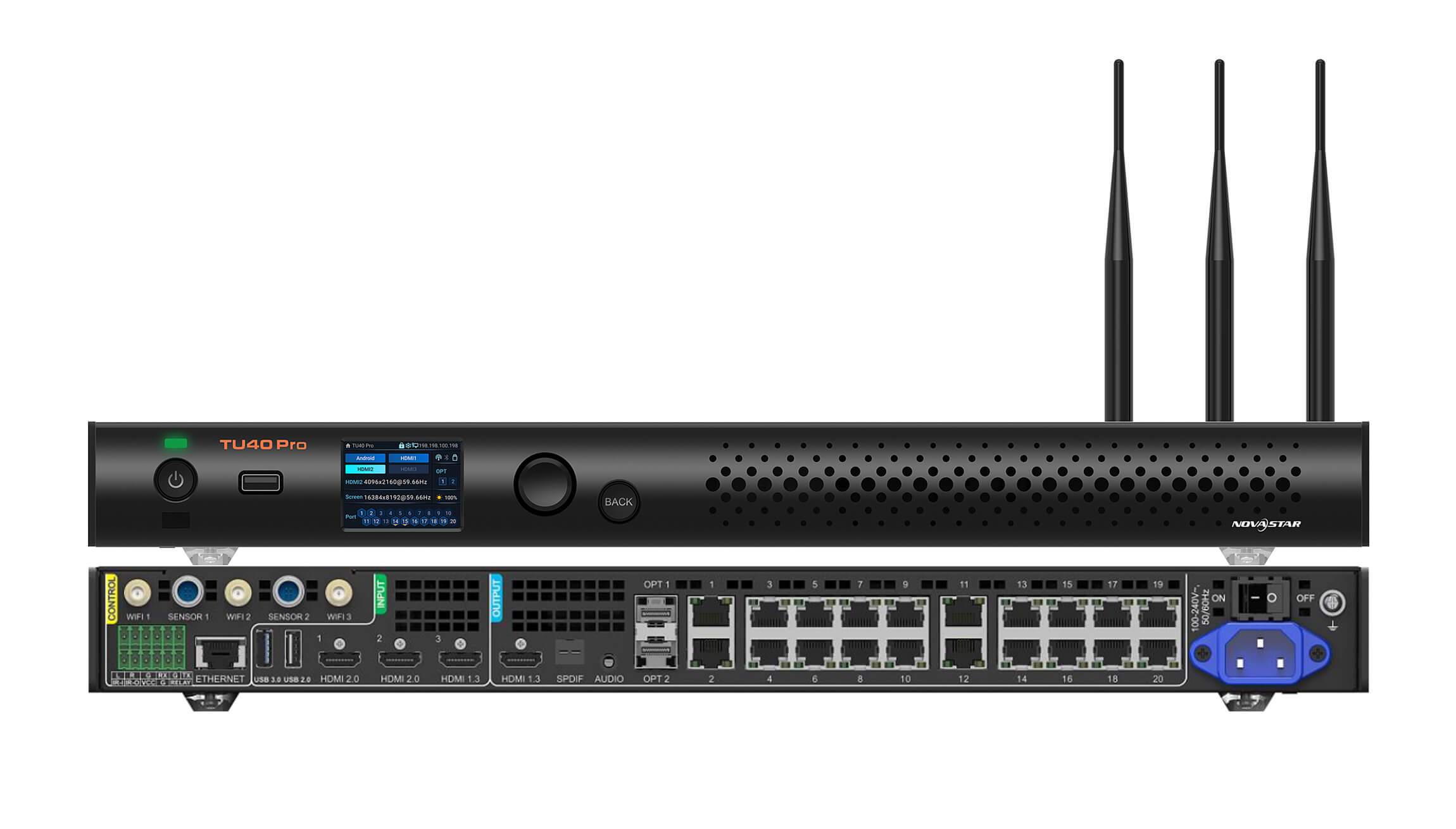
Look at output density in a NovaStar TU4K Pro vs TU20 Pro matchup and the hardware jump hits you right away. The TU4K Pro packs 20 RJ45 ਈਥਰਨੈੱਟ ਪੋਰਟ driving up to 13 ਮਿਲੀਅਨ ਪਿਕਸਲ at 8-bit 60 Hz. That lights up a native 4K screen (8.29M pixels across 13–14 ports) with spare ports left over, or runs a 6.5M-pixel boardroom wall with full 10 primary plus 10 hot-backup lines out of one 19-inch (482.6 mm) rack unit.
For auditoriums where the AV closet sits more than 80 to 100 m (262 to 328 ft) behind the stage, the TU4K Pro also gives you 2 x 10G SFP+ fiber ports (OPT 1 mirrors Ethernet 1–10; OPT 2 mirrors Ethernet 11–20). Pop in NovaStar 10G SFP single-mode optics and feed two CVT10-S fiber converters parked behind the wall instead of fighting 20 thick copper runs through ceiling conduit.
02. True 4K@60Hz HDMI 2.0 input and multi-window collaboration
While the TU15 Pro and TU20 Pro stay on HDMI 1.3 (ideal for 1080p60 laptops), the TU4K Pro steps up with an HDMI 2.0 input plus loop-out alongside two HDMI 1.3 inputs. Executive rooms running 4K60 Teams or Cisco conferencing codecs land directly at native 3,840 x 2,160 with crisp spreadsheet clarity, plus multi-window PIP and wireless split casting. Need an intermediate step between TU20 Pro and TU4K Pro? Check the ਨੋਵਾਸਟਾਰ TU40 ਪ੍ਰੋ.
Don’t cheap out on passive copper HDMI cords either once table boxes sit far from the screen. Standard passive HDMI cables choke on 4K 60 Hz 18 Gbps bandwidth past 5 to 7 m (16.4 to 23.0 ft), making the boardroom wall flicker black whenever presenters move chairs. On any NovaStar TU4K Pro vs TU20 Pro conference build with a credenza over 10 m (32.8 ft) from the lectern, pull active optical HDMI cables or compact HDBaseT extenders rated for full 4:4:4 bandwidth—you’ll cut out half the frustrating “no signal” helpdesk calls before executives ever step inside the room.
4. NovaStar TU20 Pro and TU15 Pro: compact smart control for 2K and ultra-wide meeting rooms
Most corporate meeting walls fall between 2.4 x 1.35 m (7.9 x 4.4 ft) and 4.8 x 2.7 m (15.7 x 8.9 ft) at Full HD (1,920 x 1,080) or 21:9 ultra-wide dimensions. Installing a 20-port 4K rack unit behind a 108-inch meeting wall just wastes budget and power. That’s why the ਨੋਵਾਸਟਾਰ TU20 ਪ੍ਰੋ ਅਤੇ TU15 ਪ੍ਰੋ handle the bulk of day-to-day corporate installs.
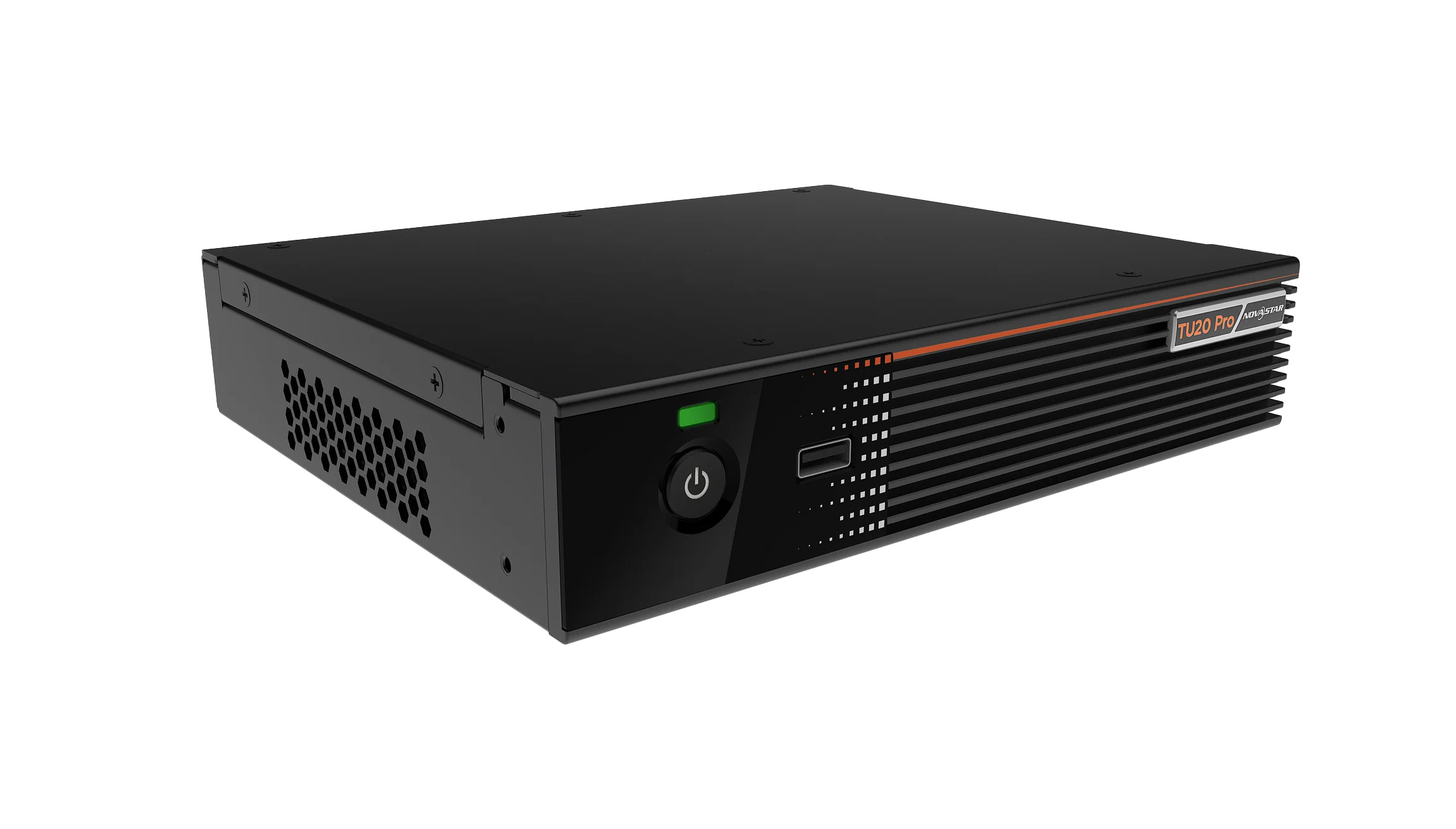
01. NovaStar TU20 Pro: 6 Ethernet ports (3.9M pixels) for Full HD and 21:9 rooms
ਵਿੱਚ ਇੱਕ NovaStar TU4K Pro vs TU20 Pro quote for standard boardrooms, the TU20 Pro wins whenever total wall pixels fit inside 3.9 ਮਿਲੀਅਨ ਪਿਕਸਲ (6 Ethernet outputs). Even on a normal 1,920 x 1,080 Full HD screen (2,073,600 pixels), having six RJ45 ports gives you two practical wins:
- Symmetrical column wiring on 6-wide walls: Many 16:9 cabinet kits sit 6 or 10 cabinets wide. Six ports let you wire one home-run cable per vertical column cleanly without exceeding 650,000 pixels per port on awkward zigzags.
- 21:9 Teams Front Row ultra-wide rooms: Ultra-wide room canvases like 2,560 x 1,080 (2,764,800 px) or 2,880 x 1,215 (3,499,200 px) blow right past a 4-port 2.6M limit, yet sit comfortably inside the TU20 Pro’s 3.9M ceiling.
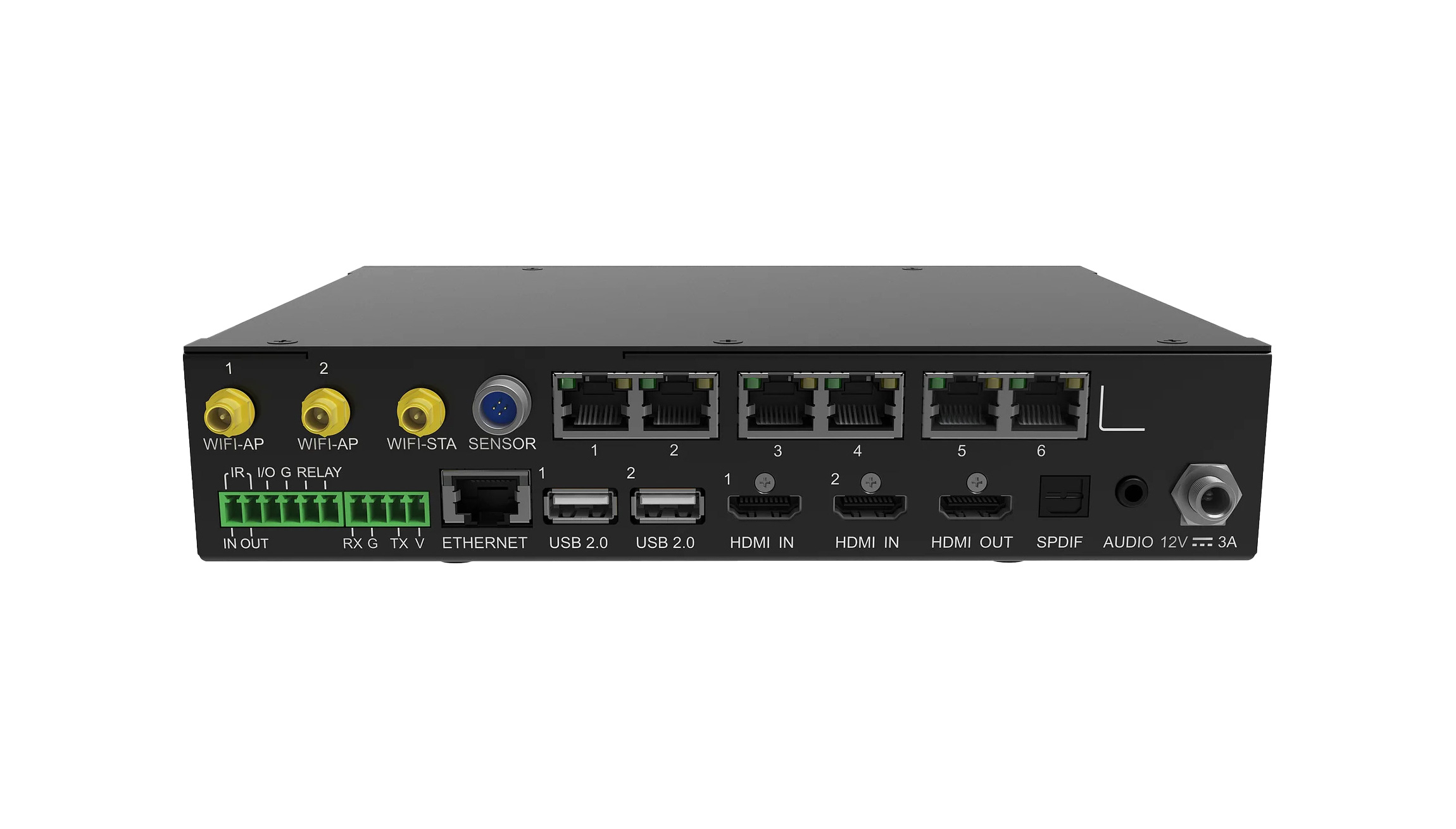
02. NovaStar TU15 Pro: 4 Ethernet ports (2.6M pixels) for compact huddle rooms
When a compact 1,920 x 1,080 or 1,280 x 720 wall divides evenly onto 2 to 4 Ethernet lines, the ਨੋਵਾਸਟਾਰ TU15 ਪ੍ਰੋ packs the exact same Android engine, dual-Wi-Fi screen casting, dual HDMI 1.3 inputs, and ViPlex Handy smartphone app control in a trimmer 4-port (2.6M pixel) box.
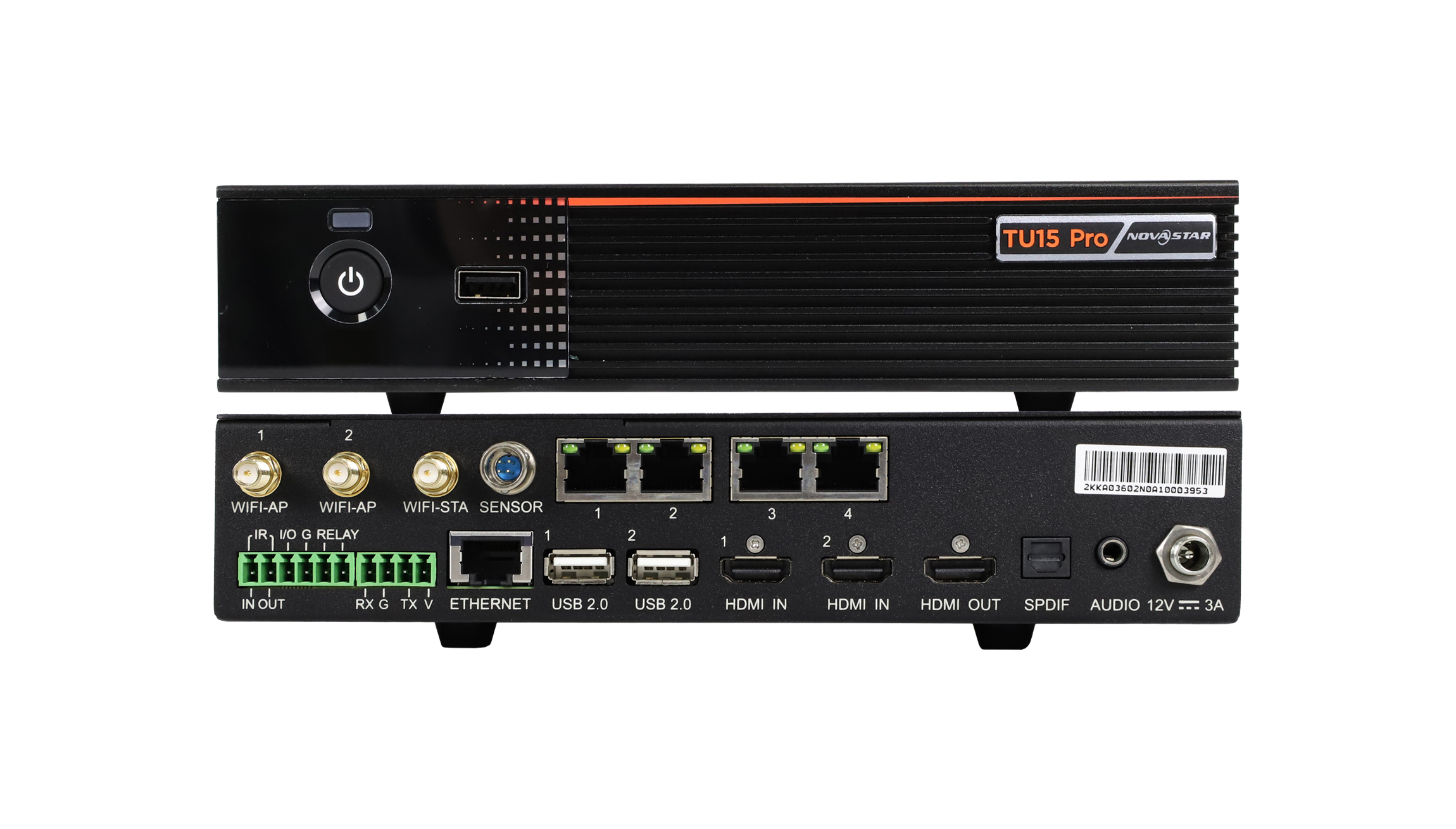
Because both the TU15 Pro and TU20 Pro slip straight behind all-in-one wall bezels or sit quietly inside shallow credenzas, you skip building out a noisy rack. When IT managers standardize multiple rooms across an office using a NovaStar TU4K Pro vs TU20 Pro split—putting TU20 Pro units in medium conference rooms and reserving the 20-port TU4K Pro for the flagship auditorium—every staff member gets the exact same wireless casting workflow while the 6-port TU20 Pro runs cooler and draws noticeably less power inside tight furniture.
Don’t overlook mounting clearance and IR sensor placement if you tuck a TU15 Pro or TU20 Pro behind closed wood millwork. Even low-power Android processors build up pocket heat when trapped in unvented credenza drawers beside a room amplifier, so punch rear cabinet intake/exhaust slots or space equipment neatly on perforated shelves. Keep an inexpensive short Cat6 service tail coiled neatly behind the bezel too—you’ll thank yourself later when someone needs quick NovaLCT access or firmware reloads without unmounting bottom trim modules.
5. Wireless screen mirroring, audio outputs, and dynamic image enhancement
Beyond raw port specs in a NovaStar TU4K Pro vs TU20 Pro comparison, it’s the everyday meeting-room features that keep AV helpdesk tickets quiet:
- Simultaneous Dual-Wi-Fi (AP + STA): Nothing annoys visiting guests faster than dropping internet the second they join a screen’s casting Wi-Fi. All three TU models run independent Access Point (AP) and Station (STA) antennas alongside Gigabit Ethernet LAN so guests cast screens locally without losing web access.
- Zero-dongle casting & ViPlex Handy remote: Laptops and phones cast straight from Windows, macOS, AirPlay, and Android (optional wireless dongles exist where guest Wi-Fi is locked down by IT). Hosts can also use the free ਵੀਪਲੈਕਸ ਹੈਂਡੀ phone app as a wireless touchpad, dimmer, and input switcher.
- Clean room sound output (SPDIF, 3.5 mm, Bluetooth 5.1): TU units strip stereo audio right off HDMI or local files and feed external soundbars, DSP mixers, or ceiling amps directly via optical SPDIF, 3.5 mm line-out, or Bluetooth.
- NovaStar receiving cards only: Every TU controller drives genuine NovaStar LED ਪ੍ਰਾਪਤ ਕਰਨ ਵਾਲੇ ਕਾਰਡ ਜਿਵੇਂ ਕਿ A10s ਪਲੱਸ or A10s ਪ੍ਰੋ. Load initial
.rcfgxparameters using NovaLCT tools from our ਨੋਵਾਸਟਾਰ ਸਾਫਟਵੇਅਰ ਡਾਊਨਲੋਡ ਪੰਨਾ (and check our receiving card vs sending card guide if mapping hardware first).
01. Room audio sync, CEC & Crestron/Extron integration tips
Two little details save awkward phone calls from executive assistants after a conference wall goes live. First, test Bluetooth audio only for casual background demos—on real video conferences or spoken presentations, hard-wire audio through optical SPDIF or 3.5 mm balanced line converters straight into your room DSP so Bluetooth buffering lag won’t throw off presenter lip-sync. Second, whenever you tie a TU processor into a tabletop Crestron, Extron, or Q-SYS touch panel over RS232 or TCP/IP, lock a fixed static IP reservation on the corporate switch and verify wake-on-LAN / screen blanking commands before signing off the punch list. Users shouldn’t have to hunt for a physical remote just to turn the wall on Monday morning.
Also watch aspect-ratio cropping when guests cast vertically from smartphones or share ultra-wide 21:9 spreadsheets onto a standard 16:9 boardroom canvas. Setting clean default scaling rules inside the TU OS stops distorted text and keeps multi-person wireless casting readable even from the back corners of a twenty-seat room.
6. Conference room sizing matrix: matching pixel pitch and aspect ratio to the right TU processor
To narrow down a NovaStar TU4K Pro vs TU20 Pro or TU15 Pro pick during fast project quoting, match typical conference diagonals (figured at 8-bit 60 Hz with standard 600 x 337.5 mm / 23.6 x 13.3 in 16:9 cabinets) against the matrix below.
| Screen Diagonal & Size | Pitch & Cabinet Grid | Resolution & Total Pixels | Min Ports (8-Bit 60 Hz) | Best-Fit TU Controller |
|---|---|---|---|---|
| 108-inch (2.4 x 1.35 m / 7.9 x 4.4 ft) | P1.25 (4 x 4 grid of 600 x 337.5 mm cabinets) | 1,920 x 1,080 px (2,073,600 px) | 4 ਪੋਰਟਾਂ | TU15 ਪ੍ਰੋ (or TU20 Pro for spare ports) |
| 135-inch (3.0 x 1.69 m / 9.8 x 5.5 ft) | P1.56 (5 x 5 grid of 600 x 337.5 mm cabinets) | 1,920 x 1,080 px (2,073,600 px) | 4–5 ports (by column) | TU20 ਪ੍ਰੋ (1 port per column cleanly) |
| 163-inch (3.6 x 2.025 m / 11.8 x 6.6 ft) | P1.875 (6 x 6 grid of 600 x 337.5 mm cabinets) | 1,920 x 1,080 px (2,073,600 px) | 4–6 ports (1 per column) | TU20 ਪ੍ਰੋ (6 ports match 6 columns) |
| 21:9 Ultra-Wide Room (4.2 x 1.69 m / 13.8 x 5.5 ft) | P1.25 (7 x 5 grid) or P1.56 ultra-wide | 3,360 x 1,350 px (4.54M px) or 2,560 x 1,080 px (2.76M px) | 5 ports (at 2.76M) or 8 ports (at 4.54M) | TU20 ਪ੍ਰੋ (to 3.9M px) or TU40 ਪ੍ਰੋ / TU4K ਪ੍ਰੋ |
| 216-inch 4K Auditorium (4.8 x 2.7 m / 15.7 x 8.9 ft) | P1.25 (8 x 8 grid of 600 x 337.5 mm cabinets) | 3,840 x 2,160 px (8,294,400 px) | 14–16 ports | TU4K ਪ੍ਰੋ (20 ports + HDMI 2.0 + 10G OPT) |
Notice why a 5 x 5 (135-inch) or 6 x 6 (163-inch) 1080p cabinet wall shows the practical value of stepping up in a NovaStar TU4K Pro vs TU20 Pro and TU15 Pro choice: although 2,073,600 pixels fit mathematically inside the 4-port TU15 Pro, having 6 ports on the TU20 Pro lets installers run one straight Ethernet drop per column (345,600 px/port) instead of zig-zagging columns awkwardly across cabinet splits.
7. Video walkthrough: switching HDMI and onboard sources on TU15 Pro and TU20 Pro
Watch the quick clip above to see how staff flip cleanly between the built-in Android desktop (wireless screen casting, lobby graphics, USB playback) and live HDMI 1 / HDMI 2 conference room table plugs without touching a Windows laptop.
ਅਕਸਰ ਪੁੱਛੇ ਜਾਣ ਵਾਲੇ ਸਵਾਲ
What is the main difference in a NovaStar TU4K Pro vs TU20 Pro comparison?
The gap comes down to pixel limit, Ethernet port density, fiber support, and 4K HDMI inputs. The TU20 ਪ੍ਰੋ ਤੱਕ ਦਾ ਸਮਰਥਨ ਕਰਦਾ ਹੈ 3.9 ਮਿਲੀਅਨ ਪਿਕਸਲ across 6 RJ45 outputs with dual HDMI 1.3 ports (great for 1080p and 21:9 meeting rooms). The TU4K ਪ੍ਰੋ pushes up to 13 ਮਿਲੀਅਨ ਪਿਕਸਲ across 20 RJ45 ports, includes 2 x 10G ਆਪਟੀਕਲ ਫਾਈਬਰ ਪੋਰਟ for long auditorium runs, and adds a true 4K@60Hz HDMI 2.0 input.
Do NovaStar TU15 Pro, TU20 Pro, and TU4K Pro still require receiving cards inside the LED cabinets?
Yes. Just like VX scalers and TB players, every TU unit outputs NovaStar Gigabit Ethernet data streams and requires genuine NovaStar LED ਪ੍ਰਾਪਤ ਕਰਨ ਵਾਲੇ ਕਾਰਡ (such as A10s Plus, A8s, A5s Plus, or MRV boards) mounted inside the LED frames.
Can I integrate a TU15 Pro, TU20 Pro, or TU4K Pro with Crestron, Extron, or Q-SYS room control systems?
Yes. Built-in RS232 serial and LAN TCP/UDP control commands let AV programmers link power wake/standby, HDMI switching, brightness, and volume presets directly onto Crestron, Extron, AMX, or Q-SYS touchpanels.
How many laptops or mobile devices can cast wirelessly to a TU20 Pro or TU4K Pro at once?
Multiple guest devices can stay joined to the TU hotspot at once, while the screen canvas splits cleanly to show up to 2 or 4 active wireless screen-mirroring windows side by side (depending on processor model and firmware mode).
Can I use a NovaStar TU20 Pro or TU4K Pro with Colorlight or Huidu ਕਾਰਡ ਪ੍ਰਾਪਤ ਕਰ ਰਹੇ ਹੋ?
No. NovaStar TU boxes speak NovaStar’s closed Gigabit protocol and only drive NovaStar receiving cards. Compare control ecosystems first in our ਨੋਵਾਸਟਾਰ ਬਨਾਮ ਕਲਰਲਾਈਟ ਬਨਾਮ Huidu ਦੀ ਅਗਵਾਈ.
AV integration checklist before ordering a NovaStar TU processor
Before locking down a NovaStar TU4K Pro vs TU20 Pro or TU15 Pro order for a client room, confirm six practical facts: exact native screen resolution (width x height), cabinet row/column grid for neat Ethernet column drops, whether conference codecs output 1080p60 (HDMI 1.3) or native 4K60 (needing the TU4K Pro’s HDMI 2.0 input), room speaker feed type (SPDIF, 3.5 mm, or Bluetooth), cable distance from equipment closet to screen (over 80 m / 262 ft means 10G fiber + CVT10 on TU4K Pro), and the exact NovaStar receiving card inside the wall.
Want our technicians to double-check your cabinet grid and control-port math before you commit to a NovaStar TU4K Pro vs TU20 Pro ਬਣਾਉਣ? Send your screen resolution and AV room notes through our contact page so we verify compatibility ahead of shipping. And when a project calls for full turnkey conference cabinets ready to hang on the wall, you can compare complete LED screens over at EagerLED.