Colorlight VX10 LED Video Controller Overview
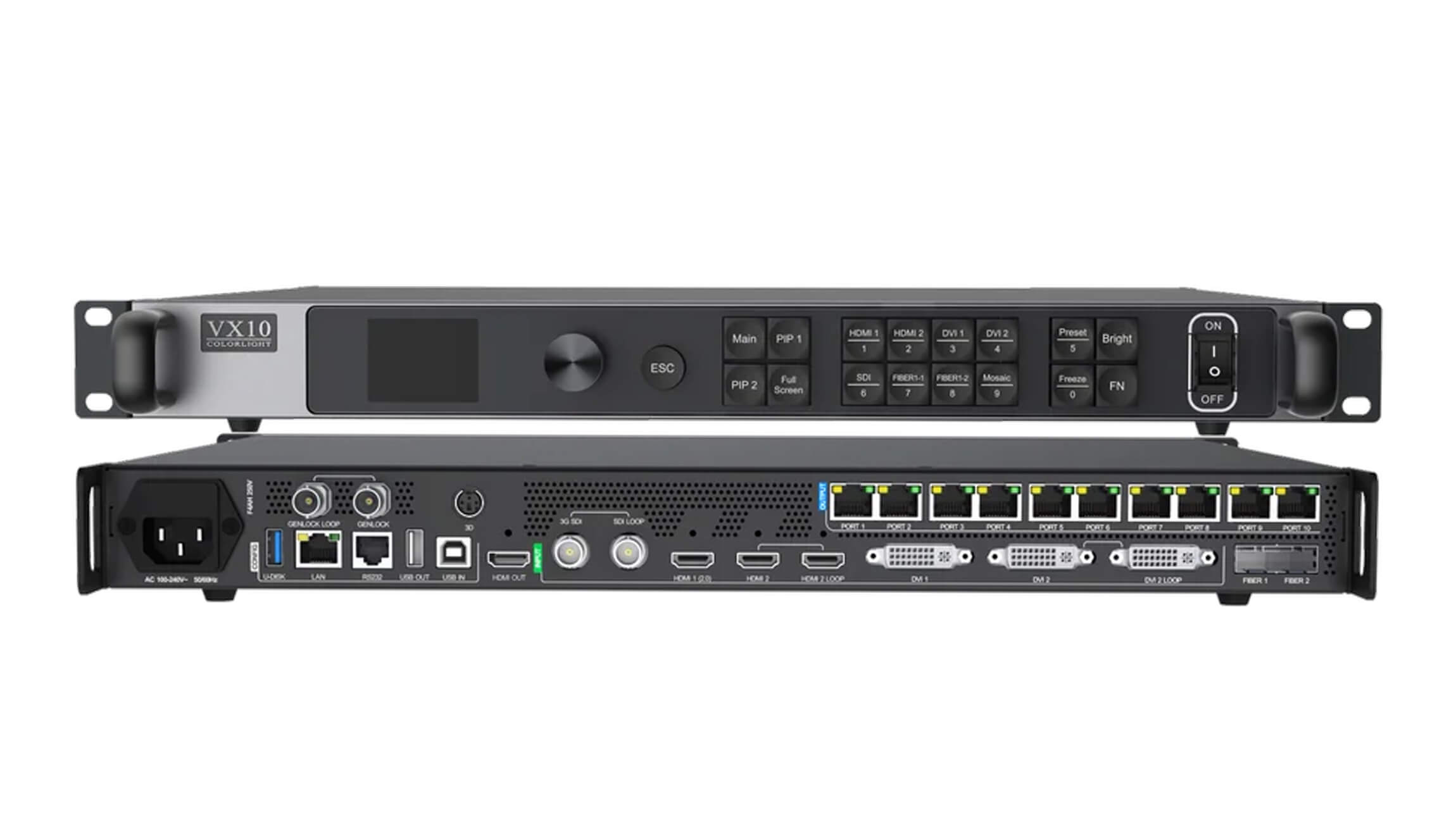
The Colorlight VX10 is an all-in-one LED display video controller that combines video processing with signal sending. It accepts 4K sources through HDMI 2.0 and connects to an LED screen through 10 Gigabit Ethernet outputs or optical fiber. It is suited to rental stages, live events, broadcast installations and other LED walls that need source switching and screen control in one unit.
Selection essentials: plan for approximately 6.5 million output pixels, check the load on each Ethernet port, and match the receiving cards, firmware and video timing to your screen. A 4K input specification does not mean that every full-resolution 4K LED wall can be driven by a single controller.
Key Specifications and Connections
| Item | Specification / planning note |
|---|---|
| Product type | LED video processor and sending controller in one unit |
| HDMI input | 1 × HDMI 2.0, supporting up to 4096 × 2160 at 60 Hz; 1 × HDMI 1.4 with loop output |
| Other video inputs | 2 × DVI (one with loop output), 1 × 3G-SDI with loop output, and Fiber1 optical input capability |
| LED outputs | 10 × Gigabit Ethernet ports; 2 × 10G optical ports with mode-dependent routing |
| Pixel capacity | Approximately 6.5 million pixels; confirm the available load for the selected frame rate, bit depth and configuration |
| Maximum dimensions | Up to 16,384 pixels wide or 8,192 pixels high, within the total pixel and port limits; these are separate limits, not a simultaneous canvas size |
| Monitoring output | HDMI 1.3 for preview or video output |
| Image processing | 8-bit / 10-bit processing, HDR, cropping, scaling and up to 3 layers with adjustable size and position |
| Synchronization | Genlock input and loop-through; Bypass mode for pixel-to-pixel operation and low latency |
| Control | LAN / TCP-IP, USB control and cascading, and RS232 |
| Operating modes | Video processor, fiber optic transceiver and Bypass |
Capacity note: the downloadable VX10 specification below lists 6.5 million pixels; Colorlight’s current VX10/VX6 product overview quotes 6.55 million. Use the documentation and load calculation for your supplied hardware, firmware and operating settings when finalizing a screen design.
Video Processing, Fiber and Backup
Build the layout around your source
Crop and scale incoming video, switch sources and position layers to suit the LED wall. Image controls include hue, saturation, contrast, brightness compensation and color temperature. HDMI accepts embedded audio; audio output through a multifunction card requires a compatible system configuration.
Plan optical routing and redundancy
Fiber1 can mirror the ten Ethernet outputs, while Fiber2 can provide a copy or backup according to the selected mode. Optical connections do not multiply the controller’s total pixel capacity. Specify compatible optical modules, fiber type and receiving equipment for the installation. Input hot backup requires sources of the same type and resolution; configure and verify the switching behavior before a live event.
Check latency in the required mode
Bypass mode provides pixel-to-pixel operation with a single source on the primary layer. Colorlight describes low-latency operation in this mode. Do not assume that a zero-frame claim applies to every scaling, layering or complete camera-to-screen setup; confirm the required workflow and receiving-card settings.
Choosing the VX10 for Your LED Wall
- Calculate the screen resolution. Multiply the cabinet count by the pixels per cabinet, then check total pixels, width, height and the load assigned to each port.
- Match the source. Confirm the connector, source resolution, frame rate, bit depth and any HDR requirement.
- Check the receiving system. Share your receiving-card model, module scan type and cabinet configuration before ordering. Browse our LED receiving cards for system planning.
- Specify the signal route. Decide whether the installation needs Ethernet, optical transport, source backup or controller redundancy.
For a compatibility check, contact our team with your screen pixel dimensions, cabinet layout, receiving-card model and input source. You can also compare other LED video processors.
Frequently Asked Questions
Does the Colorlight VX10 support 4K input?
Yes. Its HDMI 2.0 input supports up to 4096 × 2160 at 60 Hz. Input resolution and LED output capacity are different specifications: a 3840 × 2160 screen has 8,294,400 pixels, above this controller’s approximately 6.5-million-pixel capacity.
How many Ethernet outputs does the VX10 have?
It has ten Gigabit Ethernet outputs and two 10G optical ports. The optical ports support routing and backup functions; they should not be counted as extra independent pixel capacity.
Does a USB drive make the VX10 a standalone media player?
Colorlight documents USB-drive import of cabinet parameters for screen configuration. This feature should not be treated as confirmation of USB video-file playback. Plan an appropriate live video source for the required input.
Conclusion
The VX10 is a practical choice when an LED wall needs integrated video processing, ten Ethernet outputs and flexible optical connectivity. Confirm pixel loading, receiving-card compatibility and the desired processing mode before selecting the final configuration.
Product Image and Documentation
Download Specification:
Colorlight VX10 LED Display Video Controller Specification
Manufacturer references: Colorlight VX10/VX6 product overview and VX10 user manual.