VENUS X3 LIVE presentation mixing
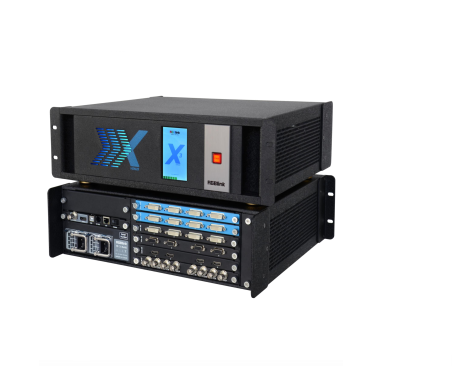
The RGBlink VENUS X3 LIVE brings source monitoring, scene preparation and program switching into an integrated vision mixer. Operators can view multiple sources, edit scenes, preview subtitles and switch layouts seamlessly. Configurations can be saved on board or to USB.
X3 LIVE connections and parameters
| Parameter | Specification |
|---|---|
| Input module choices | Up to 3 modules of the selected type: DVI, HDMI, VGA, CVBS, USB or SDI |
| Per-module connections | DVI/HDMI/VGA/USB: 4 inputs; CVBS: 8 inputs; SDI: 4 inputs with loops |
| Background inputs | 2 × HDMI |
| PGM outputs | 4 × DVI; 2 × HDMI |
| PST output | 1 × HDMI |
| PVW outputs | 1 × HDMI; 1 × VGA |
| Monitoring | Dual angle-adjustable LCD monitors; source multiview |
| Control | LAN TCP/IP; XPOSE software and T Series console support listed |
| Synchronization | Genlock; tally support |
| Power input / maximum | AC 100–240V, 50/60Hz / 205W |
| Power redundancy | Optional redundant hot-swap PSU |
| Net / package dimensions | 502 × 430 × 186 mm / 537 × 497 × 312 mm |
| Net weight | 17.95 kg |
| Operating temperature / humidity | −25°C to 55°C / 10–90% |
Check the supplied module version
The existing feature list also names HDR, HDMI 2.0 and DP 1.2 4K at 60Hz, 12G/6G/3G/HD/SD-SDI, H.264 input, 3D and 4K/2K EDID management. These require confirmation against the selected X3 LIVE hardware and input modules. The retained download is named “VENUS X3 Quick Start Manual”; confirm its applicability to X3 LIVE before using it for installation.
Frequently asked questions
What do PGM, PST and PVW outputs provide on X3 LIVE?
The connection table separates program (PGM), preset (PST) and preview (PVW) outputs. This supports preparing and checking sources before program switching.
Are all listed input-module types fitted at once?
No. The table describes module choices and per-module connections. Specify the required type and number of modules for the order.
Can I save scenes and configurations?
Yes. Scene editing, seamless switching and saving configurations on board or to USB are listed functions.
Is the linked X3 manual guaranteed to cover X3 LIVE?
The original link is retained, but its filename identifies VENUS X3 rather than X3 LIVE. Verify the model and revision before following installation or configuration instructions.
Product media and downloads