Pag-aayos Linsn RV908 laban sa RV901 Ang pagtanggap ng mga card ay tumatagal ng halos limang segundo kapag tiningnan mo ang mga output connector sa kanang bahagi ng board. Pumili ng Linsn RV908 series card (RV908M32, RV908H32, O RV908T) kapag ang iyong LED cabinet ay nagsaksak ng 16-pin HUB75 flat ribbon cables diretso sa receiving card—na nagbibigay sa iyo ng 12 onboard na HUB75 header with zero external adapter boards. Pick a Linsn RV901 series card (RV901T or RV901H) when your cabinet uses two 50-pin na babaeng pin header (JP1 at JP2) designed to mate with a separate Kard ng LED hub (tulad ng HUB75B, HUB75E, o panlabas na DIP HUB40/HUB08 adapter board).
Thousands of outdoor highway billboards, stadium perimeter walls, and stage rental rigs built over the past decade run on Linsn hardware. Kapag pumasok ka sa isang trabaho sa pagseserbisyo sa isa sa mga dingding na iyon ngayon, dalawang sakit ng ulo agad ang mararanasan mo: una, ang pag-alam kung ang isang lumang RV908H, RV908T, o RV801D ay maaaring palitan ng isang kasalukuyang RV908M32; pangalawa, ang pag-alam kung bakit humihingi ng unlock password ang LEDStudio o LedSet bago ka payagang mag-load ng mga .rcg at .con file.
Narito kung paano a Linsn RV908 laban sa RV901 gumagana ang hardware check sa workbench, paano ipares ang alinmang board sa isang Linsn TS802D o TS806D sending unit, at ang eksaktong pagkakasunod-sunod para sa pagbabasa pabalik ng mga .rcg file mula sa isang live cabinet nang hindi pinupunasan ang screen.
1. Ang paghahati ng pangunahing hardware: 12 onboard HUB75 header (RV908) vs 50-pin hub header (RV901)
Under the hood, the main FPGA processing logic on an RV908 and an RV901 comes from the exact same Linsn platapormang pang-siyam na henerasyon. Sa katunayan, kung titingnan mo ang isang Linsn RV908 laban sa RV901 magkatabi, ang parehong card ay may parehong 12-bit/16-bit internal color processing, parehong bidirectional Gigabit RJ45 network jacks, at parehong .rcg configuration file architecture sa loob ng LEDStudio. Ang dahilan Linsn parehong mekanikal ang ibinebentang board.
| modelo | Interface ng Output ng Modyul | External Hub Card Required? | Scan Mode Support | Onboard Cabinet Monitoring | Typical Cabinet Use Case |
|---|---|---|---|---|---|
| Linsn RV908M32 | 12 x 16-pin HUB75E headers | Hindi (direktang ribbon cable sa mga module) | Static up to 1/32 scan (supports E address pin) | Temperature, voltage, cable BER; optional smoke/fan port | Current all-purpose replacement for 1/16 and 1/32 scan SMD cabinets |
| Linsn RV908H32 | 12 x 16-pin HUB75E headers | Hindi (direktang ribbon cable sa mga module) | Static up to 1/32 scan | Kumpletong header ng pagsubaybay sa kapaligiran (bentilador, usok, pagsusuri ng flat-cable) | High-spec outdoor and rental cabinets requiring 1/32 scan + health sensors |
| Linsn RV908H | 12 x 16-pin HUB75 headers | Hindi (direktang ribbon cable sa mga module) | Istatiko, 1/2, 1/4, 1/8, 1/16 na pag-scan | Full onboard multifunction monitoring | Pagpapaupa ng Legacy 1/16-scan SMD at mga nakapirming panlabas na kabinet |
| Linsn RV908T | 12 x 16-pin HUB75 headers | Hindi (direktang ribbon cable sa mga module) | Static up to 1/16 scan (or firmware-specific) | Standard voltage & temperature readback | Cost-effective replacement for standard 1/8 and 1/16 scan SMD walls |
| Linsn RV901T | 2 x 50-pin female headers (JP1, JP2) | Oo (nangangailangan ng HUB75, HUB40, o HUB08 card) | Static hanggang 1/16 o 1/32 scan (sa pamamagitan ng katugmang hub card) | Standard voltage & temperature readback | Mga billboard na DIP P10/P16 sa labas at mga lumang kabinet na inuupahan gamit ang piggyback hub board |
| Linsn RV901H | 2 x 50-pin female headers (JP1, JP2) | Oo (nangangailangan ng panlabas na hub card) | Static hanggang 1/16 o 1/32 scan | Ganap na onboard na pagsubaybay sa kapaligiran at ribbon | Older monitoring-equipped cabinets with piggyback HUB boards (replacing RV801D) |
01. Bakit hindi mo basta-basta mapapalitan ang isang RV908 ng isang RV901 cabinet nang hindi tinitingnan ang mga ribbon
Ipagpalagay na may tumawag na kostumer at nagsabing, “My cabinet has a Linsn RV901T with a piggyback HUB75B board on top of it. Can I throw away both boards and bolt in a single Linsn RV908M32?
Sa elektrikal na aspeto, oo—kung ang piggyback board na iyon ay isang karaniwang 8-port o 12-port na HUB75 board, ang RV908M32 ay papalit sa parehong RV901T at sa hub card nang buo. Sa katunayan, sa marami Linsn RV908 laban sa RV901 field retrofits on older SMD cabinets, eliminating the 50-pin press-fit connection between an RV901 and its piggyback hub card gets rid of one of the biggest sources of vibration-induced contact failure on outdoor signs. Gayunman, if that RV901T is plugged into an outdoor DIP hub board (like a HUB40, HUB08, or HUB12 pinout used on traditional DIP346 P10 or P16 outdoor highway billboards), the ribbon cables inside the cabinet are not HUB75 pinout. You must keep the original hub board and install a replacement Linsn RV901T or RV901H.
02. Pixel capacity and color bit depth across a Linsn RV908 vs RV901 daisy chain
Whether you choose an RV908M32 or an RV901T + hub card, both ninth-generation receivers carry up to 256 x 256 to 512 x 256 pixels per card (ang eksaktong lapad at taas ng sobre ay nakadepende sa scan mode, refresh rate, at kung ilang RGB data group ang naka-enable sa loob ng .rcg file). Sa isang karaniwang Gigabit Ethernet, tumatakbo mula sa Port U o Port D ng isang Linsn Ang TS802D sending card, ang buong daisy chain ng mga receiving card sa isang network cable ay maaaring magmaneho hanggang sa 650,000 na mga piksel sa 8-bit 60 Hz (for example, 1,280 x 512 or 1,024 x 640 pixels). Keep in mind during any Linsn RV908 laban sa RV901 troubleshooting call that if you enable 10-bit or 12-bit color mode inside LEDStudio, per-port pixel capacity drops proportionally—so always verify color depth settings before adding extra cabinets onto an existing network port.
2. Pag-decode Linsn RV908 suffixes: RV908M32 vs RV908H32 vs RV908H vs RV908T
Once you know your cabinet uses the 12-header integrated board, the next question in a Linsn RV908 laban sa RV901 spare-parts order is what those trailing letters—M32, H32, H, at T—sa totoo lang ay masama.

01. The “32” suffix (RV908M32 & RV908H32): pin 8 E-line support for 1/32-scan modules
Mas maaga Linsn RV908 cards—specifically the classic Linsn RV908H at Linsn RV908T—were designed when nearly all SMD LED modules used 1/4, 1/8, or 1/16 scan (requiring only four row-address lines: A, B, C, D). When indoor P2.5, P2.0, and P1.86 modules adopted 1 / 32 scan, Ang Pin 8 sa 16-pin HUB75 header ay naging ikalimang linya ng address (linya ng E).

Iyon ang dahilan kung bakit Linsn idinagdag ang 32 suffix on the Linsn RV908M32 at Linsn RV908H32: both drive 1/2, 1/4, 1/8, 1/16, at 1/32 na pag-scan mga module nang direkta mula sa kahon. Mas mabuti pa, isang Ang RV908M32 ay backward-compatible sa mga mas lumang 1/16-scan RV908T at RV908H cabinets. once you load your cabinet’s .rcg file in LEDStudio or LedSet.
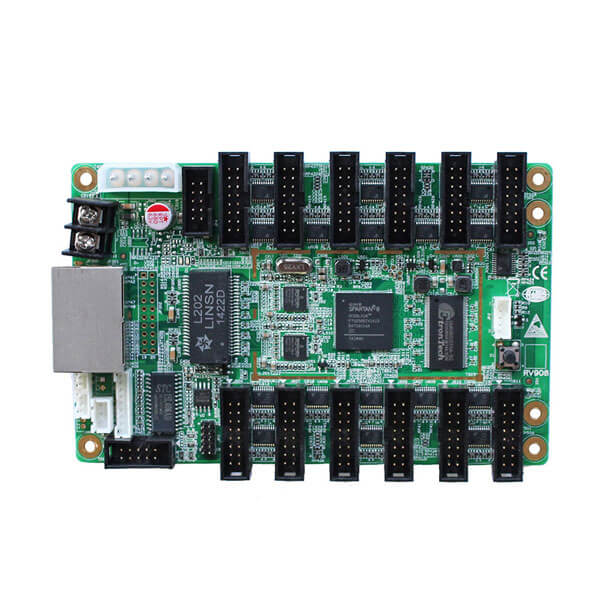
02. What “H”, “M”, and “T” stand for
T(as in RV908T / RV901T): The streamlined, cost-optimized edition removing extra auxiliary sensor headers while keeping full video performance and basic voltage/temperature readback.H(tulad ng sa RV908H / RV908H32 / RV901H): Kasama ang kumpletong onboard environmental monitoring interface (supporting cabinet door switch, fan tachometer, smoke/humidity sensors, at flat-cable fault detection nang walang hiwalay na multifunction card sa loob ng bawat cabinet).M32(as in RV908M32): The mainstream 1/32-scan production board that replaced most standard RV908 inventory across indoor and outdoor SMD screens.
3. Kapag kailangan mo pa rin ng RV901T, RV901H, o RV801D na may external hub board
Sa isang Linsn RV908 laban sa RV901 maintenance audit on older outdoor screens or rental inventory, open the cabinet door and look at how the receiving card mounts. If you see a green card with dalawang itim na 50-pin female header strips (JP1 at JP2) at isang pangalawang mas maliit na board na nakadiin sa ibabaw nito kung saan nakasaksak ang mga ribbon cable, tinitingnan mo ang isang RV901T, Isang RV901H, or the older eighth-generation Linsn RV801D.

01. Pagpapalit ng isang luma Linsn RV801 or RV801D with an RV901T / RV901H
Kung ang isang pader na 7 hanggang 10 taong gulang ay gumagana pa rin sa ikawalong henerasyon Linsn RV801D mga baraha, hindi mo na kailangang maghanap ng maalikabok at gamit nang mga board. Ang ikasiyam na henerasyon Linsn RV901T at RV901H gamitin ang eksaktong parehong dual 50-pin JP1 / JP2 pinout at mga mounting hole, para ang iyong kasalukuyang piggyback HUB board ay dumidiin nang diretso sa bagong RV901 card. Kapag sinusuri ng mga technician Linsn RV908 laban sa RV901 options for an older RV801 wall, keeping the existing HUB75 or HUB40 adapter board and snapping it onto an RV901T takes two minutes per cabinet because you don’t even have to unplug the sixteen individual flat ribbon cables from the hub board—you simply unbolt the bottom RV801 card, press the old hub board onto the new RV901T’s JP1 and JP2 headers, reconnect the 5 V power wires and Cat5e jumpers, and push the .rcg file from LEDStudio. By contrast, switching that same cabinet from an RV801 + HUB75 board over to a one-piece RV908M32 in a Linsn RV908 laban sa RV901 upgrade requires transferring every flat ribbon cable one by one from J1–J12 on the old hub board to JH1–JH12 on the new RV908M32.
02. Reading the onboard LED status lights during a Linsn RV908 vs RV901 service call
Bago mo kondenahin ang isang receiving card sa isang Linsn RV908 laban sa RV901 diagnosis, check the two tiny surface-mount indicator LEDs next to the RJ45 jacks while the cabinet is powered on:
- Pulang tagapagpahiwatig ng kuryente na naka-ON nang tuluy-tuloy: Confirms 5 V DC is reaching the card. If the red LED is dim or flickering, measure voltage across the 5 V screw terminals—anything below 4.5 V DC points to a failing cabinet power supply or oxidized terminal lug rather than a dead Linsn card.
- Mabilis na kumikislap ang berdeng indicator ng datos: Confirms Gigabit Ethernet packets from the TS802D sending card are arriving and locking cleanly. If the green LED stays completely dark or blinks slowly once per second, swap the incoming Cat5e/Cat6 jumper from the previous cabinet before replacing the card.

4. Upstream pairing: TS802D sending cards, TS806D / SB-9 boxes, at X8406 processors
Magkakabit ka man ng RV908M32 o RV901T sa loob ng kabinet, bawat Linsn receiving card needs a Linsn sending unit upstream at the control PC or video processor rack. Just like we covered in our Gabay sa pagtanggap ng LED card kumpara sa pagpapadala ng card, hindi mo maaaring isaksak ang isang Linsn ipapadala ang receiving card sa isang NovaStar o Colorlight sender.

- Linsn Kard na Nagpapadala ng PCIe ng TS802D / TS801D: The classic 2-port Gigabit sending card (up to 1.3 million pixels on TS802D: Port U and Port D, 650,000 pixels per port at 8-bit 60 Hz) that plugs into a desktop PC PCI slot (for 5 V power) and takes a DVI video loop from your graphics card plus a USB type-B cable for LEDStudio / LedSet parameter configuration.
- Linsn Panlabas na Kahon ng Kontrol na SB-9 & Linsn TS806D Sending Box (O TS951): Modern control laptops don’t have internal PCI slots. An SB-9 enclosure holds one TS802D externally with its own AC power supply, while a TS806D houses two TS802D cards (4 Gigabit outputs, 2.6 million pixels) in one rack-mount box.
- Lahat-ng-sa-isang Linsn mga processor ng video (tulad ng Linsn X8406): Pagsamahin ang multi-input HDMI/DVI video scaling, 4-window PIP layout, at built-in Linsn sending ports in a single rack unit.
5. Paglo-load ng mga .RCG at .CON file sa LEDStudio at LedSet (kasama ang 168888 unlock code)
Swapping hardware in a Linsn RV908 laban sa RV901 Kalahati lang ng trabaho ang pagkukumpuni—darating ang bagong card mula sa pabrika na may mga generic na default na parameter, kaya ang isang cabinet na iyon ay magpapakita ng mga gulu-gulong linya o mananatiling madilim hanggang sa i-push mo ang configuration file ng screen. Linsn splits screen configuration into two file extensions that you should always back up onto a USB drive:
| File / Setting | Ang Kinokontrol Nito | Kung Saan Ito Nabubuhay at Paano Ito Mabawi |
|---|---|---|
.RCG file (Receiving Card Config) | Module driver IC timing, scan mode (1/16 vs 1/32), cabinet pixel width/height, RGB data group order, refresh rate, and OE polarity | Stored inside each RV908 / RV901 receiving card’s flash memory. Can be read back from a healthy cabinet or downloaded from our Linsn RCG file download archive |
.CON file (Mapa ng Koneksyon ng Tatanggap) | How many cabinets sit in the grid (columns x rows) and the exact snake/daisy-chain path of Ethernet Port U and Port D | Nakaimbak sa mapa ng receiving chain / sending card sa loob ng LEDStudio o LedSet (Receiver Connection tab) |
168888 (Unlock Password) | Unlocks the hidden Pag-setup ng Software / Pag-configure ng Hardware screen inside LEDStudio | Sa LEDStudio, i-click ang Option → Software Setup, pagkatapos ay i-type linsn sa iyong keyboard (walang text box ang unang lilitaw) at i-enter 168888 in the password popup |
| LEDStudio vs LedSet | LEDStudio is the full legacy playback + hardware suite; LedSet (2.0 / 3.0) is the lightweight standalone hardware setup utility | Both are available in our Linsn LEDStudio & LedSet software download page |
01. Step-by-step: cloning a working cabinet’s .RCG onto a replacement RV908 or RV901
If you lost the original USB stick that came with the screen, don’t run Intelligent Setup from scratch if the rest of the wall is working fine. Follow our detailed guide (Paano Mag-update Linsn Ligtas na Pagtanggap ng Data ng LED Card) or use this quick four-step clone procedure:
- Connect your Windows laptop to the TS802D / sending box via USB cable, open LedSet (O LEDStudio → Option → Software Setup → uri
linsn→ enter168888). - Before touching the .rcg, test-read the existing parameters from a working cabinet (e.g., Receiver #1) and immediately click I-save sa File sa desktop ng iyong laptop bilang
backup_working.rcg. Also check our libre Linsn RCG file repository if every card on a single-cabinet sign died. - Ipadala ang .rcg file na iyon sa kapalit na RV908 o RV901 card, i-verify na ang imahe sa pinalitan na cabinet ay tumutugma sa mga kalapit nito, at i-click ang I-save sa Tatanggap (which writes the .rcg permanently into onboard flash EEPROM so it survives power-off).
- If the new cabinet displays the top-left corner of the video instead of its own grid position, open the Receiver Connection (.CON) tab at i-click Ipadala sa Tatanggap + I-save sa Tatanggap upang ibalik ang X/Y coordinate nito sa daisy chain.
6. Video ng bangko: Linsn X8406 4-window video processor and sender setup
Ang gabay sa video sa itaas ay nagpapakita kung paano ang isang all-in-one Linsn video processor like the X8406 combines multi-input HDMI/DVI window scaling with built-in Linsn sending outputs, replacing a separate desktop PC and TS802D PCI card in commercial control racks.
Mga madalas itanong
Paano ko masasabi sa isang sulyap lang Linsn RV908 vs RV901, tingnan kung aling card ang nasa loob ng cabinet ko?
Look at how the flat 16-pin gray ribbon cables attach to the card. If 8 to 12 flat ribbon cables plug directly into two rows of white/black 16-pin male headers soldered onto the main green receiving card, you have a Linsn RV908 (tulad ng isang RV908M32, RV908H32, O RV908HKung ang pangunahing receiving card ay may dalawang mahahabang 50-pin female header strips (JP1 at JP2) na may hiwalay na adapter board (may label na HUB75, HUB40, o HUB08) na nakadikit sa ibabaw nito, mayroon kang Linsn RV901 (RV901T or RV901H) or older RV801.
Maaari ko bang palitan ang isang luma Linsn RV908T o RV908H na may Linsn RV908M32?
Oo. Ang Linsn RV908M32 ay backward-compatible sa mga 1/2, 1/4, 1/8, at 1/16 scan cabinet na orihinal na ginawa gamit ang RV908T o RV908H, habang nagdaragdag din ng suporta sa 1/32-scan para sa mga mas bagong fine-pitch module. Ilipat lamang ang mga umiiral na .rcg at .con configuration file mula sa isang malusog na cabinet gamit ang LEDStudio o LedSet at i-click ang I-save sa Tatanggap.
What is the secret password to open Hardware Setup inside Linsn LEDStudio?
Open LEDStudio, click Option → Software Setup sa menu bar sa itaas, i-type ang salitang linsn directly on your keyboard (all lowercase, even though no cursor box is visible), and when the password prompt pops up, type 168888 at pindutin ang Enter. Ipapakita nito ang nakatagong Awditibo (.rcg) and Receiver Connection (.con) mga tab ng pag-setup.
Why do the two RJ45 ports on a Linsn TS802D sending card say U and D instead of 1 and 2?
Sa isang Linsn Para sa TS802D sending card, ang dalawang Gigabit Ethernet output jack ay may label na U (Pataas / Output 1) at D (Pababa / Output 2), bawat isa ay may dalang hanggang 650,000 pixel sa 8-bit 60 Hz. Sa loob ng Receiver Connection tab in LEDStudio or LedSet, you assign which cabinet chain is plugged into Network Port U and which chain is plugged into Network Port D. In contrast, the two RJ45 ports on an RV908 or RV901 receiving card inside the cabinet are non-directional—either jack can be used as input or output.
Can I drive a Linsn RV908M32 o RV901T receiving card mula sa isang NovaStar VX600 o Colorlight X40m controller?
Hindi A Linsn RV908 vs RV901 receiving card only understands Linsn’s proprietary Gigabit Ethernet protocol and must be driven by a Linsn kard na pangpadala (tulad ng TS802D, TS806D, TS951, o isang Linsn X-series video processor). Kung gusto mong ilipat ang isang buong dingding sa NovaStar, dapat mong palitan ang parehong sending controller at bawat cabinet receiving card (tingnan ang aming NovaStar laban sa Linsn paghahambing ng mamimili).
Ano ang kukuhanan ng litrato sa loob ng isang Linsn cabinet before ordering spare cards
Before ordering replacement boards in a Linsn RV908 laban sa RV901 service job, open one working cabinet and snap three quick photos: the white version sticker and silkscreen print on the receiving card (RV908M32, RV908H32, RV908T, RV901T, RV801D), the hub adapter board code (if your cabinet uses an RV901 with a piggyback HUB75 or HUB40 card), and the sending card or sending box model back at the control computer (TS802D, TS806D, TS951). Also check right away whether your control PC still has a saved copy of the screen’s .rcg and .con files.
Kung nakikitungo ka sa isang hindi na ipinagpatuloy na Linsn rebisyon ng card o kailangan ng tulong sa pagtutugma ng RV908M32 / RV901T sa isang mas lumang kabinet, ipadala ang mga larawan ng iyong cabinet board sa pamamagitan ng aming contact page at kukumpirmahin ng aming mga bench tech ang eksaktong drop-in na kapalit. At kapag ang isang lumang DIP o SMD na pader ay umabot sa punto kung saan ang pagpapalit ng kumpletong weatherproof cabinets ay mas mura kaysa sa pira-piraso na pagkukumpuni ng board, maaari kang mag-browse ng kumpletong kapalit na LED display sa EagerLED.