O'rtasida tanlash NovaStar TU4K Pro va TU20 Pro (or dropping down to the compact TU15 Pro) comes down to total screen pixels, RJ45 port count, and whether your conference codec pushes 4K over HDMI 2.0. Grab the TU15 Pro for small huddle rooms up to 2.6 million piksel (4 Ethernet ports); pick the NovaStar TU20 Pro for 1080p and 21:9 boardrooms up to 3.9 million piksel (6 ports); and step up to the NovaStar TU4K Pro (yoki TU40 Pro) for 4K auditoriums up to 13 million piksel (20 ports plus 2 x 10G optical outputs and HDMI 2.0).
Corporate interior designers hate tall noisy equipment racks tucked beside glass-walled boardrooms. That’s the exact gap NovaStar’s TU playback control processors fill: instead of stacking an Android signage box, a wireless BYOD casting gateway, an HDMI scaler, and a sending unit inside a tiny credenza, the TU line drops all four into one sleek housing.
Keling, qo'ying NovaStar TU4K Pro va TU20 Pro and TU15 Pro hardware side by side, check how dual-Wi-Fi screen casting and SPDIF/Bluetooth audio behave in live meetings, run real cabinet port math on 16:9 and 21:9 walls, and clarify where outdoor Taurus (TB) boxes and stage VX Pro controllers split off.
1. NovaStar TU ijro etishni boshqarish protsessori nima va u TB va VX seriyalaridan qanday farq qiladi?
Kirish oching NovaStar catalog for a corporate office wall and three totally different box lines claim they can drive indoor cabinets: VX Pro controllers, Taurus TB boxes, and Taurus TU processors. Picking the wrong family turns into a nasty surprise when a client tries sharing slides from a MacBook wirelessly on day one:
- Versus Taurus TB boxes (TB20 / TB40 / TB60): Bizning maqolamizda ko'rsatilganidek NovaStar TB40 va TB60 va TB20 qo'llanmasi, TB units are asynchronous players engineered for pole signs and outdoor storefronts. They cap at 2.3M pixels (4 ports) and aren’t set up for fast multi-guest wireless meeting casting or room soundbar handoffs.
- Versus VX Pro rack controllers (VX400 Pro / VX600 Pro / VX1000 Pro / VX2000 Pro): bizning NovaStar VX Pro seriyasi qo'llanmasi shows why rental crews love VX units—they’re rock-solid synchronous scalers. Still, they carry no internal Android player, no USB document playback, and zero wireless AirPlay/Miracast casting.
- Where TU processors (TU15 Pro, TU20 Pro, TU40 Pro, TU4K Pro) belong: They fuse an Android media engine, multi-user wireless presentation hub, HDMI video switcher, and Gigabit LED sender inside one chassis tuned specifically for meeting rooms, lecture halls, lobbies, and showrooms.
2. To'liq texnik xususiyatlarni taqqoslash: NovaStar TU4K Pro va TU20 Pro va TU15 Pro
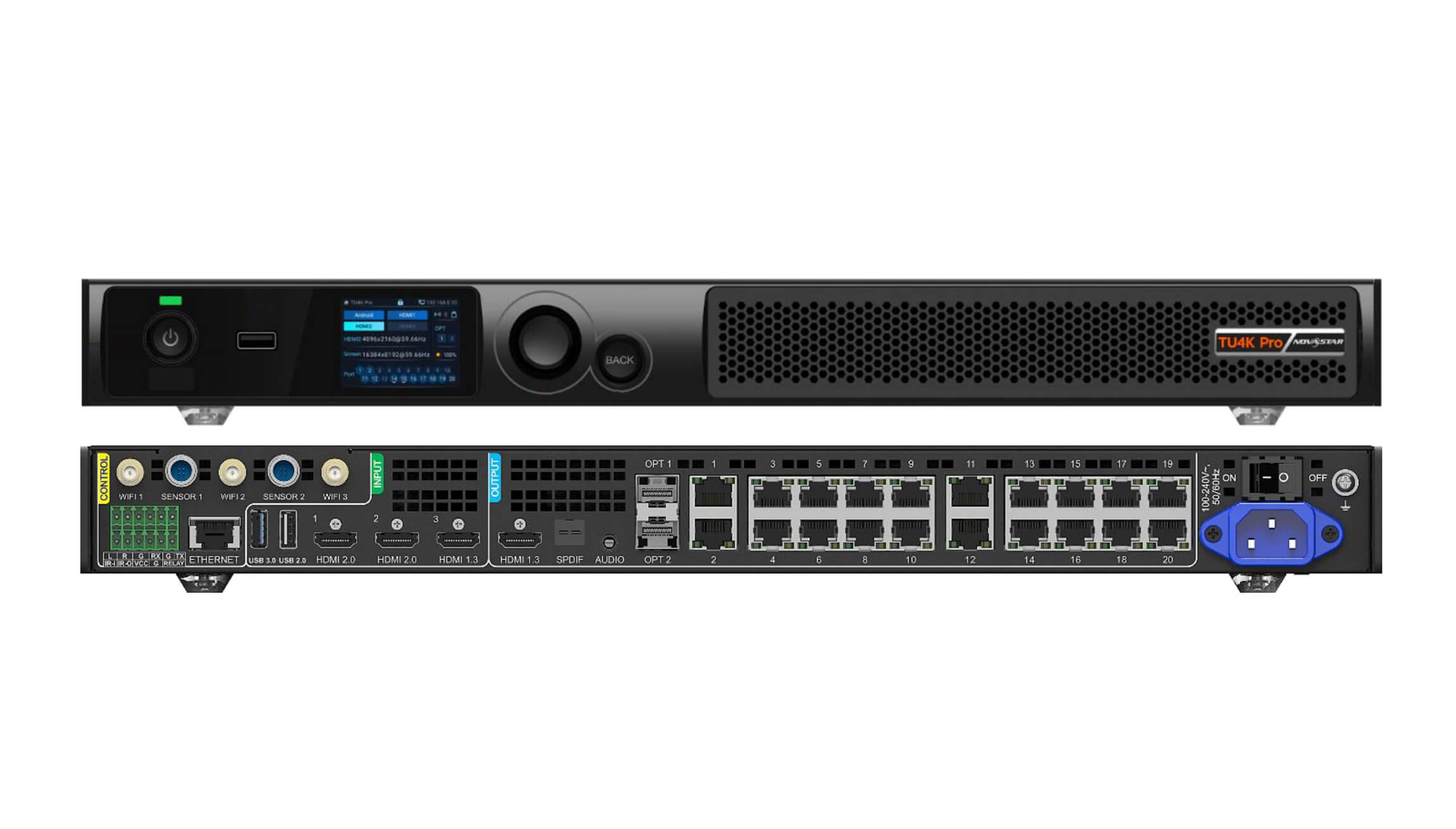
Any practical NovaStar TU4K Pro va TU20 Pro or TU15 Pro spec check starts with four lines on the sheet: pixel ceiling, Ethernet and optical jacks, HDMI bandwidth, and audio/room-control ports.
| spetsifikatsiyasi | NovaStar TU15 Pro | NovaStar TU20 Pro | NovaStar TU4K Pro |
|---|---|---|---|
| Maksimal piksel yuklanishi (8 bit @ 60 Gts) | 2.6 million piksel | 3.9 million piksel | 13.0 million piksel |
| Gigabit RJ45 outputs | 4 band | 6 band | 20 band |
| 10G SFP+ optical outputs | Yo'q (faqat mis RJ45) | Yo'q (faqat mis RJ45) | 2 x 10G OPT (OPT 1 portlari 1–10; OPT 2 portlari 11–20) |
| Maksimal kenglik / balandlik | Up to 4,096 px wide / 1,920 px tall | Up to 4,096 px wide / 1,920 px tall | Up to 16,384 px wide / 8,192 px tall |
| HDMI kirishlari | 2 x HDMI 1.3 | 2 x HDMI 1.3 | 1 x HDMI 2.0 (4K@60Hz) + 2 x HDMI 1.3 |
| HDMI loop / monitor out | 1 x HDMI 1.3 chiqishi | 1 x HDMI 1.3 chiqishi | 1 x HDMI 2.0 tsikli + 1 x HDMI 1.3 monitor chiqishi |
| USB & control ports | 1x USB 2.0, 1x USB 3.0 | 1x USB 2.0, 1x USB 3.0 | USB 3.0, USB 2.0, Type-C, RS232, Gigabit LAN |
| Audio chiqishlar | 3.5 mm analog + SPDIF raqamli + Bluetooth | 3.5 mm analog + SPDIF raqamli + Bluetooth | 3.5 mm analog + SPDIF optical/coax + HDMI audio |
| Wireless & network | Dual Wi-Fi (AP + STA) + Gigabit LAN | Dual Wi-Fi (AP + STA) + Gigabit LAN | Ikkita/uchta Wi-Fi antennalari (AP + STA) + Gigabit LAN |
| Room scale | Small huddle & 1080p meeting rooms | O'rtacha majlislar xonalari va 21:9 nisbatdagi ultra keng devorlar | 4K auditoriums, lecture halls & command rooms |
3. NovaStar TU4K Pro chuqur dive: auditoriyalar va majlislar zallari uchun 13M pikselli 4K flagman
The NovaStar TU4K Pro anchors the top of the TU series. Once conference integrators drop pixel pitch down to P0.9, P1.25, or P1.56 across a 160-inch to 220-inch auditorium wall, native canvas resolution shoots right past 1080p up to true 4K UHD (3,840 x 2,160 = 8,294,400 pixels) or wide 5K displays.
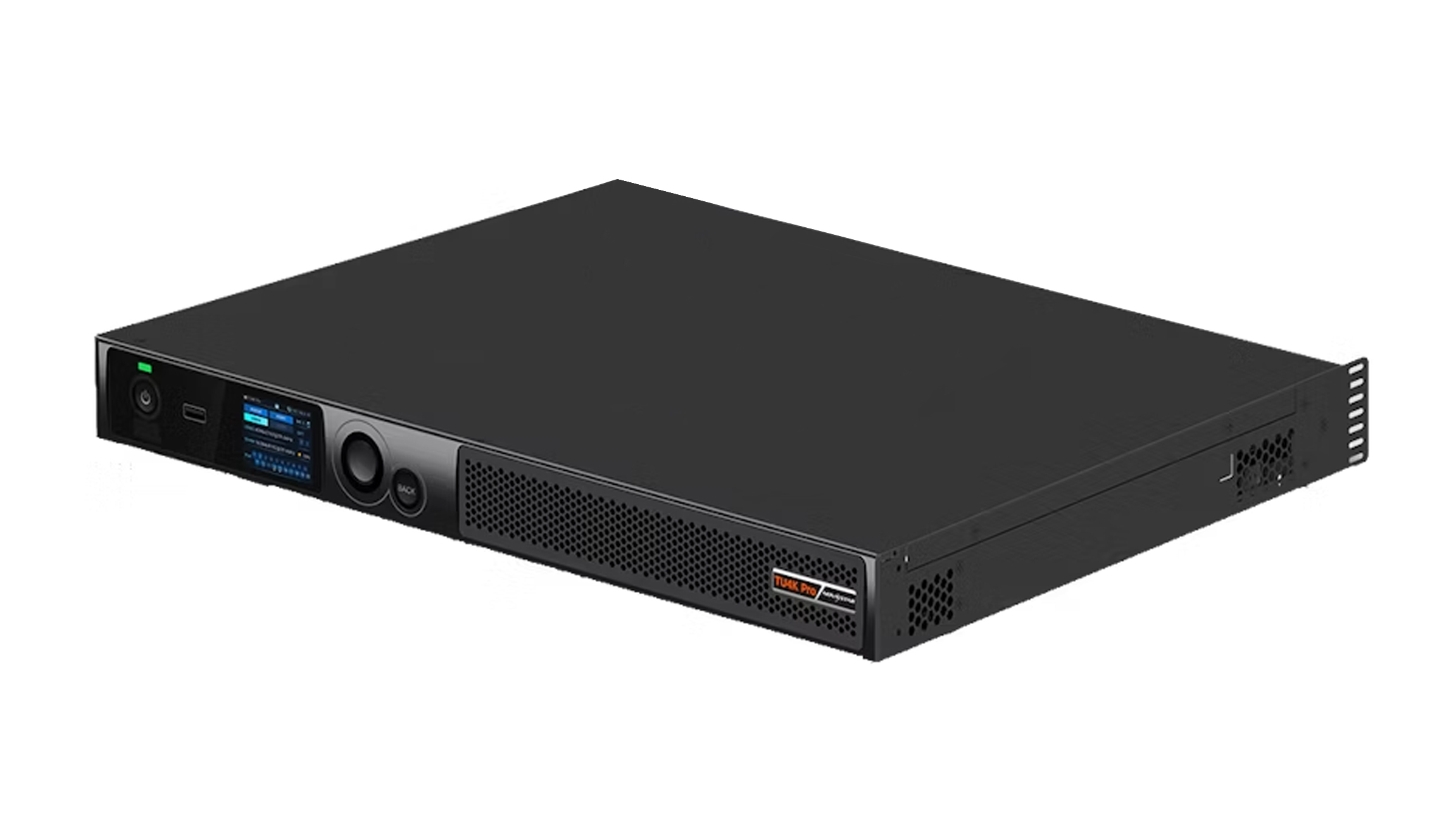
01. 20 Gigabit Ethernet portlari va 2 ta 10G optik tolali chiqishlar
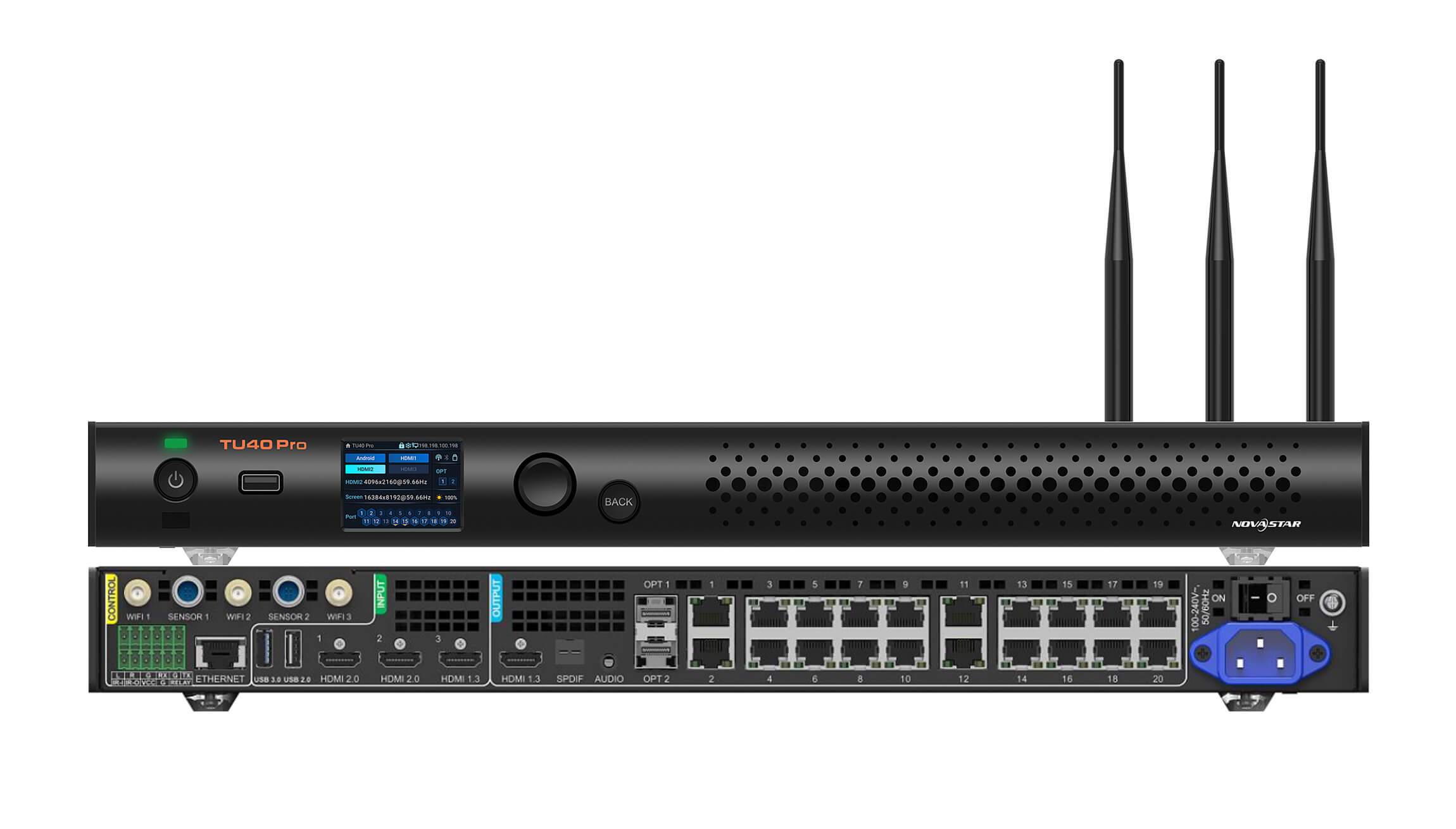
Look at output density in a NovaStar TU4K Pro va TU20 Pro matchup and the hardware jump hits you right away. The TU4K Pro packs 20 ta RJ45 Ethernet portlari driving up to 13 million piksel at 8-bit 60 Hz. That lights up a native 4K screen (8.29M pixels across 13–14 ports) with spare ports left over, or runs a 6.5M-pixel boardroom wall with full 10 primary plus 10 hot-backup lines out of one 19-inch (482.6 mm) rack unit.
For auditoriums where the AV closet sits more than 80 to 100 m (262 to 328 ft) behind the stage, the TU4K Pro also gives you 2 x 10G SFP+ fiber ports (OPT 1 mirrors Ethernet 1–10; OPT 2 mirrors Ethernet 11–20). Pop in NovaStar 10G SFP single-mode optics and feed two CVT10-S fiber converters parked behind the wall instead of fighting 20 thick copper runs through ceiling conduit.
02. Haqiqiy 4K@60Hz HDMI 2.0 kirish va ko'p oynali hamkorlik
While the TU15 Pro and TU20 Pro stay on HDMI 1.3 (ideal for 1080p60 laptops), the TU4K Pro steps up with an HDMI 2.0 input plus loop-out alongside two HDMI 1.3 inputs. Executive rooms running 4K60 Teams or Cisco conferencing codecs land directly at native 3,840 x 2,160 with crisp spreadsheet clarity, plus multi-window PIP and wireless split casting. Need an intermediate step between TU20 Pro and TU4K Pro? Check the NovaStar TU40 Pro.
Don’t cheap out on passive copper HDMI cords either once table boxes sit far from the screen. Standard passive HDMI cables choke on 4K 60 Hz 18 Gbps bandwidth past 5 to 7 m (16.4 to 23.0 ft), making the boardroom wall flicker black whenever presenters move chairs. On any NovaStar TU4K Pro va TU20 Pro conference build with a credenza over 10 m (32.8 ft) from the lectern, pull active optical HDMI cables or compact HDBaseT extenders rated for full 4:4:4 bandwidth—you’ll cut out half the frustrating “no signal” helpdesk calls before executives ever step inside the room.
4. NovaStar TU20 Pro va TU15 Pro: 2K va ultra keng majlislar xonalari uchun ixcham aqlli boshqaruv
Most corporate meeting walls fall between 2.4 x 1.35 m (7.9 x 4.4 ft) and 4.8 x 2.7 m (15.7 x 8.9 ft) at Full HD (1,920 x 1,080) or 21:9 ultra-wide dimensions. Installing a 20-port 4K rack unit behind a 108-inch meeting wall just wastes budget and power. That’s why the NovaStar TU20 Pro va TU15 Pro handle the bulk of day-to-day corporate installs.
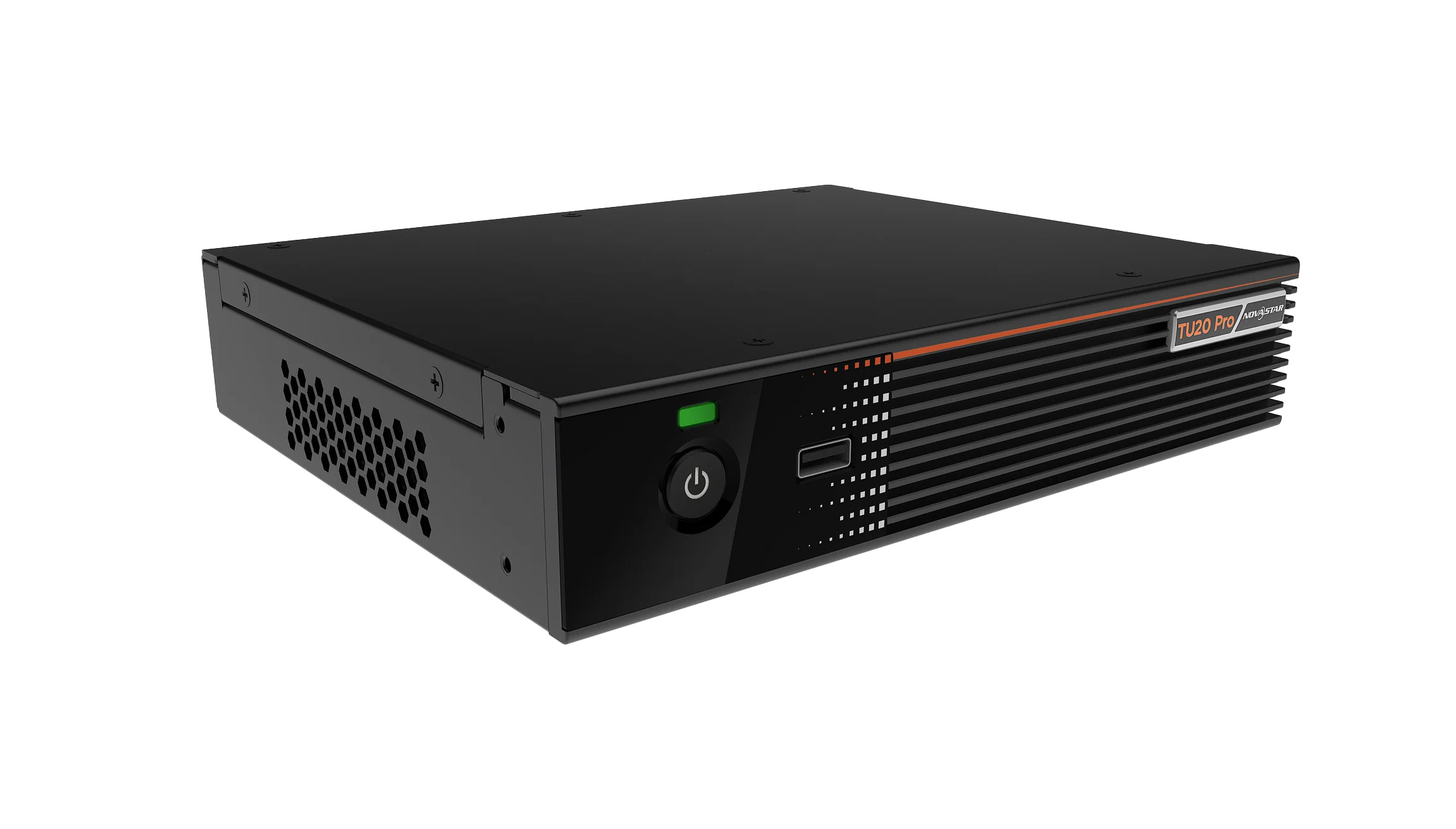
01. NovaStar TU20 Pro: 6 Ethernet ports (3.9M pixels) for Full HD and 21:9 rooms
bir NovaStar TU4K Pro va TU20 Pro quote for standard boardrooms, the TU20 Pro wins whenever total wall pixels fit inside 3.9 million piksel (6 Ethernet outputs). Even on a normal 1,920 x 1,080 Full HD screen (2,073,600 pixels), having six RJ45 ports gives you two practical wins:
- Symmetrical column wiring on 6-wide walls: Many 16:9 cabinet kits sit 6 or 10 cabinets wide. Six ports let you wire one home-run cable per vertical column cleanly without exceeding 650,000 pixels per port on awkward zigzags.
- 21:9 Teams Front Row ultra-wide rooms: Ultra-wide room canvases like 2,560 x 1,080 (2,764,800 px) or 2,880 x 1,215 (3,499,200 px) blow right past a 4-port 2.6M limit, yet sit comfortably inside the TU20 Pro’s 3.9M ceiling.
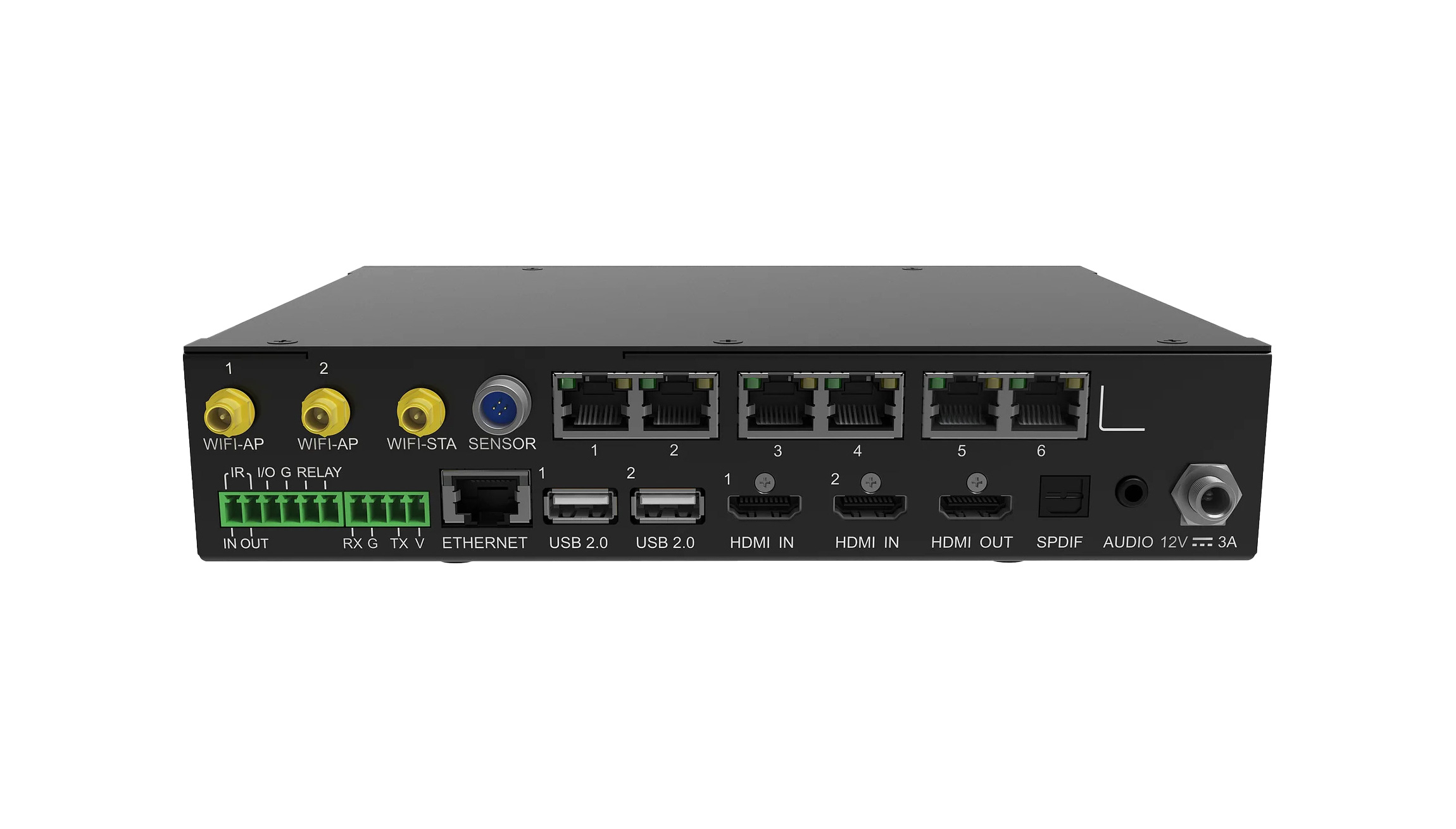
02. NovaStar TU15 Pro: 4 Ethernet ports (2.6M pixels) for compact huddle rooms
When a compact 1,920 x 1,080 or 1,280 x 720 wall divides evenly onto 2 to 4 Ethernet lines, the NovaStar TU15 Pro packs the exact same Android engine, dual-Wi-Fi screen casting, dual HDMI 1.3 inputs, and ViPlex Handy smartphone app control in a trimmer 4-port (2.6M pixel) box.
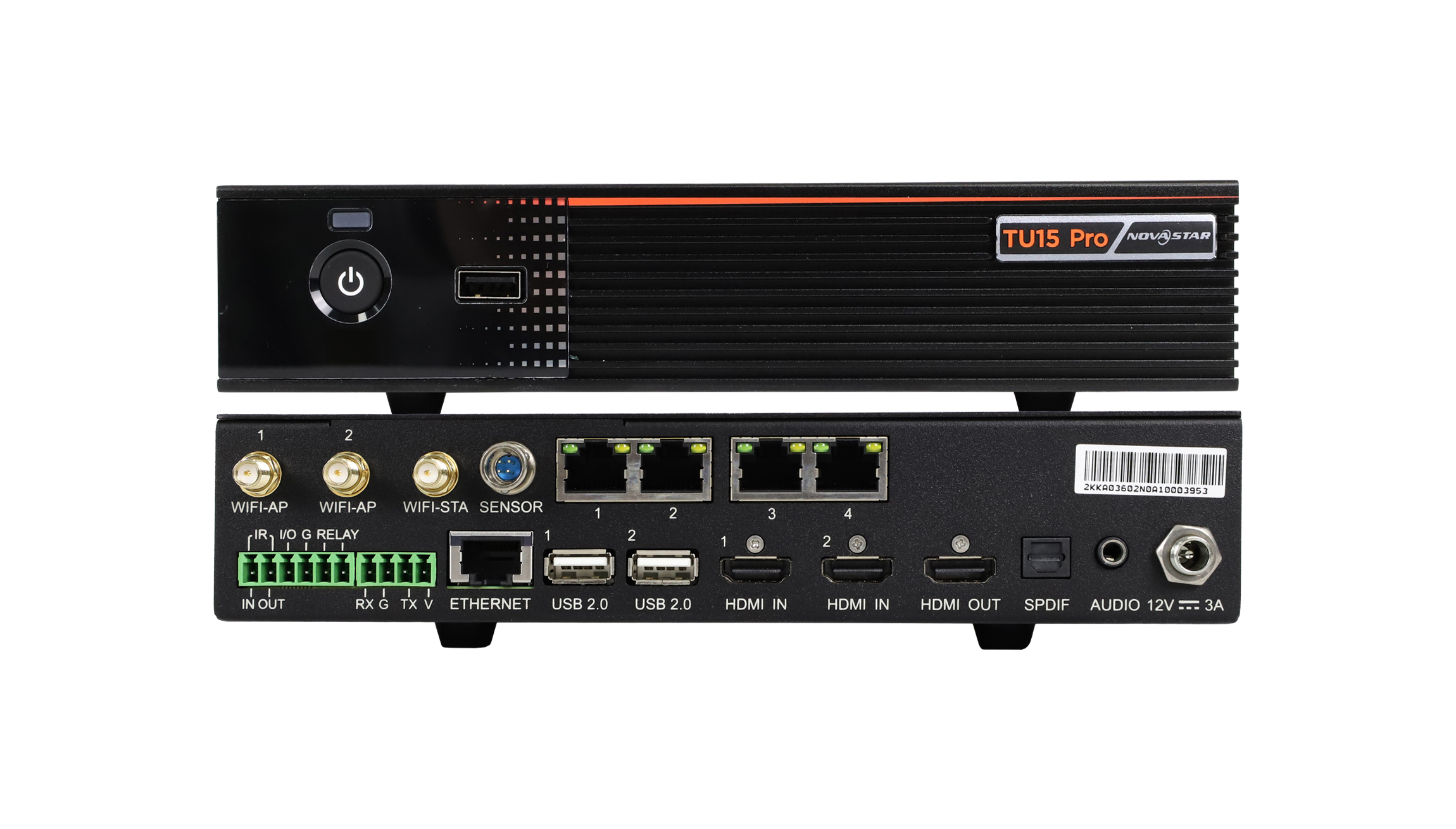
Because both the TU15 Pro and TU20 Pro slip straight behind all-in-one wall bezels or sit quietly inside shallow credenzas, you skip building out a noisy rack. When IT managers standardize multiple rooms across an office using a NovaStar TU4K Pro va TU20 Pro split—putting TU20 Pro units in medium conference rooms and reserving the 20-port TU4K Pro for the flagship auditorium—every staff member gets the exact same wireless casting workflow while the 6-port TU20 Pro runs cooler and draws noticeably less power inside tight furniture.
Don’t overlook mounting clearance and IR sensor placement if you tuck a TU15 Pro or TU20 Pro behind closed wood millwork. Even low-power Android processors build up pocket heat when trapped in unvented credenza drawers beside a room amplifier, so punch rear cabinet intake/exhaust slots or space equipment neatly on perforated shelves. Keep an inexpensive short Cat6 service tail coiled neatly behind the bezel too—you’ll thank yourself later when someone needs quick NovaLCT access or firmware reloads without unmounting bottom trim modules.
5. Simsiz ekran aks ettirish, audio chiqishlar va dinamik tasvirni yaxshilash
Beyond raw port specs in a NovaStar TU4K Pro va TU20 Pro comparison, it’s the everyday meeting-room features that keep AV helpdesk tickets quiet:
- Simultaneous Dual-Wi-Fi (AP + STA): Nothing annoys visiting guests faster than dropping internet the second they join a screen’s casting Wi-Fi. All three TU models run independent Access Point (AP) and Station (STA) antennas alongside Gigabit Ethernet LAN so guests cast screens locally without losing web access.
- Zero-dongle casting & ViPlex Handy remote: Laptops and phones cast straight from Windows, macOS, AirPlay, and Android (optional wireless dongles exist where guest Wi-Fi is locked down by IT). Hosts can also use the free ViPlex Handy phone app as a wireless touchpad, dimmer, and input switcher.
- Clean room sound output (SPDIF, 3.5 mm, Bluetooth 5.1): TU units strip stereo audio right off HDMI or local files and feed external soundbars, DSP mixers, or ceiling amps directly via optical SPDIF, 3.5 mm line-out, or Bluetooth.
- NovaStar receiving cards only: Every TU controller drives genuine NovaStar LED qabul qilish kartalari kabi A10s Plus or A10s Pro. Load initial
.rcfgxparameters using NovaLCT tools from our NovaStar dasturiy ta'minot yuklab olish sahifasi (and check our receiving card vs sending card guide if mapping hardware first).
01. Room audio sync, CEC & Crestron/Extron integration tips
Two little details save awkward phone calls from executive assistants after a conference wall goes live. First, test Bluetooth audio only for casual background demos—on real video conferences or spoken presentations, hard-wire audio through optical SPDIF or 3.5 mm balanced line converters straight into your room DSP so Bluetooth buffering lag won’t throw off presenter lip-sync. Second, whenever you tie a TU processor into a tabletop Crestron, Extron, or Q-SYS touch panel over RS232 or TCP/IP, lock a fixed static IP reservation on the corporate switch and verify wake-on-LAN / screen blanking commands before signing off the punch list. Users shouldn’t have to hunt for a physical remote just to turn the wall on Monday morning.
Also watch aspect-ratio cropping when guests cast vertically from smartphones or share ultra-wide 21:9 spreadsheets onto a standard 16:9 boardroom canvas. Setting clean default scaling rules inside the TU OS stops distorted text and keeps multi-person wireless casting readable even from the back corners of a twenty-seat room.
6. Konferensiya xonasi o'lchamlarini aniqlash matritsasi: piksel balandligi va tomonlar nisbatini o'ng TU protsessoriga moslashtirish
To narrow down a NovaStar TU4K Pro va TU20 Pro or TU15 Pro pick during fast project quoting, match typical conference diagonals (figured at 8-bit 60 Hz with standard 600 x 337.5 mm / 23.6 x 13.3 in 16:9 cabinets) against the matrix below.
| Screen Diagonal & Size | Pitch & Cabinet Grid | Resolution & Total Pixels | Min Ports (8-Bit 60 Hz) | Best-Fit TU Controller |
|---|---|---|---|---|
| 108 dyuym (2.4 x 1.35 m / 7.9 x 4.4 fut) | P1.25 (600 x 337.5 mm o'lchamdagi shkaflardan iborat 4 x 4 panjara) | 1,920 x 1,080 piksel (2,073,600 piksel) | 4 band | TU15 Pro (or TU20 Pro for spare ports) |
| 135 dyuym (3.0 x 1.69 m / 9.8 x 5.5 fut) | P1.56 (600 x 337.5 mm o'lchamdagi shkaflardan iborat 5 x 5 panjara) | 1,920 x 1,080 piksel (2,073,600 piksel) | 4–5 ports (by column) | TU20 Pro (1 port per column cleanly) |
| 163 dyuym (3.6 x 2.025 m / 11.8 x 6.6 fut) | P1.875 (600 x 337.5 mm o'lchamdagi shkaflardan iborat 6 x 6 panjara) | 1,920 x 1,080 piksel (2,073,600 piksel) | 4–6 ports (1 per column) | TU20 Pro (6 ports match 6 columns) |
| 21:9 Ultra-Wide Room (4.2 x 1.69 m / 13.8 x 5.5 ft) | P1.25 (7 x 5 grid) or P1.56 ultra-wide | 3,360 x 1,350 px (4.54M px) or 2,560 x 1,080 px (2.76M px) | 5 ports (at 2.76M) or 8 ports (at 4.54M) | TU20 Pro (to 3.9M px) or TU40 Pro / TU4K Pro |
| 216-inch 4K Auditorium (4.8 x 2.7 m / 15.7 x 8.9 ft) | P1.25 (600 x 337.5 mm o'lchamdagi shkaflardan iborat 8 x 8 panjara) | 3,840 x 2,160 piksel (8,294,400 piksel) | 14–16 portlar | TU4K Pro (20 ports + HDMI 2.0 + 10G OPT) |
Notice why a 5 x 5 (135-inch) or 6 x 6 (163-inch) 1080p cabinet wall shows the practical value of stepping up in a NovaStar TU4K Pro va TU20 Pro and TU15 Pro choice: although 2,073,600 pixels fit mathematically inside the 4-port TU15 Pro, having 6 ports on the TU20 Pro lets installers run one straight Ethernet drop per column (345,600 px/port) instead of zig-zagging columns awkwardly across cabinet splits.
7. Videoni ko'rib chiqish: TU15 Pro va TU20 Pro qurilmalarida HDMI va ichki manbalarni almashtirish
Watch the quick clip above to see how staff flip cleanly between the built-in Android desktop (wireless screen casting, lobby graphics, USB playback) and live HDMI 1 / HDMI 2 conference room table plugs without touching a Windows laptop.
Tez-tez so'raladigan savollar
NovaStar TU4K Pro va TU20 Pro taqqoslashidagi asosiy farq nima?
The gap comes down to pixel limit, Ethernet port density, fiber support, and 4K HDMI inputs. The TU20 Pro gacha qo'llab-quvvatlaydi 3.9 million piksel across 6 RJ45 outputs with dual HDMI 1.3 ports (great for 1080p and 21:9 meeting rooms). The TU4K Pro pushes up to 13 million piksel across 20 RJ45 ports, includes 2 x 10G optik tolali portlar for long auditorium runs, and adds a true 4K@60Hz HDMI 2.0 kirish.
NovaStar TU15 Pro, TU20 Pro va TU4K Pro hali ham LED shkaflari ichida qabul qiluvchi kartalarni talab qiladimi?
Yes. Just like VX scalers and TB players, every TU unit outputs NovaStar Gigabit Ethernet data streams and requires genuine NovaStar LED qabul qilish kartalari (such as A10s Plus, A8s, A5s Plus, or MRV boards) mounted inside the LED frames.
TU15 Pro, TU20 Pro yoki TU4K Pro ni Crestron, Extron yoki Q-SYS xona boshqaruv tizimlari bilan integratsiya qila olamanmi?
Yes. Built-in RS232 serial and LAN TCP/UDP control commands let AV programmers link power wake/standby, HDMI switching, brightness, and volume presets directly onto Crestron, Extron, AMX, or Q-SYS touchpanels.
How many laptops or mobile devices can cast wirelessly to a TU20 Pro or TU4K Pro at once?
Multiple guest devices can stay joined to the TU hotspot at once, while the screen canvas splits cleanly to show up to 2 or 4 active wireless screen-mirroring windows side by side (depending on processor model and firmware mode).
NovaStar TU20 Pro yoki TU4K Pro ni Colorlight bilan ishlata olamanmi yoki Huidu kartalarni qabul qilishmi?
No. NovaStar TU boxes speak NovaStar’s closed Gigabit protocol and only drive NovaStar receiving cards. Compare control ecosystems first in our NovaStar va Colorlight va boshqalar Huidu hidoyat.
NovaStar TU protsessoriga buyurtma berishdan oldin AV integratsiyasini tekshirish ro'yxati
Qulflashdan oldin NovaStar TU4K Pro va TU20 Pro or TU15 Pro order for a client room, confirm six practical facts: exact native screen resolution (width x height), cabinet row/column grid for neat Ethernet column drops, whether conference codecs output 1080p60 (HDMI 1.3) or native 4K60 (needing the TU4K Pro’s HDMI 2.0 input), room speaker feed type (SPDIF, 3.5 mm, or Bluetooth), cable distance from equipment closet to screen (over 80 m / 262 ft means 10G fiber + CVT10 on TU4K Pro), and the exact NovaStar receiving card inside the wall.
Want our technicians to double-check your cabinet grid and control-port math before you commit to a NovaStar TU4K Pro va TU20 Pro qurmoq? Send your screen resolution and AV room notes through our contact page so we verify compatibility ahead of shipping. And when a project calls for full turnkey conference cabinets ready to hang on the wall, you can compare complete LED screens over at EagerLED.