កំពុងតម្រៀបចេញ NovaStar ទល់នឹង Colorlight ទល់នឹង Huidu comes down to who touches the display once your crew packs up and leaves the site. Pick ណូវ៉ាស្តារ for touring rigs, broadcast rooms, and big synchronous stages where freelance techs already know the software cold; pick ពន្លឺពណ៌ for crisp indoor fine-pitch corporate walls and fixed commercial screens chasing high pixel count per rack dollar; and pick Huidu for storefronts and LED posters controlled straight from a phone app or USB stick with zero PC in sight.
Make that brand call before signing off on cabinet hardware, because sending units, receiving boards, and software suites don’t cross-talk at all. Mixing up a single spare card later turns into dead panels, scrambled scan rows, and wasted overnight shipping.
Let’s look at how each ecosystem behaves on a live workbench—from synchronous vs asynchronous modes and software file habits to representative models and where each brand falls short.
1. Side-by-side platform comparison: NovaStar vs Colorlight vs Huidu
មានទំងន់ NovaStar ទល់នឹង Colorlight ទល់នឹង Huidu usually shakes out around three jobsite realities: whether the wall needs live video with minimal lag or scheduled ad loops, which program your tech crew doesn’t have to Google at midnight, and how many pixels fit inside the rack budget.
| កត្តាវាយតម្លៃ | ណូវ៉ាស្តារ | ពន្លឺពណ៌ | Huidu |
|---|---|---|---|
| Primary control mode | Synchronous-first, plus Taurus asynchronous players | Balanced synchronous processors and cloud players | Asynchronous-first, plus budget synchronous VP units |
| Standout shop strengths | Universal rental crew familiarity, pixel calibration, dual backup | Clean low-nit grayscale, dense 4K/8K loading, strong cost per pixel | Quick Wi-Fi/phone app updates, direct HUB75 option, lowest box cost |
| ឧបករណ៍កម្មវិធី | NovaLCT, SmartLCT, VMP, ViPlex Express | LEDVISION, iSet, ColorlightCloud | HDPlayer, HDSet, LedArt app, XiaoHui Cloud |
| Config file format | .rcfgx / .rcfg | .rcvp / .rcvbp | Smart configuration profiles saved via HDSet |
| Flagship examples | NovaPro UHD Jr, A10s បូក | ពន្លឺពណ៌ X 40 ម។, X20 ម៉ែត្រ | HD-C16L, HD-B6L |
2. NovaStar for rental, broadcast, and large synchronous walls
ណូវ៉ាស្តារ rules live events, broadcast stages, and multi-vendor rental yards across North America and Europe. Here’s why integrators stick with it on tight load-ins: you can drop almost any freelance LED technician behind a rack and they’ll open NovaLCT or VMP without needing a phone call to tech support.
01. Hardware pairing and redundancy
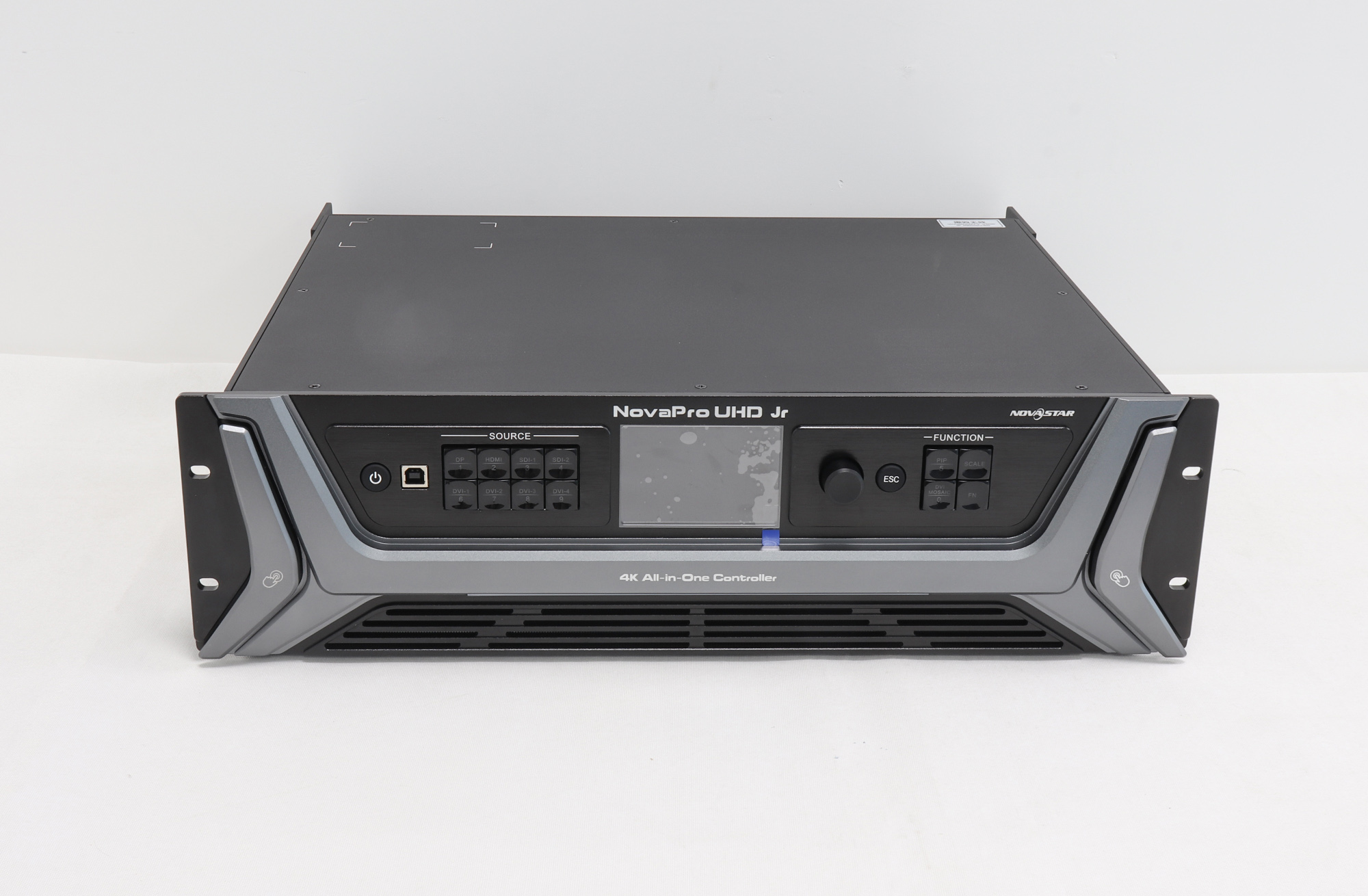
Pair a 4K scaler like the NovaPro UHD Jr with high-density NovaStar A10s Plus receiving cards and you get 10-bit/12-bit HDR pipelines plus hot Ethernet loop backup. Once copper runs cross 80 to 100 m (262 to 328 ft), plug into NovaStar’s 10G optical cages and feed converters downstage cleanly over single-mode fiber.
02. Where NovaStar isn’t worth the extra spend
Putting a full synchronous rack processor on a 3 x 2 m (9.8 x 6.6 ft) storefront ad screen wastes cash and forces you to babysit an external playback PC. Simple retail loop screens are better off on NovaStar’s Taurus TB boxes or a compact Huidu កាត។
3. Colorlight for fine-pitch indoor and commercial fixed installs
ពន្លឺពណ៌ shows up constantly in executive boardrooms, museum lobbies, and luxury retail walls. Turn an indoor fine-pitch display down to 400 or 600 nits (cd/m²) so presenters don’t get blinded, and Colorlight keeps dark gray suits smooth instead of crushing shadows into purple blocks.
01. Dense loading per rack space
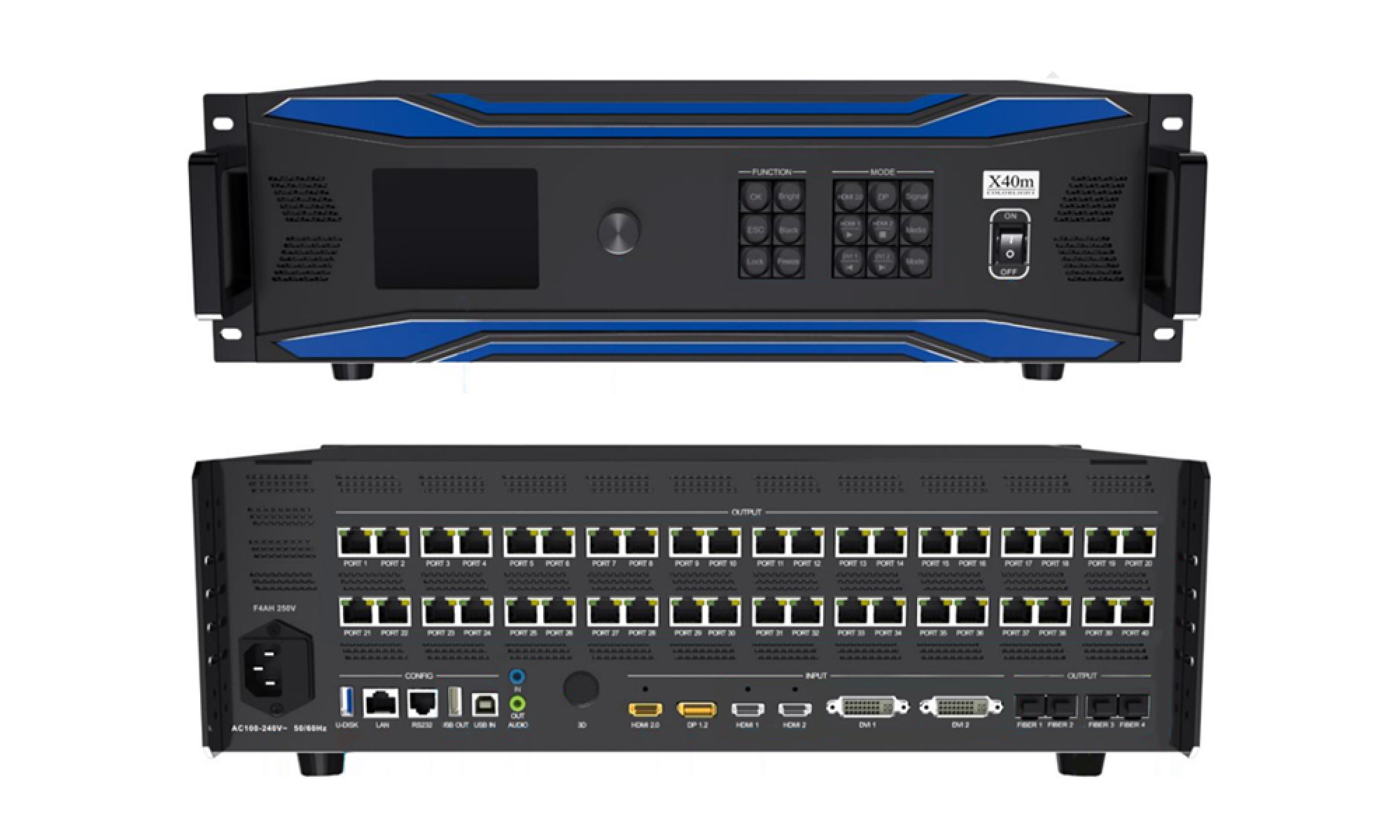
Big fixed-install ឧបករណ៍បញ្ជាវីដេអូ LED ដូចជា ពន្លឺពណ៌ X 40 ម។ squeeze huge canvas totals into fewer rack boxes, trimming hardware totals on 110–120 V US and 220–240 V European commercial bids without giving up 24/7 uptime.
02. Ecosystem catch to check first
Colorlight cabinets run on LEDVISION and iSet using .rcvp or .rcvbp receiving files. Before picking Colorlight for an out-of-state franchise rollout, make sure the local service shop has clean config backups saved and isn’t expecting NovaLCT menus when swapping a board two years later.
4. Huidu for asynchronous signage, posters, and PC-free screens
Huidu builds gear for shop owners who just want fresh promo slides on the wall without booting a control PC. Its កាតត្រួតពិនិត្យ LED អសមកាល store clips inside flash memory and update straight over USB, LedArt phone Wi-Fi, LAN, or cloud dashboards.
01. Direct HUB75 output vs adding receiving cards
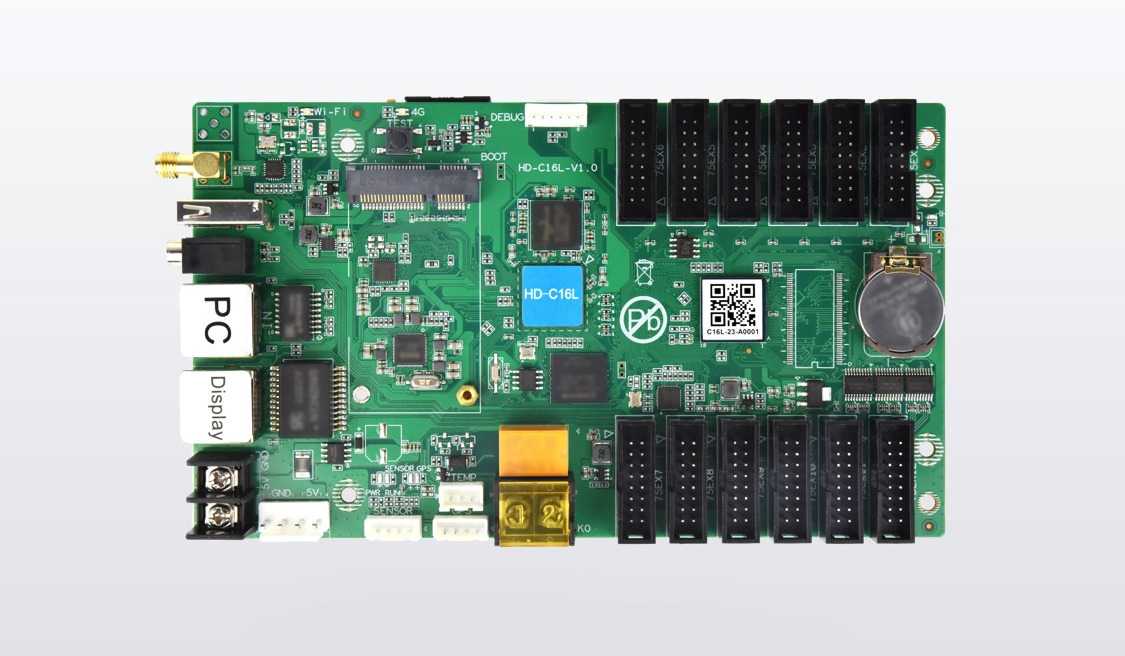
On small storefront headers, boards like the Huidu HD-C16L carry onboard HUB75E headers that wire straight to modules inside their pixel ceiling—no extra receiving cards required. For standing lobby totems, the Huidu HD-B6L adds HDMI splicing designed around multi-poster cascades.
02. កន្លែងណា Huidu runs out of room
ទោះបីជា Huidu makes capable budget VP processors, you won’t find it in touring broadcast rigs where genlock, sub-frame camera delay, and cross-company cabinet sub-hires are non-negotiable.
5. Decision matrix: choosing NovaStar vs Colorlight vs Huidu by project
Still weighing NovaStar ទល់នឹង Colorlight ទល់នឹង Huidu on an open quote? Don’t pick a logo out of habit—match how video enters the wall and who services it five years from now:
| សេណារីយ៉ូគម្រោង | Best Brand Fit | ហេតុអ្វីបានជាវាសម | ពិនិត្យមុនពេលបញ្ជាទិញ |
|---|---|---|---|
| Touring stage & rental fleets | ណូវ៉ាស្តារ | Freelance crews know it already, fast cabinet remap, dual loop backup | Remember 10-bit or 120 Hz cuts RJ45 port pixels roughly in half |
| Indoor fine-pitch boardroom | Colorlight or NovaStar | Clean low-nit grayscale (400–800 nits) and crisp 4K input scaling | Verify HDMI 2.0 / DP 1.2 plug count covers room video codecs |
| Outdoor commercial billboard | Huidu or NovaStar Taurus | PC-free flash playback, 4G cloud pushes, scheduled sensor dimming | Match light sensor port and local US/EU 4G cellular bands |
| Retail fascia & LED posters | Huidu | Phone app updates, optional hub-less HUB75 ports, lowest controller spend | Watch max width/height bounds before linking tall poster cascades |
6. Hardware setup walkthrough
Take two minutes with the rack walk-around above to see how input jacks, RJ45 LED outputs, and optical fiber bays line up on a synchronous controller. Even if your job settles on Colorlight or Huidu instead, every wall follows the exact same physical path from source wire to controller to cabinet card.
សំណួរដែលគេច្រើនសួរ
តើខ្ញុំអាចលាយ NovaStar, Colorlight និង Huidu sending and receiving cards on one wall?
No. Every ecosystem speaks its own Ethernet packet format. A NovaStar sender won’t light up Colorlight or Huidu កាតទទួល LED, and vice versa. Grab a closer look at how both ends work in our ការណែនាំអំពីកាតទទួល LED ទល់នឹងកាតផ្ញើ.
When does an asynchronous controller beat a synchronous one?
Go asynchronous whenever your screen plays scheduled promo clips, menus, or announcements with no live camera or laptop switcher involved. Go synchronous anytime live HDMI, DVI, DisplayPort, or SDI feeds need near-instant screen updates—like auditoriums, sanctuaries, or trade-show booths.
How many pixels can one Gigabit Ethernet port drive across these systems?
At standard 8-bit color and 60 Hz, expect roughly 650,000 pixels per Gigabit RJ45 jack across all three brands. Bumping to 10-bit or 12-bit HDR—or running 120 Hz frame rates—cuts per-port load roughly in half, so check exact controller limits before laying out cables.
What happens if a cabinet receiving card fails three years down the road?
Drop in a compatible card from the exact same brand and push the saved config file (.rcfgx on NovaStar or .rcvbp on Colorlight). Keeping 2% to 5% batch spares on a shelf saves major headaches later.
Next steps for selecting your control platform
មុនពេលបិទខ្ទប់មួយ NovaStar ទល់នឹង Colorlight ទល់នឹង Huidu BOM, jot down five job notes: total pixel canvas (width x height), cabinet size and pitch, content style (live HDMI/SDI vs cloud loop), cable distance from rack to the first panel, and whether dual Ethernet or fiber redundancy belongs on the quote.
Already repairing an existing wall or want a second set of eyes on your NovaStar ទល់នឹង Colorlight ទល់នឹង Huidu បញ្ជីគ្រឿងបន្លាស់? Send your cabinet photos and pixel map through our contact page so our techs check compatibility first. If you’re ordering brand-new built cabinets rather than loose control boards, check full LED displays over at EagerLED.