Colorlight A500 LED Cloud Player Overview
The Colorlight A500 is an LED display cloud player for installations that need both live HDMI content and scheduled media playback. Its eight Ethernet outputs drive up to 5.2 million pixels. It suits advertising displays, exhibition halls and hotel lobbies where operators need to change content locally or over a network.
Selection note: 8K describes video decoding capability. It does not mean the A500 can drive a full native 8K LED wall. Check your screen’s total pixels, cabinet layout and output-port allocation before ordering.
Technical Specifications
| Parameter | Specification |
|---|---|
| LED output capacity | Up to 5.2 million pixels across 8 Gigabit Ethernet outputs |
| Maximum layout dimensions | Width up to 7,680 pixels or height up to 4,096 pixels; total pixel limit still applies |
| HDMI inputs | 3 inputs: HDMI 1 up to 3840 × 2160 at 60 Hz; HDMI 2 and 3 up to 3840 × 2160 at 30 Hz |
| HDMI output | 1 HDMI 2.0 output, up to 3840 × 2160 at 60 Hz |
| Video playback | 8K decoding and playback; supports multi-window programs |
| System and storage | Android 13; 4 GB DDR memory and 64 GB eMMC storage |
| Network access | LAN and dual-band Wi-Fi; optional 4G/5G module |
| Audio outputs | SPDIF digital audio and 3.5 mm stereo audio |
| Receiving cards | Colorlight receiving cards; confirm the project configuration |
| Power input | AC 100–240 V, 50/60 Hz |
Live HDMI and Scheduled Playback
Use synchronous display for a connected live HDMI source, or asynchronous playback for stored programs. PlayerMaster lets you arrange and overlap windows containing video, images, text, clocks, web content and weather. This supports a practical lobby layout: a main promotional video beside a clock and an information panel.
The front-panel display, knob and buttons provide local control. Operators can select an HDMI source, return to asynchronous playback, adjust brightness or black out the screen without rebuilding a program.
Local and Cloud Content Management
- LAN and Wi-Fi: Manage programs and device settings through a wired network or wireless connection.
- USB publishing: Use a USB drive for plug-and-play content updates at the installation.
- Cloud workflow: Use ColorlightCloud and compatible software to publish and manage content remotely.
- Optional accessories: Specify a 4G/5G module if cellular connectivity is required. Ambient-light control requires a suitable sensor, sold separately.
For software and model documentation, use the official Colorlight download center. Check firmware and software compatibility before commissioning an existing system.
Check Your LED Display Before Ordering
- Calculate the screen resolution in pixels: width × height. Stay within the total capacity and individual dimension limits.
- Confirm cabinet wiring, receiving-card models and the pixel allocation on each Ethernet output.
- List your live HDMI sources and their resolutions. HDMI 2 and HDMI 3 have a lower maximum input frame rate than HDMI 1.
- Choose local or remote publishing and identify any cellular or sensor accessories needed for the installation.
Browse our LED media players for other screen sizes. For a configuration check, send us your screen resolution, cabinet layout and receiving-card model.
Frequently Asked Questions
Can the A500 drive a full 8K LED screen?
No. An 8K UHD screen at 7680 × 4320 contains about 33.2 million pixels, exceeding the A500’s 5.2-million-pixel LED output capacity. Source decoding and LED output capacity must be checked separately.
Does the A500 support both live and stored content?
Yes. It supports synchronous HDMI display and asynchronous program playback. Choose the mode and content layout to suit the installation.
Are cellular connectivity and brightness sensors included?
The 4G/5G module and sensors are optional. Confirm the supplied configuration when requesting these functions.
Conclusion
Choose the Colorlight A500 for a compatible LED installation within 5.2 million pixels that needs live HDMI input, scheduled media and network management. Confirm output mapping and required accessories so the player matches your actual screen.
Product Images and Specification Download
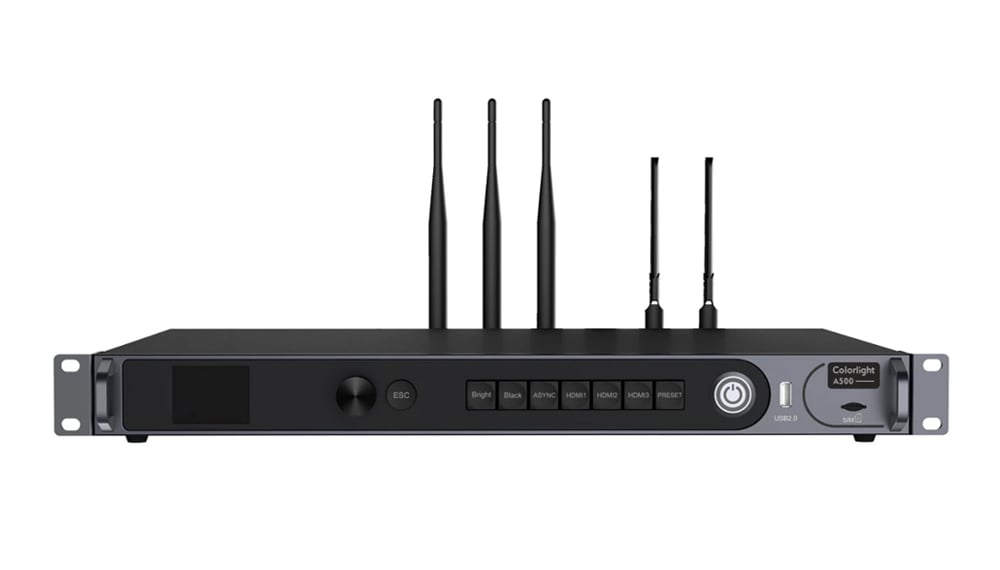
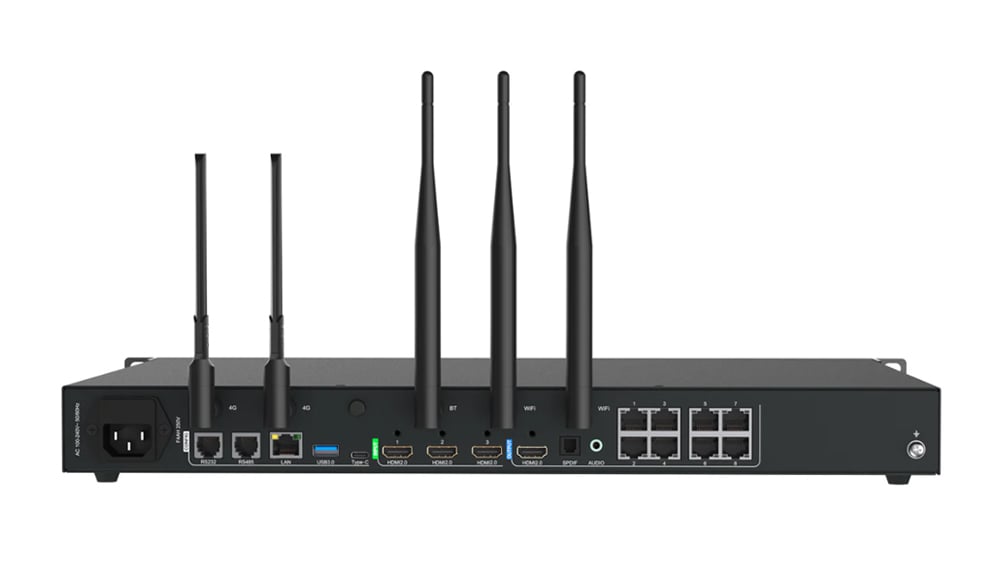
Download Specification:
Colorlight A500 LED Display Cloud Player Specification