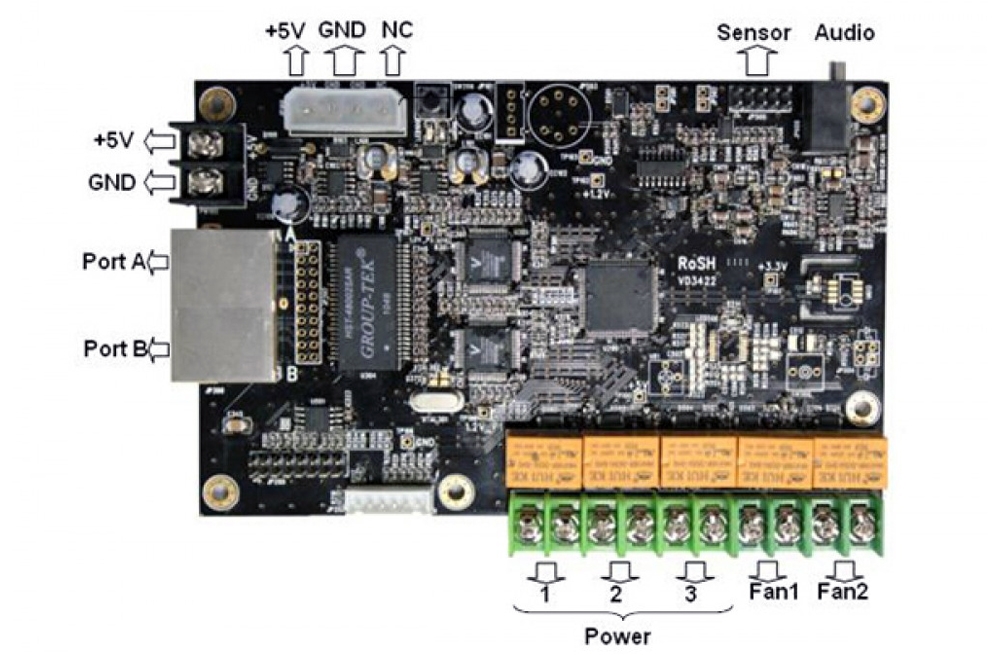
The Mooncell M-MFN02 multifunction card adds environmental monitoring, power control and audio output to an LED display installation. It supports eight power-control channels and four light sensors, alongside temperature and humidity monitoring.
M-MFN02 specifications
| Parameter | Specification |
|---|---|
| Brand / model | Mooncell M-MFN02 |
| Receiving-card connection | RJ45 ports |
| Computer control connection | RS232 serial ports |
| Power control | 8 power-supply control channels |
| Light sensor support | 4 sensors |
| Environmental monitoring | Temperature and humidity |
| Audio | Integrated audio output |
Connections and accessory selection
RJ45 ports connect the card with receiving cards, while RS232 provides a connection to the control computer. Plan the sensor positions, control wiring and audio connection for the display before installation.
Confirm the required light sensor and temperature/humidity probe separately. The available listing does not state relay contact ratings, the card supply voltage or which accessories are included.
Frequently Asked Questions
What is the Mooncell M-MFN02 used for?
It adds power-control, sensor-monitoring and audio-output functions to an LED display system. The listed connections include RJ45 for receiving cards and RS232 for the control computer.
How many power-control channels does the card support?
The listing specifies eight power-supply control channels. Relay contact ratings and direct-load limits are not given here; confirm the required switching equipment and wiring before installation.
How many brightness sensors can connect to M-MFN02?
The card supports four light sensors. Check the exact sensor model and connection arrangement when planning automatic brightness control.
Does the M-MFN02 monitor temperature and humidity?
Yes. Temperature and humidity monitoring are listed functions. Confirm the compatible probe and whether it is included with your order.
Does the card include audio output?
Yes. Integrated audio output is listed. Check the connector and audio-system requirements against the specification before connecting external equipment.
Product photos and specification download


Download Specification