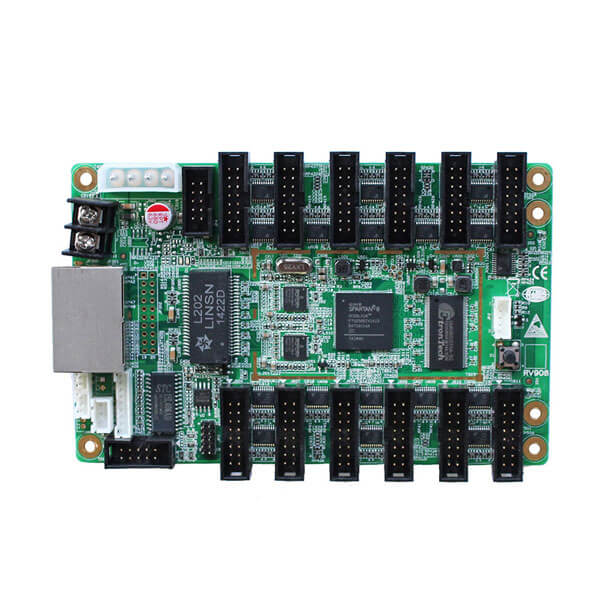
Sređivanje Linsn RV908 vs RV901 receiving cards takes about five seconds once you look at the output connectors on the right side of the board. Pick a Linsn RV908 series card (RV908M32, RV908H32, ili RV908T) when your LED cabinet plugs 16-pin HUB75 flat ribbon cables straight into the receiving card—giving you 12 onboard HUB75 headers with zero external adapter boards. Pick a Linsn RV901 series card (RV901T or RV901H) when your cabinet uses two 50-pin female pin headers (JP1 and JP2) designed to mate with a separate LED hub card (such as a HUB75B, HUB75E, or outdoor DIP HUB40/HUB08 adapter board).
Thousands of outdoor highway billboards, stadium perimeter walls, and stage rental rigs built over the past decade run on Linsn hardware. Walk into a service job on one of those walls today and you’ll run into two headaches right away: first, knowing whether an older RV908H, RV908T, or RV801D can be swapped for a current RV908M32; second, figuring out why LEDStudio or LedSet asks for an unlock password before letting you load the .rcg and .con files.
Evo kako a Linsn RV908 vs RV901 hardware check works on the workbench, how to pair either board with a Linsn TS802D or TS806D sending unit, and the exact sequence for reading back .rcg files from a live cabinet without wiping the screen.
1. The core hardware split: 12 onboard HUB75 headers (RV908) vs 50-pin hub headers (RV901)
Under the hood, the main FPGA processing logic on an RV908 and an RV901 comes from the exact same Linsn ninth-generation platform. In fact, if you look at a Linsn RV908 vs RV901 datasheet side by side, both cards share the same 12-bit/16-bit internal color processing, the same bidirectional Gigabit RJ45 network jacks, and the same .rcg configuration file architecture inside LEDStudio. The reason Linsn sells both boards is purely mechanical.
| Model | Module Output Interface | External Hub Card Required? | Scan Mode Support | Onboard Cabinet Monitoring | Typical Cabinet Use Case |
|---|---|---|---|---|---|
| Linsn RV908M32 | 12 x 16-pin HUB75E headers | No (direct ribbon cable to modules) | Static up to 1/32 scan (supports E address pin) | Temperature, voltage, cable BER; optional smoke/fan port | Current all-purpose replacement for 1/16 and 1/32 scan SMD cabinets |
| Linsn RV908H32 | 12 x 16-pin HUB75E headers | No (direct ribbon cable to modules) | Static up to 1/32 scan | Full environmental monitoring header (fan, smoke, flat-cable check) | High-spec outdoor and rental cabinets requiring 1/32 scan + health sensors |
| Linsn RV908H | 12 x 16-pin HUB75 headers | No (direct ribbon cable to modules) | Static, 1/2, 1/4, 1/8, 1/16 scan | Full onboard multifunction monitoring | Legacy 1/16-scan SMD rental and fixed outdoor cabinets |
| Linsn RV908T | 12 x 16-pin HUB75 headers | No (direct ribbon cable to modules) | Static up to 1/16 scan (or firmware-specific) | Standard voltage & temperature readback | Cost-effective replacement for standard 1/8 and 1/16 scan SMD walls |
| Linsn RV901T | 2 x 50-pin female headers (JP1, JP2) | Da (requires HUB75, HUB40, or HUB08 card) | Static up to 1/16 or 1/32 scan (via matching hub card) | Standard voltage & temperature readback | Outdoor DIP P10/P16 billboards & older rental cabinets using a piggyback hub board |
| Linsn RV901H | 2 x 50-pin female headers (JP1, JP2) | Da (requires external hub card) | Static up to 1/16 or 1/32 scan | Full onboard environmental & ribbon monitoring | Older monitoring-equipped cabinets with piggyback HUB boards (replacing RV801D) |
01. Why you can’t just swap an RV908 into an RV901 cabinet without checking the ribbons
Suppose a customer calls and says, “My cabinet has a Linsn RV901T with a piggyback HUB75B board on top of it. Can I throw away both boards and bolt in a single Linsn RV908M32?”
Electrically, yes—if that piggyback board is a standard 8-port or 12-port HUB75 board, an RV908M32 replaces both the RV901T and the hub card in one piece. In fact, in many Linsn RV908 vs RV901 field retrofits on older SMD cabinets, eliminating the 50-pin press-fit connection between an RV901 and its piggyback hub card gets rid of one of the biggest sources of vibration-induced contact failure on outdoor signs. Međutim, if that RV901T is plugged into an outdoor DIP hub board (like a HUB40, HUB08, or HUB12 pinout used on traditional DIP346 P10 or P16 outdoor highway billboards), the ribbon cables inside the cabinet are not HUB75 pinout. You must keep the original hub board and install a replacement Linsn RV901T or RV901H.
02. Pixel capacity and color bit depth across a Linsn RV908 vs RV901 daisy chain
Whether you choose an RV908M32 or an RV901T + hub card, both ninth-generation receivers carry up to 256 x 256 to 512 x 256 pixels per card (exact width and height envelope depends on scan mode, refresh rate, and how many RGB data groups are enabled inside the .rcg file). On a standard Gigabit Ethernet run from Port U or Port D of a Linsn TS802D sending card, the entire daisy chain of receiving cards on one network cable can drive up to 650,000 pixels at 8-bit 60 Hz (for example, 1,280 x 512 or 1,024 x 640 pixels). Keep in mind during any Linsn RV908 vs RV901 troubleshooting call that if you enable 10-bit or 12-bit color mode inside LEDStudio, per-port pixel capacity drops proportionally—so always verify color depth settings before adding extra cabinets onto an existing network port.
2. Decoding Linsn RV908 suffixes: RV908M32 vs RV908H32 vs RV908H vs RV908T
Once you know your cabinet uses the 12-header integrated board, the next question in a Linsn RV908 vs RV901 spare-parts order is what those trailing letters—M32, H32, Hi T—actually mean.

01. The “32” suffix (RV908M32 & RV908H32): pin 8 E-line support for 1/32-scan modules
Ranije Linsn RV908 cards—specifically the classic Linsn RV908H i Linsn RV908T—were designed when nearly all SMD LED modules used 1/4, 1/8, or 1/16 scan (requiring only four row-address lines: A, B, C, D). When indoor P2.5, P2.0, and P1.86 modules adopted 1 / 32 skeniranje, Pin 8 on the 16-pin HUB75 header became the fifth address line (E line).

Iz tog razloga Linsn dodao je 32 suffix on the Linsn RV908M32 i Linsn RV908H32: both drive 1/2, 1/4, 1/8, 1/16, and 1/32 scan modules directly out of the box. Better yet, an RV908M32 is backward-compatible with older 1/16-scan RV908T and RV908H cabinets once you load your cabinet’s .rcg file in LEDStudio or LedSet.
02. What “H”, “M”, and “T” stand for
T(as in RV908T / RV901T): The streamlined, cost-optimized edition removing extra auxiliary sensor headers while keeping full video performance and basic voltage/temperature readback.H(as in RV908H / RV908H32 / RV901H): Includes the full onboard environmental monitoring interface (supporting cabinet door switch, fan tachometer, smoke/humidity sensors, and flat-cable fault detection without a separate multifunction card inside every cabinet).M32(as in RV908M32): The mainstream 1/32-scan production board that replaced most standard RV908 inventory across indoor and outdoor SMD screens.
3. When you still need an RV901T, RV901H, or RV801D with an external hub board
U Linsn RV908 vs RV901 maintenance audit on older outdoor screens or rental inventory, open the cabinet door and look at how the receiving card mounts. If you see a green card with two black 50-pin female header strips (JP1 and JP2) and a second smaller board pressed down on top of it where the ribbon cables plug in, you’re looking at an RV901T, RV901H, or the older eighth-generation Linsn RV801D.

01. Zamjena starijeg Linsn RV801 or RV801D with an RV901T / RV901H
If a 7-to-10-year-old wall still runs eighth-generation Linsn RV801D cards, you don’t need to hunt down dusty used boards. The ninth-generation Linsn RV901T i RV901H use the exact same dual 50-pin JP1 / JP2 pinout and mounting holes, so your existing piggyback HUB board presses straight onto the new RV901 card. When technicians evaluate Linsn RV908 vs RV901 options for an older RV801 wall, keeping the existing HUB75 or HUB40 adapter board and snapping it onto an RV901T takes two minutes per cabinet because you don’t even have to unplug the sixteen individual flat ribbon cables from the hub board—you simply unbolt the bottom RV801 card, press the old hub board onto the new RV901T’s JP1 and JP2 headers, reconnect the 5 V power wires and Cat5e jumpers, and push the .rcg file from LEDStudio. By contrast, switching that same cabinet from an RV801 + HUB75 board over to a one-piece RV908M32 in a Linsn RV908 vs RV901 upgrade requires transferring every flat ribbon cable one by one from J1–J12 on the old hub board to JH1–JH12 on the new RV908M32.
02. Reading the onboard LED status lights during a Linsn RV908 vs RV901 service call
Before you condemn a receiving card in a Linsn RV908 vs RV901 diagnosis, check the two tiny surface-mount indicator LEDs next to the RJ45 jacks while the cabinet is powered on:
- Red power indicator solid ON: Confirms 5 V DC is reaching the card. If the red LED is dim or flickering, measure voltage across the 5 V screw terminals—anything below 4.5 V DC points to a failing cabinet power supply or oxidized terminal lug rather than a dead Linsn kartica.
- Green data indicator flashing rapidly: Confirms Gigabit Ethernet packets from the TS802D sending card are arriving and locking cleanly. If the green LED stays completely dark or blinks slowly once per second, swap the incoming Cat5e/Cat6 jumper from the previous cabinet before replacing the card.

4. Upstream pairing: TS802D sending cards, TS806D / SB-9 boxes, and X8406 processors
Whether you install an RV908M32 or an RV901T inside the cabinet, every Linsn receiving card needs a Linsn sending unit upstream at the control PC or video processor rack. Just like we covered in our Vodič za prijemne kartice LED u odnosu na kartice za slanje, you can’t plug a Linsn receiving card into a NovaStar or Colorlight sender.

- Linsn TS802D / TS801D PCIe Sending Card: The classic 2-port Gigabit sending card (up to 1.3 million pixels on TS802D: Port U and Port D, 650,000 pixels per port at 8-bit 60 Hz) that plugs into a desktop PC PCI slot (for 5 V power) and takes a DVI video loop from your graphics card plus a USB type-B cable for LEDStudio / LedSet parameter configuration.
- Linsn SB-9 External Control Box & Linsn TS806D Sending Box (Ili TS951): Modern control laptops don’t have internal PCI slots. An SB-9 enclosure holds one TS802D externally with its own AC power supply, while a TS806D houses two TS802D cards (4 Gigabit outputs, 2.6 million pixels) in one rack-mount box.
- Sve-u-jednom Linsn video processors (such as the Linsn X8406): Combine multi-input HDMI/DVI video scaling, 4-window PIP layout, and built-in Linsn sending ports in a single rack unit.
5. Loading .RCG and .CON files in LEDStudio and LedSet (plus the 168888 unlock code)
Swapping hardware in a Linsn RV908 vs RV901 repair is only half the job—the new card arrives from the factory with generic default parameters, so that single cabinet will show scrambled lines or stay dark until you push the screen’s configuration file. Linsn splits screen configuration into two file extensions that you should always back up onto a USB drive:
| File / Setting | Što kontrolira | Where It Lives & How to Recover It |
|---|---|---|
.RCG file (Receiving Card Config) | Module driver IC timing, scan mode (1/16 vs 1/32), cabinet pixel width/height, RGB data group order, refresh rate, and OE polarity | Stored inside each RV908 / RV901 receiving card’s flash memory. Can be read back from a healthy cabinet or downloaded from our Linsn RCG file download archive |
.CON file (Receiver Connection Map) | How many cabinets sit in the grid (columns x rows) and the exact snake/daisy-chain path of Ethernet Port U and Port D | Stored in the receiving chain / sending card map inside LEDStudio or LedSet (Receiver Connection kartica) |
168888 (Unlock Password) | Unlocks the hidden Software Setup / Hardware Config screen inside LEDStudio | In LEDStudio, click Option → Software Setup, a zatim upišite linsn on your keyboard (no text box appears first) and enter 168888 in the password popup |
| LEDStudio vs LedSet | LEDStudio is the full legacy playback + hardware suite; LedSet (2.0 / 3.0) is the lightweight standalone hardware setup utility | Both are available in our Linsn LEDStudio & LedSet software download page |
01. Step-by-step: cloning a working cabinet’s .RCG onto a replacement RV908 or RV901
If you lost the original USB stick that came with the screen, don’t run Intelligent Setup from scratch if the rest of the wall is working fine. Follow our detailed guide (Kako ažurirati Linsn LED sigurno prima podatke s kartice) or use this quick four-step clone procedure:
- Connect your Windows laptop to the TS802D / sending box via USB cable, open LED set (Ili LEDStudio → Option → Software Setup → tip
linsn→ enter168888). - Before touching the .rcg, test-read the existing parameters from a working cabinet (e.g., Receiver #1) and immediately click Spremi u datoteku on your laptop desktop as
backup_working.rcg. Also check our besplatno Linsn RCG file repository if every card on a single-cabinet sign died. - Send that .rcg file to the replacement RV908 or RV901 card, verify the image on the replaced cabinet matches its neighbors, and click Save to Receiver (which writes the .rcg permanently into onboard flash EEPROM so it survives power-off).
- If the new cabinet displays the top-left corner of the video instead of its own grid position, open the Receiver Connection (.CON) karticu i kliknite Send to Receiver + Save to Receiver to restore its X/Y coordinate in the daisy chain.
6. Bench video: Linsn X8406 4-window video processor and sender setup
The video walkthrough above shows how an all-in-one Linsn video processor like the X8406 combines multi-input HDMI/DVI window scaling with built-in Linsn sending outputs, replacing a separate desktop PC and TS802D PCI card in commercial control racks.
Često postavljana pitanja
How can I tell at a glance in a Linsn RV908 vs RV901 check which card is inside my cabinet?
Look at how the flat 16-pin gray ribbon cables attach to the card. If 8 to 12 flat ribbon cables plug directly into two rows of white/black 16-pin male headers soldered onto the main green receiving card, you have a Linsn RV908 (kao što je RV908M32, RV908H32, ili RV908H). If the main receiving card has two long 50-pin female header strips (JP1 and JP2) with a separate adapter board (labeled HUB75, HUB40, or HUB08) pressed on top of it, you have a Linsn RV901 (RV901T or RV901H) or older RV801.
Can I replace an old Linsn RV908T or RV908H with a Linsn RV908M32?
Da. Linsn RV908M32 is backward-compatible with 1/2, 1/4, 1/8, and 1/16 scan cabinets originally built with the RV908T or RV908H, while also adding 1/32-scan support for newer fine-pitch modules. Simply transfer the existing .rcg and .con configuration files from a healthy cabinet using LEDStudio or LedSet and click Save to Receiver.
What is the secret password to open Hardware Setup inside Linsn LEDStudio?
Open LEDStudio, click Option → Software Setup in the top menu bar, type the word linsn directly on your keyboard (all lowercase, even though no cursor box is visible), and when the password prompt pops up, type 168888 and press Enter. That reveals the hidden Prijamnik (.rcg) and Receiver Connection (.con) setup tabs.
Why do the two RJ45 ports on a Linsn TS802D sending card say U and D instead of 1 and 2?
Na Linsn TS802D sending card, the two Gigabit Ethernet output jacks are labeled U (Up / Output 1) i D (Down / Output 2), each carrying up to 650,000 pixels at 8-bit 60 Hz. Inside the Receiver Connection tab in LEDStudio or LedSet, you assign which cabinet chain is plugged into Network Port U and which chain is plugged into Network Port D. In contrast, the two RJ45 ports on an RV908 or RV901 receiving card inside the cabinet are non-directional—either jack can be used as input or output.
Can I drive a Linsn RV908M32 or RV901T receiving card from a NovaStar VX600 or Colorlight X40m controller?
Ne Linsn RV908 vs RV901 receiving card only understands Linsn’s proprietary Gigabit Ethernet protocol and must be driven by a Linsn sending card (such as TS802D, TS806D, TS951, or a Linsn X-series video processor). If you want to switch an entire wall over to NovaStar, you must replace both the sending controller and every cabinet receiving card (see our NovaStar protiv Linsn buyer’s comparison).
What to photograph inside a Linsn cabinet before ordering spare cards
Before ordering replacement boards in a Linsn RV908 vs RV901 service job, open one working cabinet and snap three quick photos: the white version sticker and silkscreen print on the receiving card (RV908M32, RV908H32, RV908T, RV901T, RV801D), the hub adapter board code (if your cabinet uses an RV901 with a piggyback HUB75 or HUB40 card), and the sending card or sending box model back at the control computer (TS802D, TS806D, TS951). Also check right away whether your control PC still has a saved copy of the screen’s .rcg and .con files.
If you’re dealing with a discontinued Linsn card revision or need help matching an RV908M32 / RV901T to an older cabinet, send your cabinet board photos through our contact page and our bench techs will confirm the exact drop-in replacement. And when an older DIP or SMD wall reaches the point where replacing complete weatherproof cabinets costs less than piecemeal board repairs, you can browse full replacement LED displays at EagerLED.