
Quick answer: This page is a consolidated Colorlight software download center for LEDVISION, iSet, ColorAdept, PlayerMaster, user manuals, specifications and firmware. For most Windows-based LED screen setup tasks, start with LEDVISION. Use iSet for advanced screen configuration and calibration. Firmware must match the exact controller model and hardware revision.
Last reviewed: August 18, 2026. Newer versions are listed first where possible, but the newest file is not always the correct file for older hardware.
Which Colorlight software should you download?
Choose the application by task and hardware family, not by version number alone. The table below gives the fastest starting point.
| Tool | Best for | Platform guidance |
|---|---|---|
| LEDVISION | LED display configuration, screen connection and content playback on compatible Colorlight control systems | Use the Windows packages listed below |
| iSet | Screen parameter setup, mapping, adjustment and advanced configuration | Windows and macOS packages are available below |
| ColorAdept | Color management and configuration workflows for supported Colorlight hardware | Choose the Windows or macOS package that matches your computer |
| PlayerMaster / ColorlightCloud | Program publishing and management for compatible media players and cloud players | Confirm the player model in its manual before installation |
| Firmware | Device-specific fixes and feature updates | Match the exact model, PCB or hardware revision and current firmware branch |
Before you install Colorlight firmware
Important: Do not install firmware only because its version number is higher. A package intended for another model or hardware revision can make a controller unavailable.
- Read the model name and hardware or PCB revision from the device label.
- Record the current software and firmware versions before changing anything.
- Back up the LED screen configuration and receiver-card parameters.
- Use a stable power and network connection during the update.
- If the model or revision is unclear, confirm compatibility before installing.
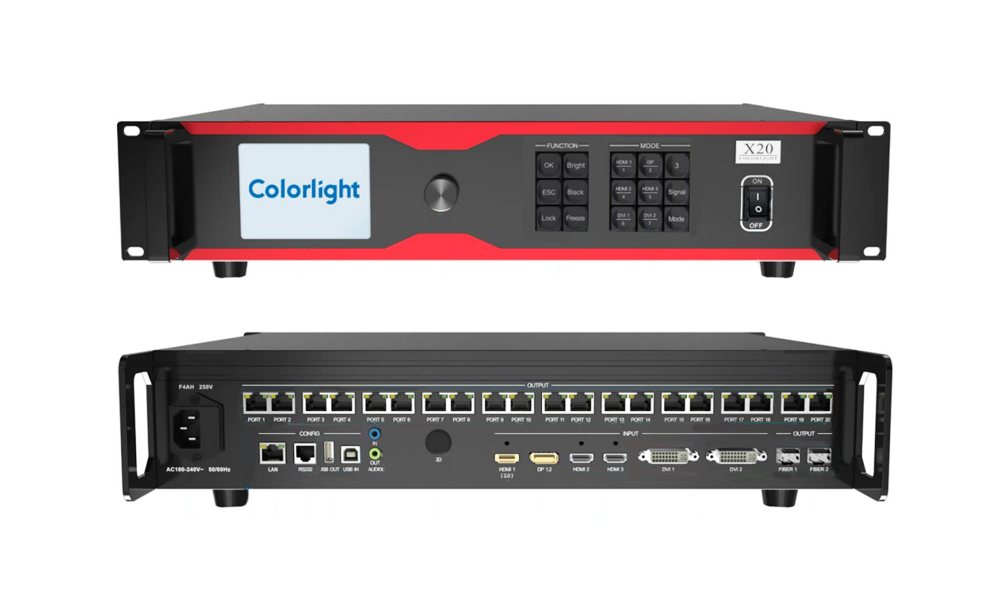
To compare hardware with the download families on this page, see the Colorlight X20 controller, Colorlight AX6K media station, Colorlight A40 cloud player, or browse LED receiving cards.
Colorlight Software Downloads
| Colorlight iSet |
|---|
| Colorlight LEDVISION |
|---|
| Colorlight LEDVISION V9.6 | Colorlight LEDVISION V9.2 | Colorlight LEDVISION V9.0 |
|---|---|---|
| Colorlight LEDVISION V8.8 | Colorlight LEDVISION V8.6 | Colorlight LEDVISION V8.5 |
| Colorlight LEDVISION V8.0 | Colorlight LEDVISION V7.2 | Colorlight LEDVISION V7.0 |
| Colorlight LEDVISION V6.9 | Colorlight LEDVISION V6.8 | Colorlight LEDVISION 6.6 Setup |
| Colorlight LEDVISION 6.5 Setup | Colorlight LEDVISION 6.0 Setup | Colorlight LEDVISION 5.0 Setup |
| Colorlight LEDVISION 4.20 Setup | Colorlight LEDVISION 4.18 Setup | Colorlight LEDVISION 4.12 Setup |
| Colorlight LEDVISION 3.66 Setup | Colorlight LEDVISION 3.50 Setup | Colorlight LEDVISION 2.05 (For 5A and i5A Series) |
| Colorlight LEDVISION 3.15 (For 5A and i5A Series) | Colorlight LEDVISION 3.50 (For 5A and i5A Series) |
| Colorlight ColorAdept |
|---|
| Colorlight GrandShow | Colorlight LED Assistant | Colorlight DSConfig | Colorlight DSManager |
|---|---|---|---|
| CE Basic V2.0 | LED Assistant(iOS) V5.2.4 | DSConfig V1.0 | DSManager V1.0 |
| CE PhoneAPP(Harmony OS/Android) | LED Assistant V5.0.58 for Android |
| Colorlight PlayerMaster | Colorlight LEDUpgrade | Colorlight Calibration Pro | Colorlight Colorhome | Colorlight Kylin VICP |
|---|---|---|---|---|
| PlayerMaster V1.9 | Colorlight LEDUpgrade V5.0 | Calibration Pro V7.2 | Colorhome(Andriod版) V1.4 | Colorlight Harmony OS/Android |
| PlayerMaster V1.8 | Colorlight LEDUpgrade V4.0 | Calibration Pro V7.0 | Colorhome (iOS 版) V1.4 | |
| PlayerMaster V1.4 | Colorlight LEDUpgrade V3.6 | Colorlight Calibration Pro V6.5.0 Setup | ||
| PlayerMaster V1.2 | Colorlight LEDUpgrade V3.2 | Colorlight Calibration Pro V5.5 Setup | ||
| Colorlight LEDUpgrade V3.0 | Colorlight Calibration Pro V4.0 Setup | |||
| Colorlight LEDUpgrade V2.6 | Colorlight Calibration Pro V3.5 Setup |
Colorlight Software User Manuals
Colorlight Specifications and User Manuals
Colorlight Video Processor Specifications and Manuals
| Colorlight Super Processor |
|---|
| Colorlight Professional Processor |
|---|
Colorlight LED Control System Specifications and Manuals
| Colorlight Receiving Card |
|---|
| Colorlight Accessories |
|---|
ColorlightCloud Specifications and Manuals
| Colorlight Cloud Player | ColorlightCloud Server | ColorlightCloud Software |
|---|---|---|
| A4K User Manual V1.2 | ColorlightCloud User Manual V1.1 | PlayerMaster User Manual V1.4 |
| A4K Specification V1.4 | ||
| A2K User Manual V1.4 | ||
| A2K Specification V1.3 | ||
| C3Pro User Manual V2.0 | ||
| C3Pro Specification V2.1.1 | ||
| A100 Specification V3.2 | ||
| A200 Specification V2.2 | ||
| A100&A200 User Manual V1.1 |
Colorlight Media Server Specifications
Colorlight Firmware Downloads
Colorlight Video Processor Firmware
| Colorlight Professional Processor Firmware |
|---|
| Colorlight Super Processor Firmware |
|---|
| Colorlight Video Splicer Firmware |
|---|
Colorlight LED Control System Firmware
| Colorlight Receiving Card |
|---|
| Colorlight Sender Firmware | Colorlight Accessories Firmware |
|---|---|
| S20 V2.60 | iM9 V13.00 |
| S20F V1.20 | |
| S6F PCB6.1 V4.60 | |
| S4 PCB5.0 V3.0 | |
| S2 V6.0 |
ColorlightCloud Firmware
Colorlight Media Server Firmware
Colorlight Software Download FAQ
Which Colorlight software is used to configure an LED screen?
LEDVISION is the usual starting point for configuring and controlling a compatible Colorlight LED display from Windows. iSet is used for advanced screen setup, mapping and adjustment. The correct choice still depends on the controller family and project workflow.
Is Colorlight software available for macOS?
Some iSet and ColorAdept releases on this page include macOS packages. LEDVISION downloads listed here are Windows packages. Check the operating-system label beside each link before downloading.
Should I always install the newest Colorlight firmware?
No. Install firmware only when the package explicitly matches the device model and hardware or PCB revision. Back up the current configuration first. Version number alone does not prove compatibility.
What is included on this download page?
The page groups Colorlight software installers, user manuals, product specifications and firmware for video processors, LED control systems, cloud players and media servers. Package names and version labels are shown so you can identify the correct file.
What should I do if I cannot identify the correct file?
Do not guess. Send the model label, hardware revision, current firmware version and a description of the task through the contact page so compatibility can be checked before installation.
Compatibility note: Download availability can change, and archived packages may be retained for older installations. Verify the filename and device model before using any installer or firmware package.

