
Short answer: The NovaStar MCTRL300, MCTRL660, and MCTRL4K are synchronous LED sending controllers for different screen sizes. The MCTRL300 is the practical choice for smaller displays, the MCTRL660 provides more capacity and outputs for medium-size screens, and the MCTRL4K is designed for large 4K and high-pixel-count LED walls. The right model depends on total pixels, output-port loading, source format, and system design.
This guide compares the three controllers, explains how they work in an LED display system, and shows which model fits common applications.
NovaStar MCTRL300 vs MCTRL660 vs MCTRL4K at a Glance
| Model | Typical maximum loading capacity | Ethernet outputs | Common video inputs | Best suited to |
|---|---|---|---|---|
| MCTRL300 | About 1.3 million pixels | 2 | Single-link DVI | Small indoor screens, retail displays, meeting rooms, and compact rental systems |
| MCTRL660 | About 2.3 million pixels | 4 | HDMI and DVI | Medium-size video walls, stages, events, and commercial LED displays |
| MCTRL4K | About 8.8 million pixels | 16, plus optical-fiber connectivity on supported configurations | HDMI 2.0, DisplayPort 1.2, and DVI | 4K LED walls, broadcast, control rooms, large events, and high-end installations |
Note: Loading capacity is not the same as input resolution. A controller may accept a particular source format while the configured LED canvas must still remain within the controller’s total pixel and per-port limits. Always confirm the exact hardware revision, firmware, receiving-card compatibility, and official specification sheet before final system design.
What Is an LED Display Controller?
An LED display controller is the link between a video source and the LED receiving cards installed in the screen cabinets. It accepts a video signal, maps that signal to the physical LED canvas, and sends pixel data through Ethernet or optical-fiber connections. Receiving cards then distribute the data to the LED modules.
The MCTRL300, MCTRL660, and MCTRL4K are synchronous controllers. This means the LED screen displays content from a live source such as a computer, media server, camera system, or video processor. They are different from asynchronous players that store and play content without a continuously connected source.
How Do MCTRL Controllers Work?
- The source supplies video. A computer, processor, or media server sends a compatible DVI, HDMI, or DisplayPort signal to the controller.
- The controller reads the active image. NovaLCT or compatible NovaStar software is used to define screen width, height, cabinet layout, receiving-card parameters, and port assignments.
- Pixel data is divided among outputs. The controller maps sections of the image to its Ethernet ports. Each port must stay within its own loading limit.
- Receiving cards drive the cabinets. Data travels through the cabinet chain, where receiving cards pass the correct rows and columns to the LED modules.
- The complete wall stays synchronized. Correct mapping, timing, calibration data, and signal distribution allow all cabinets to reproduce one continuous image.
These MCTRL models are primarily sending controllers, not full video scalers. If the source size does not match the LED canvas, a compatible video processor or properly configured source may be required.
MCTRL300: Best for Smaller, Cost-Conscious LED Screens
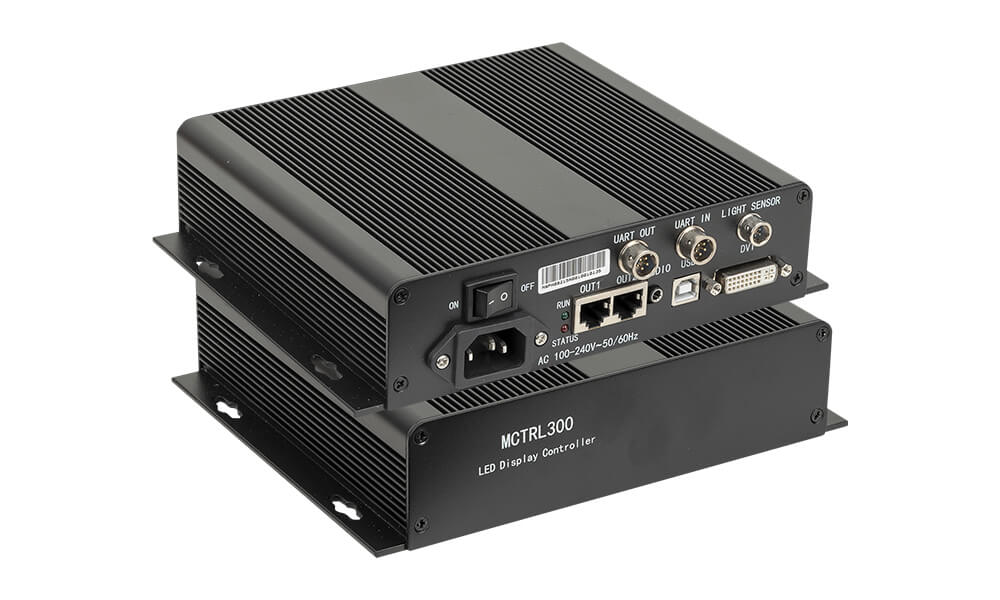
The NovaStar MCTRL300 is a compact controller with two Gigabit Ethernet outputs and a typical loading capacity of about 1.3 million pixels. Its straightforward DVI-based signal path makes it suitable for systems that do not require 4K inputs or a large number of output ports.
Key MCTRL300 Features
- Approximately 1.3 million pixels of total loading capacity
- Two Gigabit Ethernet outputs for cabinet data distribution
- DVI video input for a stable digital source connection
- USB control and cascading for configuration with NovaLCT
- Compact form factor for fixed installations and small rental systems
When Should You Choose the MCTRL300?
Choose the MCTRL300 when the complete LED canvas and each port load fit comfortably within its limits. Typical uses include shop windows, reception displays, conference rooms, small stages, and modest indoor video walls. It is often the most economical option of the three, but the screen layout must be calculated before purchase.
MCTRL660: More Capacity for Medium-Size LED Displays
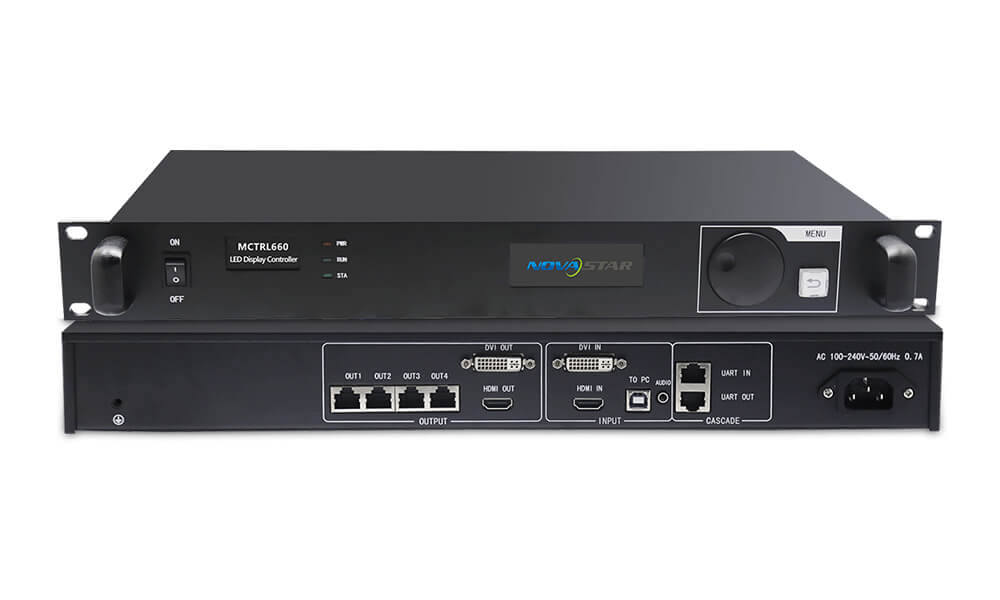
The NovaStar MCTRL660 increases capacity to about 2.3 million pixels and provides four Gigabit Ethernet outputs. It is a better fit when an MCTRL300 does not provide enough total pixels, enough ports, or the required source connectivity.
Key MCTRL660 Features
- Approximately 2.3 million pixels of total loading capacity
- Four Gigabit Ethernet outputs
- HDMI and DVI source connectivity
- Support for common professional LED display resolutions and custom screen layouts
- NovaLCT configuration for cabinet mapping, brightness, calibration, and receiving-card settings
When Should You Choose the MCTRL660?
The MCTRL660 is well suited to medium-size indoor or outdoor displays, rental stages, event backdrops, houses of worship, conference halls, and commercial video walls. It offers a useful middle ground: more headroom and output flexibility than the MCTRL300 without the scale and cost of a 4K controller.
MCTRL4K: High Capacity for 4K and Large LED Walls
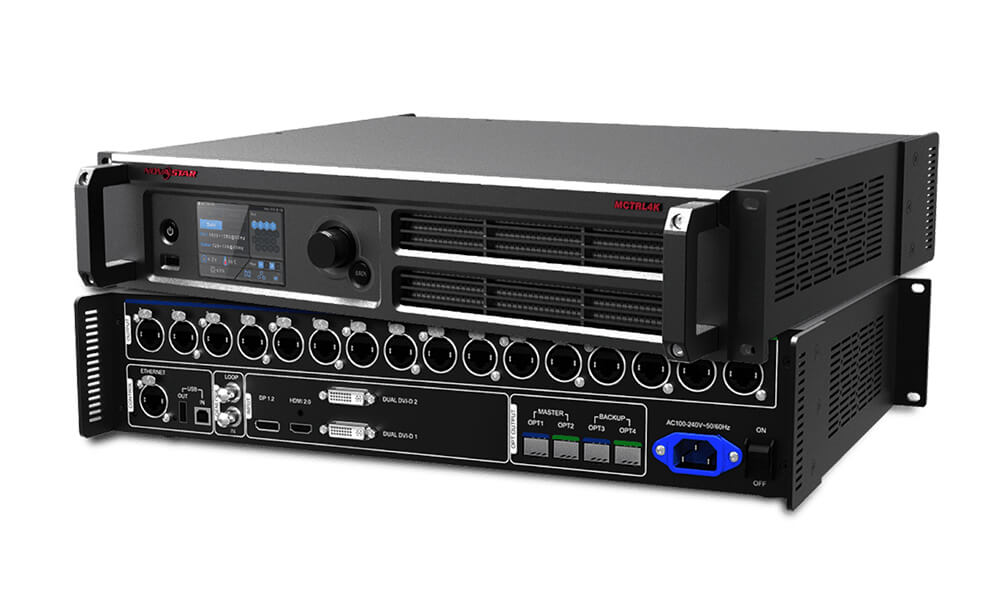
The NovaStar MCTRL4K is the high-capacity model in this comparison. It accepts modern 4K source formats and can load approximately 8.8 million pixels across 16 Gigabit Ethernet outputs. Optical connections on supported configurations are useful when the controller and screen are separated by long distances.
Key MCTRL4K Features
- Approximately 8.8 million pixels of loading capacity
- Sixteen Gigabit Ethernet outputs for large cabinet networks
- HDMI 2.0, DisplayPort 1.2, and DVI source options
- Support for 4K-class inputs and wide or tall custom LED canvases within specified limits
- Professional features for high-bit-depth, low-latency, calibration, and large-screen workflows, subject to system configuration
When Should You Choose the MCTRL4K?
Use the MCTRL4K for high-pixel-count stages, broadcast studios, control rooms, large conference displays, premium retail installations, and 4K LED walls. It is especially valuable when a design needs many data outputs, a native 4K source, long-distance optical transmission, or greater expansion headroom.
How to Choose the Right NovaStar Controller
1. Calculate the Total Active Pixels
Multiply the LED screen’s total pixel width by its total pixel height. Do not calculate from physical dimensions alone. A smaller fine-pitch screen can contain more pixels than a much larger coarse-pitch screen.
2. Check the Load on Every Ethernet Port
Total capacity is only one limit. Cabinet routing must also keep every individual output within its supported pixel load. Uneven cabinet chains can overload one port even when the total screen appears to fit.
3. Match the Video Source and Connector
The MCTRL300 is centered on DVI, the MCTRL660 adds more convenient HDMI connectivity, and the MCTRL4K supports higher-bandwidth 4K inputs. Confirm resolution, refresh rate, color depth, HDCP behavior, and connector type for the actual source device.
4. Decide Whether You Need Scaling or Switching
If you need seamless source switching, picture-in-picture, cropping, or scaling, place a suitable LED video processor before the sending controller or choose an all-in-one controller that includes processing. The MCTRL’s main job is screen control and signal distribution.
5. Allow Practical Headroom
A design should not depend on theoretical maximums without margin. Leave room for cabinet-route changes, future expansion, backup design, and the source timing required by the project.
Why Are These Controllers Important for LED Displays?
- Accurate pixel mapping: The controller ensures that each part of the source image appears on the correct cabinet and module.
- Stable synchronization: It keeps cabinet chains aligned so the wall behaves as one display.
- Signal integrity: Proper data distribution helps prevent missing cabinets, image tearing, flicker, and intermittent links.
- Consistent visual performance: Controller and receiving-card settings affect brightness, grayscale, refresh behavior, and calibration results.
- Serviceability: Clear port maps and saved configuration files make installation, troubleshooting, and cabinet replacement easier.
Frequently Asked Questions
Which is better: MCTRL300, MCTRL660, or MCTRL4K?
There is no single best model. The MCTRL300 is best for smaller screens, the MCTRL660 for medium-size systems that need more ports and capacity, and the MCTRL4K for 4K or large high-pixel-count LED walls. Choose the smallest controller that safely meets every design requirement with reasonable headroom.
Can the MCTRL300 accept an HDMI source?
The MCTRL300 primarily uses DVI input. An HDMI source may work through a compatible HDMI-to-DVI cable or converter because both carry digital video, but audio, HDCP, resolution, and timing compatibility must be verified.
Does the MCTRL660 scale video?
The MCTRL660 is primarily a sending controller and should not be treated as a full scaler. Match the source canvas to the configured LED screen or use a dedicated video processor when scaling and multi-source presentation are required.
Can the MCTRL4K control any 4K LED wall?
Not automatically. The wall’s total pixels, maximum width and height, per-port load, cabinet topology, receiving cards, source timing, and firmware must all fall within the supported system limits.
Do these controllers work without a computer?
They need a live video source during normal synchronous playback. A computer is commonly used for setup with NovaLCT, but the ongoing source can be a media server, camera processor, video switcher, or another compatible device.
Conclusion
For most buyers, the decision is straightforward: select the MCTRL300 for a small and simple LED screen, the MCTRL660 for a medium-size display that needs more capacity and outputs, or the MCTRL4K for a 4K source and a large, high-pixel-count wall. Final selection should always be based on a pixel-load calculation and a complete signal-and-cabinet plan rather than screen size alone.
Before ordering, compare your source resolution, total LED canvas, receiving cards, cabinet routing, transmission distance, and future expansion needs with the controller’s official specifications.

