
Quick answer: An LED display is a modular screen that creates images with light-emitting diodes. The six facts that matter most are that service life depends on operating conditions, pixel pitch controls viewing distance, LED package type affects use, brightness must match the environment, image quality depends on the entire system, and business results depend on content and placement as much as the hardware.
This practical guide explains those points in plain language so you can compare an indoor video wall, an outdoor advertising screen, or an event display with fewer surprises.
LED display facts at a glance
| Factor | What it means | Why it matters |
|---|---|---|
| Service life | LEDs can operate for tens of thousands of hours, but brightness gradually declines. | Heat, power quality, maintenance, and operating brightness affect useful life. |
| Pixel pitch | The center-to-center distance between neighboring pixels, measured in millimeters. | A smaller pitch supports a sharper image at a closer viewing distance. |
| LED package | SMD, DIP, COB, and related packaging methods place and protect the LEDs differently. | The package affects durability, contrast, viewing angle, and suitable applications. |
| Brightness | Light output is commonly specified in nits, or cd/m2. | An indoor screen needs far less brightness than a screen facing direct sunlight. |
| Control system | Sending devices, receiving cards, processors, software, and modules work together. | Resolution, refresh rate, color, and reliability depend on correct system design. |
| Commercial value | The display is a communication platform, not a guaranteed sales result. | Location, audience, content, scheduling, and measurement determine its return. |
1. An LED display is a complete electronic system
LED stands for light-emitting diode. In a direct-view LED display, red, green, and blue diodes form pixels. The system controls the intensity of those colors to reproduce text, graphics, and video.
The visible screen is only one part of the installation. A typical system also includes LED modules, cabinets or frames, power supplies, receiving cards, a sending device or controller, signal cables, power distribution, control software, and a video source. Large installations may also need a video processor, backup signal paths, remote monitoring, cooling, and brightness sensors.
This system view is important when comparing quotations. Two screens with the same size and pixel pitch can perform very differently if they use different driver ICs, power supplies, receiving cards, cabinet structures, or calibration processes.
2. LED displays can last for years, but “100,000 hours” is not a guarantee
Manufacturers often quote an LED lifetime of up to 100,000 hours. That figure normally describes a laboratory or component-level condition and does not mean every display will deliver unchanged brightness for that long. LEDs gradually lose light output, while other components can require service earlier.
Useful display life depends on:
- Operating brightness: Running every LED at maximum output increases heat and stress.
- Temperature and ventilation: Poor cooling shortens the life of LEDs, power supplies, and electronic components.
- Power quality: Stable power distribution and surge protection reduce avoidable failures.
- Weather protection: Outdoor cabinets need suitable ingress protection, drainage, corrosion resistance, and sealing.
- Maintenance: Cleaning air paths, checking connections, and replacing failed modules early keeps performance consistent.
- Content and operating schedule: Static, high-brightness images and continuous operation can cause uneven aging.
For procurement, ask the supplier how lifetime is defined, what brightness level was used for the estimate, which parts are covered by warranty, and how spare modules will be matched after calibration.
3. Pixel pitch determines detail and practical viewing distance
Pixel pitch is the distance from the center of one pixel to the center of the next, expressed in millimeters. A P2.5 display has a 2.5 mm pitch; a P10 display has a 10 mm pitch.
A smaller pixel pitch places more pixels in the same area. It can show finer detail and remain comfortable at a shorter distance, but it usually costs more and may require more data processing. A larger pitch is often economical when viewers are farther away.
There is no single viewing-distance formula that fits every project. A useful starting estimate for general content is roughly one meter of minimum viewing distance per millimeter of pixel pitch. For example, P2.5 may suit viewing from about 2.5 meters, while P10 may suit about 10 meters. Text size, visual acuity, content type, installation height, and the acceptable level of visible pixel structure can shift the real requirement.
Choose pitch from the closest important viewer, not from screen size alone. Before ordering, test representative text, images, and video on a sample or comparable installed screen at the actual viewing distance.
4. SMD and DIP packages serve different priorities
Two common LED packaging technologies are SMD and DIP:
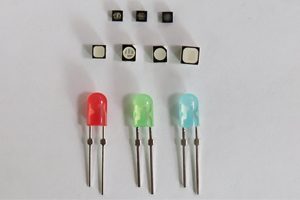
- SMD (surface-mount device): Red, green, and blue LED elements are typically integrated into a compact package mounted on the circuit board. SMD supports wide viewing angles and fine pixel pitches, so it is widely used for indoor displays and many modern outdoor screens.
- DIP (dual in-line package): Separate lamp-style LEDs have leads that pass through the circuit board. DIP has traditionally been valued for high brightness and outdoor durability, especially at larger pixel pitches.
Package type alone does not prove quality. A well-designed outdoor SMD module can outperform a poorly designed DIP module. Compare the actual brightness, contrast, viewing angle, waterproofing, mask design, thermal management, and service record.
COB and other integrated packaging approaches are also increasingly used, particularly where fine pitch, surface protection, and reduced pixel damage are priorities. The best choice depends on environment, pitch, maintenance method, budget, and expected handling.
5. More brightness is not always better
Brightness helps an LED display remain readable under ambient light. Outdoor screens facing daylight commonly need several thousand nits, while indoor screens usually need much less. Exact requirements depend on orientation, shading, viewing distance, background contrast, and local conditions.
Excessive brightness can make indoor content uncomfortable, waste power, reduce contrast in dark scenes, and accelerate aging. Outdoor brightness should also be scheduled or automatically reduced after sunset. Ask for automatic brightness control when the display operates across large changes in ambient light.
Image quality also depends on factors beyond brightness:
- Contrast and black level
- Refresh rate and camera compatibility
- Grayscale performance at low brightness
- Color temperature and calibration consistency
- Viewing angle
- Video processing and source quality
For broadcast, virtual production, or phone-camera use, verify the display on camera. A specification sheet alone may not reveal scan lines, flicker, moire, or poor low-gray performance.
6. An LED display can support business goals, but placement and content drive results
An LED display can attract attention, update messages quickly, support wayfinding, show live data, and adapt content by time or audience. Those capabilities make it useful for retail, transportation, sports, events, control rooms, corporate spaces, and public information.
However, hardware does not guarantee a particular increase in sales. Results depend on whether the right audience can see the screen, understand the message, and act on it. Avoid generic percentage claims that do not match your location or measurement method.
Define success before choosing the screen. Useful measures may include foot traffic, coupon redemptions, enquiries, dwell time, event engagement, or the time saved by replacing printed signs. Then plan short, legible content with a clear action and test different schedules.
How to choose an LED display
Use this checklist when comparing an indoor LED display or an outdoor LED display:
- Measure the viewing conditions. Record the closest and typical viewing distances, installation height, ambient light, and screen orientation.
- Define the content. Fine text and detailed dashboards need more pixels than large logos or roadside messages.
- Calculate native resolution. Divide screen width and height in millimeters by pixel pitch. Confirm that the controller and processor support the total pixel load.
- Specify the environment. Check indoor or outdoor use, ingress protection, operating temperature, humidity, wind load, salt exposure, and ventilation.
- Plan service access. Decide whether modules, power supplies, and cards must be maintained from the front or rear.
- Compare visual performance. Review brightness, refresh rate, grayscale, contrast, color uniformity, viewing angle, and calibration.
- Check electrical and structural needs. Include maximum and average power, distribution, grounding, surge protection, support structure, and local approvals.
- Confirm support. Ask about warranty terms, spare parts, remote diagnosis, configuration files, training, and future module matching.
If you are new to the terminology, read our guide to what an LED sign is and how it works.
Frequently asked questions
What is the most important LED display specification?
There is no single most important specification. Pixel pitch, brightness, total resolution, viewing distance, refresh rate, protection level, service access, and control-system capacity must match the application. Start with viewing distance and environment, then design the system around the content.
How long does an LED display last?
LED components can operate for tens of thousands of hours, and some suppliers quote up to 100,000 hours under defined conditions. Actual useful life varies with temperature, operating brightness, power quality, weather protection, component quality, and maintenance. Brightness loss is gradual rather than a single end-of-life event.
Is a smaller pixel pitch always better?
No. A smaller pitch improves close-range detail but increases pixel count, processing demand, power density, and usually cost. Once the pixels are no longer noticeable at the intended distance, a finer pitch may offer little practical benefit.
Which is better for outdoor screens, SMD or DIP?
Both can work outdoors. DIP remains common where high brightness and robust lamp construction are priorities. Outdoor SMD is widely used when a wider viewing angle, improved color mixing, or a finer pitch is required. Compare the complete module and cabinet specifications rather than choosing by package name alone.
What parts are needed for an LED display?
A typical system includes LED modules, cabinets or frames, power supplies, receiving cards, a sending controller or media player, signal and power cabling, control software, and a video source. Some systems also require a video processor, distribution equipment, sensors, backup devices, and remote monitoring.
Key takeaway
The best LED display is not simply the brightest screen or the model with the smallest pixel pitch. It is the screen whose resolution, package type, brightness, structure, control system, and service plan match the real viewing environment and business objective.
Need help checking pixel load, controller capacity, or compatible replacement parts? Contact LED Controller Card with the screen dimensions, pixel pitch, module specification, and intended use.

