
An LED sign is a digital display that uses light-emitting diodes to present text, images, video, or live information. Unlike a printed sign, its content can be updated through a controller and content management software. LED signs are used for storefront advertising, transport information, stadium displays, events, wayfinding, public notices, and many other applications.
The term can describe anything from a simple programmable message board to a large full-color outdoor video display. The right system depends on where the sign will be installed, how far away viewers will be, what content it must show, and how often that content will change.
LED sign basics at a glance
- What it is: a modular electronic display made from LEDs, control hardware, power supplies, and software.
- What it shows: text, graphics, animation, video, schedules, prices, alerts, or data feeds.
- Where it works: indoor or outdoor locations, in fixed installations or temporary rental systems.
- Why businesses use it: content can be changed quickly without printing and replacing a physical sign.
- What determines image quality: pixel pitch, viewing distance, brightness, refresh rate, color calibration, and source quality.
What exactly is an LED sign?
An LED sign is a group of LED modules arranged to create a larger display surface. Each module contains pixels, and each pixel contains one or more LEDs. A controller tells those pixels when to turn on and what color or brightness to produce. Multiple modules can be combined inside a cabinet to create almost any practical screen size or aspect ratio.
In everyday use, people may say LED sign, LED display, LED screen, digital billboard, or LED video wall. These terms overlap, but they are not always identical. “LED sign” often emphasizes communication or advertising, while “LED video wall” usually describes a larger display designed for detailed graphics and video.
| Characteristic | An LED sign is | An LED sign is not |
|---|---|---|
| Content | Editable digital media | A permanently printed message |
| Display technology | A matrix of light-emitting pixels | A projector shining onto a screen |
| System design | Modules, controller, power, cabinet, and software working together | Only an LED panel with no supporting hardware |
| Operation | A system that needs configuration, content, and maintenance | A set-it-and-forget-it poster |
How does an LED sign work?
A complete LED sign converts a content file or live data source into instructions for thousands or millions of pixels. The signal moves through several parts:
- Content source: a computer, media player, cloud platform, camera, or data feed supplies the message.
- Sending controller: the controller processes the source and maps it to the display. Synchronous systems show a live source; asynchronous systems store and play scheduled content without a permanently connected computer.
- Receiving cards: these distribute pixel data to individual cabinets or modules.
- LED modules: the modules create the visible image from red, green, and blue light.
- Power supplies: these convert incoming AC power to the regulated DC power required by the modules and electronics.
- Cabinet and connections: the structure aligns and protects the components while data and power cables connect the system.
For a programmable message board, start with our programmable LED display board guide. For system hardware, compare asynchronous LED control cards, LED receiving cards, and LED power supplies.
Main types of LED signs
Indoor and outdoor LED signs
Indoor signs normally prioritize closer viewing, finer pixel pitch, controlled brightness, and quiet operation. Outdoor LED sign boards need weather-resistant cabinets, suitable ingress protection, higher brightness, effective heat management, and secure mounting. Outdoor specifications should be chosen for the actual climate and installation position rather than by brightness alone.
Fixed and rental LED displays
A fixed sign is designed for long-term installation on a building, pole, or structure. A rental LED display uses cabinets built for repeated assembly, transport, and fast servicing at concerts, exhibitions, conferences, and other events.
Text, graphic, and full-color video signs
Single-color or limited-color signs are well suited to simple messages, clocks, prices, and alerts. Full-color LED signs can reproduce photos, branded graphics, animation, and video. The content requirement should determine the display type; a higher specification does not automatically make a message more effective.
Programmable and live-source signs
A programmable LED sign can store scheduled content and play it automatically. A live-source display follows a connected video source in real time. Many modern systems support both workflows, depending on the controller and software.
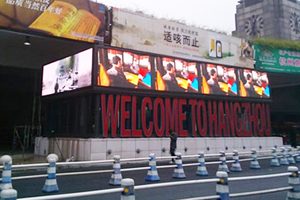
LED sign vs digital signage, LCD, and static signs
Digital signage is the broader communication system. It includes the screen, media player, software, network, content, and operating process. An LED sign can be the display component of a digital signage system.
LCD signage uses a backlit liquid-crystal panel. It is common at close viewing distances and standard TV-like sizes. Direct-view LED signs use modular light-emitting pixels, making them easier to scale to large or custom dimensions and more suitable for many high-brightness applications.
Static signage uses printed, painted, or formed material. It can be economical for information that rarely changes, but every update requires physical replacement. An LED sign is more useful when messages, prices, schedules, promotions, or alerts change regularly.
What an LED sign cannot do by itself
An LED sign is a communication tool, not a complete communication strategy. It will not fix unclear messaging, poor placement, weak content, or an unsuitable viewing angle. It also cannot deliver its best image if the controller, power system, modules, or source resolution are mismatched.
A display is not automatically readable just because it is bright. Text size, contrast, dwell time, motion, viewing distance, ambient light, and local rules all affect whether viewers can understand the message safely and quickly.
How to design readable LED sign content
- Lead with one message. Give each screen a clear purpose instead of crowding it with unrelated announcements.
- Use a strong visual hierarchy. Make the main statement easy to identify before supporting details.
- Choose legible type. Use simple fonts, adequate letter height, and enough spacing for the expected viewing distance.
- Create contrast. Separate text from the background and test the design at the brightness used on site.
- Limit motion. Animation should support the message, not compete with it. Avoid rapid flashing and distracting transitions.
- Allow enough reading time. A moving viewer needs a shorter, simpler message than a person standing in a lobby.
- Keep content current. Remove expired promotions and schedule updates so the display remains trustworthy.
- Preview on the real sign. A design that looks good on a laptop may not work at distance or in direct sunlight.
How to choose the right LED sign
| Decision | Questions to answer | Why it matters |
|---|---|---|
| Purpose | Will it show text, prices, graphics, video, live data, or emergency messages? | Defines the required color, processing, software, and resolution. |
| Location | Is it indoors, outdoors, shaded, exposed, wall-mounted, or freestanding? | Affects brightness, weather protection, cooling, structure, and service access. |
| Viewing distance | How close is the nearest viewer and how far is the typical viewer? | Guides pixel pitch and physical dimensions. |
| Content workflow | Will content be scheduled remotely or supplied live? | Determines whether an asynchronous player, video controller, or hybrid system is appropriate. |
| Maintenance | Can technicians access the front, rear, or both sides? | Influences cabinet design, downtime, and long-term service cost. |
| Power and control | Are electrical capacity, signal distance, redundancy, and network access planned? | Prevents unstable operation and incompatible components. |
For outdoor advertising and information systems, explore outdoor LED display screens. If a long viewing distance and robust outdoor design are priorities, a P10 outdoor LED sign may be one option, but pixel pitch should always be confirmed against the actual viewing distance and content.
Common LED sign mistakes to avoid
- Too much content: viewers cannot absorb long paragraphs or several competing offers at once.
- Wrong pixel pitch: a pitch selected without considering viewing distance can waste budget or reduce clarity.
- Brightness used as the only quality measure: color consistency, contrast, calibration, refresh rate, and processing also matter.
- Mismatched components: modules, receiving cards, controller capacity, power supplies, and software must be compatible.
- No service plan: access, spare modules, configuration backups, and technical support should be planned before installation.
- Ignoring local requirements: permits, structural engineering, electrical rules, brightness limits, and content restrictions may apply.
Frequently asked questions
Is an LED sign the same as an LED screen?
They often refer to the same direct-view LED technology. “LED sign” usually emphasizes messaging, advertising, or public information, while “LED screen” is a broader term that also covers video walls, stages, control rooms, and broadcast displays.
Can an LED sign show video?
A full-color LED sign can show video when it has enough resolution and a compatible controller. Text-only or limited-color signs may support simple animation but are not designed for full video.
What is a programmable LED sign?
It is an LED display whose messages and schedules can be changed through software. Content may be transferred over a network, Wi-Fi, USB, or another supported connection, depending on the controller.
What is the best pixel pitch for an LED sign?
There is no single best pitch. A smaller pitch provides more pixels within the same area and is generally used for closer viewing. A larger pitch can be practical for signs viewed from farther away. Content detail, screen size, viewing distance, budget, and service conditions should be evaluated together.
What parts are needed for a complete LED sign?
A typical system includes LED modules, cabinets or a mounting structure, receiving cards, a sending controller or media player, power supplies, data and power cables, control software, and a content source. Sensors, remote monitoring, backup paths, and surge protection may also be appropriate.
Final takeaway
An LED sign is a flexible digital communication system, not simply a bright replacement for a printed poster. Its value comes from pairing the right display hardware with readable content, a suitable controller, dependable power, and a realistic maintenance plan. Define the audience, viewing conditions, content, and operating workflow first; then select the display components around those requirements.
Need help matching modules, controllers, power supplies, and accessories for a new or existing LED sign? Contact LED Controller Card with the screen size, pixel pitch, installation environment, content source, and control requirements.

