
Short answer: Yes. An LED display power supply is essential because every LED screen needs stable DC power for its LED modules, receiving cards, and control electronics. For most modular LED screens, this is a regulated constant-voltage supply, commonly 5V DC. The correct unit prevents flicker, color shifts, unexpected shutdowns, and premature component failure.
This guide explains what an LED display power supply does, how it differs from a constant-current LED driver, and how to size and install one for an indoor or outdoor LED screen.
What Is an LED Display Power Supply?
An LED display power supply is an AC-to-DC switching power supply designed to provide low-voltage, high-current output to LED display modules and related electronics. It typically accepts 110V or 220V AC, depending on the model and region, and converts it to a regulated DC output such as 5V.
The power supply is part of a complete LED display system:
- LED modules create the image.
- Receiving cards distribute image data to the modules.
- Controller and video processing equipment prepare and transmit content.
- The power supply provides stable DC power to the modules and cabinet electronics.
Without a correctly matched power supply, even a high-quality module or LED receiving card cannot operate reliably.
Do LED Screens Really Need a Dedicated Power Supply?
Yes. LED display modules cannot normally connect directly to mains electricity. They require regulated DC power at the voltage specified by the module manufacturer. A dedicated LED screen power supply also provides protections that a display installation needs, including overcurrent, short-circuit, overvoltage, and thermal protection when supported by the selected model.
A properly selected supply provides four practical benefits:
- Stable brightness: Output voltage remains controlled as the displayed content changes.
- Accurate color: Adequate current helps prevent voltage drop and color inconsistency.
- Reliable operation: Electrical protection reduces the risk of damage during faults.
- Longer service life: Operating below the maximum rating reduces heat and component stress.
Constant Voltage vs. Constant Current: Which Does an LED Display Use?
This distinction is important. Individual LEDs are current-driven devices, but most finished LED display modules already contain driver ICs that regulate current for the pixels. The cabinet power supply therefore normally delivers a constant DC voltage to the module, while the module’s driver circuitry controls LED current.
| Power method | Typical use | What it controls |
|---|---|---|
| Constant voltage | Modular LED display cabinets and signs | Maintains a specified DC voltage, often 5V |
| Constant current | Bare LEDs, LED strings, or luminaires without onboard current regulation | Maintains a specified current through the LEDs |
Use the voltage printed on the LED module or listed in its datasheet. Never assume that two visually similar modules use the same voltage. Supplying 12V to a 5V module can cause immediate damage.
How to Size a Power Supply for an LED Display
Start with the maximum power consumption of each module, not its average consumption. Then include the receiving card, hub board, fans, and other DC-powered cabinet components.
Recommended calculation:
Required power supply rating = total maximum DC load / target loading percentage
A practical target is to operate a supply at no more than about 80% of its rated output under normal maximum load. This leaves approximately 20% headroom for temperature, component tolerance, and load changes.
Example calculation
Assume one cabinet contains 12 modules rated at 25W maximum each, plus 20W for the receiving card and fans:
- Modules: 12 x 25W = 300W
- Control electronics and fans: 20W
- Total maximum load: 320W
- Minimum rating with 20% headroom: 320W / 0.8 = 400W
In this example, use at least 400W of total rated capacity. Depending on cabinet design and service requirements, that capacity may be divided across two or more power supplies. For a 5V system, a 400W load corresponds to 80A because current equals power divided by voltage.
Do not distribute modules only by count. Balance the expected current across the output terminals and keep cable resistance in mind. Large current differences can create uneven voltage drop across the cabinet.
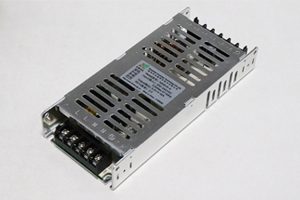
7 Specifications to Check Before Buying
1. Output voltage
Match the power supply output to the module’s rated input voltage. Many LED display modules use 5V DC, but other voltages exist. Check the label and datasheet before wiring.
2. Output current and wattage
Confirm both values. At a fixed voltage, wattage equals voltage multiplied by current. A 5V, 60A unit can provide 300W under its rated conditions.
3. AC input range
Select a unit compatible with local mains power. Some models support a wide input range, while others use a manual 110V/220V selector. An incorrect selector position can damage the supply.
4. Efficiency and power factor
Higher efficiency reduces heat inside the cabinet. Power factor correction can also reduce input current and improve power-system utilization, which matters in large installations with many supplies.
5. Protection functions
Look for documented short-circuit, overcurrent, overvoltage, and overtemperature protection. Protection behavior varies by model, so confirm whether recovery is automatic or requires power cycling.
6. Cooling and derating
Check whether the unit is fanless or fan-cooled and review its temperature derating curve. A supply that delivers full rated output in a cool workshop may provide less usable power inside a hot outdoor cabinet.
7. Safety certification and form factor
Choose approvals appropriate for the installation market and project requirements. Also verify dimensions, terminal position, mounting holes, and clearance for airflow. For regulated projects, a suitable UL LED display power supply may be required.
Indoor vs. Outdoor LED Screen Power Supplies
| Factor | Indoor display | Outdoor display |
|---|---|---|
| Environment | Usually temperature-controlled and dry | Greater heat, humidity, dust, and condensation risk |
| Protection strategy | Ventilated cabinet may be sufficient | Weather-resistant cabinet design, sealing, drainage, and grounding are critical |
| Thermal margin | Standard derating may apply | More headroom may be needed at high ambient temperature |
| Serviceability | Access is often straightforward | Redundant or easily replaceable supplies can reduce downtime |
An outdoor rating for the display cabinet does not automatically mean every internal power supply is waterproof. Protection depends on the complete enclosure, ventilation path, seals, and installation method.
Installation Checklist
- Disconnect and isolate mains power before installation.
- Verify the AC input setting and the DC output voltage before connecting modules.
- Connect protective earth to the power supply and metal cabinet as required.
- Use correctly sized cables, terminals, breakers, and fuses.
- Observe polarity: connect positive to positive and negative to negative.
- Keep low-voltage DC runs short enough to control voltage drop.
- Distribute loads evenly across supplies and output terminals.
- Provide the ventilation clearance specified by the manufacturer.
- Measure output voltage at the farthest module while the screen is under load.
- Have mains wiring completed or checked by a qualified electrician.
Common LED Display Power Problems
The screen flickers or restarts
Possible causes include an undersized supply, loose terminals, excessive voltage drop, overheating, or an intermittent short circuit. Test the voltage under load rather than only when the screen is idle.
One cabinet is dimmer or has a color shift
Compare voltage at the power supply and at the affected module. Long or undersized cables, overloaded terminals, and uneven load distribution can reduce the voltage reaching part of the screen.
The power supply shuts down when the image turns white
A full-white image often produces a high load. If shutdown occurs only at high brightness, check the total maximum load, current limit, cooling, and available AC input capacity.
The supply is unusually hot or noisy
Check airflow, dust buildup, fan condition, ambient temperature, and loading. Heat is a warning to investigate; do not solve it by bypassing protection or increasing voltage.
Frequently Asked Questions
What power supply is used for an LED display?
Most modular LED displays use a regulated AC-to-DC switching power supply. A 5V constant-voltage supply is common, but the correct voltage, current, and power rating must match the LED module and cabinet design.
How many LED modules can one power supply support?
Divide the supply’s usable wattage by the maximum wattage per module, then reserve capacity for receiving cards, fans, and headroom. Confirm the result with the module datasheet and do not exceed terminal current limits.
Should an LED power supply run at 100% load?
Continuous operation at the maximum rating is usually not a good design target. Keeping normal maximum load near or below 80% provides useful margin, but the manufacturer’s derating and installation instructions take priority.
Can I use a higher-wattage power supply?
Yes, if the output voltage is correct and the installation is properly protected. The load draws the current it needs; a higher current capacity does not force extra current into the module. Incorrect voltage, however, can damage the display.
Can one power supply feed both modules and a receiving card?
Often yes, provided they require the same voltage and the combined load remains within the supply and terminal ratings. Follow the receiving card and module wiring diagrams.
Final Recommendation
A reliable LED screen starts with correct power design. Match the module voltage, calculate the full cabinet load, add sensible headroom, plan for heat and voltage drop, and use appropriate electrical protection. For compatible models, compare the LED power supplies available from LedControllerCard.com, or contact the team with your module voltage, maximum wattage, cabinet layout, and input-voltage requirements.

