
A video wall processor is the central device that turns one or more video sources into a coordinated image across multiple displays or an LED wall. It scales, crops, switches, positions, and synchronizes content so the entire wall behaves like one canvas instead of a collection of separate screens.
Quick answer: choose a video wall processor by matching five things: the wall’s total pixel resolution, required input and output formats, number of simultaneous windows, acceptable latency, and reliability needs. For an LED display, also confirm that the processor’s output timing and pixel capacity match the LED controller or sending device.
In this guide:
What Is a Video Wall Processor?
A video wall processor receives video from sources such as media players, cameras, computers, presentation systems, or broadcast equipment. It then processes those signals and distributes correctly sized sections of the final image to the displays that form the wall.
The processor may perform several jobs at the same time:
- Scaling: converting source content to the wall’s native resolution.
- Windowing: showing multiple sources in separate regions of the canvas.
- Cropping and positioning: selecting and placing the required part of each source.
- Switching: changing sources or layouts during operation.
- Synchronization: keeping outputs aligned to reduce tearing or timing differences.
- Image adjustment: managing brightness, contrast, color, aspect ratio, and output timing.
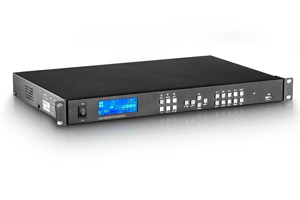
Video Wall Processor vs. LED Controller
These devices are related, but they are not always the same. A video wall processor manages source selection, scaling, layouts, and output canvases. An LED controller or sending device converts that processed video into the pixel map and data stream used by the LED receiving cards and modules.
Some all-in-one LED video controllers combine both functions. When comparing products, check the signal path and feature list instead of relying only on the product name.
Four Main Types of Video Wall Processors
| Processor type | Best suited to | Main advantages | Points to consider |
|---|---|---|---|
| Dedicated hardware processor | Permanent LED walls, control rooms, venues, and live production | Predictable performance, low latency, appliance-style reliability, and simple operation | Expansion is limited by the chassis, cards, ports, and licensed features |
| PC or video-card-based processor | Interactive content, visualization, unusual layouts, and software-driven applications | Flexible rendering, application integration, and upgrade options | Requires careful GPU, driver, operating-system, cooling, and stability management |
| AV-over-IP processor | Large campuses, distributed control rooms, and installations with many remote sources | Scalable routing, flexible endpoints, and easier source distribution over a network | Network design, bandwidth, compression, security, and latency must be engineered correctly |
| All-in-one LED video controller | Rental, staging, conference rooms, and compact LED display systems | Combines processing and LED control, reducing devices and cabling | Confirm total pixel load, output ports, redundancy options, and supported screen mapping |
There is no universal best type. Dedicated hardware is often the most predictable choice for continuous operation. PC-based systems are useful when software flexibility is the priority. AV-over-IP is strong when sources and destinations are spread across a facility. All-in-one controllers simplify smaller or mobile LED systems.
Key Specifications to Compare
Marketing labels such as “4K” do not describe the entire system. Use the specifications below to compare processors on equal terms.
| Specification | What to verify | Why it matters |
|---|---|---|
| Canvas and output resolution | Maximum width, height, total pixels, refresh rate, and number of independent outputs | The wall may be wider or taller than a standard 16:9 format even when its total pixel count is below 4K |
| Input formats | HDMI, DisplayPort, DVI, SDI, USB-C, IP streams, supported resolutions, and HDCP requirements | Every source must connect at a supported format without unnecessary converters |
| Windows and layers | Maximum simultaneous sources, layer sizes, picture-in-picture, overlap, and roaming capability | A processor can have many inputs but still support only a limited number of visible windows |
| Latency | Processing delay in frames or milliseconds for the selected operating mode | Low delay is important for live cameras, broadcast, simulation, command centers, and interactive content |
| Color processing | Bit depth, color space, chroma sampling, HDR support, and calibration controls | The signal chain must preserve the level of color quality the content and display can reproduce |
| Synchronization | Frame lock, genlock, output synchronization, and screen-tearing controls | Timing consistency becomes more important across large canvases and camera-facing LED walls |
| Redundancy | Backup inputs, dual power supplies, redundant signal paths, hot-swappable modules, and failover behavior | Mission-critical and live systems need a defined recovery path when a component or signal fails |
| Control | Front-panel operation, software, web interface, presets, scheduling, API, and third-party control support | The operating team must be able to recall layouts and recover quickly without specialist intervention |
How to Choose a Video Wall Processor
- Calculate the native canvas. Record the wall’s total pixel width and height. For an LED wall, calculate the final mapped resolution from the cabinet layout and each cabinet’s pixel dimensions. Total pixels equal width multiplied by height, but also check the processor’s maximum width and height limits.
- List every source. Note connector type, resolution, frame rate, copy-protection requirements, cable distance, and whether audio must follow video. Include future sources so the design has reasonable expansion capacity.
- Define the layouts. Determine how many sources must appear at once, whether windows overlap, and whether operators need presets, seamless switching, labels, backgrounds, or custom aspect ratios.
- Set a latency target. A retail information wall can usually tolerate more delay than a live camera feed, virtual production stage, simulator, or operator workstation. Ask for latency in measurable frames or milliseconds.
- Design for failure. Decide whether downtime is acceptable. Critical installations may require redundant processors, power, input feeds, network paths, or LED sending routes.
- Test the complete signal chain. The processor, cables, extenders, converters, LED controller, receiving cards, and display must support the same resolution, refresh rate, color format, and timing. A single incompatible link can limit the system.
Quick Selection Examples
| Application | Typical priority | Useful features |
|---|---|---|
| Retail or corporate LED wall | Simple operation and reliable playback | Preset layouts, scheduled switching, flexible scaling, and remote management |
| Control room | Many simultaneous sources and continuous operation | Multi-window layouts, redundant power and signals, KVM or IP integration, and role-based control |
| Live event or rental LED wall | Low latency and fast setup | Seamless switching, preview, presets, genlock, broad input compatibility, and backup routes |
| Broadcast or camera-facing LED wall | Timing and image consistency | Genlock, precise frame-rate handling, color controls, low latency, and camera-friendly output settings |
Where the Processor Fits in an LED Display System
A typical LED signal chain is:
Video source -> video wall processor -> LED sending controller -> receiving cards -> LED modules
The processor prepares the canvas and layouts. The sending controller divides the image into output regions and transmits display data. Receiving cards distribute that data within each cabinet. In an all-in-one controller, the first two processing stages may be integrated in one enclosure.
Browse our LED video processor category to compare available systems. For larger multi-window applications, the Kystar KS6000 splicing processing platform is one example of a modular processing approach.
Video Wall Processor Setup Checklist
- Update device firmware only after reviewing release notes and backing up the current configuration.
- Set the processor’s output canvas to the display’s exact native pixel map.
- Configure EDID so each source sends a supported resolution and frame rate.
- Check aspect ratio and cropping with test patterns before loading production content.
- Verify window boundaries, bezel compensation, LED cabinet mapping, and rotation where applicable.
- Match color range and color space across sources, processor, controller, and display.
- Test every preset, source change, control method, backup path, and power-recovery sequence.
- Save a known-good configuration and document cable labels, port assignments, and recovery steps.
Common Selection Mistakes
- Buying by the “4K” label alone. A processor may accept 4K input but have different limits for output canvas size, refresh rate, layers, or connectors.
- Ignoring non-standard LED resolutions. Extra-wide and extra-tall canvases can exceed a dimension limit even when total pixels appear acceptable.
- Confusing inputs with visible windows. Ten connected sources do not necessarily mean ten sources can be displayed simultaneously.
- Leaving no capacity margin. Additional cabinets, higher frame rates, more layers, and redundancy can increase bandwidth and output requirements.
- Overlooking latency. Scaling, network compression, frame synchronization, and intermediate converters can add delay.
- Skipping operational planning. A technically capable processor can still be the wrong choice if presets, permissions, monitoring, and recovery are too complex for the team.
Video Wall Processor FAQ
Do all video walls need a processor?
No. A simple wall showing one pre-scaled source may be handled by the display controller or built-in daisy-chain features. A separate processor is useful when the wall needs multiple sources, custom layouts, non-standard resolutions, seamless switching, scaling, redundancy, or centralized control.
What is the difference between a video wall processor and a matrix switcher?
A matrix switcher routes inputs to outputs, while a video wall processor also scales, crops, composites, and maps content across a unified canvas. Some products combine both functions, so compare their windowing and processing specifications.
Can a 4K processor drive any 4K video wall?
Not automatically. Confirm maximum output width and height, total pixel capacity, frame rate, number of outputs, connector bandwidth, layer limits, and compatibility with the LED controller. “4K input” does not always mean a full 4K multi-window output.
Is AV-over-IP better than a hardware video wall processor?
It depends on the installation. AV-over-IP is easier to scale across many rooms and long distances, while a dedicated hardware processor often provides more predictable latency and appliance-style operation. Large systems may use both.
How much spare capacity should a processor have?
Allow capacity for planned expansion, additional windows, backup inputs, and higher-bandwidth formats. The exact margin depends on the project, but selecting a processor that runs at its absolute limit leaves little room for future changes or failover.
For connector and bandwidth planning, use the processor datasheet together with the official HDMI specification overview. Connector shape alone does not confirm supported bandwidth, resolution, or features.
Final Recommendation
Start with the wall’s native pixel map and the required on-screen layouts, then work backward through output capacity, inputs, latency, control, and redundancy. Request a written signal-flow diagram and verify the proposed configuration with the actual source formats before purchase.
For help matching a processor to an LED display system, contact LED Controller Card with the wall resolution, cabinet layout, source list, required number of windows, and preferred control method.

