
A practical 2026 guide to calculating LED screen pixels, preserving capacity headroom, mapping output ports and choosing the right VX Pro controller.
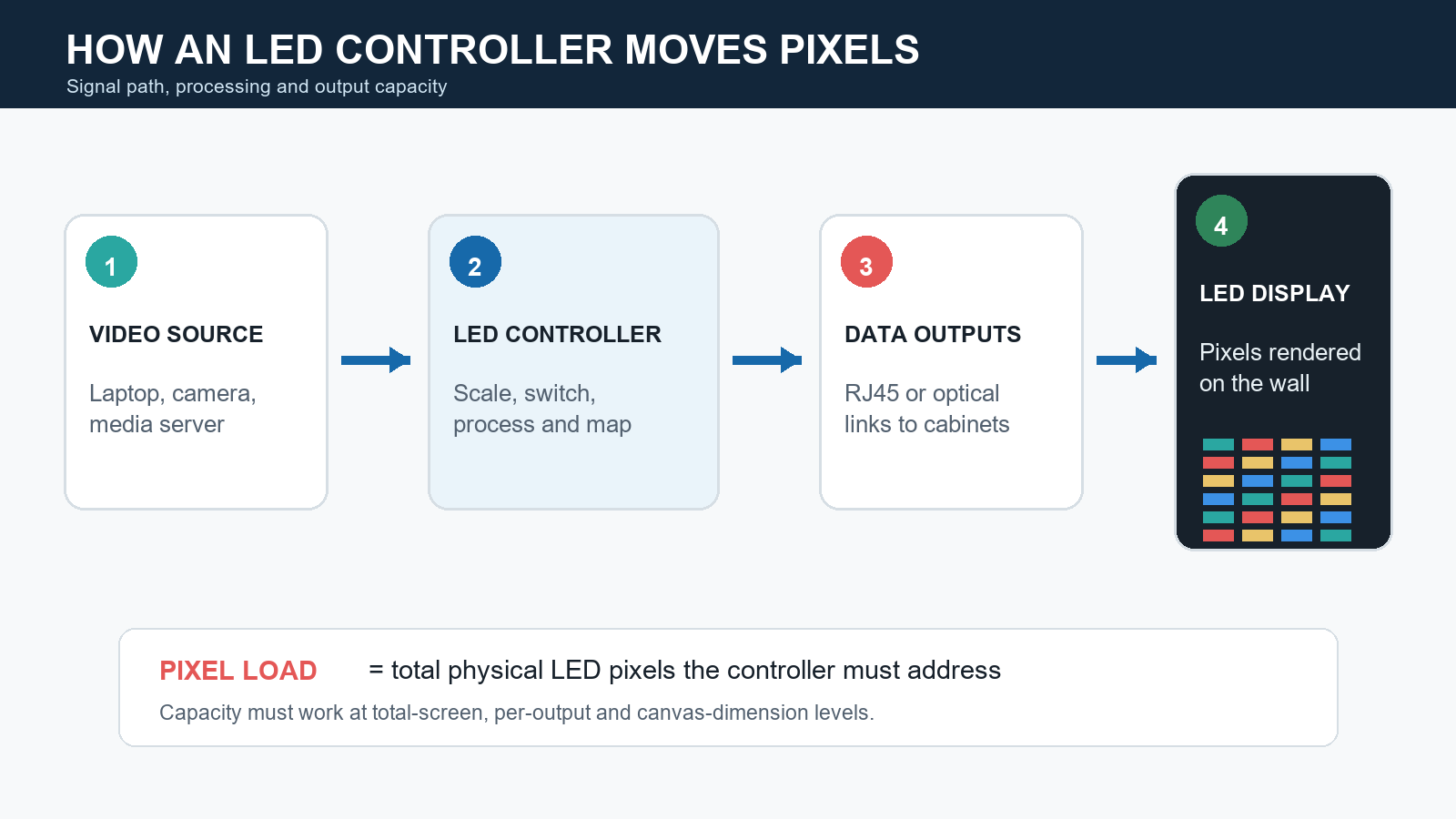
Figure 1. An LED controller must process the source and distribute enough data to every physical pixel.
| Quick answer Choose a NovaStar LED controller by calculating the display’s physical pixel count, adding 10% to 20% planning headroom, and then checking that the chosen model also supports the required canvas width, canvas height, output-port mapping, input formats and redundancy. For the 2026 VX Pro range, headline capacities are 2.6 million, 3.9 million, 6.5 million and 13 million pixels. Capacity is the starting point, not the final approval. |
Last verified: September 8, 2026, using NovaStar’s official 2026 product catalog. Always confirm the exact product manual and firmware limits before procurement or deployment.
The Short Version: A Five-Step Selection Method
- Calculate physical resolution:screen width in millimeters / pixel pitch, then do the same for height.
- Multiply width pixels by height pixelsto get the raw pixel load.
- Add 10% to 20% planning headroomfor mapping flexibility, future changes and operational resilience. This margin is an engineering recommendation, not a published NovaStar limit.
- Check the geometry:maximum canvas width, maximum canvas height and any model-specific output constraints.
- Validate the workflow:inputs, scaling, layers, latency, fiber distance, backup design and control software.
What Is Pixel Load in an LED Controller?
Pixel load is the number of physical LED pixels that the sending device must address. It is not the same as cabinet count, screen area or the input video’s nominal resolution. A 4K source can be scaled to a lower-resolution LED wall, while a very wide custom LED canvas can exceed a controller’s output capacity even if the content source is only 1080p.
| Definition Pixel load = physical pixel width x physical pixel height. For multiple independent canvases served by one controller, add the pixel counts of all canvases that are active at the same time. |
Pixel pitch determines how many LEDs fit into a given physical dimension. Smaller pitch means more pixels in the same area and therefore a larger control-system load. This is why an 8-meter-wide P1.5 wall requires far more controller capacity than an 8-meter-wide P4 wall.
How to Calculate Pixel Load
Use the final, cabinet-approved pixel resolution whenever it is available. If the project is still at concept stage, calculate a planning resolution from the physical dimensions and pitch:
Pixel width = display width (mm) / pixel pitch (mm)
Pixel height = display height (mm) / pixel pitch (mm)
Raw pixel load = pixel width x pixel height
Planned load = raw pixel load x 1.10 to 1.20
Round the width and height to match the actual module and cabinet pixel matrix, not merely to the nearest mathematical pixel. Cabinet geometry can change the final number.
Figure 2. A 5 m x 3 m P2.5 wall is 2.40M pixels raw and 2.76M pixels with a 15% planning margin.
From Total Pixel Load to Output-Port Budget
The 2026 VX Pro ratings scale at 650,000 pixels per Ethernet output when the published total is divided by the output count: 2.6M / 4, 3.9M / 6, 6.5M / 10 and 13M / 20. This is a useful early-planning ratio, but it is not permission to treat every design as a perfectly balanced pool.
Average pixels per active output = raw pixel load / number of active outputs
For the 2.40M-pixel example, four outputs would average 600,000 pixels each, leaving only 50,000 pixels of average room per output. Six outputs would average 400,000 pixels each and provide much more mapping flexibility. The real port map must still follow cabinet boundaries, receiving-card limits and physical cable routes.
| Important Unused capacity on one output does not automatically rescue an overloaded output elsewhere. Build a port-by-port map and check the heaviest path, not only the average. |
Why Headline Capacity Is Not Enough
A controller can pass the total-pixel test and still be the wrong choice. Treat these as separate gates:
- Total capacity:The combined physical pixels must remain within the controller’s rated loading capacity.
- Canvas dimensions:An ultra-wide ribbon or unusually tall screen may breach the maximum width or height even when its total pixel count looks modest.
- Per-output distribution:Pixels must be divided across available Ethernet or optical paths in a topology the receiving cards support. Uneven cabinet columns can create a bottleneck on one output.
- Redundancy:Port, optical-link or full-device backup can consume outputs or require a second unit. Do not count backup paths as normal additional capacity.
- Input and processing needs:HDMI, DisplayPort, SDI, genlock, layers, presets, scaling and low-latency requirements may eliminate an otherwise adequate model.
| Engineering rule Size the normal operating map first. Then model the failure state. If a backup path cannot carry the required mapped area after a cable, port or device failure, the design is not truly redundant. |
NovaStar VX Pro Pixel Load Comparison (2026)
NovaStar’s official 2026 catalog positions the VX Pro family as all-in-one controllers that combine video processing and LED control. For compatible hardware and receiving cards, see our NovaStar controller collection. The series covers 2.6 million to 13 million pixels and uses 4, 6, 10 or 20 Ethernet outputs.
| Model | Rated load | Ethernet outputs | Maximum canvas (W x H) | Best-fit planning range* |
|---|---|---|---|---|
| VX400 Pro | 2.6M px | 4 | 10,240 x 8,192 px | Up to about 2.17M-2.36M raw |
| VX600 Pro | 3.9M px | 6 | 10,240 x 8,192 px | Up to about 3.25M-3.55M raw |
| VX1000 Pro | 6.5M px | 10 | 10,240 x 8,192 px | Up to about 5.42M-5.91M raw |
| VX2000 Pro | 13.0M px | 20 | 16,384 x 8,192 px | Up to about 10.83M-11.82M raw |
*Planning ranges reverse-calculate the controller rating with 10% to 20% headroom. They are editorial engineering guidance, not NovaStar specifications. Rated load, output count and maximum canvas values are from NovaStar Catalog 2026.
Figure 3. The 2026 VX Pro capacity ladder. Final approval still requires geometry and port-map checks.
Which NovaStar Controller Should You Choose?
Choose VX400 Pro for compact walls with a verified sub-2.6M map
VX400 Pro is the smallest capacity tier in the 2026 VX Pro family, with 2.6M pixels and four Ethernet outputs. It can suit modest fixed installations, conference-room walls or smaller rental canvases when the final map is comfortably below the ceiling. A 2.40M-pixel wall technically fits, but it leaves only 200,000 pixels of spare capacity, about 7.7%, so the next tier is usually more prudent if mapping is unfinished or expansion is likely.
Choose VX600 Pro when 2.6M is too tight
VX600 Pro increases capacity to 3.9M pixels and six Ethernet outputs. It is a sensible class for the 5 m x 3 m P2.5 example above because the 2.76M planned load fits with room for practical output allocation. It also offers more mapping flexibility than a four-port design.
Choose VX1000 Pro for mid-size, fine-pitch or multi-screen projects
VX1000 Pro supports 6.5M pixels and ten Ethernet outputs. Consider an 8 m x 4.5 m P2.6 screen: the planning resolution is approximately 3,077 x 1,731, or 5.33M raw pixels. With 15% headroom, the target becomes about 6.13M, which fits the VX1000 Pro class but is close enough to require a finalized cabinet map and backup review.
Choose VX2000 Pro for native 4K-class canvases or larger systems
A 3,840 x 2,160 LED canvas contains 8.29M pixels. It exceeds VX1000 Pro’s 6.5M rating before any margin is added. With a 15% planning margin, the target is about 9.54M pixels, pointing to VX2000 Pro at 13M pixels. VX2000 Pro also raises maximum width to 16,384 pixels and provides 20 Ethernet outputs, plus the broader input and layer resources listed in the official catalog.
Do Not Use Pixel Load as the Only Buying Criterion
After capacity, compare the features that determine whether the controller fits the production environment:
- Input compatibility:Match the switcher, media server and camera ecosystem. Confirm connector versions, supported frame rates and whether loop-through is required.
- Scaling and layers:An all-in-one controller is useful when content must be resized, cropped or composited without a separate processor. Count simultaneous layers at the formats actually used.
- Synchronization:Genlock or source synchronization matters for broadcast, camera-facing stages and multi-device systems.
- Signal distance:For venues with a distant control room, verify optical-port quantity, compatible converters and backup topology.
- Latency and image quality:Live IMAG, esports and virtual production have stricter latency demands than digital signage. Test the full chain, including receiving cards and camera behavior.
- Operations:Check NovaLCT, VICP or Unico workflow compatibility, preset needs, remote control, monitoring and the technicians’ training level.
- Availability and lifecycle:A technically ideal model is not useful if local support, spare units, certified accessories or firmware support are unavailable.
A Practical Pre-Purchase Checklist
- [ ] Final physical dimensions and pixel pitch are approved.
- [ ] Cabinet and module pixel matrices match the calculation.
- [ ] Raw and planned pixel loads are documented.
- [ ] Maximum canvas width and height are within the selected model’s limits.
- [ ] Every Ethernet output has a feasible cabinet map with no overloaded path.
- [ ] Primary and backup maps have been checked separately.
- [ ] Input connectors, resolutions, frame rates and HDCP requirements are confirmed.
- [ ] Layer, scaling, preset, genlock, latency and optical-distance requirements are confirmed.
- [ ] Receiving cards, firmware and configuration software are compatible.
- [ ] The configuration has been bench-tested with representative content before deployment.
Common NovaStar Controller Sizing Mistakes
- Using square meters instead of physical pixels.Area alone does not reveal load because pixel pitch changes pixel density.
- Matching the source resolution instead of the LED resolution.The controller drives the physical canvas, even when the source is scaled.
- Choosing a model at 99% of rated capacity.It may leave too little freedom for cabinet grouping, redundancy or a late-stage size change.
- Ignoring a very wide or tall canvas.Total pixels may fit while a maximum-dimension limit does not.
- Assuming ports pool perfectly.Output utilization depends on how cabinets are physically wired and assigned.
- Treating backup outputs as free capacity.A redundant design must still work when the primary path fails.
Frequently Asked Questions
How many pixels can a NovaStar LED controller handle?
It depends on the model. In NovaStar’s 2026 VX Pro series, published loading capacities range from 2.6M pixels for VX400 Pro to 13M pixels for VX2000 Pro. Always verify maximum width, height and output mapping as well as total pixels.
How do I calculate LED screen pixel load?
Divide the display width and height in millimeters by the pixel pitch in millimeters, then multiply the resulting pixel dimensions. Use the final cabinet pixel map when available. Add a documented planning margin before selecting the controller.
Will a 2.6M-pixel controller run a 2.4M-pixel screen?
It can fit on headline capacity, but the remaining margin is only about 7.7%. That may be acceptable for a finalized, nonredundant map, but a 3.9M class controller is usually safer when mapping flexibility, backup or future changes matter.
Which NovaStar controller is suitable for a 4K LED screen?
A native 3,840 x 2,160 canvas is 8.29M pixels, so it exceeds the 6.5M VX1000 Pro rating. Within the 2026 VX Pro range, VX2000 Pro’s 13M-pixel capacity is the relevant class, subject to port mapping and workflow checks.
Does a smaller pixel pitch require a larger controller?
For the same physical screen dimensions, yes. A smaller pitch places more pixels into the same area, increasing the load. If the physical pixel resolution remains unchanged, pitch by itself does not change the controller requirement.
How much pixel-load headroom should I allow?
A practical planning allowance is 10% to 20%, with 15% often used for early selection. This is not an official NovaStar rule. The correct margin depends on the final cabinet map, redundancy design and likelihood of expansion.
How many pixels should I assign to each Ethernet output?
The published 2026 VX Pro totals equate to 650,000 pixels per Ethernet output when divided evenly. Use that ratio only for early planning. Final assignment must comply with the exact controller, receiving-card, bit-depth, frame-rate and cabinet-topology limits, and the heaviest output must pass independently.
Can one NovaStar controller drive multiple LED screens?
Yes, if the controller and configuration support the intended canvases and the combined active pixel load, dimensions, output allocation and processing requirements remain within limits. Treat synchronized outputs, independent content and backup behavior as separate design questions.
Final Recommendation
Start with the physical LED resolution, not the source format or cabinet count. Add a transparent planning margin, then validate canvas dimensions, output mapping and the failure-state design. Finally, compare input, processing, synchronization, latency, fiber and operational requirements. This sequence produces a controller choice that is explainable, testable and far less likely to fail during commissioning.
| Bottom line For most projects, the best NovaStar LED controller is the smallest model that passes every constraint with credible headroom – not simply the cheapest model whose headline pixel count is higher than the screen’s raw total. |

