
Indoor LED screens are modular direct-view displays designed for close viewing in controlled lighting. They are widely used in control rooms, government facilities, conference halls, retail stores, broadcast studios, houses of worship and live events. The right screen depends on five practical factors: viewing distance, pixel pitch, ambient light, content type and service access.
This guide explains how to compare LED screens for indoor use, choose the correct specifications and plan a reliable installation. For available configurations, see our indoor LED display screen collection.
Indoor LED screens: selection at a glance
- Control rooms: prioritize fine pixel pitch, continuous operation, front service and power or signal redundancy.
- Events and stages: prioritize fast assembly, a high refresh rate, camera-friendly performance and durable rental cabinets.
- Retail and showrooms: prioritize color consistency, slim installation and brightness that matches the store lighting.
- Government and corporate spaces: prioritize clear text, stable long-term operation, simple content control and discreet installation.
- Broadcast studios: prioritize a high refresh rate, low scan-line risk, accurate color and precise brightness adjustment.
What is an indoor LED screen?
An indoor LED screen is built from display modules containing light-emitting diodes. Multiple modules form cabinets, and multiple cabinets create a video wall of almost any practical size or aspect ratio. Unlike an LCD video wall, a direct-view LED display has no visible panel bezels, so maps, dashboards, videos and presentation content can appear on one continuous canvas.
Indoor models are intended for protected environments. They normally use finer pixel pitches and lower brightness than outdoor displays because viewers stand closer and indoor ambient light is easier to control. They can also be built as a fixed installation, a portable rental system, a curved wall or a custom-format display.
Best indoor LED screens by application
| Application | Main priority | Typical pixel pitch | Recommended features |
|---|---|---|---|
| Control room | Readable detailed data | P0.9-P1.8 | Front service, redundancy, 24/7 design |
| Government or command center | Clear maps and multi-source content | P1.2-P2.0 | Secure control, high reliability, uniform color |
| Conference room | Text and presentation clarity | P1.2-P2.5 | 16:9 cabinet options, low brightness control |
| Retail or showroom | Visual impact and brand color | P1.5-P3 | Slim cabinets, wide viewing angle |
| Indoor event or stage | Fast setup and camera performance | P2.6-P3.9 | Rental locks, high refresh rate, corner protection |
| Broadcast studio | On-camera image quality | P1.2-P2.6 | High refresh rate, low moire risk, fine adjustment |
These ranges are starting points rather than fixed rules. Screen size, audience distance, content resolution and budget should be evaluated together before choosing a final specification.
How to choose an indoor LED screen
1. Match pixel pitch to viewing distance
Pixel pitch is the center-to-center distance between adjacent pixels, measured in millimeters. A smaller number produces a finer image at close range, but it also increases the number of LEDs and the total system cost.
| Closest regular viewing distance | Useful starting range | Common use |
|---|---|---|
| About 1-2 m | P0.9-P1.5 | Control rooms, premium boardrooms |
| About 2-3 m | P1.5-P2.5 | Meeting rooms, studios, showrooms |
| About 3-5 m | P2.5-P3.9 | Retail, churches, indoor stages |
| More than 5 m | P3.9 or larger | Large halls and distant audiences |
Always test representative text, maps, spreadsheets or video at the real viewing distance. A specification that looks impressive on paper may not be the best value for the actual content.
2. Choose brightness for the room
Most indoor LED displays do not need outdoor-level brightness. Excessive brightness can cause eye fatigue, reduce perceived contrast and make camera exposure more difficult. A practical indoor range is often about 600-1,200 nits, with lower settings used in darker rooms and higher output reserved for atriums or window-facing installations. The controller should allow smooth brightness adjustment throughout the day.
3. Check refresh rate and camera use
For ordinary presentations, stable playback is the main requirement. For filmed events, virtual production or broadcast, specify a high refresh rate, suitable scan configuration and precise grayscale performance. A 3,840 Hz refresh rate is a common camera-friendly target, but the complete system should be tested with the actual cameras, shutter settings and content workflow.
4. Confirm resolution and aspect ratio
The physical screen size and pixel pitch determine the native pixel resolution. Start with the content format, such as Full HD, 4K, dashboards or multiple CCTV feeds, then calculate the display dimensions. Standard 16:9 layouts make video production simpler, while control rooms may benefit from a wider canvas that supports several sources at once.
5. Plan maintenance before installation
Front-service modules are useful when a screen is mounted directly against a wall. Rear-service cabinets need enough space for technicians to reach power supplies, receiving cards and cables. The plan should also define ventilation, structural support, power distribution, spare modules and safe access. A tidy service design reduces downtime and protects the visual alignment of the display.
Indoor LED screens for control rooms
LED screens for control rooms must present dense information for long periods without distracting bezels. Operators may need to read alarms, maps, camera feeds and small labels from several workstations. For this use, prioritize fine pixel pitch, low-brightness image quality, uniform color and stable calibration across every cabinet.
Reliability is equally important. A control room design can include redundant signal paths, backup power paths, spare receiving cards and scheduled health monitoring. The video processor must have enough inputs and output capacity for the required canvas. Explore compatible LED video processors, LED receiving cards and LED power supplies when planning the complete system.
Government and corporate indoor LED screens
A government indoor LED screen may be used in an emergency operations center, council chamber, public information hall or command facility. The display should support clear text, multiple sources and predictable operation. Buyers should document access control, content ownership, backup procedures and maintenance responsibilities as part of the project specification.
Corporate installations have similar needs in lobbies, auditoriums and boardrooms. A low-profile structure, quiet operation and accurate brand colors are often more important than maximum brightness. When the screen will be used for video calls or presentations, confirm that the processor can switch sources cleanly and scale common computer resolutions without cropping.
Indoor LED screens for events and stages
An indoor rental LED screen is designed for repeated assembly and transport. Strong cabinet frames, fast locks, protected corners and simple cabling help crews build a flat, secure wall efficiently. For concerts, trade shows, conferences and special events, also evaluate viewing angle, refresh rate, camera performance and the availability of spare modules.
Choose pixel pitch according to the nearest audience position rather than the farthest seat. If cameras will record the stage, arrange a camera test before the event. The test should check scan lines, moire, color, brightness and how the display behaves behind presenters.
Placement and installation
Place the screen where the audience can see the full canvas without uncomfortable head movement. Confirm sightlines from the front row, entrances and important seating positions. Wall-mounted screens should account for ventilation and service access; suspended screens require an engineered structure and approved rigging hardware.
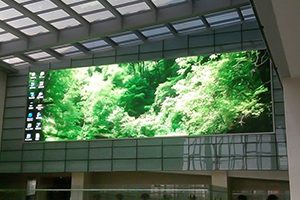
Before final installation, verify the electrical load, grounding, cable routes, heat management and emergency access. Commission the screen with real content and record the brightness, color and calibration settings for future maintenance.
Indoor LED display system components
A complete indoor LED display is more than the visible panels. It normally includes LED modules and cabinets, power supplies, receiving cards, a sending controller or video processor, signal and power cables, mounting hardware and control software. System compatibility matters: the pixel capacity, port loading and signal path must match the final screen resolution.
For asynchronous signage that plays scheduled content without a permanently connected computer, review asynchronous LED control cards. For live presentations or multiple video sources, a dedicated processor usually provides more flexible scaling and switching.
Questions to ask an indoor LED screen supplier
- What pixel pitch and screen size suit the closest viewing distance?
- What is the exact native resolution of the completed wall?
- Is the system front-service or rear-service?
- What refresh rate, grayscale and brightness range are guaranteed?
- Are spare modules, receiving cards and power supplies included?
- How are modules calibrated after replacement?
- What controller and software are supplied?
- What structure, power and ventilation must the site provide?
- What warranty, remote support and commissioning services are available?
Frequently asked questions
What pixel pitch is best for an indoor LED screen?
The best pitch depends mainly on the closest regular viewing distance and the detail in the content. P0.9-P1.8 is common for close-view control rooms and premium meeting spaces, while P2.5-P3.9 can be more economical for stages, retail areas and audiences several meters away.
How bright should an indoor LED screen be?
About 600-1,200 nits is a useful planning range for many indoor spaces. The correct setting depends on room lighting, nearby windows, camera use and viewing comfort. Reliable low-brightness color performance is often more valuable than a very high maximum figure.
Is an LED wall better than an LCD video wall?
An LED wall provides a continuous image without panel bezels and can be built in custom sizes. LCD video walls may have a lower entry cost for some small installations. The better choice depends on viewing distance, desired size, bezel tolerance, brightness and maintenance requirements.
Can an indoor LED display run 24/7?
Yes, when the system is engineered for continuous operation with suitable power, cooling, component quality and maintenance. Critical control rooms should also consider redundant signal and power paths plus on-site spares.
What information is needed for an accurate quotation?
Provide the intended use, screen width and height, closest viewing distance, installation location, wall or rigging details, input sources, operating hours and expected delivery date. Photos or drawings of the site help the supplier identify access, structure and cabling requirements.
Get the right indoor LED display configuration
The most effective indoor LED screen is not simply the model with the smallest pixel pitch. It is the system that delivers readable content at the real viewing distance, fits the room, supports the required sources and can be maintained safely.
Browse our indoor LED display options or contact EagerLED with your screen size, viewing distance and application. Our team can help match the display, controller and supporting components to your control room, government facility, retail space or event.

