
A P6 outdoor LED display is a weather-resistant screen with a 6 mm pixel pitch, designed for medium- and long-distance viewing. This model operates from -35°C to 50°C, has front IP65 protection, and provides a 120° horizontal by 70° vertical viewing angle. It is suited to outdoor advertising, venues, transport sites, water parks, and other installations exposed to cold, rain, or dust.
For buyers comparing an LED screen P6 outdoor solution, the important decisions are viewing distance, cabinet protection, total pixel load, brightness requirements, and controller compatibility. The specifications and checklist below explain how to evaluate them.
Key P6 Outdoor LED Display Specifications
| Specification | Value | Why it matters |
|---|---|---|
| Pixel pitch | 6 mm | Balances image detail and viewing distance for outdoor signage. |
| Approximate pixel density | 27,778 pixels/m² | Calculated from the 6 mm pitch; useful when estimating total resolution. |
| Operating temperature | -35°C to 50°C | Supports operation in cold winters and hot outdoor environments. |
| Front protection | IP65 | The display face is dust-tight and protected against water jets. |
| Viewing angle | 120° horizontal / 70° vertical | Helps audiences see content across a broad viewing area. |
| Typical LED package | Outdoor SMD3535 | Commonly used for durable full-color outdoor modules. |
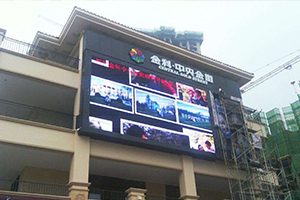
What Does P6 Mean on an Outdoor LED Screen?
P6 means the centers of adjacent LED pixels are 6 mm apart. A smaller pixel pitch places more pixels into the same area and supports closer viewing, while a larger pitch is generally selected for longer viewing distances. At 6 mm pitch, one square meter contains approximately 27,778 pixels.
A practical starting point for comfortable viewing is about 6 meters, although content type, screen size, installation height, and audience expectations also matter. Text-heavy content should be tested at the actual viewing distance before the final cabinet layout is approved.
Why This P6 Display Works in Cold Weather
The specified -35°C to 50°C operating range makes this anti-low-temperature LED screen appropriate for cold regions as well as standard outdoor environments. Low-temperature capability matters because power supplies, connectors, masks, and control electronics must remain stable when materials contract and moisture may condense.
- Cold-weather operation: The -35°C lower limit supports winter installations where standard commercial displays may not be suitable.
- Front IP65 protection: The viewing face resists dust and water jets. Under IEC 60529, the first digit describes solid-particle protection and the second describes water protection.
- Important limitation: “Front IP65” does not automatically mean the rear of the cabinet, connectors, or service doors have the same rating. Confirm the complete cabinet specification for the installation direction and local weather exposure.
Image Quality and Viewing Coverage
The 120° horizontal and 70° vertical viewing angles help deliver consistent content to audiences spread across a wide area. For road-facing displays, building facades, event venues, and public spaces, the screen should be positioned so the main audience remains within these angles.
Pixel pitch alone does not determine picture quality. Source resolution, scaling, refresh rate, grayscale performance, module calibration, brightness, and the LED controller all affect the final image. Use high-contrast layouts and sufficiently large text for outdoor advertising, especially when viewers are moving.
How to Choose a P6 LED Module Controller
GSC data shows that users often search for a “P6 LED module controller.” There is no single controller that fits every P6 screen. Select the control system from the total pixel count, cabinet wiring, scan mode, required inputs, and operating method.
- Calculate screen resolution: Divide the physical width and height by 6 mm to estimate the pixel dimensions.
- Check receiving-card load: Confirm each cabinet or module group stays within the pixel capacity and connector layout of the LED receiving card.
- Size the sending system: The sending card or video controller must support the screen’s total pixels, output ports, source resolution, and redundancy needs.
- Match electrical and scan parameters: Verify module interface, scan type, data groups, power distribution, and configuration files before installation.
- Choose synchronous or asynchronous control: Live video and event screens commonly use synchronous control; scheduled signage may use an asynchronous LED control card.
For the related cabinet format, see the P6 outdoor large LED display panel with SMD3535 LEDs. Controller capacity should still be checked against the final screen dimensions rather than selected from pixel pitch alone.
Best Applications for a P6 Outdoor LED Display
- Outdoor advertising: Building facades, shopping areas, billboards, and roadside messaging.
- Cold-region installations: Public information and commercial signage exposed to severe winter temperatures.
- Sports and event venues: Scoreboards, perimeter displays, and audience information screens.
- Water parks and pools: Locations where the display face may be exposed to spray; the rear enclosure and connections must also be protected appropriately.
- Transport and public spaces: Arrival information, wayfinding, safety notices, and city communication.
Installation and Maintenance Checklist
- Confirm that the cabinet, rear doors, cable glands, connectors, and ventilation design meet the site’s full weather-protection requirements.
- Use power supplies and control components rated for the expected temperature range.
- Provide drainage and avoid cable routes where water can collect.
- Allow for thermal expansion and contraction in the steel structure and cabinet joints.
- Ground the display correctly and include surge and lightning protection appropriate to local regulations.
- Verify ventilation or heating strategy without blocking airflow or compromising ingress protection.
- Calibrate modules after installation and keep matching spare modules, power supplies, and receiving cards.
- Test content at the actual viewing distance during daylight and at night.
Frequently Asked Questions
What is the recommended viewing distance for a P6 outdoor LED screen?
About 6 meters is a practical starting point for minimum comfortable viewing. The ideal distance depends on screen size, content detail, installation height, and how quickly the audience moves past the display.
Can this P6 outdoor LED display operate below freezing?
Yes. Its stated operating range is -35°C to 50°C, so it is designed for sub-zero environments. The complete system, including power supplies, controller hardware, cables, and cabinet seals, must also be rated for the site conditions.
Is the complete screen waterproof because the front is IP65?
Not necessarily. Front IP65 applies to the display face. Ask for the rear protection rating and confirm cabinet joints, doors, fans, cable glands, and connectors before using the screen in exposed locations.
Which controller should I use for a P6 outdoor LED display?
Choose the controller from total screen resolution, receiving-card load, scan configuration, number of output ports, input sources, and redundancy requirements. Pixel pitch by itself is not enough to select a controller.
What content works best on a P6 screen?
Use bold type, strong contrast, short messages, and images or video prepared for the screen’s native aspect ratio. Preview the design from the intended viewing distance and avoid fine text that will not resolve clearly.
Summary
This P6 outdoor LED display combines a 6 mm pixel pitch, -35°C to 50°C operation, front IP65 protection, and wide viewing coverage for demanding outdoor projects. A reliable installation depends on matching the cabinet, power, control system, structure, and environmental protection to the exact site.
Browse our outdoor LED display screens, or contact our team with the screen dimensions, viewing distance, installation location, and content source for a compatible configuration.

