VX600 Pro ByPass operation can reach a specified device delay of zero frames when low latency is enabled, but video processing is unavailable in this mode. If your LED wall still needs the controller to scale or compose the picture, the zero-frame headline is not a complete configuration specification. Choose the operating mode around the required picture functions as well as the delay target.
For an AV rental integrator evaluating a live-video signal path, this is a mode-selection question before it is a latency promise. Confirm where the final picture will be prepared, whether synchronization is required, and which delay is being discussed. The controller’s documented device delay is not a measurement of the entire camera-to-screen system.
What changes in VX600 Pro ByPass mode?
The controller can work in different roles, but the available features depend on the selected role. NovaStar’s VX600 Pro All-in-One Controller Specifications identifies video controller, fiber converter and ByPass modes. Its function-limitations table states that video processing is unavailable when the unit operates as an independent display controller in ByPass mode.
That restriction is the starting point for assessing VX600 Pro ByPass operation. A product’s general feature list can mention scaling, multiple layers and low latency without saying that every feature operates together in every mode. Read the limitations beside the headline capabilities before approving a signal-path drawing.
If another device prepares the complete picture, state that responsibility in the design. Identify the format and canvas that will arrive at the controller, then have the proposed mapping and compatible equipment confirmed. Do not assume a mode change will preserve the result of a layout that depended on the controller’s processing functions.
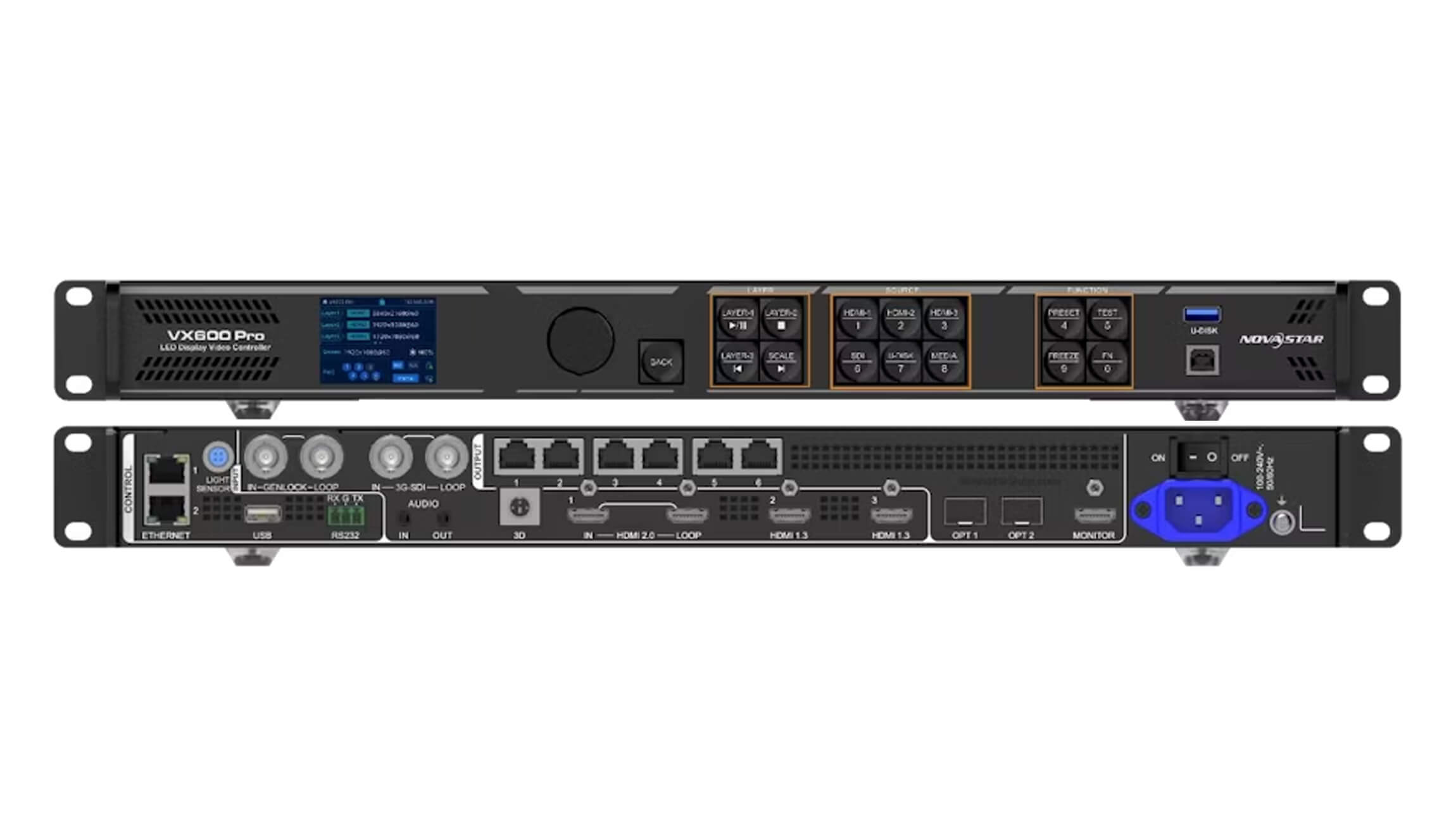
Use the VX600 Pro product page to check the unit and interfaces being quoted. This explanation uses the store’s archived V1.0.1 specification dated March 5, 2025, cross-checked against the manufacturer’s V1.1.1 specification dated August 15, 2025. Confirm the applicable instructions for the supplied firmware before changing an installed system.
Read VX600 Pro ByPass latency with its conditions
The published latency table separates video controller and ByPass operation, and it distinguishes whether low latency is enabled. For video controller mode it lists one to two frames with low latency and two to three without it. For ByPass it lists zero frames with low latency and one frame without it.
These figures are the manufacturer’s device-delay specifications under the stated modes. They are not observations from a test performed for this article. The table below helps a purchaser preserve those conditions when asking for a configuration, rather than transferring the lowest figure to every use of the product.
| Proposed operating condition | Published device delay | Question to settle before approval |
|---|---|---|
| Video controller with low latency | 1–2 frames | Does the proposed topology satisfy the applicable low-latency conditions? |
| Video controller without low latency | 2–3 frames | Is this device contribution acceptable within the complete system target? |
| ByPass with low latency | 0 frames | Where will the picture processing occur, and is Genlock required? |
| ByPass without low latency | 1 frame | Which functions and synchronization settings does the actual project require? |
VX600 Pro ByPass mode does not remove delay elsewhere in the system. A camera, upstream production device and the LED display chain can each contribute to the observed result. When an acceptance specification describes total delay, identify the measurement endpoints and the active equipment. Avoid calling the full installation zero-latency solely because of the controller’s table entry.
Can low latency and Genlock be used together?
The specifications distinguish the modes here too. In video controller mode, low latency and Genlock are not listed as mutually exclusive. In ByPass mode, the document says that the two functions cannot be enabled simultaneously. Keep the synchronization requirement visible when evaluating the lowest-latency configuration.
For VX600 Pro ByPass operation, a requirement that includes both enabled low latency and enabled Genlock conflicts with this published limitation. Ask the system designer to resolve that requirement before ordering or reconfiguring the equipment. Do not silently remove synchronization from a specification merely to retain the zero-frame figure.
The document also associates low latency with cabinet alignment at the top of the screen’s circumscribed rectangle. Confirm the applicable topology rules against the actual cabinet layout and firmware instructions. A total pixel count within the product’s headline capacity is not by itself evidence that every low-latency condition has been met.
This is a reason to retain a cabinet-routing diagram with the source and mode record. If the installation changes shape or output routing, revisit the relevant conditions. Keep any measured before-and-after result tied to that specific arrangement rather than presenting it as an unconditional property of the model.

Keep picture preparation and screen mapping separate
Choosing VX600 Pro ByPass operation does not finish the screen configuration. The intended content must still reach the correct LED positions through the approved control arrangement. Assign responsibility for preparing the picture, confirming source compatibility and maintaining the screen configuration, so the handover does not leave those tasks assumed.
A useful configuration inquiry describes what the controller must do to the incoming picture. If the project needs a resized picture, an inset source or a multi-window composition, say where that result will be produced. Do not describe only the finished visual effect and expect the supplier to infer which upstream equipment will create it.
For a processing-based proposal, compare the relevant functions in the store’s LED video processor category. A different operating mode or device may suit the required combination, but evaluate its own latency, source and synchronization conditions. This article does not approve a substitute model for an unspecified project.
VX600 Pro ByPass should also be recorded as an operating condition in any demonstration request. Two demonstrations using the same model can have different processing paths and different delay contributions. Record the mode, low-latency state, synchronization choice, input format and connected equipment before comparing the results.

Specify the result you need to verify
For an existing rental system, preserve its configuration and working-mode record before planning a change. Have the responsible technician review the matching operating instructions and the proposed picture path. This is a design and acceptance discussion, not a recommendation to change modes during a live event.
Agree which functions must remain available and what the complete system delay requirement means. A source-to-controller comparison answers a different question from a camera-to-LED measurement. State the frame rate and the method alongside the result, rather than comparing unnamed measurements from unrelated setups.
When discussing VX600 Pro ByPass with a supplier, ask for the proposed arrangement to identify the processing device and the synchronization choice. If a capability depends on firmware or compatible receiving cards, retain those identifications with the answer. A clear scope lets your installation team distinguish a documented device capability from a project result still awaiting verification.
Frequently asked questions
Does a zero-frame specification mean zero milliseconds for the full display system?
No. The published figure concerns the controller in the stated mode. The complete system has other stages, and frame-based figures need the associated operating conditions. A whole-system claim requires a defined measurement covering the intended endpoints.
Can a photograph of the front-panel SCALE button prove scaling is available in every mode?
No. A physical button shows the unit’s controls, while the function-limitations table defines the restrictions for the operating mode. Use the matching document and firmware instructions to confirm the functions available in the proposed arrangement.
Does a saved preset prove that the measured delay will remain the same after the system is changed?
No. A saved setup is not a measurement of a changed signal path. Reconfirm the mode, source, synchronization and connected equipment when comparing a later arrangement with the accepted reference. Keep the relevant configuration and observations together.
Send the required functions with your latency target
To assess VX600 Pro ByPass for your rental system, provide the source format, physical LED matrix, cabinet-routing diagram and proposed processing path. State whether scaling, composition or Genlock is required, and identify whether your delay target concerns the controller or the complete installation.
Use the EagerLED configuration inquiry page to discuss those requirements. Request an answer tied to the intended mode and equipment. That gives the production and installation teams a clearer basis for acceptance than an isolated zero-frame headline.