Changing RCVP to RCVBP by renaming a file does not convert its contents. A different extension may change which files a dialog displays, but it does not establish that the receiving-card parameters are compatible. For a replacement cabinet, obtain a file supported by the actual software and matched to the installed module.
This distinction matters when a maintenance contractor receives an old configuration archive and a newer laptop. The immediate problem may be a file-selection filter, a software-version difference or an incorrect module file. Treating every missing filename as a conversion problem can send the investigation in the wrong direction.
The practical acceptance test is not whether Windows shows the preferred suffix. It is whether the intended Colorlight software can read the original file and whether the documented configuration works on the identified cabinet. Keep the source file unchanged while investigating.
Why renaming RCVP to RCVBP is not conversion
A filename and the data stored inside it are different things. Renaming changes the label used to identify a file; an actual conversion reads a supported source format and writes an appropriate target format. Simply replacing the final letters does not perform that work. It also does not change scan settings, driver-chip parameters or module data order.
An RCVP to RCVBP request should therefore start with a question: which application and version produced the file, and which application and version must open it? Without those details, nobody has defined the conversion being requested. A screenshot of an unsupported-file message is more useful than a renamed copy accompanied by the statement that it should work.
Our Colorlight configuration-file download hub contains both extensions and module-specific variants. Their presence in one archive is not a declaration that the formats or their parameter sets are interchangeable. Use that page to locate candidate files, then verify the particular candidate against the cabinet record.
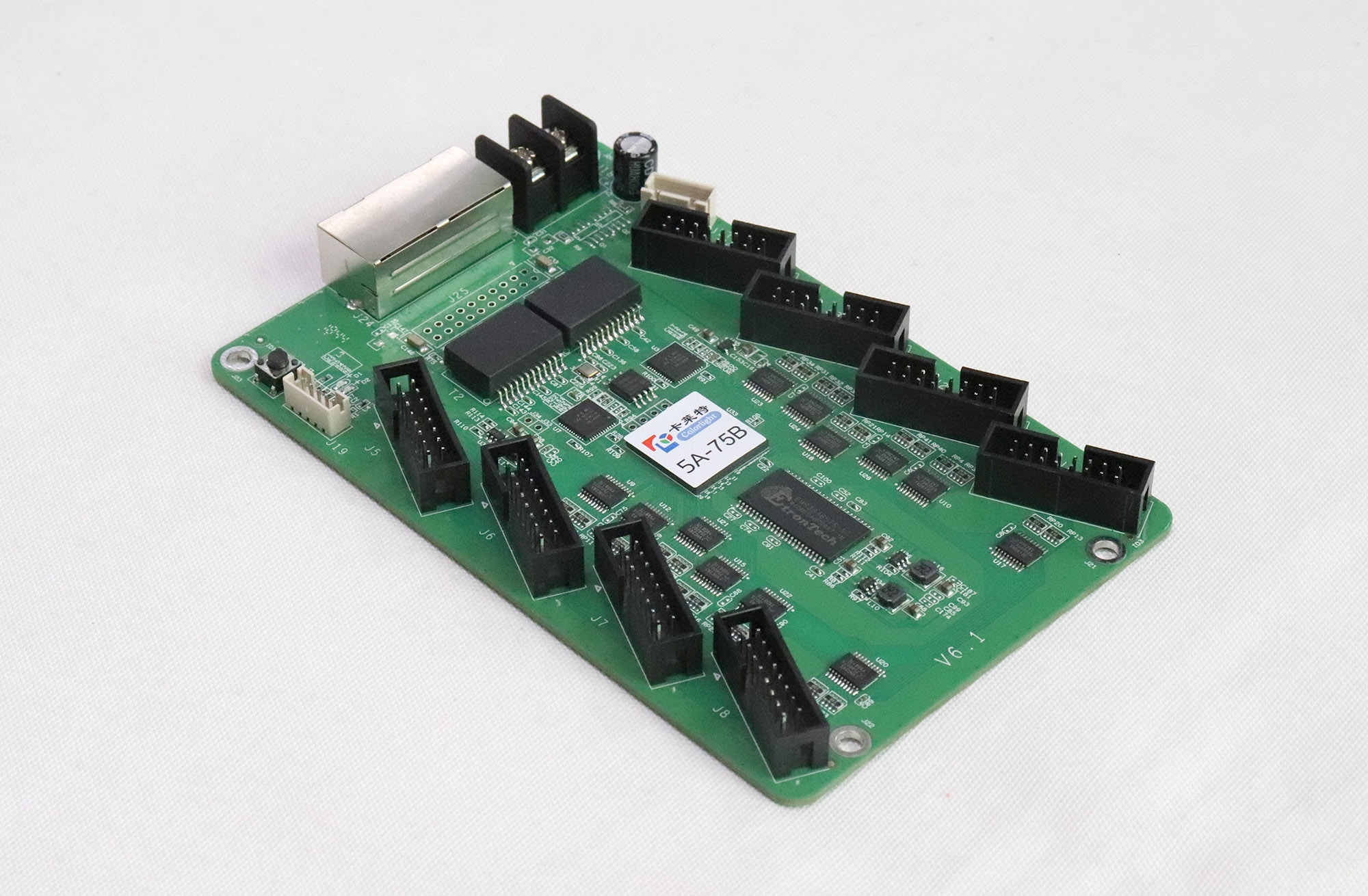
Record the hardware before changing the file
Identify the receiving card, its board revision and the LED module behind it. The photographs here show a Colorlight 5A-75B as a hardware-identification example. They do not identify the card in your cabinet or certify a configuration for it. A matching product family is only one part of the evidence.
Ask the module supplier for the module pixel resolution, scan ratio, driver IC and connector definition. Record the sender, receiving-card firmware and control-software version as well. Two modules sold under the same pixel-pitch label can require different settings, so pitch alone is not a sufficient file-selection rule.
Before attempting RCVP to RCVBP conversion, separate known facts from assumptions in the service record. For example, “module label photographed” is stronger than “probably the original P2.5 model.” If the driver IC cannot be identified from the documentation, request clarification rather than selecting the nearest-looking filename.
Photograph the working cabinet’s wiring and its position in the screen. A replacement can require correct parameters and correct screen mapping. File acceptance in the software does not, by itself, prove that the replacement occupies the right location or displays the intended section of the picture.
RCVP to RCVBP handover evidence
Use the following checklist when comparing supplier responses. It distinguishes a missing detail from a tested result and gives the receiving technician something concrete to verify. These are recommended handover records, not a claim that every software version exposes identical commands.
| Supplier deliverable | What it establishes | If it is missing |
|---|---|---|
| Original file with its original extension | A traceable starting point | Request the untouched source rather than another renamed copy |
| Software name and exact version | The intended environment for opening the file | Ask for the version used for export and test |
| Module and receiver identification | Which hardware the parameters are intended to serve | Resolve labels, revision and driver IC before testing |
| Test record for the intended cabinet | What was actually displayed and checked | Arrange a controlled sample test |
| Recovery copy and restore instructions | A defined route back to the known configuration | Preserve the existing setup before any write |
For an RCVP to RCVBP inquiry, ask the supplier to distinguish “opens successfully” from “tested on this module.” Those are separate results. A useful response identifies the file, the test hardware and the checks performed; a screenshot of a file dialog proves much less.

If the file is not visible in the import dialog
First confirm that the archive has been extracted and that you are selecting a parameter file rather than the archive itself. Display the full filename in the operating system so that an extra suffix is visible. A file ending in an archive extension or an accidental double extension can be mistaken for the intended configuration.
Next record the file type requested by the software dialog. If it offers a documented compatible-file option, use that option as intended. Do not assume that forcing a file into view makes it readable, and do not treat an accepted filename as confirmation of the underlying parameters.
The correct RCVP to RCVBP route, if one is needed and supported, depends on the source and target versions. Request the documented import/export process from the supplier responsible for that configuration. This article does not establish a universal converter, a guaranteed menu path or a rule that all old files open in newer software.
Changing software versions is a separate maintenance decision. Check the relevant 5A-75B hardware information when that is the installed model, but keep the cabinet’s actual compatibility record as the deciding evidence. Do not introduce a firmware update merely to make a filename appear.
Accept the result on one identified cabinet
Once a supported file and procedure are available, have a qualified technician work on a controlled sample before applying anything across the wall. Preserve the existing configuration using the compatible software’s documented backup method. Record what the backup contains and where it is stored; do not overwrite it with an untested export.
An RCVP to RCVBP test should retain the original file, the proposed replacement and the software-version record as separate items. Check basic colors, grayscale, line order and the intended image area. Note any flicker, shifted rows or incorrect colors, but do not diagnose a specific driver-chip fault from one visual symptom alone.
After the configuration has been saved through the documented procedure, check the intended behavior again after a controlled restart. A picture that appears immediately is useful evidence, but the handover also needs to establish the expected persistent state. Restore the known configuration if the sample does not meet the agreed requirements.

Questions about configuration-file conversion
Should I upload the original archive to a free online converter?
Avoid giving an unidentified service the only copy of a project configuration. First ask the configuration supplier for a supported offline procedure or a correctly exported file. An online service’s ability to accept an upload does not establish compatibility with the receiving card, software version or module.
Will a file checksum prove that the new configuration works?
A checksum can help confirm whether a delivered file changed during transfer. It cannot prove that its contents match the LED module. Use it for file identity, then keep the hardware and display tests as separate acceptance evidence.
What if the original supplier is unavailable?
Retain every known-working file, hardware label, wiring photograph and software-version record. A technician may need to assess the configuration from that evidence and the actual cabinet. Do not assume that a public download with a similar pitch label can replace the missing project record.
Request a traceable configuration-file check
For RCVP to RCVBP support, send the original filename, the software versions involved, receiver and module photographs, driver-IC details and the exact error message. State whether the existing wall still works and whether you have an untouched backup. Those details help distinguish file selection, format support and hardware matching.
If you are ordering replacement cards or modules, contact EagerLED with the cabinet information and ask what compatibility evidence is available before purchase. Treat RCVP to RCVBP as a documented file-and-hardware check: approve the supported file and tested result, rather than a changed extension.