
LED display maintenance combines routine inspection, cleaning, environmental control, electrical checks, and timely replacement of worn parts. For most large LED screens, operators should perform a quick visual check before each use, clean accessible ventilation areas monthly, inspect cabinet connections quarterly, and schedule a qualified technical service at least once a year.
This guide explains what an owner or facility team can safely maintain, what requires a trained technician, and how to build a practical preventive maintenance schedule for indoor and outdoor LED displays.
Why LED Display Maintenance Matters
A large LED display is a system of modules, power supplies, receiving cards, cables, fans, cabinets, and control equipment. A fault in one small component can create black modules, color errors, flicker, overheating, or intermittent signal loss.
Preventive maintenance helps you:
- reduce unexpected downtime;
- spot loose or corroded connections early;
- maintain consistent brightness and color;
- protect power supplies and control cards from heat and dust;
- extend the service life of the screen.
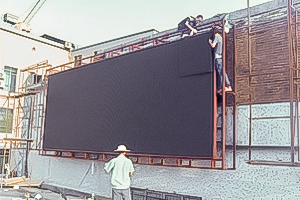
LED Screen Maintenance Schedule
| Frequency | Maintenance task | Who should do it |
|---|---|---|
| Before each use | Check for dark pixels, black modules, flicker, color differences, unusual noise, and alarms. | Operator |
| Weekly | Review operating temperature, humidity, ventilation, and controller status. | Operator |
| Monthly | Clean accessible air inlets, filters, and the surrounding area. Review the fault log. | Trained maintenance staff |
| Quarterly | Inspect cabinet seals, grounding, cables, connectors, fans, and power supplies. | Qualified LED technician |
| Every 6-12 months | Deep-clean cabinets, test spare modules, back up configuration files, and check brightness uniformity. | Qualified LED technician |
| After severe weather | Inspect outdoor cabinets for water entry, impact damage, corrosion, and loose structural hardware. | Qualified technician |
The exact interval depends on operating hours, climate, dust, salt exposure, screen design, and the manufacturer’s instructions. High-traffic outdoor installations usually need more frequent checks.
10 Essential LED Display Maintenance Steps
1. Start With a Visual Inspection
Turn on the display and show solid red, green, blue, white, and black test patterns. Record the cabinet or module position of any dead pixels, dark areas, color shifts, flicker, or horizontal and vertical lines. Photos and a dated fault log make recurring problems easier to diagnose.
2. Check Temperature, Humidity, and Ventilation
Keep the cabinet environment within the limits specified by the display manufacturer. Make sure air inlets and outlets remain clear. Check that fans and air-conditioning systems operate normally. Excess heat shortens the life of LEDs, power supplies, and control electronics.
During humid or rainy periods, inspect for condensation and water ingress. Do not energize wet equipment to dry it. Isolate the system and let a qualified technician identify and correct the moisture source first.
3. Clean Dust From Accessible Areas
Power down and isolate the display before opening a cabinet. Use an antistatic soft brush or a suitable low-suction vacuum on accessible dry areas. Avoid compressed air that can force debris deeper into connectors or damage components.
Dust absorbs moisture and restricts airflow. Over time, this can contribute to corrosion, overheating, and short circuits. Cleaning frequency should increase in construction zones, roadside locations, and other dusty environments.
4. Clean Filters and Cooling Equipment
Clean or replace air-conditioning and ventilation filters according to the equipment manual. Confirm that fans rotate freely and do not produce abnormal noise. A blocked filter can raise cabinet temperature even when the cooling unit appears to be running.
5. Inspect Power and Signal Connections
Loose power cables, ribbon cables, network cables, and hub connections are common causes of intermittent black modules or flicker. With power safely isolated, a qualified technician should check connectors for looseness, discoloration, corrosion, heat damage, or bent pins.
Never reseat cables or modules while the display is energized unless the manufacturer provides a specific hot-swap procedure.
6. Check Grounding and Surge Protection
Verify protective grounding, lightning protection, and surge-protection devices on outdoor installations. Electrical work should follow local regulations and the equipment manufacturer’s procedures. See the OSHA electrical safety guidance for general workplace electrical-safety principles.
7. Clean the Front Surface Correctly
Remove loose dirt with a soft, non-abrasive brush. Use only cleaning methods and solutions approved for the module type. Never direct a high-pressure water jet at an outdoor LED display screen; pressure can damage masks, seals, LEDs, and cabinet joints.
For a high or difficult-to-access screen, use trained access professionals with the proper fall-protection equipment.
8. Back Up Control-System Files
Save the receiving-card configuration, screen-connection map, calibration data, media-player settings, and controller firmware information. Label the backup with the screen name and date. A current backup can greatly reduce recovery time after a receiving-card or controller replacement.
9. Keep Tested Spare Parts
Store compatible LED modules, power supplies, receiving cards, hub boards, cables, masks, and fasteners in a clean, dry, labeled location. Test spares periodically. Modules from a different production batch may show a color or brightness difference, so retain matching modules when possible.
10. Record Every Fault and Repair
For each incident, note the date, cabinet position, symptom, weather, operating status, diagnosis, parts replaced, and technician. A maintenance history reveals patterns such as repeated overheating, water ingress, or power-supply failures.
What LED Display Maintenance Can Owners Do?
Operators can usually perform external visual checks, run test patterns, review controller alarms, keep the surrounding area clean, and maintain a fault log. Trained in-house staff may clean accessible filters and inspect de-energized cabinets if the manufacturer permits it.
Use a qualified LED technician for:
- work inside electrical cabinets;
- grounding, surge protection, or mains-power faults;
- water ingress or condensation;
- burnt connectors, repeated fuse trips, or overheating;
- module, power-supply, receiving-card, or hub-board replacement;
- calibration, configuration recovery, and structural inspection.
Quick Fault Guide
| Symptom | Possible causes | First safe action |
|---|---|---|
| One black module | Loose power or signal connection, failed module, or hub-port issue | Record its position and arrange a de-energized connection check. |
| Several cabinets offline | Power-distribution, network, sending-card, or fiber-link fault | Check controller alarms and escalate to a technician. |
| Flickering image | Unstable power, loose cable, incorrect refresh settings, or signal fault | Stop repeated power cycling and capture a video of the symptom. |
| Uneven brightness or color | Calibration mismatch, aged modules, or mixed production batches | Run test patterns and compare affected cabinet positions. |
| Condensation or water marks | Seal failure, drainage problem, or environmental-control issue | Isolate power and do not restart until the screen is inspected. |
| Burning smell or abnormal heat | Electrical overload, damaged connector, blocked cooling, or failing power supply | Shut down safely and call a qualified technician immediately. |
Frequently Asked Questions
How often should a large LED screen be maintained?
Perform a visual check before each use, environmental checks weekly, accessible cleaning monthly, technical inspections quarterly, and a comprehensive service every 6 to 12 months. Adjust the schedule for operating hours and environmental conditions.
Can an LED display run continuously?
Many commercial LED displays support long operating periods, but the permitted duty cycle depends on the product and cooling design. Follow the manufacturer’s specification, monitor temperature, and schedule planned downtime for inspection and cleaning.
Can I wash an outdoor LED screen with water?
Do not use a pressure washer. Use only the cleaning method approved by the display manufacturer. Water jets can bypass cabinet seals and damage LED modules or electronics.
What is the most common cause of a black LED module?
Common causes include a loose power or signal connector, a failed module, a damaged hub-board port, or a power-supply problem. Record the exact location and have the cabinet checked with power isolated.
When should I call a professional?
Call a qualified technician for electrical faults, water ingress, repeated overheating, burnt components, structural damage, or any repair that requires opening energized equipment. If you need compatible LED display parts or help identifying a replacement, contact our LED display support team.
LED Display Maintenance Checklist Summary
- Inspect the picture and record faults.
- Monitor heat, humidity, ventilation, and alarms.
- Clean dust, filters, and front surfaces correctly.
- Inspect power, signal, grounding, seals, and cooling.
- Back up configuration files and keep tested spares.
- Escalate electrical, moisture, and structural work to qualified technicians.
A consistent LED screen maintenance plan is less expensive than emergency repair and helps preserve image quality, safety, and uptime throughout the display’s service life.

