
Choose the NovaStar MX20 for a smaller LED wall with straightforward HD sources, the MX30 when you need more output capacity and a 4K HDMI input, and the MX40 Pro when larger canvases, 12G-SDI or advanced production requirements justify the upgrade. The right choice depends on the complete signal path, including the receiving cards inside your cabinets.
This comparison is for LED integrators, rental teams and buyers planning a new system or controller upgrade. It separates published specifications from practical selection advice. Specifications were checked against NovaStar documents available on 8 October 2026; this is a document-based comparison, not a hands-on performance test. [1–3]
Quick comparison table
| Specification | MX20 | MX30 | MX40 Pro |
|---|---|---|---|
| Maximum device load | 3.9 million pixels | 6.5 million pixels | 9 million pixels |
| Gigabit Ethernet outputs | 6 | 10 | 20 |
| 10G optical ports | 2 | 2 | 4 |
| Video inputs | 2 × HDMI 1.3 1 × 3G-SDI | 1 × HDMI 2.0 1 × HDMI 1.4 1 × DP 1.1 2 × 3G-SDI | 3 × HDMI 2.0 1 × DP 1.2 1 × 12G-SDI |
| Independent layers | 3 | 3 | 4 |
| Rack height | 1U | 2U | 2U |
What all three controllers have in common
All three belong to NovaStar’s COEX platform and work with VMP, its Vision Management Platform. They combine processing and sending functions. Layering and scaling are available in all-in-one mode, while send-only mode serves workflows with upstream processing. [1–3] For a team standardizing its operation, this shared environment matters: changing models does not automatically require a completely different control workflow.
NovaStar MX20 for smaller LED walls
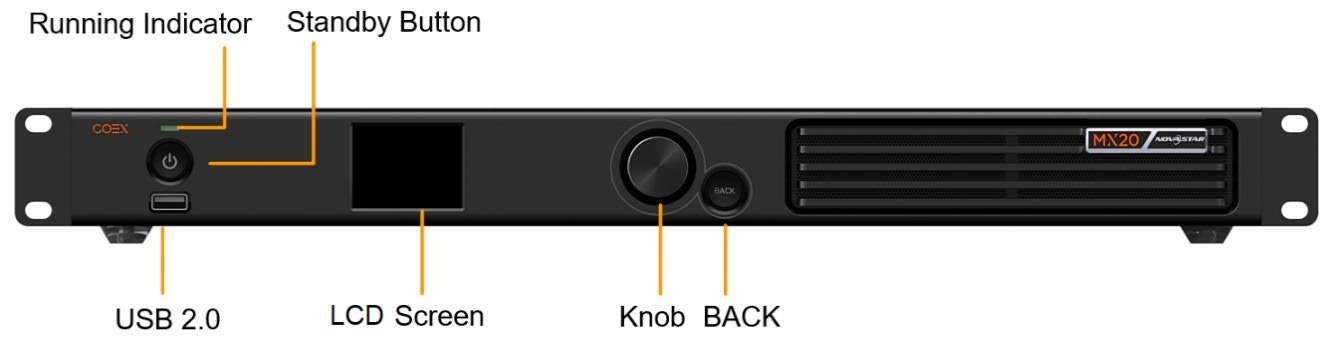
Figure 1. MX20 front panel. Image: NovaStar, MX20 specifications V1.5.1. [1]
The MX20 is a sensible starting point when the screen and source requirements are modest. Its HDMI input specification lists 1920 × 1200 at 60 Hz, with supported custom formats subject to separate width and height limits. [1] A connector labeled HDMI therefore should not be treated as proof that a standard UHD signal will work.
Consider a 1920 × 1080 LED wall: its 2,073,600 pixels sit below the published device ceiling. That makes MX20 a candidate, provided the cabinet wiring distributes those pixels within each output’s limit. A presentation system with a laptop and an HD production feed may gain little from paying for inputs that will never be used.
Plan the source format before ordering. If an existing media server is locked to 3840 × 2160, changing its output or adding external conversion introduces another setup task. A controller with an appropriate native input can simplify that installation even when the wall itself is small.
NovaStar MX30 for more capacity and 4K sources
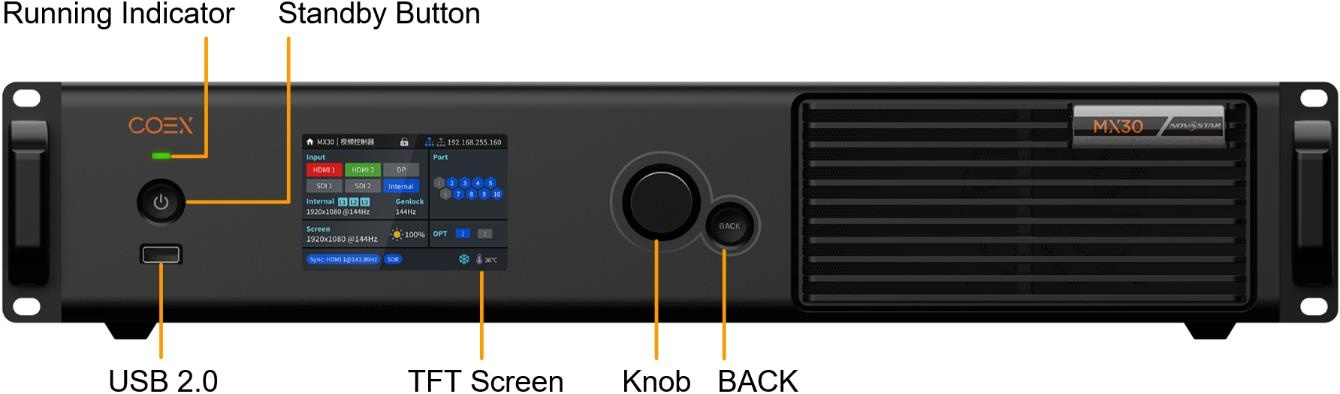
Figure 2. MX30 front panel. Image: NovaStar, MX30 specifications V1.5.0. [2]
The MX30 is the practical middle option when MX20 output capacity is insufficient or a 4K HDMI source is essential. Its HDMI 2.0 input accepts up to 4096 × 2160 at 60 Hz under supported signal conditions, and its specifications list HDR10 and HLG on that input. [2] Check color sampling and bit depth against the detailed timing table.
A 3200 × 1800 wall contains 5,760,000 pixels. That exceeds MX20’s headline capacity but falls below MX30’s. For this example, MX30 deserves evaluation before moving to MX40 Pro. The available margin still has to accommodate the chosen transmission settings and a workable cabinet-to-port allocation.
NovaStar MX40 Pro for demanding production
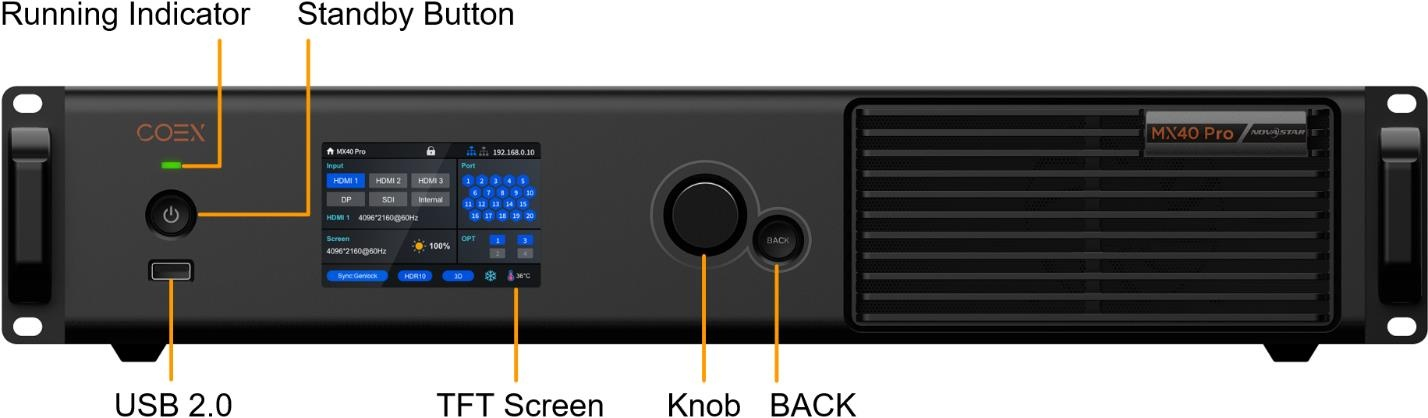
Figure 3. MX40 Pro front panel. Image: NovaStar, specifications V1.5.0. [3]
The MX40 Pro offers the broadest production toolkit of these three models. Its 12G-SDI input, four-layer capability and 3D LUT support are relevant when a system must accept professional video sources and maintain a deliberate color workflow. NovaStar also documents HDR10, HLG and camera-related functions such as Shutter Fit. [3]
These capabilities make it a stronger candidate for broadcast, filmed events and virtual production, but the controller alone cannot guarantee a camera-ready image. Receiving cards, driver ICs, calibration, camera settings and the LED panels must be considered together. Ask the integrator to demonstrate the intended workflow with the actual cabinet type.
For a straightforward presentation wall, those extras may not change the visible result. The upgrade becomes easier to justify when it removes a specific constraint: an incompatible SDI source, insufficient output capacity, a missing layer or a required color-management step. Build the purchase decision around that constraint.
A useful procurement question is whether the production team already uses an external switcher or processor. If that equipment performs the required compositing, the controller layer count may have little value. If the LED controller must assemble the final image itself, write down every simultaneous source and its placement before deciding which model offers enough flexibility.
Input resolution and LED wall capacity are different
A UHD image at 3840 × 2160 contains 8,294,400 pixels. MX30 can accept an appropriate 4K HDMI signal, yet its 6.5-million-pixel device rating is below the number needed to display that complete canvas pixel for pixel. Accepting, scaling and distributing an image are separate operations.
Among these three, MX40 Pro is the candidate for that full UHD canvas because its 9-million-pixel ceiling exceeds the calculated total. This is a capacity screening result, not approval of every UHD configuration. Confirm the actual frame rate, bit depth, receiving cards and port map before committing to the design.
Use the same method for unusual aspect ratios. Multiply the active wall width by its height, then check dimensional limits and each cable run. A wide panoramic screen can challenge an input’s supported timing even when its total pixel count appears comfortable.
Real world differences that affect system design
Bit depth and output loading
Higher bit depth and higher frame rates consume more transmission bandwidth. Do not carry an 8-bit capacity assumption into a 10-bit project. NovaStar publishes Ethernet loading tables and receiving-card conditions for each model. [1–3] Treat those tables as design inputs alongside the cabinet resolution and wiring plan.
For example, dividing a wall’s total pixels by the number of ports gives only an average. One heavily loaded chain may exceed its allowance while other outputs remain lightly used. Draw the actual cabinet routes, calculate each route separately and reserve any outputs needed for the selected backup arrangement.
Fiber transport and redundancy
The MX20 and MX30 describe their second optical port as a copy channel. MX40 Pro supports both 20-port and 40-port optical output modes; its channel assignments change with the mode. [1–3] Extra optical connectors should therefore never be counted automatically as extra independent canvas capacity.
Specify the failure you want the design to survive. A spare transport path addresses a different problem from a second controller or a backup source. Request a wiring diagram that identifies primary paths, backup paths, converters and power dependencies. Include optical modules and compatible conversion hardware in the quotation.
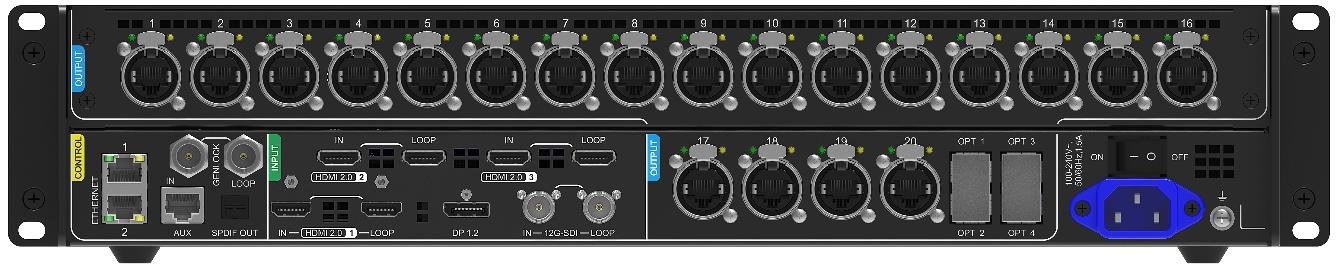
Figure 4. MX40 Pro rear panel showing Ethernet outputs and optical ports for system planning. Image: NovaStar specifications V1.5.0. [3]
Latency and synchronization
All three provide Genlock connections, but NovaStar’s low-latency limitations state that Low Latency cannot operate simultaneously with Genlock. [1–3] Avoid selecting features independently from a checklist and assuming they can all run together. A live camera system needs a coordinated timing design.
During acceptance, measure the complete path from the source through the screen. A minimum controller-processing figure does not include the camera, switcher, media server or panel behavior. Test the final mode with representative content, especially if the audience can see a speaker and their live image at the same time.
Which controller should you choose
Start with the native wall resolution and the source connection. Shortlist MX20 for an HD LED installation within its loading limits. Move to MX30 for the intermediate capacity range or a required 4K HDMI input. Choose MX40 Pro when the larger canvas or production features solve a documented requirement.
Compare complete installed costs instead of controller prices alone. Ask each supplier to include the same cabling, optical hardware, configuration work and backup scope. If future expansion is likely, calculate the expanded wall now; a vague promise of upgrade capacity is less useful than a verified second-stage port map.
A practical selection example
Imagine a venue replacing an HD wall with a 3200 × 1800 display while retaining a UHD media-server feed. The first filter favors MX30 over MX20 because both the source format and pixel count have changed. Next, the installer must check the planned bit depth and distribute the cabinets across ten outputs. If that calculation fails, the apparent fit at the headline level is insufficient.
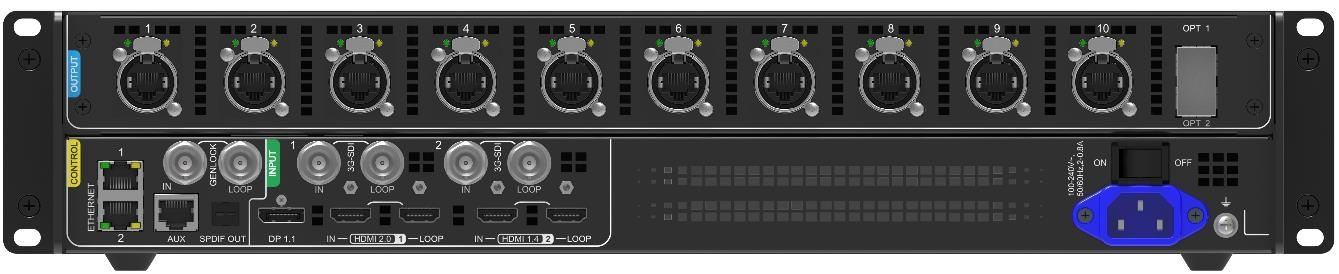
Figure 5. MX30 rear panel showing the source inputs and ten Ethernet outputs discussed in the selection example. Image: NovaStar specifications V1.5.0. [2]
Now change the brief: the venue wants a native UHD wall, direct 12G-SDI input and a color pipeline used by its camera crew. Those requirements point toward evaluating MX40 Pro. The larger model is justified by named requirements, and the acceptance plan should demonstrate each one. Keep the same discipline when comparing quotations: an omitted converter or untested backup arrangement can outweigh a small price difference.
Frequently asked questions
Can the MX30 display a complete UHD wall?
Not as one 3840 × 2160 pixel-for-pixel canvas within its published 6.5-million-pixel device rating. That wall requires approximately 8.29 million pixels. MX30 can accept supported UHD input and scale it to a smaller LED canvas; the input label does not remove the output limit.
Is the MX40 Pro always the best choice?
It has the most extensive capabilities in this comparison, but the best purchase is the model that meets the project’s verified requirements. A smaller wall with simple sources may not benefit from the additional hardware. Spend on the complete system, including reliable distribution and commissioning.
Can existing receiving cards be reused?
Possibly, but verify the exact model and required functions against NovaStar’s compatibility tables. Basic compatibility does not prove support for every advanced feature. Obtain the cabinet configuration files and confirm the firmware and receiving-card combination before planning a controller-only replacement. [1–3]
What should a supplier confirm before purchase?
Request a written design showing the native canvas, source timing, bit depth, receiving cards, per-port loading and backup topology. Include the expected operating mode and software versions. For filmed applications, add an acceptance test using the intended camera settings and representative dark and moving content.
Before signing off, save the approved configuration and label the cabinet routes so the installation can be reproduced. Record any assumptions about source output, optical mode and spare ports. These records make later expansion or a replacement controller easier to assess without repeating the entire design process.
Conclusion
The NovaStar MX20 vs MX30 vs MX40 Pro comparison leads to three clear starting points. MX20 fits smaller systems with compatible HD sources. MX30 adds useful capacity and 4K HDMI input for intermediate projects. MX40 Pro is the stronger candidate for a full UHD canvas and workflows requiring 12G-SDI or advanced production tools.
Choose by the constraint your project actually faces. Calculate the LED pixels, verify the source format, then check receiving-card compatibility and output loading at the intended settings. That process produces a more dependable selection than choosing by model number, connector count or maximum resolution alone.
NovaStar specifications and product sources
- MX20 LED Display Controller Specifications, V1.5.1 (NovaStar).
- MX30 LED Display Controller Specifications, V1.5.0 (NovaStar).
- MX40 Pro LED Display Controller Specifications, V1.5.0 (NovaStar).

