
The short answer: the VX600 Pro fits LED walls up to 3.9 million pixels driven from 6 Gigabit Ethernet ports. Move to the VX1000 Pro when the pixel load, the cabinet count or the cable routing pushes past that, because it loads 6.5 million pixels from 10 Gigabit Ethernet ports. Everything else buyers usually compare — a 4K HDMI 2.0 input at 4096 × 2160 @ 60 Hz, 6 × 2K layer resources, 256 presets, two 10G optical ports and 0-frame ByPass latency — is identical on both controllers.
Related comparison: planning a smaller wall? Our NovaStar VX400 vs VX400 Pro guide applies the same pixel-load, input and layer checks to the 2.6-million-pixel class.
Quick pick: which controller fits your project
Both units belong to the same NovaStar VX Pro Series generation, run the same control software and share the same input and layering architecture. That makes this comparison simpler than most: you are choosing loading capacity and output-port count, not a different feature set.
| Choose the VX600 Pro if… | Choose the VX1000 Pro if… |
|---|---|
| Your total pixel load is 3.9 million pixels or less | Your total pixel load sits between 3.9 and 6.5 million pixels |
| Six Ethernet outputs cover every cabinet group with spare capacity | You need 7–10 Ethernet runs to keep cable routing short and organised |
| You drive one 4K screen, one studio wall or a mid-size stage | You drive a wide fine-pitch wall, several screen segments or a larger rental stage |
| You want the lower power draw of the pair (41 W rated) | You want headroom for a future screen expansion (44 W rated) |
If your design already passes 6.5 million pixels, neither controller in this comparison fits: move to the NovaStar VX2000 Pro, which loads 13 million pixels from 20 Ethernet ports. If the wall is smaller than 2.6 million pixels, price the NovaStar VX400 Pro before committing to either model here.
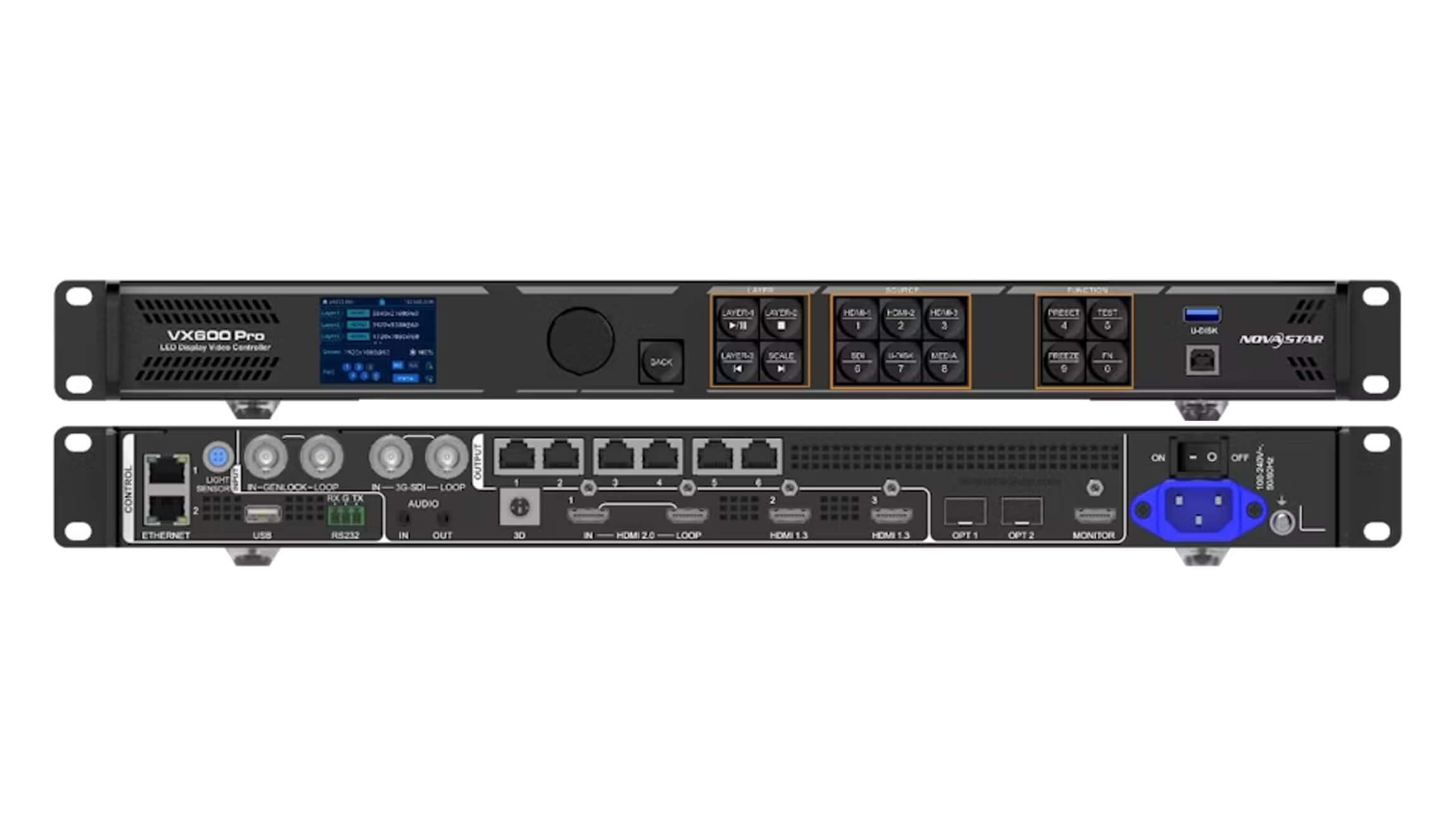
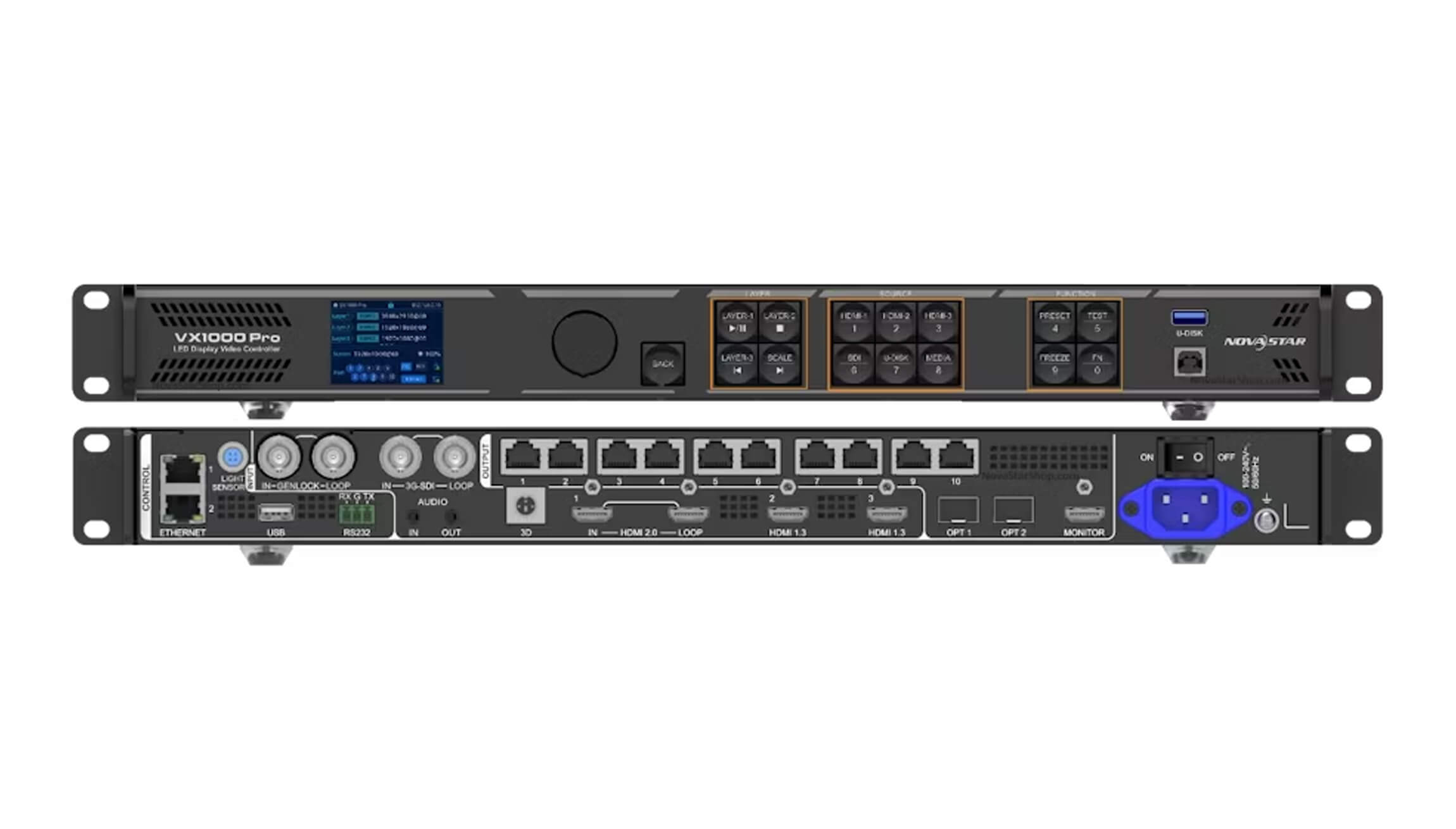
VX600 Pro vs VX1000 Pro: full specification comparison
The table uses the published NovaStar VX Pro Series figures. Where the two controllers are identical, the table says so instead of repeating product language.
| Specification | NovaStar VX600 Pro | NovaStar VX1000 Pro |
|---|---|---|
| Product class | All-in-one 4K LED video processor and controller | All-in-one 4K LED video processor and controller |
| Loading capacity | 3,900,000 pixels | 6,500,000 pixels |
| Gigabit Ethernet output ports | 6 | 10 |
| Published limit per Ethernet port | 650,000 pixels at 8-bit output depth | 650,000 pixels at 8-bit output depth (6,500,000 ÷ 10 outputs) |
| Maximum canvas | 10,240 pixels wide or 8,192 pixels high, within the total loading capacity | 10,240 pixels wide or 8,192 pixels high, within the total loading capacity |
| Maximum input resolution | 4096 × 2160 @ 60 Hz through HDMI 2.0 | 4096 × 2160 @ 60 Hz through HDMI 2.0 |
| Video and media inputs | 1 × HDMI 2.0 (IN & LOOP), 2 × HDMI 1.3, 1 × 3G-SDI (IN & LOOP), 1 × self-adaptive OPT 1, 1 × USB 3.0 | 1 × HDMI 2.0 (IN & LOOP), 2 × HDMI 1.3, 1 × 3G-SDI (IN & LOOP), 1 × self-adaptive OPT 1, 1 × USB 3.0 |
| 10G optical ports | 2 | 2 |
| Monitoring output | 1 × HDMI 1.3, fixed 1920 × 1080 @ 60 Hz | 1 × HDMI 1.3, fixed 1920 × 1080 @ 60 Hz, plus a 3D connector |
| Layer resources | 6 × 2K × 1K, combinable as 1 × 4K + 2 × 2K | 6 × 2K × 1K, combinable as 1 × 4K + 2 × 2K |
| Presets | Up to 256 user-defined presets | Up to 256 user-defined presets |
| Latency | ByPass 0 frames; video controller 1–2 frames with low latency enabled; fiber converter 0 frames | ByPass 0 frames; video controller 1–2 frames with low latency enabled; fiber converter 0 frames |
| Working modes | Video controller, fiber converter, ByPass | Video controller, fiber converter, ByPass |
| Control | Front panel, NovaLCT, Unico web interface, VICP app | Front panel, NovaLCT, Unico client or web interface, VICP app, optional handheld remote (NovaStar item code M07020005) |
| Audio | HDMI-embedded audio plus 3.5 mm audio input and output, up to 48 kHz | HDMI-embedded audio plus independent 3.5 mm audio input and output with output volume control |
| Rated power consumption | 41 W | 44 W |
| Dimensions | 482.6 × 302.2 × 50.1 mm | 482.6 × 302.2 × 50.1 mm |
| Net weight | 3.9 kg | 3.9 kg |
| Operating temperature | 0–50 °C | 0–50 °C |
| Typical noise level | 45 dB(A) at 25 °C | 45 dB(A) at 25 °C |
What actually changes between them
- Loading capacity: 3.9 million versus 6.5 million pixels. This is the number that decides most projects. It sets the largest screen the controller can map without adding another processor.
- Gigabit Ethernet outputs: 6 versus 10. More outputs mean more cabinet groups can be fed directly from the controller, which usually shortens cable runs and simplifies port mapping on wide walls.
- Rated power: 41 W versus 44 W. The difference is small, but the VX600 Pro leaves slightly more thermal headroom in a densely populated rack.
- Shared platform: inputs, layers, presets, optical ports and latency. Both accept the same 4K HDMI 2.0 source, both publish 6 × 2K layer resources, both store 256 presets, both carry two 10G optical ports and both reach 0-frame ByPass latency.
Practical consequence: if a wall fits inside 3.9 million pixels and six outputs, the VX1000 Pro does not deliver a sharper or smoother picture — its extra capacity simply stays unused. Buy the larger controller when the pixel number, the cabinet count or a planned expansion needs it, not for the model name.
Pixel load and port count: worked examples
Two calculations decide which controller you need. Run both before comparing quotations.
- Pixel load: (screen width ÷ pixel pitch) × (screen height ÷ pixel pitch), rounded down to whole pixels.
- Port count: total pixels ÷ 650,000 pixels per Gigabit Ethernet port, rounded up.
| Project example | Pixel calculation | Ports needed at 650,000 pixels per port | Controller that fits |
|---|---|---|---|
| P2.5 indoor wall, 6.0 × 3.375 m | 2400 × 1350 = 3,240,000 pixels | 4.99 → 5 of 6 ports | VX600 Pro |
| P3.91 rental wall, 12.0 × 6.0 m | 3069 × 1534 = 4,707,846 pixels | 7.24 → 8 of 10 ports | VX1000 Pro |
| P1.86 fine-pitch wall, 8.0 × 4.5 m | 4301 × 2419 = 10,404,119 pixels | 16.01 → 16 ports | VX2000 Pro (both controllers in this comparison are exceeded) |
These examples are arithmetic illustrations using the published per-port limit, not project quotations. Real designs should be checked cabinet by cabinet, because NovaStar calculates loading capacity from the physical cabinet layout rather than requiring a single rectangular canvas — a rule that usually raises Ethernet port utilisation compared with strict rectangular mapping.
Cabinet mapping, ports and optical links
- Map per cabinet, not per rectangle. Because the platform has no rectangle restriction, the pixel load follows the cabinets you actually have. That matters on L-shaped, curved or stepped walls where a rectangular canvas would waste capacity.
- Keep spare outputs. A 4.7-million-pixel wall needs eight of the VX1000 Pro’s ten outputs; the remaining two cover a future cabinet column, a backup path or a second screen segment.
- Use the optical ports deliberately. Both controllers provide two 10G optical ports. OPT 1 is self-adaptive for input or output, and OPT 2 supports copy, backup or loop output depending on the working mode.
- Watch the Ethernet distance rule. Copper Gigabit Ethernet runs are limited to 100 m in total length, so walls with distant cabinet columns are often better served by more controllers or by deploying the optical ports to a remote receiving position.
- Plan receiving cards and hub boards with the controller. A 6-port and a 10-port controller use the same signal chain, but the number of receiving card groups changes. Confirm that mapping before ordering spares.
Video inputs, latency and live events
For live production, the two controllers behave the same way. Each has one HDMI 2.0 input with loop output for a 4K60 source, two HDMI 1.3 inputs for HD feeds, one 3G-SDI input with loop output for broadcast chains, a self-adaptive OPT 1 port and a USB 3.0 media port for instant playback and testing.
Latency is identical across the pair: 0 frames in ByPass mode, 1–2 frames in video controller mode with low latency enabled, and 0 frames in fiber converter mode. That combination keeps both models usable for camera-to-screen work, conference walls and rental stages where the screen live image has to stay in step with the stage.
In control terms, operators can work from the front panel, NovaLCT, the Unico web interface and the VICP app. The VX1000 Pro additionally supports an optional handheld remote, which is useful when an operator needs preset recall away from the rack.
Price: what moves a quote
NovaStar does not publish one list price for either controller, and a real quotation usually differs from the controller price on its own. Optical modules, the optional handheld remote, spare receiving cards, the number of cabinet groups to map and the level of pre-sales support all change the total.
That is why a VX600 Pro and a VX1000 Pro quote should be compared as complete configurations. Send the wall dimensions, the pixel pitch, the source list and your pixel-load calculation, and we will confirm current pricing, lead time and the port map for both options so the comparison is like for like.
The connector-level detail is published on our product pages for the NovaStar VX600 Pro all-in-one video controller and the NovaStar VX1000 Pro all-in-one video controller.
Pre-purchase checklist
- Calculate the total pixel load, then confirm the 650,000-pixel per-port limit at your output bit depth.
- Count the cabinet groups that need a direct Ethernet run and leave at least one spare output.
- List every source: 4K HDMI 2.0, HD HDMI 1.3, 3G-SDI, optical and USB media.
- Confirm whether the screen needs ByPass mode for live camera work.
- Decide whether optical modules and a handheld remote are required, and include them in the quote.
- Check the largest screen this controller may ever drive, not only the current installation.
Frequently asked questions
What is the main difference between the VX600 Pro and the VX1000 Pro?
Loading capacity and Ethernet output count. The VX600 Pro loads up to 3.9 million pixels from 6 Gigabit Ethernet ports, while the VX1000 Pro loads up to 6.5 million pixels from 10 ports. The video inputs, layer resources, presets, optical ports and latency modes are the same on both.
How many pixels can each controller load?
The VX600 Pro loads up to 3,900,000 pixels and the VX1000 Pro loads up to 6,500,000 pixels. Both are limited to a canvas of 10,240 pixels wide or 8,192 pixels high, within that total loading capacity.
Is the VX600 Pro a 4K controller?
Yes. The VX600 Pro accepts up to 4096 × 2160 @ 60 Hz through its HDMI 2.0 input, which covers DCI 4K and UHD 3840 × 2160. It also provides two HDMI 1.3 inputs at up to 1920 × 1080 @ 60 Hz and one 3G-SDI input with loop output.
Is the VX1000 Pro 4K?
Yes. Like the rest of the VX Pro Series, the VX1000 Pro accepts real 4K at 4096 × 2160 @ 60 Hz on HDMI 2.0, and it adds a 3G-SDI input with loop output, a self-adaptive OPT 1 optical port and USB 3.0 media playback.
Do both controllers have the same layers and presets?
Yes. Both publish 6 × 2K × 1K layer resources, which can be combined as 1 × 4K + 2 × 2K or used as 6 × 2K layers, and both store up to 256 user-defined presets. Layer size, position, priority and aspect ratio are adjustable on both models.
What is the latency of the VX600 Pro and the VX1000 Pro?
Both run at 0 frames in ByPass mode and 1–2 frames in video controller mode with low latency enabled, with 0 frames in fiber converter mode. That makes both models suitable for camera-to-screen and live-event workflows.
How many pixels can a VX1000 Pro drive per Ethernet port?
The published Pro-series figure is 650,000 pixels per Gigabit Ethernet port at 8-bit output depth. Ten ports at that figure produce the VX1000 Pro’s 6.5-million-pixel loading capacity, and the same per-port basis gives the VX600 Pro 3.9 million pixels across 6 ports.
Which controller should I choose for a 5-million-pixel LED wall?
A 5,000,000-pixel wall exceeds the VX600 Pro’s 3.9-million-pixel capacity, so the VX1000 Pro is the correct choice. At 650,000 pixels per port that load needs at least 8 of the 10 Ethernet outputs, leaving two outputs for backup or expansion.
What is the price of the VX600 Pro and the VX1000 Pro?
Pricing is quoted per configuration rather than published as a single list price, because optical modules, the optional handheld remote, spare cards and project support change the total. Send your wall dimensions, pixel pitch, source list and pixel load and we will confirm current pricing and availability for both controllers.
Can I buy a VX600 Pro and expand it into a VX1000 Pro later?
No. Loading capacity and Ethernet output count are fixed by the hardware platform, so a project that outgrows 3.9 million pixels or 6 outputs needs the VX1000 Pro or VX2000 Pro rather than an upgrade path. Sizing should cover the largest screen the controller will ever drive, including planned expansion.
Related reading
- VX1000 Pro vs VX2000 Pro: load and input guide
- How to choose a NovaStar LED controller: pixel load and sizing guide
- What do an LED processor and an LED controller do?
- LED display controller guide: signal flow and sizing
- LED controller bench testing: verify the whole signal chain
Sources and verification
Specifications in this article were verified in September 2026 against NovaStar’s official VX Pro Series product page and the published VX600 Pro and VX1000 Pro specification data, covering loading capacity, Ethernet and optical outputs, input connectors, layer resources, presets, latency modes, power consumption and physical data. No external company links are included in this article. Product data can change with hardware revisions, so confirm the figures on the current datasheet for your revision before purchase.
Need a controller matched to a specific wall? Send us the screen dimensions, pixel pitch, source list and the pixel load you calculated. We supply NovaStar controllers, sending cards, receiving cards, hub cards and power supplies, and we can check the port mapping for the VX600 Pro, VX1000 Pro and VX2000 Pro before you order.

