
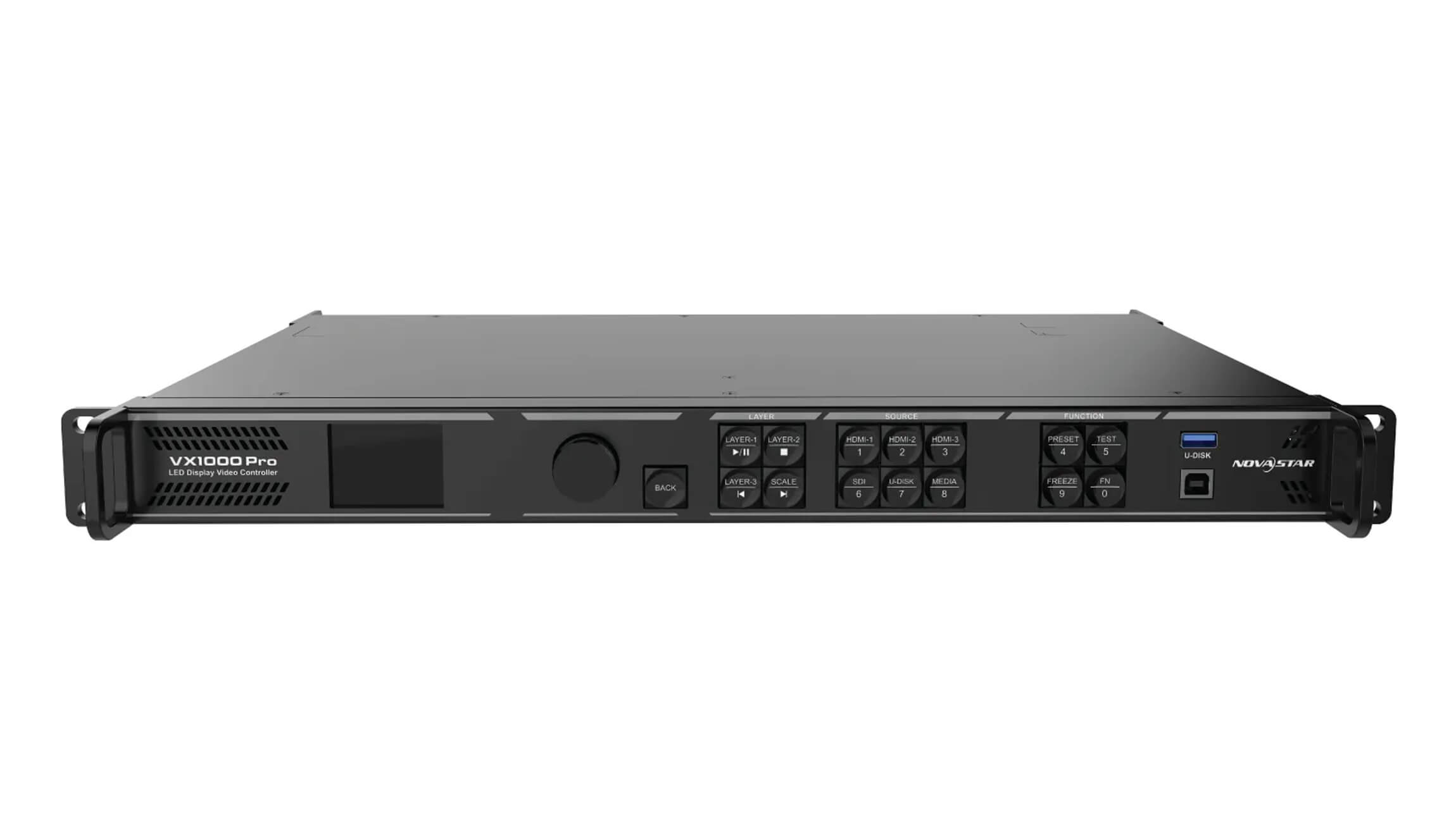
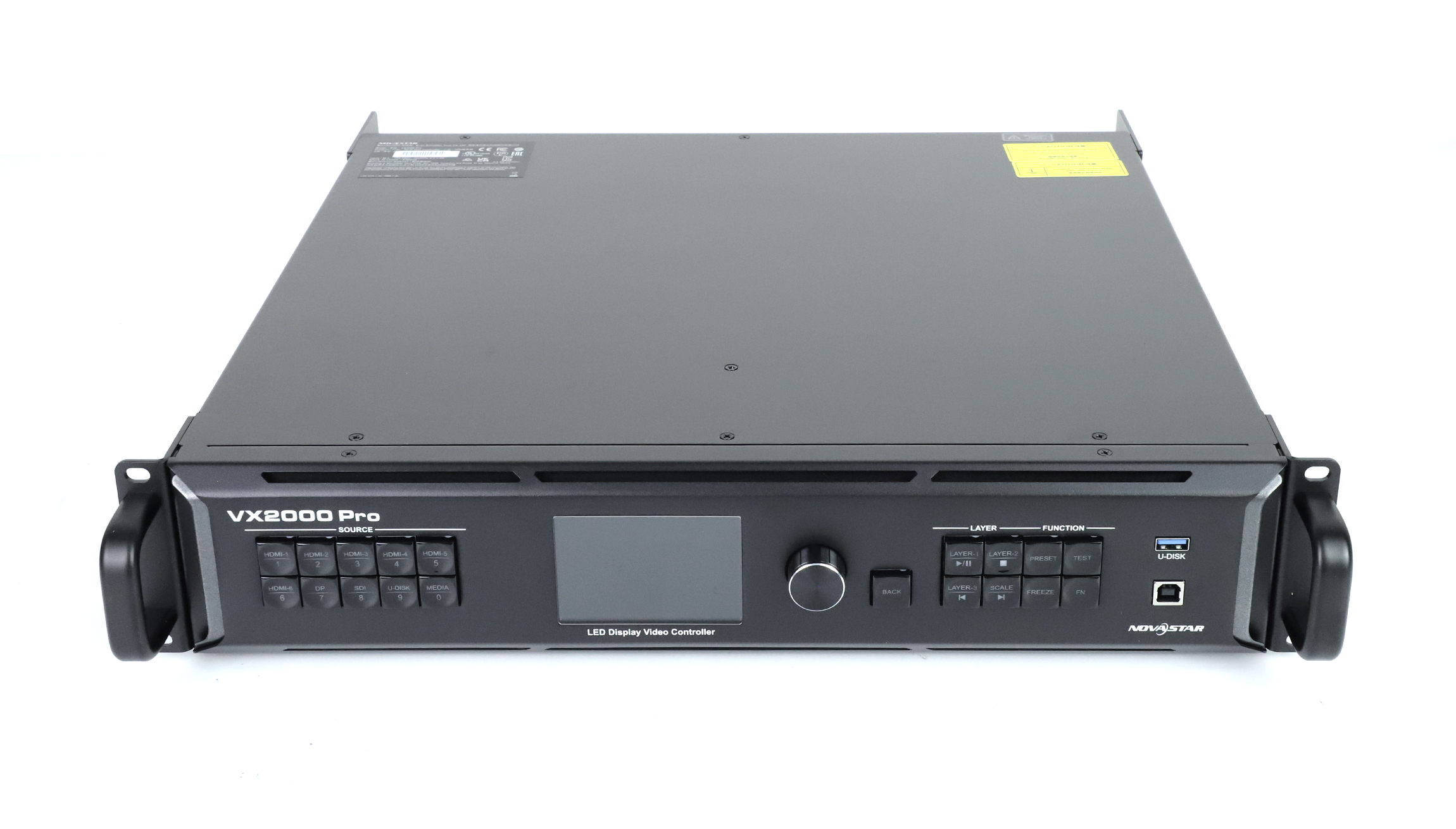
Quick answer: the NovaStar VX1000 Pro loads up to 6,500,000 pixels through 10 Gigabit Ethernet outputs, and the NovaStar VX2000 Pro loads up to 13,000,000 pixels through 20 Gigabit Ethernet outputs. Both accept video input up to 4K × 2K @ 60 Hz and both share the same 8,192-pixel maximum canvas height, so the real decision is total pixel load, widest canvas edge, input connectors and layer resources — not the model name.
Choose the VX1000 Pro when the whole canvas stays under 6.5 million pixels, the widest edge stays within 10,240 pixels, and one HDMI 2.0 input plus two HDMI 1.3 inputs and one 3G-SDI input cover your sources. Choose the VX2000 Pro when the canvas needs 6.5–13 million pixels, a width up to 16,384 pixels, up to 12 layer resources, DP 1.2 and 12G-SDI inputs, or four optical fiber ports with HDMI and fiber input mosaicing.
VX1000 Pro vs VX2000 Pro: specification comparison
Both units are all-in-one controllers that combine video processing and LED display control in one rack device. The table below lists the published figures that decide a project.
| Specification | NovaStar VX1000 Pro | NovaStar VX2000 Pro |
|---|---|---|
| Loading capacity | 6,500,000 pixels | 13,000,000 pixels |
| Gigabit Ethernet output ports | 10 | 20 |
| Single-port figure stated in the official specification | 650,000 pixels maximum per port at 8-bit output depth | No single-port figure is published; 13,000,000 ÷ 20 ports equals 650,000 pixels per port when the load is split evenly |
| Maximum canvas width | 10,240 pixels | 16,384 pixels |
| Maximum canvas height | 8,192 pixels | 8,192 pixels |
| Layer resources | 6 × 2K × 1K | 12 × 2K × 1K |
| Layer specifications | 4K × 2K, 4K × 1K and 2K × 1K, using 4x, 2x and 1x 2K resources | Same three layer specifications and the same resource multiplier |
| Maximum video input resolution | 4K × 2K @ 60 Hz | 4K × 2K @ 60 Hz |
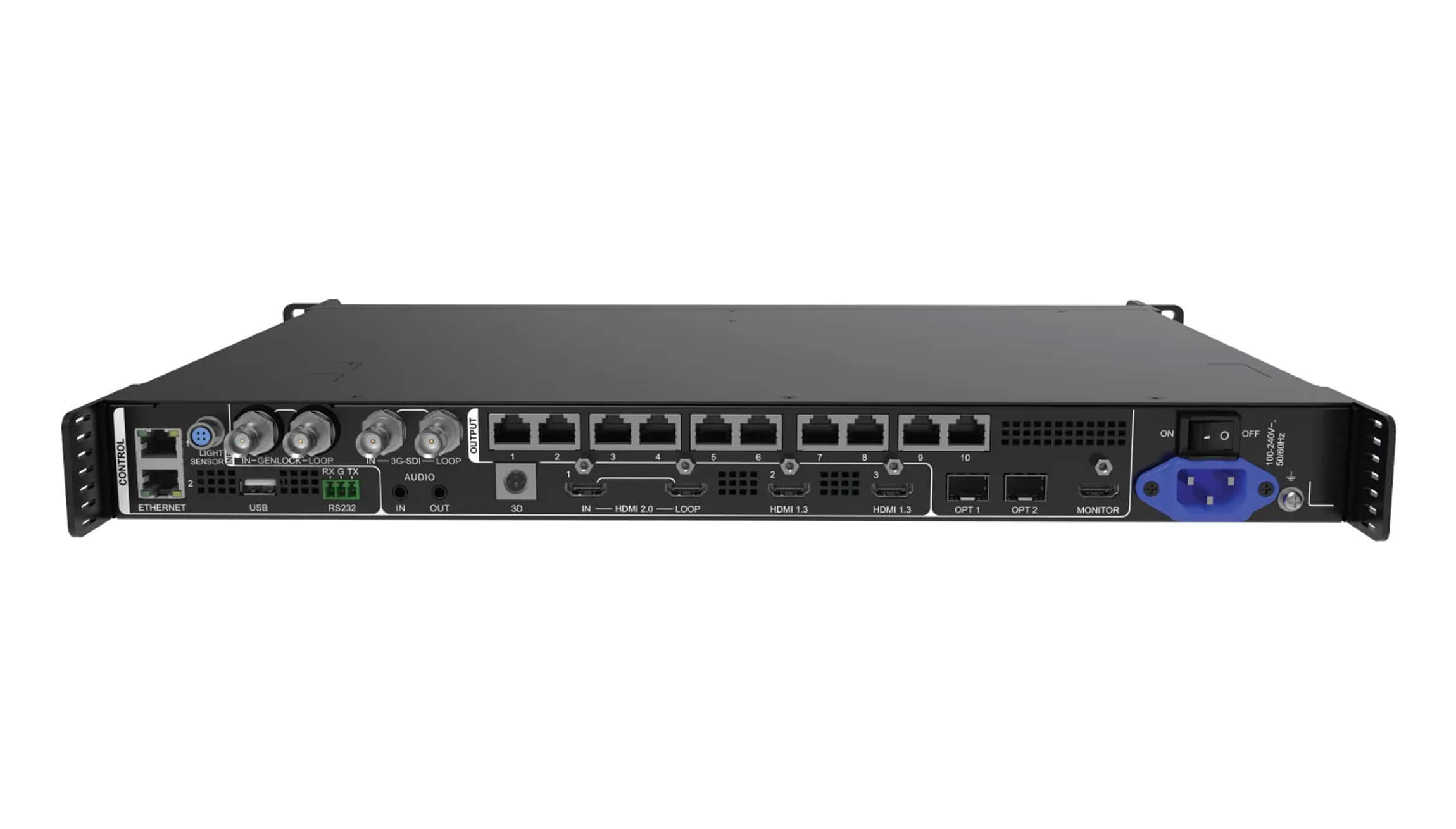
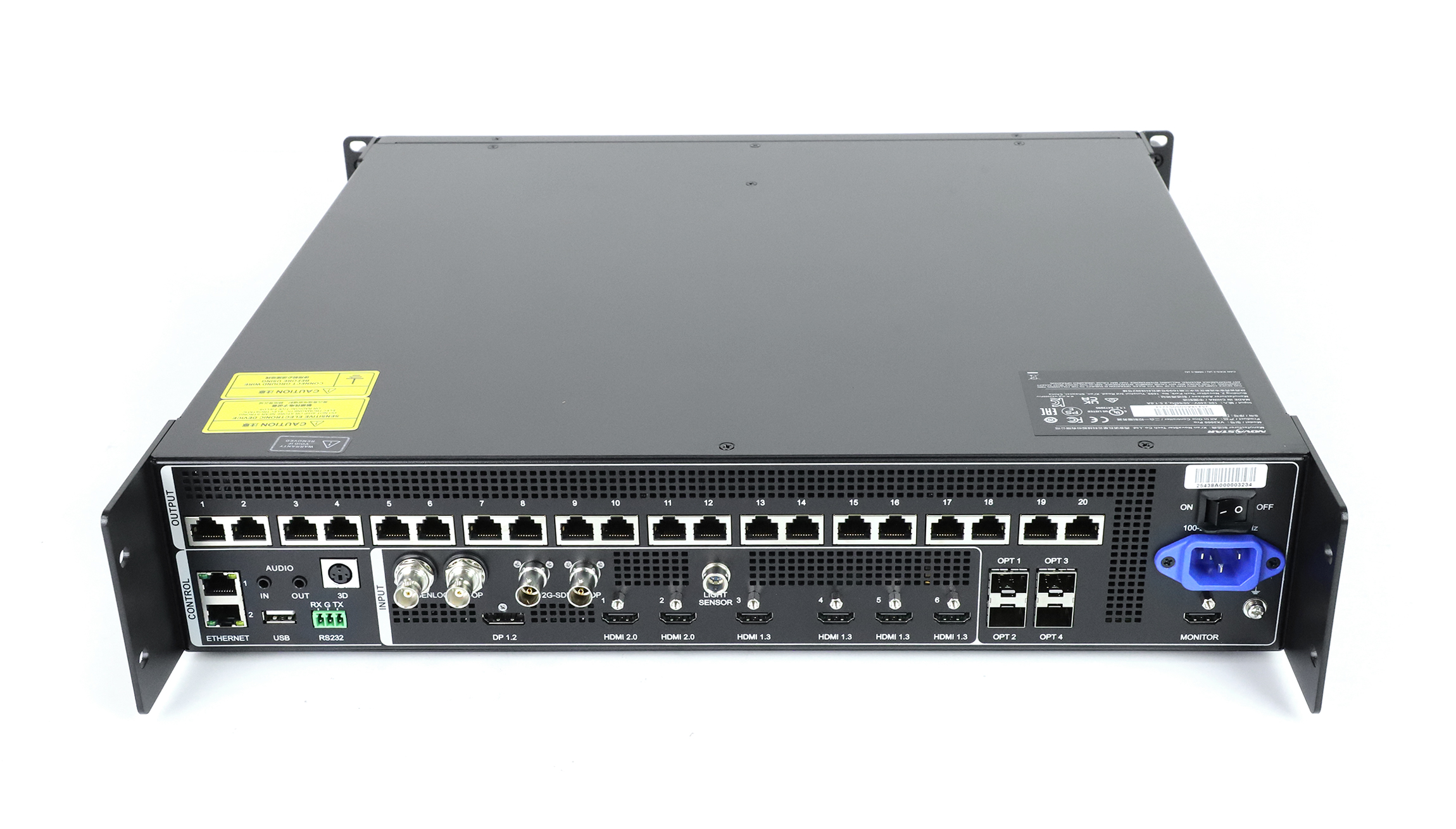
| Video input connectors | 1 × HDMI 2.0 (IN & LOOP), 2 × HDMI 1.3, 1 × 3G-SDI (IN & LOOP), 1 × self-adaptive OPT 1, 1 × USB 3.0 | 1 × DP 1.2, 2 × HDMI 2.0, 4 × HDMI 1.3, 1 × 12G-SDI (IN & LOOP), 2 × self-adaptive OPT 1 / OPT 2, 1 × USB 3.0 |
| Input mosaicing | Not listed in the official specification | HDMI mosaic of two HDMI 2.0 or four HDMI 1.3 inputs (maximum 4K × 2K); fiber input mosaic through OPT 1 / OPT 2 |
| Optical fiber ports | 2 × 10G: OPT 1 self-adaptive, OPT 2 for copy, backup or loop output | 4 × 10G: OPT 1 / OPT 2 self-adaptive, OPT 3 / OPT 4 for copy or backup output |
| Fiber transmission distance | Single-mode twin-core ≤ 10 km, multi-mode twin-core ≤ 300 m | Same figures |
| USB source resolution | Fixed at 1920 × 1080 @ 60 Hz | Fixed at 3840 × 2160 @ 60 Hz |
| Presets | Up to 256 user-defined | Up to 256 user-defined |
| Working modes | Video controller, fiber converter, ByPass | Video controller, fiber converter, ByPass |
| Latency | Low latency plus ByPass mode can reduce device delay to 0 frame | Video controller 1–2 frames low latency (2–3 frames standard); ByPass 0 frames low latency (1 frame standard); fiber converter 0 frames |
| Rated power consumption | 44 W | 83 W |
| Dimensions (W × D × H) | 482.6 × 302.2 × 50.1 mm | 482.6 × 493.0 × 94.6 mm |
| Net weight | 3.9 kg | 7 kg |
| Control options | Front panel knob, NovaLCT, Unico, VICP app, optional remote control (item code M07020005) | Front panel knob, NovaLCT, Unico web page, VICP app |
| Certifications listed | CE, FCC, IC, PSE, RCM, EAC, UL, CB, KC, RoHS | Same list |
Load guide: how much can each controller drive?
Pixel load is the number of physical LED pixels that the controller must address. It is not cabinet count, not screen area and not the resolution of the video source. The formula is the same for both models:
Pixel load = physical pixel width × physical pixel height, added together for every canvas that runs at the same time. Width in pixels equals the wall width in millimetres divided by the pixel pitch, and the same applies to height. If you want the full selection method, including headroom policy and receiving-card mapping, our NovaStar controller pixel load sizing guide walks through it step by step.
| Load limit | VX1000 Pro | VX2000 Pro |
|---|---|---|
| Total loading capacity | 6,500,000 pixels | 13,000,000 pixels |
| Gigabit Ethernet outputs | 10 ports | 20 ports |
| Published single-port maximum | 650,000 pixels at 8-bit output depth | Not published as a single figure; 13,000,000 ÷ 20 = 650,000 pixels per port when evenly mapped |
| Maximum width | 10,240 pixels | 16,384 pixels |
| Maximum height | 8,192 pixels | 8,192 pixels |
| Ports needed for a 9,000,000-pixel wall | Not possible: 9,000,000 exceeds the 6,500,000-pixel capacity | 14 ports minimum (9,000,000 ÷ 650,000 = 13.85), leaving 6 of the 20 ports free |
Two habits keep a project inside these numbers. First, size the load on real pixels, not on nominal source resolution: a 4K source scaled down to a small wall still uses only the wall’s pixel count, while a very wide custom canvas can exceed a controller’s limit even when the source is only 1080p. Second, plan a margin. Manufacturers publish limits, not comfortable operating points, so an engineering target of roughly 10 % to 20 % headroom leaves room for a cabinet re-arrangement, a deeper colour mode or a last-minute extra panel.
Worked pixel-load examples
| Example wall | Pixel calculation | Ports at 650,000 pixels per port | Controller that fits |
|---|---|---|---|
| P2.5, 5.0 m × 2.8125 m fixed installation | 2,000 × 1,125 = 2,250,000 pixels | 4 ports minimum | VX1000 Pro, using about 35 % of capacity |
| P1.5, 6.0 m × 3.375 m stage screen | 4,000 × 2,250 = 9,000,000 pixels | 14 ports minimum | VX2000 Pro; a VX1000 Pro would be 2,500,000 pixels over its limit |
| P1.5, 24 m × 1.2 m ultra-wide ribbon | 16,000 × 800 = 12,800,000 pixels | 20 ports minimum | VX2000 Pro, but the load consumes all 20 ports; split the wall or accept no spare capacity |
Example three shows why port arithmetic matters as much as total capacity. The 24 m ribbon fits inside the 13,000,000-pixel total and, at 16,000 pixels wide, also fits inside the 16,384-pixel maximum width — yet it needs every output port on the controller. The same wall would be impossible on a VX1000 Pro for two separate reasons: 12,800,000 pixels exceeds 6,500,000, and 16,000 pixels exceeds the 10,240-pixel maximum width.
Input guide: connectors and formats
This is the largest practical difference between the two models. The VX1000 Pro concentrates on HDMI and 3G-SDI sources; the VX2000 Pro adds DisplayPort, a second HDMI 2.0 input, two more HDMI 1.3 inputs and 12G-SDI.
| Input | VX1000 Pro | VX2000 Pro |
|---|---|---|
| DP 1.2 | Not available | 1 input, maximum 4096 × 2160 @ 60 Hz, custom maximum 8192 pixels wide or 8,188 pixels high, 8/10/12-bit, HDCP 1.3 |
| HDMI 2.0 | 1 input with loop output (up to six devices in one loop), maximum 4096 × 2160 @ 60 Hz, custom maximum 8192 × 1080 or 1080 × 8188, 8/10/12-bit, HDCP 1.4 and 2.2, RGB 4:4:4 and YCbCr 4:4:4 / 4:2:2 / 4:2:0 | 2 inputs, same resolution, custom and colour-depth limits as the VX1000 Pro HDMI 2.0 inputs |
| HDMI 1.3 | 2 inputs, maximum 1920 × 1080 @ 60 Hz, custom maximum 2048 pixels wide or high, 8-bit, HDCP 1.4 | 4 inputs with the same limits |
| SDI | 1 × 3G-SDI with loop output, ST-424 (3G), ST-292 (HD) and ST-259 (SD), maximum 1920 × 1080 @ 60 Hz, 10-bit, deinterlacing processing | 1 × 12G-SDI with loop output, ST-2082 (12G), ST-2081 (6G), ST-424 (3G), ST-292 (HD) and ST-259 (SD), maximum 4096 × 2160 @ 60 Hz, deinterlacing processing |
| Optical fiber input | OPT 1 only, self-adaptive for video input or sending-card output | OPT 1 and OPT 2, both self-adaptive; the two sources can also be combined into a mosaic input |
| USB playback | 1 × USB 3.0, source resolution fixed at 1920 × 1080 @ 60 Hz; media files up to 3840 × 2160; mp4, mkv, mov, avi, flv, m4v, mpg, mpeg and ts; H.264 up to 3840 × 2160 @ 30 fps and H.265 up to 3840 × 2160 @ 60 fps at 100 Mbps | 1 × USB 3.0, source resolution fixed at 3840 × 2160 @ 60 Hz; mp4 with H.264 up to 3840 × 2160 @ 30 fps and H.265 up to 3840 × 2160 @ 60 fps; AAC-LC audio at up to 48 kHz |
| Input mosaicing | Not listed in the official specification | Two HDMI 2.0 inputs or four HDMI 1.3 inputs can be mosaiced into one source up to 4K × 2K; fiber input mosaic is also supported |
| Audio | Audio embedded with HDMI sources plus 3.5 mm audio input and output, sampling up to 48 kHz | Audio embedded with HDMI and DP sources plus 3.5 mm audio input and output, sampling up to 48 kHz |
| EDID and sync | EDID import and export; Genlock in and loop, bi-level and tri-level sync, 24 to 60 Hz | EDID import and export; Genlock in and loop, bi-level and tri-level sync; output synchronization across cascaded units |
On the output side the difference is fiber capacity. The VX1000 Pro has two 10G optical ports: OPT 1 sends the output of Ethernet ports 1–10, and OPT 2 copies, backs up or loops that output. The VX2000 Pro has four: OPT 1 and OPT 2 are self-adaptive for input or output, while OPT 3 and OPT 4 copy or back up the output groups of Ethernet ports 1–10 and 11–20. Both work with single-mode twin-core modules up to 10 km and multi-mode twin-core modules up to 300 m, and optical modules are installed separately.
Need to confirm which software controls a given unit? NovaLCT, Unico, the VICP mobile app and firmware packages are collected on our NovaStar software download page.
Connector capacity modes: SL, DL and 4K
Both models publish the same three connector capacity settings, and the setting must match the input source. This is where a technically valid controller can still fail to process a signal.
| Connector capacity | Standard resolution | Custom maximum width | Custom maximum height |
|---|---|---|---|
| SL | 1920 × 1080 @ 60 Hz | 2048 pixels (2048 × 1080 @ 60 Hz) | 2048 pixels (1080 × 2048 @ 60 Hz) |
| DL | 3840 × 1080 @ 60 Hz or 3840 × 2160 @ 30 Hz | 4096 pixels (4096 × 1080 @ 60 Hz) | 3840 pixels (1080 × 3840 @ 60 Hz) |
| 4K | 4096 × 2160 @ 60 Hz or 8192 × 2160 @ 30 Hz | 8192 pixels (8192 × 1080 @ 60 Hz) | 8188 pixels (1080 × 8188 @ 60 Hz) |
The rule is explicit in both specifications: if the resolution of an input source is larger than the maximum width limit of the connector capacity, the connector capacity must be switched so the source can be processed normally. In practice, a 5120 × 1080 ultra-wide source cannot run in SL or DL mode; the connector needs the 4K setting, whose custom width limit reaches 8192 pixels. Match the mode to the widest source in the rack, and remember that switching modes changes the maximum height as well.
Layer resources: what each input can open
Layer availability is expressed in 2K × 1K resources, and the same conversion applies to both controllers. A 2K × 1K layer uses 1 resource, a 4K × 1K layer uses 2, and a 4K × 2K layer uses 4.
| Resource budget | VX1000 Pro (6 resources) | VX2000 Pro (12 resources) |
|---|---|---|
| 4K × 2K layers | 1 layer (4 resources) with 2 resources left over | Up to 3 layers (12 resources) |
| 4K × 1K layers | Up to 3 layers (2 resources each) | Up to 6 layers |
| 2K × 1K layers | Up to 6 layers | Up to 12 layers |
| Mixed layout example | 1 × 4K × 2K + 1 × 4K × 1K, or 1 × 4K × 2K + 2 × 2K × 1K | 2 × 4K × 2K + 2 × 4K × 1K |
Which layer sizes you can actually open also depends on the capacity of the input connector used to open the layer, as stated in both documents. A production that needs three simultaneous 4K × 2K layers, or a PiP-heavy broadcast layout with a dozen smaller windows, belongs on the VX2000 Pro.
Latency, working modes and backup
Both controllers run as a video controller, a fiber converter or in ByPass mode, and both support presets, output synchronization and pixel-level brightness and chroma calibration with NovaLCT and NovaStar calibration software. Two constraints are easy to miss:
- 3D content reduces capacity. With 3D enabled and a Side-by-Side or Top-and-Bottom source, both specifications state that the output capacity is halved. A 6,500,000-pixel VX1000 Pro then behaves like a 3,250,000-pixel controller for that program.
- Low latency constrains cabinet alignment. When low latency is enabled, all cabinets loaded by Ethernet ports must be aligned at the top of the circumscribed rectangle. In ByPass mode, low latency and Genlock cannot be enabled at the same time.
Documented latency is where the platform difference appears. The VX2000 Pro measures 1–2 frames in the video controller mode with low latency enabled (2–3 frames without), 0 frames in ByPass mode with low latency (1 frame without) and 0 frames in fiber converter mode. The VX1000 Pro specification states that low latency plus ByPass mode reduces device delay to 0 frame. For a stage or virtual-production workflow where a 1-frame difference changes the workflow, verify the current requirement directly in your project plan rather than assuming the two units behave identically.
Redundancy also differs in scope. The VX2000 Pro lists end-to-end backup between devices, between input sources, between Ethernet ports and between OPT and Ethernet ports, plus an Ethernet port backup test. The VX1000 Pro gained dual receiving card backup with specification version V1.2.0, alongside a standby mode, screen power on and off from an optional remote control and Mac compatibility.
Whatever the model, verify the assembled system before it leaves the warehouse. Our LED controller bench testing checklist covers the card-to-card, card-to-module and power-rail tests that catch parameter and firmware mismatches, and the controller signal flow and sizing guide explains how ports, receiving cards and hub boards divide the load.
Which controller should you buy?
If your wall is smaller than 6.5 million pixels, start one step down the series with our NovaStar VX400 vs VX400 Pro comparison, which covers the 2.6-million-pixel class and the input, layer and latency trade-offs.
| Project situation | Better fit | Reason |
|---|---|---|
| Fixed-installation wall up to about 5 million pixels with HDMI and 3G-SDI sources | VX1000 Pro | Capacity is sufficient, and the unit is smaller and lighter: 50.1 mm tall, 3.9 kg and 44 W |
| Wall between 6.5 and 13 million pixels | VX2000 Pro | Only the VX2000 Pro covers that load range in this pair |
| Ultra-wide canvas wider than 10,240 pixels | VX2000 Pro | Maximum width of 16,384 pixels versus 10,240 pixels |
| Single-link 4K camera chain over SDI | VX2000 Pro | 12G-SDI input up to 4096 × 2160 @ 60 Hz; the VX1000 Pro tops out at 3G-SDI |
| Broadcast or rental desk feeding DisplayPort laptops and two HDMI 2.0 sources | VX2000 Pro | DP 1.2 plus two HDMI 2.0 inputs and input mosaicing |
| Three simultaneous 4K × 2K layers or up to twelve 2K windows | VX2000 Pro | 12 layer resources versus 6 |
| Long-distance fiber transport with separate backup paths for two output groups | VX2000 Pro | Four optical ports with OPT 3 / OPT 4 as copy or backup outputs |
| Single-fiber run to a remote screen group with HDMI and 3G-SDI sources | VX1000 Pro | OPT 1 sends the output of all ten Ethernet ports; OPT 2 can copy, back up or loop it |
| USB playback of 4K media without an external player | VX2000 Pro | USB source is fixed at 3840 × 2160 @ 60 Hz; the VX1000 Pro USB source is fixed at 1920 × 1080 |
| Budget-sensitive project with a canvas under 6.5 million pixels and no SDI or DP requirement | VX1000 Pro | Same processing architecture, presets, calibration and ByPass modes at 44 W |
Both models are available from our store with the matching accessories: the NovaStar VX1000 Pro all-in-one video controller and the NovaStar VX2000 Pro all-in-one LED display controller. If you are still weighing a processor against a controller, the LED processor versus controller explainer clarifies which function your signal chain still needs.
Pre-purchase checklist
- Calculate total pixel load from the real wall dimensions and pixel pitch, not from the source resolution.
- Check the maximum width and maximum height of the canvas, including the circumscribed rectangle rule.
- Divide the load into output-port groups and confirm no port exceeds 650,000 pixels at 8-bit output depth.
- Add 10 % to 20 % planning headroom for mapping changes and later expansion.
- List every source connector and its resolution, frame rate and colour depth; confirm none exceeds the connector capacity mode in use.
- Confirm whether any source is interlaced, and plan external deinterlacing if required.
- Count layers by resource: 1 for 2K × 1K, 2 for 4K × 1K, 4 for 4K × 2K.
- Decide whether 3D is needed, and if so halve the expected output capacity in the plan.
- Plan the fiber path, optical module type and distance, plus the backup topology you actually need.
- Check rack space, depth and power: 50.1 mm and 44 W for the VX1000 Pro against 94.6 mm and 83 W for the VX2000 Pro.
Sources and verification method
Every figure in this guide is taken from NovaStar’s official specification documents for the two products, last verified on 23 September 2026:
- NovaStar VX1000 Pro All-in-One Controller Specifications, document version V1.2.0, released 30 September 2025.
- NovaStar VX2000 Pro All-in-One Controller Specifications, document version V1.0.3, released 19 June 2025.
Where the two documents present information differently, this guide says so rather than blending the figures: the VX1000 Pro specification publishes a 650,000-pixel single-port maximum, while the VX2000 Pro specification publishes the 13,000,000-pixel total and the connector capacity modes, so the per-port value shown above is an even split of the published total. LED controller behaviour can change between hardware revisions and firmware versions. Confirm the revision that applies to your order, and treat any pilot or acceptance figure as project-specific.
Frequently asked questions
How many pixels can the NovaStar VX1000 Pro load?
The VX1000 Pro loads up to 6,500,000 pixels across 10 Gigabit Ethernet outputs, with a maximum canvas width of 10,240 pixels and a maximum height of 8,192 pixels. Its official specification lists a maximum of 650,000 pixels on a single port at 8-bit output depth.
How many pixels can the NovaStar VX2000 Pro load?
The VX2000 Pro loads up to 13,000,000 pixels across 20 Gigabit Ethernet outputs, with a maximum canvas width of 16,384 pixels and a maximum height of 8,192 pixels. The specification does not publish a single-port maximum, but 13,000,000 divided by 20 ports equals 650,000 pixels per port when the load is split evenly.
What is the main difference between the VX1000 Pro and VX2000 Pro?
Capacity and connectivity. The VX2000 Pro doubles the pixel load from 6.5 million to 13 million, doubles the Ethernet outputs from 10 to 20, raises the maximum canvas width from 10,240 to 16,384 pixels, doubles layer resources from 6 to 12, and adds DP 1.2, a second HDMI 2.0 input, two more HDMI 1.3 inputs, 12G-SDI, four optical ports and input mosaicing.
Can both controllers accept 4K input?
Yes. Both models accept video input up to 4K × 2K @ 60 Hz. The difference is the connector set: the VX1000 Pro receives 4K over one HDMI 2.0 input, while the VX2000 Pro receives 4K over DP 1.2, either of two HDMI 2.0 inputs, or 12G-SDI. Neither supports interlaced HDMI or DisplayPort input.
Does the VX1000 Pro have DisplayPort or 12G-SDI inputs?
No. The VX1000 Pro input set is one HDMI 2.0, two HDMI 1.3, one 3G-SDI, one self-adaptive OPT 1 optical port and one USB 3.0 port. DisplayPort 1.2 and 12G-SDI are available on the VX2000 Pro.
Which controller should I choose for a 10-million-pixel LED wall?
A 10,000,000-pixel canvas exceeds the VX1000 Pro capacity of 6,500,000 pixels, so it requires the VX2000 Pro, which covers up to 13,000,000 pixels. At 650,000 pixels per port, 10,000,000 pixels also needs at least 16 of the 20 Ethernet outputs, so check the mapping carefully and keep the remaining ports in mind for backup or future expansion.
Need help matching a controller to a specific wall? Send us the wall dimensions, pixel pitch, source list and the pixel load you calculated. We supply NovaStar controllers, receiving cards, sending cards, hub cards and power supplies, and we can check the port mapping before you order.

