
Short answer: for a new LED installation, choose the NovaStar TB10 Plus. Both players load the same 650,000 pixels, so capacity is not what separates them — the TB10 Plus has double the memory and storage (2 GB RAM / 32 GB vs 1 GB / 16 GB), runs the Wi-Fi hotspot and Wi-Fi station at the same time, and is the model NovaStar still documents and certifies for international sale (CE, FCC, IC, CQC, CB, NTRA). Keep an existing NovaStar TB10 if it already runs your screens, or if you specifically need its USB 3.0 (Type-A) and USB Type-C control ports and its 4,096 × 3,840-pixel canvas. If you need more than 650,000 pixels, neither TB10 board is the answer — step up to the TB50 (1.3 million pixels) or the TB60 (2.3 million pixels).
Key takeaways
- Same loading capacity: TB10 and TB10 Plus are both rated at 650,000 pixels with one Gigabit output port.
- Different generation: the TB10 datasheet dates from 2022–2023; the TB10 Plus is the current Taurus player and its specification is still being revised (V1.0.3, 31 July 2026).
- The real differences are I/O, memory and radio behaviour — not pixel capacity.
- TB10 Plus wins on: 2 GB RAM / 32 GB storage, simultaneous Wi-Fi AP + Wi-Fi Sta, brightness and temperature/humidity sensor support, and CE/FCC/IC certification.
- TB10 wins on: a larger maximum canvas (4,096 × 3,840 vs 2,048 × 2,048), USB 3.0 plus USB Type-C control ports, and a lighter, smaller body (255.4 g vs 465.6 g).
- Neither player offers synchronous/asynchronous switching or HDMI cascading — for those features you need a TB20 Plus or TB50 and above.
What each player is
NovaStar TB10: the earlier Taurus multimedia player
The TB10 is a compact LED multimedia player that combines content playback and LED data sending in one box. It publishes programs and controls a screen from a PC, phone or tablet, supports cloud publishing and cloud monitoring, and plays content straight from a USB drive. Its datasheet (V1.0.2, 14 June 2023) documents a 650,000-pixel load, a 4-core 1.3 GHz processor, 1 GB of RAM, 16 GB of internal storage, USB 3.0 Type-A and USB Type-C control ports, a 100 Mbps Ethernet port and 4K video decoding.
NovaStar TB10 Plus: the current generation
The TB10 Plus is the model NovaStar sells today for the same job. It is also a 650,000-pixel asynchronous player with one Gigabit LED output port, but it is built around a quad-core ARM A53 processor at 1.4 GHz with 2 GB of RAM and 32 GB of storage, adds sensor support (brightness or temperature/humidity), keeps the Wi-Fi hotspot and Wi-Fi station on at the same time, and carries CE, FCC, IC, CQC, CB and NTRA certification.
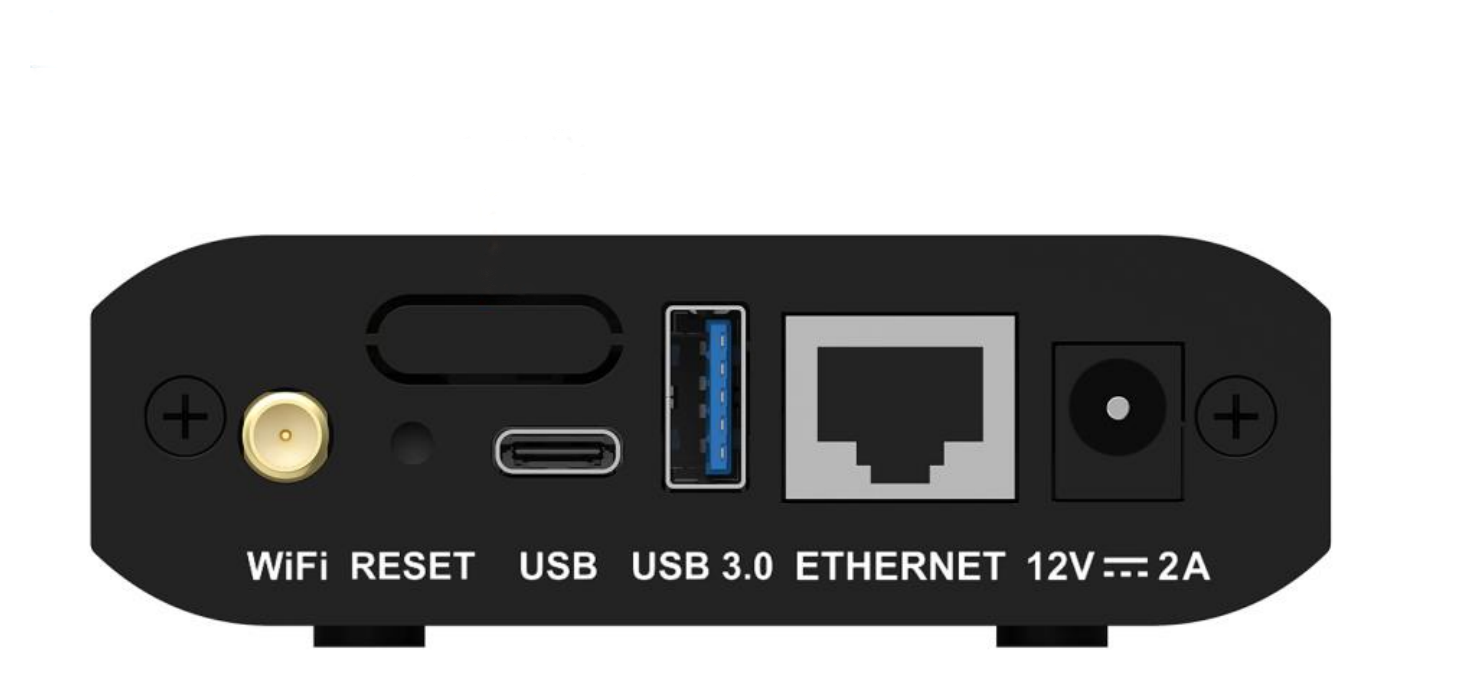

NovaStar TB10 vs TB10 Plus: specification comparison
Every figure below comes from the manufacturer’s own documents: the TB10 Taurus series multimedia player datasheet V1.0.2 (14 June 2023), the TB10 Plus Multimedia Player Specifications V1.0.3 (31 July 2026), and NovaStar’s Taurus series comparison page (TB10 Plus / TB20 Plus / TB30 / TB50 / TB60).
| Specification | NovaStar TB10 | NovaStar TB10 Plus |
|---|---|---|
| Maximum loading capacity | 650,000 pixels | 650,000 pixels |
| Maximum canvas (W × H) | 4,096 × 3,840 pixels | 2,048 × 2,048 pixels |
| Ultra-long screen support | Not documented as a separate mode | Up to 8,192 × 2,048 pixels |
| LED output | 1 × Gigabit Ethernet port | 1 × Gigabit Ethernet port |
| Audio output | 1 × stereo audio output (48 kHz) | 1 × 3.5 mm audio output (48 kHz) |
| USB / control ports | 1 × USB 3.0 Type-A (USB playback, firmware), 1 × USB Type-C (direct PC connection) | 1 × USB 2.0 Type-A (playback, firmware, storage expansion up to 128 GB), 1 × USB Type-B (control computer) |
| Wired control network | 1 × 100 Mbps Ethernet port | 1 × Fast Ethernet port (100 Mbps) |
| Processor | 4-core, 1.3 GHz | Quad-core ARM A53, 1.4 GHz |
| RAM | 1 GB | 2 GB |
| Internal storage | 16 GB | 32 GB |
| Video decoding | 4K hardware decoding | 4K hardware decoding |
| Simultaneous playback | 1 × 4K, 2 × 1080p, 4 × 720p | 1 × 4K, 2 × 1080p, 4 × 720p, 4 × 480p, 20 × 360p |
| Operating system (as documented) | Android 11.0 | Android 10.0 |
| Wi-Fi | 2.4 GHz, Wi-Fi AP or Wi-Fi STA (switched between modes) | 2.4 GHz, Wi-Fi AP + Wi-Fi Sta can run at the same time |
| 4G | Optional module, sold separately | Optional module, sold separately |
| Sensors | Reserved sensor connector | Brightness sensor or temperature/humidity sensor |
| Multi-screen synchronisation | NTP, GPS (with the specified 4G module), RF (with the specified RF module) | NTP, GPS (with 4G module), RF (with RF module); synchronous playback halves decoding capacity |
| Network priority | Wired > Wi-Fi > 4G | Wired > Wi-Fi > 4G |
| Power | DC 12 V, 2 A; maximum 12 W | DC 5–12 V; maximum 15 W |
| Dimensions | 130.5 × 89.0 × 29.5 mm | 141.2 × 120.0 × 33.5 mm |
| Net weight | 255.4 g | 465.6 g |
| Ingress protection | IP20 | IP20 |
| Certifications | CQC, SRRC | CE, FCC, IC, CQC, CB, NTRA |
Where the two players really differ
1. Memory and storage: 1 GB / 16 GB vs 2 GB / 32 GB
This is the most practical difference. The TB10 Plus doubles both RAM and internal storage. In day-to-day use that means more room for stored programs and media libraries, smoother handling of large projects, and more headroom when a screen runs unattended for months. If your workflow is “upload a playlist and let it run”, either player copes; if you store long or frequent content updates locally, the TB10 Plus is the safer long-term choice.
2. Canvas size: 4,096 × 3,840 vs 2,048 × 2,048
Both are 650,000-pixel players, but they arrange those pixels differently:
- TB10: maximum width 4,096 pixels and maximum height 3,840 pixels — a bigger square-ish canvas.
- TB10 Plus: 2,048 × 2,048 pixels in the normal scenario, or up to 8,192 × 2,048 pixels for ultra-long screens.
For a tall, near-square or non-standard layout, the TB10’s canvas is more flexible. For long fascia strips, lamp-post signs and ribbon displays, the TB10 Plus is the one designed for it.
3. Wi-Fi behaviour: switching modes vs running both at once
The TB10 is documented as switching between Wi-Fi AP mode (your phone connects to the player’s hotspot) and Wi-Fi STA mode (the player joins your router). The TB10 Plus can keep both active: the player joins the site Wi-Fi and serves its own hotspot, so an installer can still reach the box locally while it is publishing over the network.
4. Ports: USB 3.0 + Type-C vs USB 2.0 + Type-B
The TB10 uses a USB 3.0 Type-A port for USB playback and firmware updates, plus a USB Type-C port for a direct cable to the control computer. The TB10 Plus uses USB 2.0 Type-A for playback, firmware and storage expansion up to 128 GB, and a USB Type-B port for the control computer. On paper the TB10’s USB 3.0 link is faster; in practice, playback and firmware files are small enough that most users notice the TB10 Plus’s larger supported USB drive capacity (up to 128 GB) more than the bus speed.
5. Sensors and monitoring
The TB10 carries a reserved sensor connector. The TB10 Plus is documented as supporting a brightness sensor or a temperature/humidity sensor — useful when you want automatic brightness control on a street-facing screen or want to log cabinet conditions.
6. Certification and lifecycle: the reason most buyers should pick the Plus
The TB10 is certified to CQC and SRRC — Chinese schemes. The TB10 Plus adds CE, FCC, IC, CB and NTRA coverage. If the screen ships to Europe, North America, Latin America or a project that asks for compliance paperwork, the TB10 Plus removes a real obstacle. The TB10 Plus also sits inside NovaStar’s current Taurus comparison and firmware line, so it is the model that continues to receive specification updates.
7. The documented OS difference
The TB10 datasheet lists Android 11.0; the TB10 Plus datasheet and NovaStar’s Taurus comparison page both list Android 10.0. On its own this rarely changes what an installer can do, because both players are closed appliances driven by NovaStar’s own publishing tools and cloud platforms rather than by third-party apps. What matters more is that the TB10 Plus is the platform NovaStar is actively maintaining.
What 650,000 pixels means on a real LED screen
Both players share the same ceiling, so the same screens fit either one. The table below converts 650,000 pixels into approximate screen area for common pixel pitches. These are theoretical maximums calculated from pixel density alone — real designs also need to account for cabinet dimensions, receiver card mapping and one Gigabit port per 650,000 pixels.
| Pixel pitch | Pixels per m² | Approximate maximum area at 650,000 pixels | Example screen (W × H) |
|---|---|---|---|
| P2.5 | 160,000 | ≈ 4.1 m² | 2.5 m × 1.6 m |
| P3 | 111,111 | ≈ 5.9 m² | 3.2 m × 1.8 m |
| P3.91 | 65,410 | ≈ 9.9 m² | 4.0 m × 2.4 m |
| P4 | 62,500 | ≈ 10.4 m² | 4.3 m × 2.4 m |
| P5 | 40,000 | ≈ 16.3 m² | 5.4 m × 3.0 m |
| P6.67 | 22,478 | ≈ 28.9 m² | 7.2 m × 4.0 m |
| P10 | 10,000 | ≈ 65 m² | 10.8 m × 6.0 m |
Which player should you choose?
| Your situation | Better fit | Why |
|---|---|---|
| New shop, fascia, lamp-post or fixed signage build with a screen under 650,000 pixels | TB10 Plus | Current model, current certification, more memory and storage, simultaneous Wi-Fi AP + Sta |
| Screen will be exported or a client asks for CE/FCC/IC documentation | TB10 Plus | Only the TB10 Plus carries CE, FCC, IC, CB and NTRA certification |
| Long, thin display such as a fascia or ribbon screen | TB10 Plus | Documented ultra-long-screen mode up to 8,192 × 2,048 pixels |
| You already run a fleet of TB10 players and standardise on one spare part | TB10 | Keeps spares, firmware and installer habits consistent |
| You need the biggest possible canvas from a 650,000-pixel asynchronous player | TB10 | Maximum canvas of 4,096 × 3,840 pixels |
| You want the fastest local USB transfer or a direct Type-C connection | TB10 | USB 3.0 Type-A and USB Type-C ports |
| Screen is larger than 650,000 pixels | TB50 or TB60 | 1.3 million and 2.3 million pixels respectively |
| You need synchronous/asynchronous switching or HDMI cascading | TB20 Plus, TB50 or above | On NovaStar’s Taurus comparison, those two rows are marked “×” for the TB10 Plus and TB30, and supported from TB20 Plus / TB50 upwards |
Setup notes that apply to both players
- No separate sending card is required. Playback and sending are integrated in both models; each drives its LED screen through one Gigabit output port.
- Wired network first. Both players prioritise wired Ethernet over Wi-Fi and 4G when more than one connection is available.
- Default Wi-Fi password differs by model. The TB10 datasheet documents the default SSID as “AP + the last 8 digits of the serial number” with the default password 12345678. On the TB10 Plus the default SSID is “model + last 8 digits of the serial number” and the password is printed on the SSID label of the unit.
- Synchronous playback halves decoding capacity. This is documented for the TB10 Plus: switching on multi-screen synchronisation halves the device’s playback capability, so size your programming accordingly.
- USB file limits (TB10 Plus). Supported file systems are FAT32 and NTFS, USB drives must be 2 GB to 128 GB, and a single file must be under 4 GB.
- 4G is always an add-on. Neither player ships with a 4G module; GPS time synchronisation needs the specified module installed.
Watch the Taurus players being set up
If you prefer to see the workflow before you buy, our own walkthroughs cover the configuration steps that apply to the Taurus family, including this pair of players:
- NovaStar Taurus TB1 / TB2 / TB30 / TB40 / TB50 / TB60 LED display player setup (video) — publishing, network settings and screen control on the Taurus series.
- NovaStar TB series multimedia player guide (video) — what the player box does and where it sits in the signal chain.
How we compared these two players
We did not run side-by-side lab tests for this article, and we do not publish measured performance figures we cannot reproduce. The comparison uses manufacturer documentation only: the TB10 Taurus series multimedia player datasheet V1.0.2 (14 June 2023), the TB10 Plus Multimedia Player Specifications V1.0.3 (31 July 2026), and NovaStar’s Taurus series comparison page covering TB10 Plus, TB20 Plus, TB30, TB50 and TB60. One limitation is worth stating plainly: NovaStar’s current comparison page no longer lists the original TB10, so every TB10 figure quoted here comes from that player’s own datasheet rather than from a current product page. Where the two documents describe the same feature differently, both numbers are shown above rather than averaged.
Frequently asked questions
What is the main difference between the NovaStar TB10 and TB10 Plus?
They load the same 650,000 pixels. The TB10 Plus is the newer model with 2 GB RAM and 32 GB storage, simultaneous Wi-Fi AP and Wi-Fi Sta, USB up to 128 GB, sensor support and CE/FCC/IC/CQC/CB/NTRA certification. The TB10 has 1 GB RAM and 16 GB storage, a larger 4,096 × 3,840-pixel canvas, and USB 3.0 Type-A plus USB Type-C ports.
Do the TB10 and TB10 Plus have the same loading capacity?
Yes. Both are rated at 650,000 pixels with one Gigabit Ethernet output port, so a screen that fits one player fits the other. The choice comes down to memory, ports, Wi-Fi behaviour, certification and lifecycle.
Which one is newer, the TB10 or the TB10 Plus?
The TB10 Plus. Its datasheet was first released in May 2025 and was last revised in July 2026. The TB10 datasheet dates from 2022 and was last revised in June 2023, and its figures no longer appear on NovaStar’s current Taurus comparison page.
Can the TB10 or TB10 Plus play 4K content?
Both support 4K hardware decoding. The TB10 is documented for 1 × 4K, 2 × 1080p or 4 × 720p simultaneous playback; the TB10 Plus adds more tiers, including 1 × 4K, 2 × 1080p, 4 × 720p, 4 × 480p or 20 × 360p.
Do these players support synchronous playback?
Both are asynchronous players with multi-screen synchronisation by NTP, GPS (with the specified 4G module) or RF (with the specified RF module). Neither model is documented with synchronous/asynchronous switching or HDMI cascading, and NovaStar notes that enabling synchronous playback halves the TB10 Plus decoding capability.
What is the default Wi-Fi password of a NovaStar TB10 or TB10 Plus?
The TB10 datasheet documents the default SSID as “AP + last 8 digits of the serial number” and the default password as 12345678. On the TB10 Plus the SSID is “model + last 8 digits of the serial number” and the default password is printed on the SSID label on the unit, so it varies per device.
Do I need to buy a 4G module separately?
Yes. Neither the TB10 nor the TB10 Plus ships with a 4G module; it is optional and purchased separately. GPS-based time synchronisation also requires the specified module.
What if my screen needs more than 650,000 pixels?
Move up the Taurus range. The TB50 handles 1.3 million pixels and the TB60 handles 2.3 million pixels. If you need a video input as well, choose a player with HDMI input or a video processor instead — see our TB20 vs TB20 Plus, TB30 vs TB40 and TB40 vs TB60 comparisons for the same series.
Which should I buy in 2026?
For new work, the TB10 Plus. It is the model NovaStar still documents, certifies and updates, it has twice the memory and storage, and it avoids the “is this model still supported?” conversation with the end customer. Choose the TB10 only to match an existing fleet or for its specific canvas and USB 3.0/Type-C ports.
Do both players work with the same NovaStar software and cloud platform?
Both are published to through NovaStar’s ecosystem: local control from a PC, phone or tablet, USB playback, and cloud publishing and monitoring through NovaStar’s platforms. NovaStar’s current comparison lists the TB10 Plus as supporting VNNOX Care/VNNOX Media and the NovaStar SDK. Keep the firmware on the current release for whichever model you run, and confirm the exact software build with the supplier when you order.
Related LED player and controller guides
- NovaStar TB10 Taurus series multimedia player — current price and availability in our store.
- NovaStar TB10 Plus LED multimedia player — current price and availability in our store.
- LED media players — all asynchronous players and control boxes we stock.
- NovaStar products — controllers, sending cards and video processors by brand.
- NovaStar TB30 vs TB40: capacity and use cases
- NovaStar TB40 vs TB60: choosing a Taurus player
- NovaStar TB20 vs TB20 Plus: which player to choose?
- NovaStar VX400 vs VX400 Pro: key differences
- VX600 Pro vs VX1000 Pro: which controller fits your LED screen?
- VX1000 Pro vs VX2000 Pro: load and input guide
- NovaStar TB30 vs TB50 comparison and specification guide (our sister site)
- NovaStar multimedia player guide (our sister site)
Sources and verification
All specifications in this article were taken from the following manufacturer documents and checked against each other. Third-party pages were not used as a specification source.
- NovaStar TB10 Taurus series multimedia player datasheet, document version V1.0.2, released 14 June 2023 (previous versions: V1.0.1, 18 November 2022; V1.0.0, 28 June 2022).
- NovaStar TB10 Plus Multimedia Player Specifications, document version V1.0.3, released 31 July 2026 (V1.0.2, 5 January 2026; V1.0.1, 29 August 2025; V1.0.0, 27 May 2025).
- NovaStar Taurus series comparison page: TB10 Plus / TB20 Plus / TB30 / TB50 / TB60.
- Pixel-load areas in this article are calculated from pixel pitch and the manufacturer’s 650,000-pixel rating. They are theoretical maximums, not tested installations.
Prices, stock status and firmware versions change; check the product pages linked above for the current state before ordering. If you are matching a player to a cabinet layout or receiver card arrangement, send us the screen dimensions and pixel pitch and we will confirm the configuration before you buy.

