
Short answer: The NovaStar TB20 and TB20 Plus are the same class of Taurus-series LED multimedia player. Both load up to 650,000 pixels, both send through one Gigabit Ethernet output, and both add an HDMI 1.3 input to a 2 GB / 32 GB Android platform. The TB20 Plus is the faster and more widely certified of the two: its quad-core ARM A53 processor runs at 1.4 GHz instead of 1.2 GHz, it plays more videos at once (3×1080p and 8×720p instead of 2×1080p and 4×720p), and its specification sheet lists CE, FCC and IC alongside CQC. Choose the TB20 Plus for export projects and for busy multi-window playback; choose the TB20 only when your supplier, region and certification requirements match that model. If the wall needs more than 650,000 pixels, neither player is enough — step up to a TB30, TB40 or TB60.
Key takeaways
- Identical pixel ceiling. 650,000 pixels each, 2048 × 2048 pixels for a standard screen and up to 8192 × 2048 pixels for an ultra-long screen. The limit is set by the single Gigabit Ethernet output port, so more capacity means a different model, not a different setting.
- The TB20 Plus is faster. Quad-core ARM A53 at 1.4 GHz against 1.2 GHz, with 2 GB RAM and 32 GB of storage on both. Simultaneous playback rises from 2 to 3 × 1080p and from 4 to 8 × 720p.
- Certification lists differ. The TB20 document lists CQC and SRRC. The TB20 Plus document lists CE, FCC, IC and CQC — the marks most export projects in North America and Europe ask for.
- Same ports, same mechanics. One Gigabit Ethernet LED output, one Fast Ethernet control port, HDMI 1.3 input, USB 2.0 Type-A, USB Type-B, 3.5 mm audio out, DC 5–12 V, 15 W maximum, 141.2 × 120.0 × 33.5 mm, 470.3 g, IP20.
- Do not read “4K” as 4K input. Both players decode 4K files, but the HDMI input accepts a maximum of 2048 × 1024 @ 60 Hz. A genuine 4K camera feed needs a video processor in front.
- 4G and GPS are options. Both ship without the 4G module, and GPS or RF time synchronization needs the specified module installed. Connection priority is wired, then Wi-Fi, then 4G.
Table of contents
- TB20 vs TB20 Plus at a glance
- What the TB20 and TB20 Plus share
- The three differences that decide the model
- Pixel budget: how large a screen 650,000 pixels supports
- How to choose: TB20 or TB20 Plus?
- Two worked examples
- Mistakes buyers make with TB20-class players
- Running the player: software, cloud and options
- FAQ
- Sources and verification
TB20 vs TB20 Plus at a glance
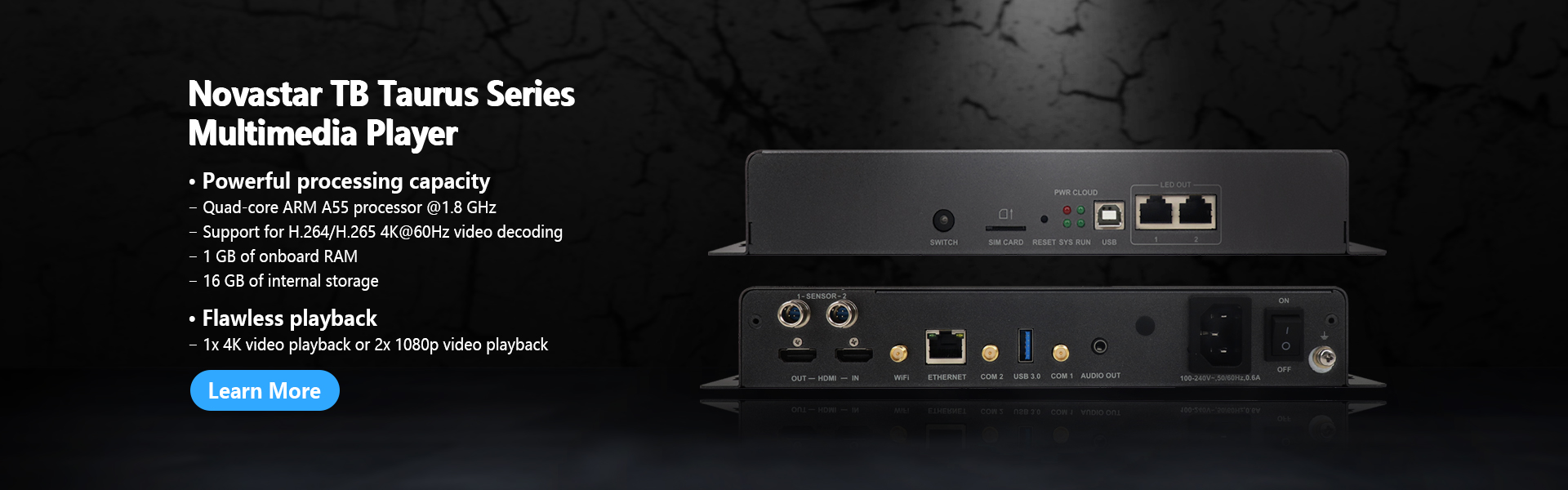
The table follows NovaStar’s official specification documents for each model: TB20 Multimedia Player Specifications V1.0.4 (released 2026-08-31) and TB20 Plus Multimedia Player Specifications V1.0.0 (released 2025-05-27).
| Specification | NovaStar TB20 | NovaStar TB20 Plus |
|---|---|---|
| Loading capacity | Up to 650,000 pixels | Up to 650,000 pixels |
| Maximum width × height | 2048 × 2048 pixels | 2048 × 2048 pixels |
| Ultra-long screen support | Up to 8192 × 2048 pixels | Up to 8192 × 2048 pixels |
| Gigabit Ethernet LED output | 1 | 1 (up to 650,000 pixels per port) |
| Fast Ethernet control port | 1 | 1 |
| HDMI input | 1 × HDMI 1.3, maximum input 2048 × 1024 @ 60 Hz, custom EDID 512–2048 | 1 × HDMI 1.3, maximum input 2048 × 1024 @ 60 Hz, pixel clock ≤ 164 MHz, custom EDID 64–2048 |
| Processor | Quad-core ARM A53 @ 1.2 GHz | Quad-core ARM A53 @ 1.4 GHz |
| Memory and storage | 2 GB RAM, 32 GB internal storage | 2 GB RAM, 32 GB internal storage |
| Video decoding | 4K hardware decoding; H.265/HEVC up to 4096 × 2304 @ 60 Hz (100 Mbps), H.264 up to 4096 × 2304 @ 30 Hz | 4K hardware decoding; H.265/HEVC up to 4096 × 2304 @ 60 Hz (100 Mbps), H.264 up to 4096 × 2304 @ 30 Hz |
| Simultaneous playback | 1×4K, 2×1080p, 4×720p, 4×480p or 16×360p | 1×4K, 3×1080p, 8×720p, 16×480p or 20×360p |
| Operating system | Android 10 | Android 10 |
| Internal and USB storage | USB 2.0 Type-A up to 128 GB; FAT32 / NTFS drives, single file under 4 GB | USB 2.0 Type-A up to 128 GB; ext4 and FAT32 supported, FAT32 single file maximum 4 GB |
| Audio output | 1 × 3.5 mm, fixed 48 kHz | 1 × stereo 3.5 mm, fixed 48 kHz |
| Playback modes | Asynchronous (internal) and synchronous (HDMI), switched on the front panel | Asynchronous (internal) and synchronous (HDMI), switched on the front panel |
| Wi-Fi | 2.4 GHz, Wi-Fi AP and Wi-Fi Sta can run at the same time | 2.4 GHz, Wi-Fi AP and Wi-Fi Sta can run at the same time |
| 4G and time synchronization | Optional 4G module (not included); NTP, plus GPS or RF with the matching module | Optional 4G module (not included); NTP, plus GPS or RF with the matching module |
| Power | DC 5 V to 12 V, 15 W maximum | DC 5 V to 12 V, 15 W maximum |
| Dimensions (L × W × H) | 141.2 × 120.0 × 33.5 mm | 141.2 × 120.0 × 33.5 mm |
| Net weight | 470.3 g | 470.3 g |
| Operating temperature and rating | –20 °C to +60 °C, IP20 | –20 °C to +60 °C, IP20 |
| Certifications listed | CQC, SRRC | CE, FCC, IC, CQC |
What the TB20 and TB20 Plus share
Because the two models come from the same Taurus platform, a project rarely fails on the basics. Both offer:
- The same screen limit: 650,000 pixels through a single Gigabit Ethernet output, 2048 × 2048 pixels for a standard screen and up to 8192 × 2048 pixels for ultra-long screens. The pixel ceiling is a sending limit, not a content limit — a screen with 800,000 physical pixels needs a bigger player even if every clip is 1080p.
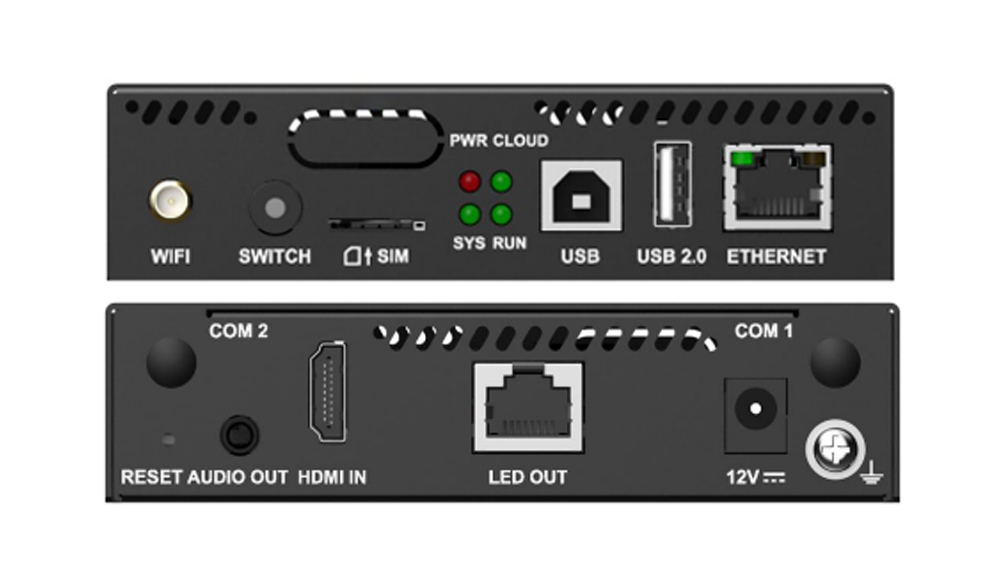
- The same port set: one Gigabit Ethernet LED output, one Fast Ethernet port for publishing and control, HDMI 1.3 input, USB 2.0 Type-A for playback and firmware upgrades, USB Type-B for a direct computer connection, and a 3.5 mm audio output.
- The same platform class: Android 10, 2 GB of RAM, 32 GB of internal storage and hardware 4K decoding, with H.265/HEVC handled up to 4096 × 2304 at 60 Hz.
- The same playback logic: a front-panel SWITCH toggles between asynchronous mode (content from internal storage) and synchronous mode (the HDMI input becomes the video source, scaled to fit the screen).
- The same connectivity options: 2.4 GHz Wi-Fi with AP and station mode running together, an optional 4G module, and NTP, GPS or RF time synchronization when the matching module is fitted.
- The same mechanical and electrical envelope: 141.2 × 120.0 × 33.5 mm, 470.3 g, DC 5–12 V input, 15 W maximum consumption and an IP20 rating for indoor cabinets.
The three differences that decide the model
1. Processor speed and how much plays at once
This is the only performance difference between the two models. The TB20 runs its quad-core ARM A53 processor at 1.2 GHz; the TB20 Plus runs at 1.4 GHz. Memory and storage are identical at 2 GB and 32 GB, and both decode the same codecs, so the gain appears in the number of streams the player can handle simultaneously:
| Simultaneous playback | NovaStar TB20 | NovaStar TB20 Plus |
|---|---|---|
| 4K videos | 1 | 1 |
| 1080p videos | 2 | 3 |
| 720p videos | 4 | 8 |
| 480p videos | 4 | 16 |
| 360p videos | 16 | 20 |
For a single full-screen video, a menu board with one video plus a logo, or a scrolling text and image programme, the TB20 and TB20 Plus behave the same. The gap opens in layouts that stack several windows on one screen — for example a chain-store display with a promotional video, an animated price panel and a weather widget running at once. NovaStar also notes that enabling synchronous playback across multiple screens halves the decoding capability of the device, so budget for that if the installation uses multi-screen sync.
2. Certification: the difference that most often decides the order
The two specification documents list different certification sets. The TB20 document names CQC and SRRC. The TB20 Plus document names CE, FCC, IC and CQC. If the installation is in the United States, Canada or the European Union, that difference normally settles the question on its own, because customs and site acceptance look for the marks in the product documentation rather than for the model name. Confirm the exact certification list for the specific hardware revision you are offered, and ask for the certificate number for the destination country. Certification lists change between revisions, and NovaStar’s own documents note that products sold into a region without the required certification are the customer’s legal risk.
3. HDMI scaling range and USB file systems
Two smaller documentation differences are worth knowing before you build a workflow around them:
- Custom EDID range. The TB20 specification (V1.0.4) states a custom EDID width and height of 512–2048 pixels. The TB20 Plus specification (V1.0.0) states 64–2048 pixels, with the pixel clock not exceeding 164 MHz. Custom EDID has to be supported by the source device as well, so a narrower range is not automatically a fault — but if you plan to feed an unusual resolution, check the current document revision for the exact model.
- USB drive formats. The TB20 document describes FAT32 and NTFS drives with a single file under 4 GB. The TB20 Plus document describes ext4 and FAT32, with FAT32 capped at a 4 GB file, and states that exFAT and FAT16 are not supported. Neither player is a media server: keep test files inside the documented format and size before you rely on a USB playlist at commissioning.
Pixel budget: how large a screen 650,000 pixels supports
Both players cap a standard screen at 2048 × 2048 pixels and support ultra-long screens up to 8192 × 2048 pixels, with 650,000 pixels as the sending limit. Pixel pitch converts that limit into screen area, which is the number buyers actually care about.
| Pixel pitch | Pixels per m² (approx.) | Maximum screen area at 650,000 pixels |
|---|---|---|
| P2.5 | 160,000 | ≈4.1 m² |
| P3 | 111,111 | ≈5.9 m² |
| P3.91 | 65,536 | ≈9.9 m² |
| P4 | 62,500 | ≈10.4 m² |
| P5 | 40,000 | ≈16.3 m² |
| P6.67 | 22,500 | ≈28.9 m² |
| P10 | 10,000 | ≈65 m² |
These figures are theoretical maximums taken from the pixel limit alone. A real design also has to satisfy the 2048-pixel width for standard screens (8192 pixels for ultra-long screens), the way cabinets map onto the single output port, the receiving cards in the chain and the scan mode of the modules. Treat the table as a first filter, then confirm the final layout in NovaStar’s configuration software. Our NovaStar pixel load and sizing guide walks through that calculation.
How to choose: TB20 or TB20 Plus?
| Choose the TB20 when… | Choose the TB20 Plus when… |
|---|---|
| Your supplier, region and site acceptance only require the CQC and SRRC marks listed in the TB20 document | The project is in North America, Europe or another region that expects CE, FCC or IC marks |
| The programme shows one video, or a small number of windows, at a time | The layout runs three or more 1080p videos, or many small clips, simultaneously |
| Budget is the deciding factor and the specification difference has no effect on the content plan | You want the same chassis, ports and pixel ceiling with the highest available processing headroom in this class |
| You need a narrow, unusual HDMI resolution and the current TB20 document revision covers it | You need custom EDID down to 64 pixels, or you are standardising one model across an export fleet |
| The screen stays well inside 650,000 pixels and will not grow | The screen stays inside 650,000 pixels today but may gain cabinets later — though a step up to a TB30 or TB40 is the safer answer for real growth |
| Choose neither if the wall needs more than 650,000 pixels, more than one output port, or a genuinely 4K live input. Move to the TB30 vs TB40 comparison or the TB40 vs TB60 comparison, and put a video processor in front when the source is 4K. | |
Two worked examples
Example 1 — 5 m × 3 m retail wall at P5. The area is 15 m², and at 40,000 pixels per m² the screen needs about 600,000 pixels. That sits inside the 650,000-pixel limit with roughly 8% of headroom, so one TB20-class player is enough. If the store fronts are in the United States or EU, specify the TB20 Plus for its certification list; the content is a single promotional loop, so the extra streams are a bonus rather than a requirement.
Example 2 — 8 m × 4 m outdoor advertising wall at P3.91. The area is 32 m², which at 65,536 pixels per m² needs roughly 2.1 million pixels. That is more than three times the capacity of either the TB20 or the TB20 Plus, so the correct answer is a larger Taurus player such as a TB40 or TB60, and possibly a split across several players or a sending-card chain. Sizing this on the TB20 would fail at commissioning.
In both cases, take the pixel count from the real cabinet grid rather than the nominal screen size, then confirm the design in the configuration software. Test the player, sending card and receiving cards together before installation: our LED controller bench testing guide covers the checks that catch mismatched parts early.
Mistakes buyers make with TB20-class players
- Reading “4K” as a 4K HDMI input. The player decodes 4K files from internal storage, but the HDMI 1.3 input accepts a maximum of 2048 × 1024 @ 60 Hz. A 4K live source needs a video processor in front.
- Sizing the screen to the exact pixel limit. A wall designed at 645,000 pixels leaves almost no room for late changes. Headroom costs far less than replacing a sender during commissioning.
- Assuming the 4G module and GPS antenna are included. Both players ship without the 4G module, and GPS or RF time synchronization needs the specified module. Connection priority is wired network, then Wi-Fi, then 4G.
- Forgetting that multi-screen sync halves decoding. NovaStar’s documentation states that enabling synchronous playback halves the number of videos the device can decode at once, which changes the usable stream count on both models.
- Planning audio without checking the path. The audio output is a fixed 48 kHz 3.5 mm connector, and NovaStar notes that audio with a sample rate of 48 kHz is required when a multifunction card is used for output.
- Transferring certification assumptions across the family. The TB20 and TB20 Plus lists are not the same, and neither are the lists for the TB30, TB40, TB50 and TB60. Check per model and per revision.
- Using the wrong USB drive format. Keep files inside the documented format and file-size ceiling. exFAT and FAT16 are not supported on the TB20 Plus, and FAT32 caps a single file at 4 GB.
Running the player: software, cloud and options
Both models publish content and control screens from a computer, phone or tablet, and both can be managed remotely through NovaStar’s cloud platform. Content publishing and remote control use the ViPlex family and the VNNOX cloud, while screen configuration work uses NovaStar’s control software. Our NovaStar software download page collects NovaLCT, VMP and firmware links in one place, and the guide to producing content for LED screens covers the file formats and resolutions that suit players in this class.
For a visual walkthrough of the hardware and its ports, watch NovaStar TB series LED display multimedia player on our YouTube channel: NovaStar TB Series LED Display Multimedia Player – EagerLED video guide. More installation and configuration videos are on the EagerLED YouTube channel.
Readers comparing the whole Taurus family can use our sister-site review of the NovaStar TB20 Plus multimedia player for a closer look at the hardware. Inside this site, the TB30 vs TB40 comparison and TB40 vs TB60 comparison continue the series, the VX600 Pro vs VX1000 Pro guide and VX1000 Pro vs VX2000 Pro guide cover the processors that sit upstream of a player, and the LED processor vs LED controller explainer separates the two roles if you are still deciding what the box has to do.
FAQ
What is the difference between the NovaStar TB20 and the TB20 Plus?
The main differences are processor speed, simultaneous playback and certification. The TB20 runs a quad-core ARM A53 processor at 1.2 GHz and plays 2×1080p or 4×720p videos at once; the TB20 Plus runs at 1.4 GHz and plays 3×1080p or 8×720p. The TB20 document lists CQC and SRRC certification, while the TB20 Plus document lists CE, FCC, IC and CQC. Loading capacity, ports, dimensions, weight, power and the Android 10 platform with 2 GB RAM and 32 GB storage are the same.
Is the TB20 Plus faster than the TB20?
Yes, by 17% on clock speed: 1.4 GHz against 1.2 GHz for the same quad-core ARM A53 processor. In practice that shows up as more simultaneous video streams, not a different interface or a different screen limit. Memory and internal storage are identical at 2 GB and 32 GB.
Do the TB20 and TB20 Plus load the same number of pixels?
Yes. Both are rated at up to 650,000 pixels through a single Gigabit Ethernet output, with a maximum of 2048 × 2048 pixels for a standard screen and up to 8192 × 2048 pixels for ultra-long screens. If your wall exceeds 650,000 pixels, choose a larger Taurus player such as a TB30, TB40 or TB60 instead of either of these two models.
Can I use the TB20 Plus in the United States or the European Union?
The TB20 Plus specification lists CE, FCC, IC and CQC certification, which is the coverage that export projects normally require. The TB20 document lists CQC and SRRC. Certification can change between hardware revisions, so ask your supplier for the certificate number covering the exact model and revision you are buying, for the country of installation.
Do the TB20 and TB20 Plus accept a 4K HDMI signal?
No. Both have an HDMI 1.3 input with a maximum input of 2048 × 1024 @ 60 Hz, HDCP 1.4 support and no interlaced signal support. They decode 4K files from internal storage or USB, but a live 4K feed has to be processed first. Use a VX600 Pro or VX1000 Pro upstream, then send the player a resolution inside its HDMI limit.
Do the TB20 and TB20 Plus support 4G and GPS?
Both support 4G communication, NTP time synchronization, and GPS or RF synchronization when the matching module is installed. The 4G module is not included with either player. Connection priority is wired network first, then Wi-Fi, then 4G.
What software runs a TB20 or TB20 Plus?
Content publishing and remote control use NovaStar’s ViPlex tools and the VNNOX cloud platform, with NovaLCT and related utilities for screen configuration. We collect the current software entries on our NovaStar software download page.
Which model should I buy for a small LED sign?
For a single-screen sign inside 650,000 pixels showing one video at a time, either model works technically. Buy the TB20 Plus when the destination country or the multi-window content plan calls for it; buy the TB20 when your supplier and site only require the CQC and SRRC list. If the sign is a chain rollout, standardise one model across the fleet so spares, firmware and training stay consistent.
Related Taurus guides
- NovaStar TB10 vs TB10 Plus: Which Player to Choose? — the entry-level asynchronous Taurus players.
- NovaStar TB30 vs TB40: Capacity and Use Cases — documented pixel capacity, HDMI live input, power and mounting, with pixel-budget examples.
- NovaStar TB40 vs TB60: Choosing a Taurus Player — where the two-port DC player ends and the four-port AC player begins.
- NovaStar LED controller pixel load sizing guide — how to turn pixel pitch into a load budget before you order.
Sources and verification
The specifications in this article follow NovaStar’s official documents, which should be treated as the authority for any order:
- NovaStar TB20 Multimedia Player Specifications, V1.0.4 (released 2026-08-31)
- NovaStar TB20 Plus Multimedia Player Specifications, V1.0.0 (released 2025-05-27)
- NovaStar Taurus series product range and firmware release notes (T10 / TB10 / TB20, V5.1.0.1301, 2026-09-18)
Three cautions when you compare sources. First, reseller listings and older datasheets frequently quote different processor, storage or capacity values for the same model number, so confirm the hardware revision and its document version with your supplier. Second, the two documents used here are dated differently, so where a value is revision-dependent — custom EDID range and USB file systems in particular — check the current revision for the exact model. Third, the TB10, TB10 Plus, TB20, TB20 Plus, TB30, TB40, TB50 and TB60 are separate models: do not transfer one model’s capacity or certification list to another.
Choosing between the TB20 and the TB20 Plus comes down to one performance decision and one compliance decision. Send us your screen size, pixel pitch, cabinet layout, content plan and destination country, and we will confirm whether a TB20 Plus, a larger Taurus player such as the TB30 or TB40, or a different NovaStar controller matches the load. The TB10 and TB10 Plus pages show the entry models, and the TB50 and TB60 pages cover the upper end of the family.

