
Quick answer: For a NovaStar vs Huidu decision, choose NovaStar as the first system to evaluate when an LED project is built around live video inputs, advanced processing, redundancy, or an established NovaStar rental and production workflow. Choose Huidu as the first system to evaluate when scheduled playback, straightforward content publishing, and an established Huidu signage workflow are the priorities.
Neither brand is universally better. Both sell synchronous control, asynchronous playback, receiving-card, software, and video-processing products. The dependable decision is made at model level: match the controller or player, receiving cards, software, pixel map, source timing, backup plan, and local support as one tested system.
Source and independence note, checked September 1, 2026: This guide compares the manufacturers’ current public product families, cloud platforms, and download catalogs. LED Controller Card sells products from both brands. We do not claim a universal price, reliability, latency, or market-share winner because the manufacturers do not publish directly comparable evidence for those claims.
NovaStar vs Huidu: the practical verdict
The first question is not “Which brand is better?” It is “How will this screen receive and play content?” A stage backdrop following a switcher’s live HDMI or SDI feed has a different control path from a roadside billboard that downloads a playlist and runs without a connected source computer.
NovaStar is normally the stronger starting shortlist for demanding live-production workflows because its current official portfolio gives substantial emphasis to COEX, VMP, MCTRL control, processors, receiving cards, and production-oriented support. Huidu is normally the stronger starting shortlist for scheduled signage when its HDPlayer, HDSet, asynchronous player, and XiaoHui cloud workflow matches the operator’s needs. This is a shortlist rule, not a substitute for a model-specific datasheet.
Do not repeat the common oversimplification: Huidu is not an asynchronous-only brand, and NovaStar is not a synchronous-only brand. Huidu’s official catalog lists synchronous sending products and video processors; NovaStar’s Nova Cloud catalog lists TB-series multimedia players for scheduled playback.
Start with synchronous vs asynchronous control
Synchronous LED control sends a connected source to the LED screen in real time. It is the normal architecture for live events, broadcast-style workflows, control rooms, studios, and venues where the screen must follow a computer, camera, switcher, or media server continuously.
Asynchronous LED control stores content on a controller or multimedia player, then plays it according to a local or cloud-managed schedule. It is the natural architecture for advertising displays, shop signs, menu boards, transport information, and screen networks that should keep playing without a permanently connected source.
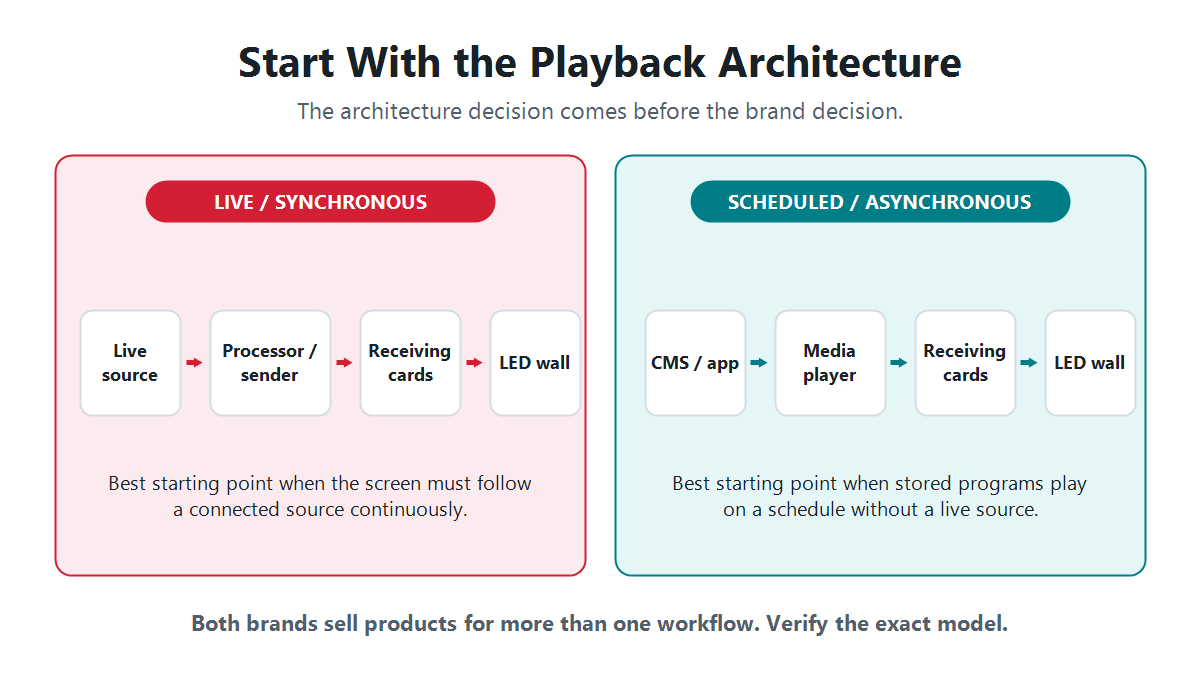
Hybrid projects need both behaviors. A stadium perimeter screen may run scheduled sponsor content most of the day but switch to a live source during an event. In that case, confirm whether the selected player supports the required live-input handoff, whether an external processor is needed, and what happens after source loss, power loss, or a network interruption.
NovaStar vs Huidu ecosystem comparison
| Decision area | NovaStar | Huidu | What the buyer must verify |
|---|---|---|---|
| Synchronous control | The official LED Control System page groups COEX 5G and 1G solutions, VMP software, MCTRL senders, and multiple receiving-card families. | The official catalog lists HD-T16/T08, HD-T08F, HD-T901, HD-T902x2/T902x1, and receiving-card families. | Input timing, maximum canvas width and height, total loading, pixels per output, backup functions, and receiving-card match. |
| Asynchronous playback | Nova Cloud lists TB10 Plus, TB20 Plus, TB30, TB50, and TB60 as multimedia players. The store also carries newer and specialized async products. | The official asynchronous catalog lists HD-A and HD-H product families, including dual-mode multimedia players and full-color playback boxes. | Local storage, supported media formats, update method, live-input requirements, network options, sensors, and offline recovery. |
| Video processing | NovaStar maintains a separate processor portfolio, including all-in-one and modular production options. | Huidu maintains a separate video-processing portfolio alongside its sending and playback products. | Connector type, input resolution, layers, scaling, EDID handling, low-latency mode, presets, genlock, and redundancy where required. |
| Configuration software | Current-generation COEX products use VMP; NovaLCT remains relevant to many established NovaStar systems. Use the hardware/software compatibility matrix for the selected generation. | Huidu labels HDSet as synchronous/asynchronous full-color debugging software and HDPlayer as asynchronous full-color software. | Supported Windows version, driver permissions, firmware pairing, configuration backup, language, training, and recovery procedure. |
| Cloud publishing | NovaStar connects its Nova Cloud multimedia players with VNNOX services. | Huidu publishes a XiaoHui cloud information-publishing solution and related mobile-control options. | Account ownership, regions, subscription terms, user roles, audit history, connectivity, device health, and what still works offline. |
| Receiving cards and files | NovaStar receiving cards and RCFG/RCFGX configuration workflows belong to the NovaStar control chain. | Huidu receiving cards, controller firmware, and configuration workflows belong to the Huidu control chain. | Never assume cross-brand interoperability. Obtain the receiving-card model, firmware, hub mapping, scan mode, and a known-good backup file. |
| Price and support | There is no honest brand-wide winner without a current bill of materials. Hardware, licenses, connectivity, spare units, commissioning time, training, and regional support all affect total cost. | Compare written quotations for the same pixel map, inputs, backup scope, accessories, warranty, and after-sales response. | |
When should you choose NovaStar?
Start with NovaStar when the project is live-input heavy or already standardized on NovaStar receiving cards, configuration files, software, and technician training. Its official portfolio spans COEX control, VMP, MCTRL products, processors, Nova Cloud multimedia players, and several receiving-card families, which gives an integrator multiple upgrade paths inside one ecosystem.
- Live event or broadcast-style operation: shortlist a synchronous or all-in-one controller that supports every required source timing, layer, backup path, and output map.
- Fine-pitch or production workflow: evaluate the current COEX/VMP generation when image control, device coordination, redundancy, or a documented hardware/software matrix matters.
- Existing NovaStar screen: keeping compatible receiving cards and known-good RCFG/RCFGX files can reduce migration risk and retraining.
- Scheduled signage within NovaStar: do not overlook the TB multimedia-player family simply because NovaStar is often associated with live control.
Useful next pages include the NovaStar software and firmware download guide, the NovaStar RCFG/RCFGX file guide, and store examples such as the NovaStar VX1000 Pro and NovaStar TB20 Plus.
When should you choose Huidu?
Start with Huidu when the project is centered on scheduled content, the operator prefers the HDPlayer/HDSet workflow, or the installed screen already uses Huidu receiving cards and validated configuration files. Huidu’s official catalog gives asynchronous full-color products a clear, structured place, while also listing synchronous sending products and video processors for projects that need more than stored playback.
- Single-screen or distributed signage: evaluate HD-A and HD-H multimedia players against the exact pixel map, networking method, content format, and cloud requirement.
- Operator-friendly publishing: compare HDPlayer, mobile-control options, and XiaoHui cloud against the daily tasks the content team must complete.
- Existing Huidu screen: preserving compatible receivers, firmware, and a proven setup file can be more valuable than changing brands for one headline feature.
- Synchronous Huidu project: products such as the HD-T family show why Huidu should not be dismissed as asynchronous-only.
For current software and manuals, use the Huidu software download center. On September 1, 2026, Huidu’s official page listed HDPlayer 7.11.18.0 as the latest version; always recheck before installation because software releases can change. Store examples include the Huidu HD-A5L multimedia player and Huidu HD-T08F synchronous sending box.
How to choose a control system in seven checks
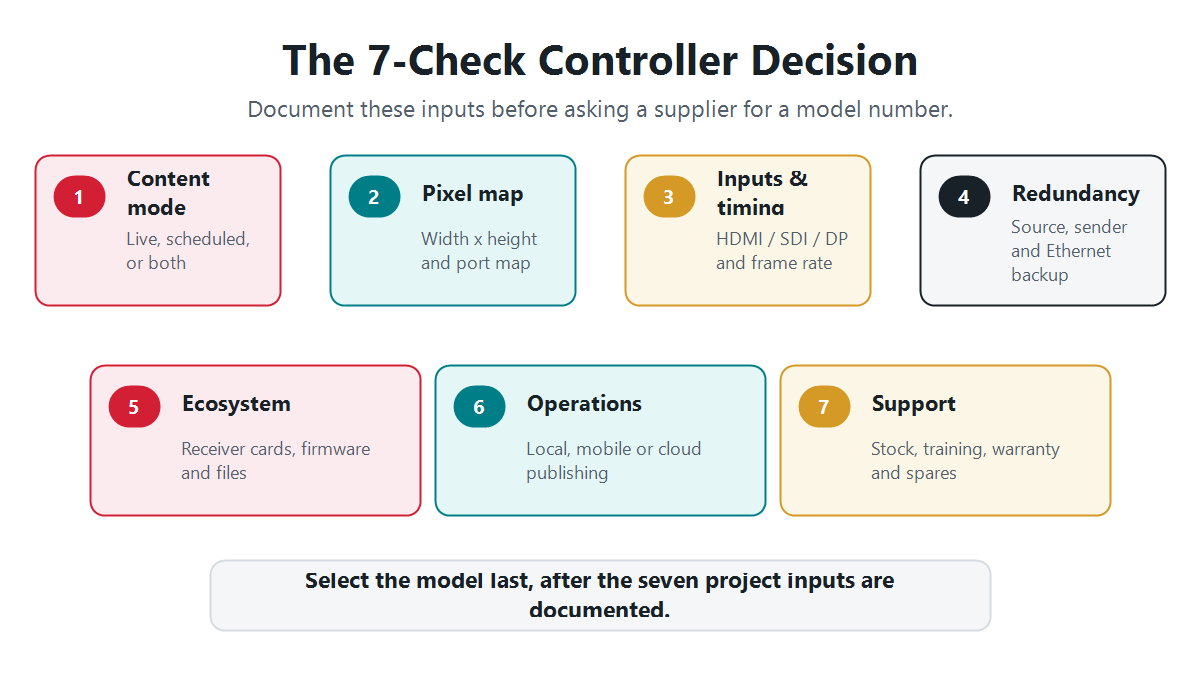
- Define the content mode. Write down whether the screen needs a continuous live source, scheduled local playback, cloud publishing, or a hybrid of those modes.
- Calculate the exact pixel canvas. Multiply final width by final height in pixels. A 1920 × 1080 canvas contains 2,073,600 pixels; 1280 × 512 contains 655,360 pixels; 3840 × 1080 contains 4,147,200 pixels; and 3840 × 2160 contains 8,294,400 pixels. These calculations are not controller ratings. Check total load, maximum width and height, and the per-output map in the exact datasheet.
- Inventory every source and timing. Record HDMI, DVI, DisplayPort, SDI, USB, network-stream, and sensor requirements. For a 60 Hz live source, confirm that the entire input-processing-output chain supports the required timing rather than assuming that a connector name guarantees it.
- Specify redundancy. Decide whether the project needs source backup, sender backup, Ethernet-output backup, dual power, a spare controller, or only a documented recovery procedure.
- Audit the installed ecosystem. Record the receiving-card brand and model, firmware, hub board, cabinet resolution, scan mode, port map, and known-good configuration file before proposing a controller.
- Map daily operations. Identify who publishes content, from which device, through which network, with what approval roles, and what should happen when the internet connection is unavailable.
- Compare support and total cost. Obtain a like-for-like bill of materials that includes accessories, licenses, connectivity, commissioning, training, spares, warranty, and a named escalation path. Run an acceptance test that includes cold boot, source loss and recovery, network interruption, configuration restore, and an 8-hour content loop.
Capacity warning: total pixels are only the first gate. A controller can have enough headline loading capacity and still be unsuitable because the screen exceeds a width or height limit, the Ethernet load cannot be mapped cleanly, the source timing is unsupported, or the required backup mode is absent.
Can NovaStar and Huidu components be mixed?
Do not assume they can be mixed. Treat the controller or media player, receiving cards, firmware, configuration files, and screen map as a matched control chain. A similar Ethernet connector does not establish protocol, firmware, feature, or configuration compatibility.
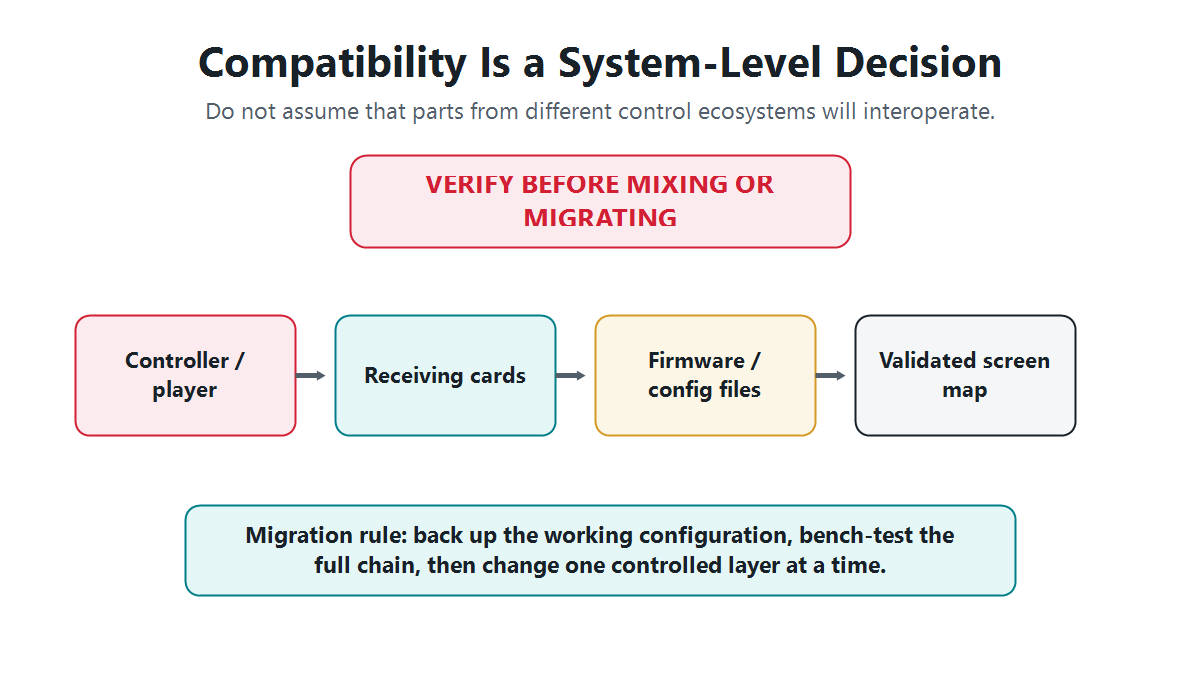
Before a migration, export and archive the working configuration, photograph the port map, record firmware versions, label cabinet order, and keep a rollback device available. Bench-test the proposed sender or player with the actual receiving card, representative modules, and final content. Change one layer at a time so a fault can be isolated.
Five common buying mistakes
- Choosing by brand reputation alone. A respected brand does not make the wrong model suitable for the required canvas, timing, or workflow.
- Comparing only total pixel capacity. Width, height, per-port load, frame rate, bit depth, layers, inputs, and backup can be the real limits.
- Ignoring the receiving cards. The existing cabinet electronics and configuration files often determine the lowest-risk path.
- Assuming cloud control solves every operational problem. Account ownership, permissions, subscriptions, cellular data, regional access, and offline behavior must be specified.
- Buying hardware before testing the workflow. A model should be accepted only after the source, screen map, software, recovery procedure, and operator tasks have been demonstrated.
Sources and verification methodology
We used current first-party manufacturer pages for product-family and software claims, then used LED Controller Card product pages only for internal examples and availability paths. The screen-resolution figures above are direct width-by-height calculations, not published controller limits.
- NovaStar official LED Control System catalog – COEX, VMP, MCTRL, and receiving-card families.
- NovaStar official Nova Cloud catalog – TB-series multimedia players and cloud services.
- NovaStar official downloads – current manuals, firmware, release notes, and compatibility documents.
- NovaStar Catalog 2026 – current portfolio reference.
- Huidu official LED control system catalog – receiving cards and synchronous sending products.
- Huidu official asynchronous full-color catalog – HD-A and HD-H product families.
- Huidu official software downloads – HDPlayer, HDSet, manuals, and version listings.
- Huidu official cloud-platform solution – XiaoHui cloud publishing context.
Limitations: product families contain models with different inputs, loading limits, functions, and regional availability. Prices, warranty terms, software versions, and cloud terms can change. Confirm the exact datasheet, firmware, supplied accessories, and written quotation before purchase.
Need a model-level recommendation? Send the final pixel width and height, content mode, source connectors, receiving-card model, backup requirement, and installation country.
Frequently asked questions
Is NovaStar better than Huidu?
Neither is universally better. NovaStar is a strong first shortlist for live-production and advanced-processing workflows; Huidu is a strong first shortlist for scheduled signage and straightforward publishing. Both cover more than one control architecture, so choose the exact model and support path.
Can NovaStar receiving cards work with a Huidu controller?
Do not assume compatibility. Treat the controller or player, receiving cards, firmware, configuration files, and screen map as one matched ecosystem. Mix brands only when the manufacturers or supplier document support and the full chain passes a bench test.
Which brand is better for asynchronous LED displays?
Both have asynchronous products. NovaStar offers TB-series multimedia players, while Huidu offers HD-A and HD-H families. Compare the exact pixel map, media formats, connectivity, cloud workflow, live-input needs, recovery behavior, and local support.
Which software do NovaStar and Huidu use?
NovaStar uses VMP for current COEX products and NovaLCT for many established systems, with VNNOX services for cloud publishing. Huidu provides HDSet for synchronous/asynchronous configuration, HDPlayer for asynchronous content, and XiaoHui cloud services. Verify the hardware/software compatibility matrix and current version before installation.
What information is needed before choosing an LED controller?
Provide the exact canvas resolution, live or scheduled content mode, source connectors and timings, receiving-card brand and model, Ethernet-output and backup requirements, network or cloud plan, installation country, and expected supplier support.

