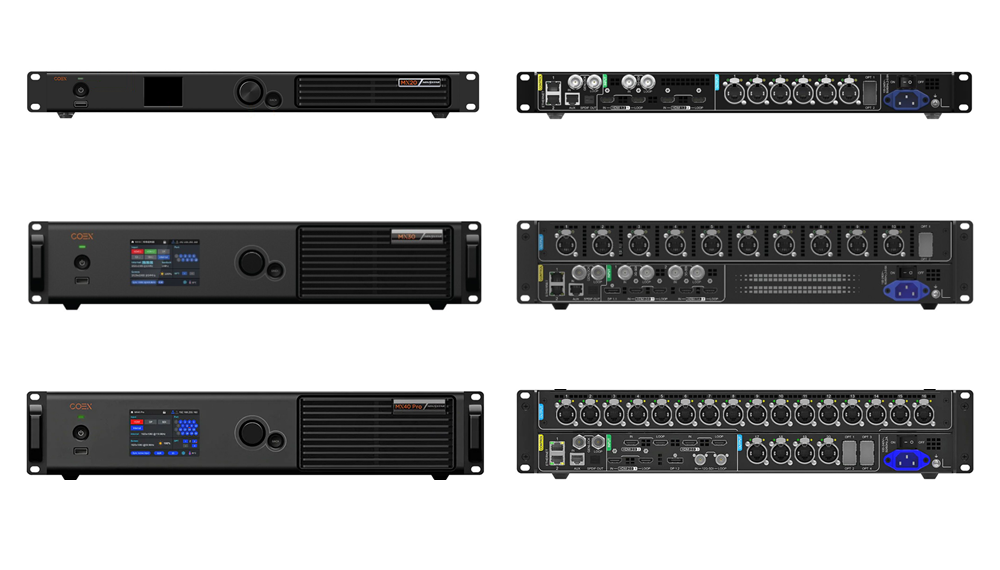
Specifying a NovaStar COEX VMP controller—such as the NovaStar MX40 Pro, MX30, or MX20—shifts your LED video wall from the legacy NovaLCT architecture to NovaStar’s Vision Management Platform (VMP). Choose the MX20 for compact fine-pitch commercial walls up to 3.9 million pixels (6 Ethernet ports), the MX30 for mid-sized 4K corporate and broadcast rooms up to 6.5 million pixels (10 Ethernet ports + 2 x 10G OPT), and the MX40 Pro for flagship XR stages, broadcast studios, and 10-bit/12-bit HDR walls up to 9 million pixels (20 Ethernet ports + 4 x 10G OPT + HDMI 2.1 / 12G-SDI).
This deep engineering guide is written for broadcast systems engineers, virtual-production technical directors, and commercial AV integrators designing high-grayscale indoor or touring LED pipelines. Because a NovaStar COEX VMP controller uses a modernized 1G/5G communication stack and dedicated VMP software, pairing it with the wrong receiving card firmware, miscalculating 10-bit/12-bit port derating, or mixing incompatible fiber converters can stall site commissioning.
In the sections below, we break down the hardware and bandwidth differences across the MX series, explain how 8-bit, 10-bit, and 12-bit color depth affect actual pixel capacity per Gigabit Ethernet port and 10G optical trunk, detail how to pair NovaStar A10s Pro receiving cards for Dynamic Booster and full-grayscale calibration, and map out step-by-step fiber topologies using CVT10-S and CVT10-M converters.
1. What makes a NovaStar COEX VMP controller different from legacy VX processors
For over a decade, most synchronous LED walls relied on NovaLCT software paired with MCTRL sending boxes or VX series all-in-one processors. While the NovaStar VX Pro series remains the most cost-effective workhorse for standard 8-bit 60 Hz commercial and rental displays, camera-critical environments—such as broadcast television studios, XR virtual production stages, corporate executive briefing centers, and cinema-grade fine-pitch walls—expose the limits of traditional 8-bit processing.
A NovaStar COEX VMP controller was engineered specifically to solve four bottlenecks that show up on camera and in low-brightness indoor rooms running at 150 to 600 nits (cd/m²):
- Real-time frame-synchronized adjustments in VMP: Instead of digging through nested parameter dialogs and sending manual “Send to Receiving Card” commands in NovaLCT, VMP discovers controllers and cabinets automatically, groups multiple screens onto one visual canvas, and applies color-gamut, gamma, and brightness changes in real time without black-frame flashes.
- True 10-bit and 12-bit color pipeline with minimal latency: On high-end models like the MX40 Pro, HDMI 2.1, DisplayPort 1.4, and 12G-SDI inputs feed an end-to-end high-bit-depth processing engine capable of sub-frame internal latency when paired with compatible receiving cards.
- Advanced image algorithms (Dynamic Booster, Full-Grayscale Calibration, Shutter Fit): Paired with NovaStar A10s Pro receiving cards, the COEX platform dynamically analyzes frame luminance to boost local contrast, calibrates non-linear LED behavior across every grayscale step (not just peak white), and tunes refresh timing to eliminate scanlines on cinema cameras.
- Modular & high-density scaling up to the CX and MX2000 tiers: Beyond standalone 1U/2U units, the COEX ecosystem scales up to modular servers like the NovaStar CX40 Pro and MX2000 Pro, plus entry COEX controllers like the NovaStar KU20.
01. When to specify COEX VMP vs when to stay on VX Pro
Not every project needs a NovaStar COEX VMP controller. If you are building a standard outdoor advertising sign, a church stage running 8-bit 60 Hz graphics, or a multi-purpose corporate hall where local AV staff already use NovaLCT daily, a VX600 Pro or VX1000 Pro delivers lower hardware cost and universal crew familiarity. Conversely, specify a COEX controller whenever your tender calls for HDR10/HLG playback, Rec.709 / DCI-P3 / Rec.2020 color-space management, camera genlock with phase offset, or multi-step low-gray uniformity in dim rooms.
2. Deep hardware breakdown: MX20 vs MX30 vs MX40 Pro
While our quick reference post (NovaStar MX20 vs MX30 vs MX40 Pro comparison) summarizes headline port counts, system integrators writing formal rack elevations need exact input bandwidth, layer capacities, optical trunk allocations, and independent vs all-in-one architecture distinctions. Every NovaStar COEX VMP controller in the MX family shares the VMP software interface, but they serve three distinct engineering tiers.
| Engineering Parameter | NovaStar MX20 | NovaStar MX30 | NovaStar MX40 Pro |
|---|---|---|---|
| Controller class | All-in-one video controller (scaling + sending) | All-in-one video controller (scaling + sending) | Flagship 4K independent LED display controller |
| Max pixel load (8-bit @ 60 Hz) | 3.9 million pixels | 6.5 million pixels | Up to 9.0 million pixels (via 20 RJ45 / 4 x 10G OPT) |
| Gigabit Ethernet RJ45 ports | 6 ports | 10 ports | 20 ports (grouped across 2 x 10G optical trunks) |
| 10G SFP+ optical fiber ports | 2 x 10G OPT (OPT 1 mirrors ports 1–6; OPT 2 backup) | 2 x 10G OPT (OPT 1 drives 10 ports; OPT 2 backup/copy) | 4 x 10G OPT (OPT 1 & 2 primary 20 ports; OPT 3 & 4 backup) |
| Primary video inputs | 2 x HDMI 1.4, 1 x 3G-SDI (with loop) | 1 x HDMI 2.0, 1 x HDMI 1.4, 1 x DP 1.1, 2 x 3G-SDI | 1 x HDMI 2.1 (or HDMI 2.0 input card), 1 x DP 1.4, 2 x 12G-SDI |
| Multi-window scaling layers | Up to 3 independent layers + OSD | Up to 3 independent 4K/2K layers + OSD | 1:1 pixel-accurate independent canvas (external server/scaler) or onboard scaling per firmware |
| Genlock input & loop | Supported (Bi-level / Tri-level sync) | Supported (Bi-level / Tri-level sync) | Supported with fine phase offset & frame multiplier |
| Supported color bit depth | 8-bit / 10-bit | 8-bit / 10-bit / 12-bit | 8-bit / 10-bit / 12-bit with full HDR10 & HLG |
01. NovaStar MX40 Pro: the flagship 4K broadcast and XR benchmark
The NovaStar MX40 Pro is purpose-built for environments where a dedicated media server (such as Disguise, Pixera, or a broadcast switcher) feeds a high-bit-depth 4K or 8K-sliced canvas directly into the LED wall. Equipped with HDMI 2.1, DisplayPort 1.4, and dual 12G-SDI inputs, this NovaStar COEX VMP controller exposes 20 physical Gigabit Ethernet RJ45 ports alongside 4 x 10G SFP+ optical ports on its rear panel.

A critical hardware detail on the MX40 Pro is how its 20 RJ45 ports and 4 optical ports share internal bandwidth: OPT 1 carries the same data streams as Ethernet ports 1 through 10, while OPT 2 carries Ethernet ports 11 through 20. OPT 3 and OPT 4 act as hot-backup optical trunks for OPT 1 and OPT 2 respectively. That means one 2U MX40 Pro chassis can either drive 20 copper Ethernet lines directly in a short-throw studio (under 80 m / 262 ft) or feed two NovaStar CVT10-S fiber converters at the stage with full dual-fiber redundancy.
02. NovaStar MX30: all-in-one 4K scaling and 10-port loading
When a project needs COEX VMP image processing and real-time software control—plus built-in multi-layer window scaling without an external media server—the NovaStar MX30 hits the sweet spot. With 10 Gigabit Ethernet outputs and 2 x 10G optical ports, it drives up to 6.5 million pixels at 8-bit 60 Hz, easily covering a full 3,840 x 1,080 ultra-wide boardroom or a standard 4K (3,840 x 2,160 = 8.29M px) screen when paired with a second synced unit.

Because the MX30 integrates HDMI 2.0, DisplayPort 1.1, HDMI 1.4, and dual 3G-SDI inputs alongside three independent scaling layers, corporate AV integrators can route a room presentation PC, a video-conferencing codec, and a live camera SDI feed directly into the MX30 without adding an external presentation switcher.
03. NovaStar MX20: compact 6-port entry into the COEX VMP ecosystem
For mid-sized conference rooms, broadcast news desks, and retail experience centers under 3.9 million pixels, the NovaStar MX20 brings the same VMP software experience, 3-layer scaling, and 10G fiber output into a slim 1U chassis with 6 Gigabit Ethernet ports.

Even at the 6-port tier, the MX20 retains 2 x 10G SFP+ optical ports (OPT 1 primary for ports 1–6, OPT 2 backup) and 3G-SDI + dual HDMI 1.4 inputs. If you are standardizing a corporate campus on VMP so one IT team can monitor both a large auditorium (on MX40 Pro or MX30) and smaller executive meeting rooms, deploying the MX20 in the smaller rooms keeps every screen on the exact same control software and SNMP/control protocol.
3. Port-loading engineering: 8-bit, 10-bit, and 12-bit pixel math
One of the most expensive procurement mistakes when sizing a NovaStar COEX VMP controller is calculating Ethernet port count using 8-bit capacity when the client expects 10-bit HDR or 12-bit studio color depth. Because a standard 1G copper Ethernet port has a fixed physical bandwidth ceiling, increasing color depth or frame rate reduces the maximum pixels each RJ45 port can drive.
Under the 1G communication pipeline (connecting standard 1G receiving cards such as the NovaStar A10s Pro), per-port pixel capacity scales according to the engineering formula and reference limits in the table below. Always verify exact frame-rate derating in NovaStar’s official COEX datasheet for your target firmware release.
| Color Depth (@ 60 Hz) | Max Load per 1G RJ45 Port | MX20 Total (6 Ports) | MX30 Total (10 Ports) | MX40 Pro Total (20 Ports) |
|---|---|---|---|---|
| 8-bit RGB (SDR standard) | ~650,000 pixels | Up to 3,900,000 px | Up to 6,500,000 px | Up to 9,000,000 px (input ceiling) |
| 10-bit RGB (HDR10 / HLG) | ~320,000 – 487,500 px (receiving-card dependent) | ~1,920,000 – 2,925,000 px | ~3,200,000 – 4,875,000 px | ~6,400,000 – 9,000,000 px |
| 12-bit RGB (Studio grade) | ~320,000 pixels | Not applicable (8/10-bit) | Up to ~3,200,000 px | Up to ~6,400,000 px |
| 8-bit @ 120 Hz (High frame rate) | ~325,000 pixels | Up to ~1,950,000 px | Up to ~3,250,000 px | Up to ~6,500,000 px |
| 8-bit @ 60 Hz with 1:1 Single-Unit Backup | 650,000 px (half ports used as backup) | 1,950,000 px (3 + 3 ports) | 3,250,000 px (5 + 5 ports) | 6,500,000 px (10 + 10 ports) |
01. Worked sizing calculation: 4K P1.56 indoor broadcast wall
Assume a hypothetical 4.8 x 2.7 m (15.7 x 8.9 ft) studio backdrop built from 600 x 337.5 mm (23.6 x 13.3 in) P1.5625 cabinets in an 8 x 8 array (64 cabinets, each 384 x 216 = 82,944 pixels, totaling 3,072 x 1,728 = 5,308,416 pixels):
- 8-bit 60 Hz SDR mode: At 650,000 pixels per port, wiring 6 to 7 cabinets per port requires 10 Ethernet ports—fitting on one NovaStar MX30 (primary only) or one NovaStar MX40 Pro with 10 primary + 10 backup ports.
- 10-bit 60 Hz HDR mode (with A10s Pro): With per-port capacity reduced to roughly 320,000–480,000 pixels, each port loads 4 cabinets (331,776 pixels). Driving all 64 cabinets requires 16 Ethernet ports, making the 20-port NovaStar MX40 Pro mandatory.
4. Receiving card pairing: A10s Pro, Armor series, and 5G architecture
A NovaStar COEX VMP controller is only as capable as the LED receiving cards installed inside your cabinets. While COEX controllers maintain backward compatibility with many Armor series cards, unlocking the full VMP feature set requires pairing the controller with the right receiving card tier and matching COEX firmware.

01. Why the NovaStar A10s Pro is the default 1G pairing for COEX
On 1G Ethernet pipelines (using the RJ45 ports on the MX20, MX30, or MX40 Pro), the NovaStar A10s Pro (alongside the NovaStar A10s Plus) is the benchmark receiving card. Measuring a compact 70 x 45 mm (2.76 x 1.77 in) with high-density board-to-board connectors, the A10s Pro supports up to 512 x 512 pixels per card and unlocks COEX’s high-value image processing tools:
- Full-Grayscale Calibration: Traditional pixel calibration corrects brightness and chromaticity only at high brightness, leaving blotchy mottling when a fine-pitch conference wall is dimmed to 20% brightness. A10s Pro stores multi-level calibration coefficients across the entire grayscale curve.
- Dynamic Booster & HDR10 / HLG: Dynamically optimizes contrast frame by frame while reducing average power consumption on dark scenes.
- 1-Frame Low Latency & Shutter Fit: Cuts end-to-end processing delay and synchronizes PWM refresh cycles with camera shutter angles on virtual-production stages.
02. Understanding 1G vs 5G COEX receiving cards
When reviewing NovaStar COEX documentation, engineers often encounter references to both 1G solutions (A10s Pro, A8s Pro, A5s Plus running on standard Gigabit RJ45 ports) and 5G solutions (CA50E and XA50 Pro receiving cards running at 5 Gbps per port via CX80 Pro or MX2000 Pro 5G cards). Keep two compatibility rules clear during procurement:
- MX20, MX30, and MX40 Pro use 1G RJ45 Ethernet ports: Their built-in copper RJ45 outputs (and CVT10 10G-to-1G fiber converters) communicate directly with 1G receiving cards like the A10s Pro. You cannot plug a 5G-only receiving card directly into a 1G RJ45 port without a matching 5G architecture.
- Firmware alignment is mandatory: An A10s Pro shipped for a legacy NovaLCT VX1000 wall runs standard NCP/rcfgx firmware. Before deploying existing cabinets on a NovaStar COEX VMP controller, download the matching COEX NCP package from our NovaStar software download center and push it through VMP so every cabinet reports online cleanly.
5. Long-distance 10G optical fiber wiring with CVT10-S and CVT10-M
Any copper Cat5e or Cat6A run between your control room and the first LED cabinet is limited to 100 m (328 ft)—with 80 m (262 ft) strongly recommended in touring and broadcast venues to prevent EMI-induced packet drop. Because an MX40 Pro outputs up to 20 Gigabit Ethernet streams, pulling 20 separate copper snakes from FOH to the stage is heavy, slow, and prone to connector damage.

01. How 10G OPT trunks map to CVT10 fiber converters
Each 10G SFP+ optical port (OPT 1 and OPT 2) on a NovaStar COEX VMP controller multiplexes up to 10 Gigabit Ethernet ports over a single duplex LC fiber cable. At the LED screen, a NovaStar CVT10-S (single-mode, up to 10 km / 6.2 miles) or NovaStar CVT10-M (multi-mode, up to 300 m / 984 ft) demultiplexes that 10G optical signal back into 10 standard RJ45 ports that plug directly into your cabinets.
- On the MX20 (6 RJ45 ports): OPT 1 carries ports 1–6 over fiber to a CVT10 unit (ports 7–10 on the CVT10 remain unused, as explained in our technical troubleshooting note: Why Are CVT10 Ports 9 and 10 Unavailable?). OPT 2 acts as the optical hot backup.
- On the MX30 (10 RJ45 ports): OPT 1 carries all 10 Ethernet ports over one fiber trunk to one CVT10 converter; OPT 2 carries the redundant backup fiber to a second fiber port or backup CVT10.
- On the MX40 Pro (20 RJ45 ports): OPT 1 (ports 1–10) and OPT 2 (ports 11–20) feed two CVT10 units at the LED wall, while OPT 3 and OPT 4 provide full redundant optical paths. For ruggedized touring racks with Neutrik opticalCON / EtherCON connectors, you can also specify the NovaStar CVT10 Pro-S / CVT10 Pro-M.
Always populate the controller’s SFP+ cages with genuine NovaStar 10G SFP single-mode optical modules (1310 nm, 10 km) when connecting to a CVT10-S, or 850 nm multi-mode modules when connecting to a CVT10-M. Mixing single-mode and multi-mode transceivers across the same fiber patch cord causes optical link failure. For a full breakdown of CVT10 vs CVT4K topologies, see our LED Screen Fiber Converter Buying Guide: CVT10 vs CVT4K.
6. VMP software workflow vs NovaLCT field operations
For engineering teams migrating from legacy sending boxes to a NovaStar COEX VMP controller, the biggest day-to-day operational shift is replacing NovaLCT with VMP (Vision Management Platform). Understanding how VMP handles device discovery, cabinet pack files (.ncp), and topological backup prevents commissioning delays on site.
- Unified cabinet pack (
.ncp) vs standalone.rcfgxfiles: COEX VMP uses an integrated NCP (NovaStar Cabinet Pack) file bundling receiving-card firmware, module parameters, and frame-rate presets into one verified package. - Automatic topology recognition: Connect your laptop via Gigabit LAN, drag cabinet groups onto the VMP canvas, and click along the daisy-chain path. COEX automatically recognizes OPT and Ethernet port mapping, making backup loops effortless.
- Brand isolation: A NovaStar COEX VMP controller cannot drive Colorlight, Huidu, or Mooncell receiving cards. See our NovaStar vs Colorlight vs Huidu comparison guide and LED receiving card vs sending card guide.
7. Video walkthrough: NovaStar MX40 Pro hardware interfaces
The video walkthrough above shows the physical front-panel touchscreen interface and rear connector layout of the NovaStar MX40 Pro, illustrating how the 20 RJ45 ports, 4 x 10G SFP+ slots, HDMI 2.1 / DP 1.4 / 12G-SDI inputs, and Genlock BNC connectors are arranged for 19-inch (482.6 mm) rack mounting.
Frequently asked questions
Can I configure a NovaStar MX40 Pro, MX30, or MX20 using legacy NovaLCT software?
No. A NovaStar COEX VMP controller is managed exclusively through NovaStar’s VMP (Vision Management Platform) software rather than legacy NovaLCT. VMP runs on Windows and macOS and connects to the MX20, MX30, or MX40 Pro over standard Gigabit Ethernet LAN, allowing one workstation to discover, map, and calibrate multiple COEX controllers simultaneously.
Do existing LED cabinets with A8s or A10s Plus receiving cards work with an MX40 Pro or MX30?
Yes, many Armor series receiving cards (including A10s Pro, A10s Plus, A8s Pro, and A5s Plus) are compatible with COEX 1G Ethernet ports, provided their firmware is updated to a COEX-supported version (typically via an NCP cabinet pack or firmware update inside VMP). However, certain advanced image algorithms—such as Dynamic Booster and Full-Grayscale Calibration—require specific hardware like the A10s Pro and a supported driver IC on the LED module.
Why does the MX40 Pro list 20 Ethernet ports if its maximum pixel capacity is capped around 9 million pixels?
While 20 Gigabit Ethernet ports theoretically support 20 x 650,000 = 13 million pixels at 8-bit 60 Hz, the MX40 Pro’s maximum total load is governed by its 4K input and internal processing bandwidth (up to roughly 9 million pixels at 8-bit 60 Hz, or 4,096 x 2,160 = 8,847,360 pixels). The 20 physical RJ45 ports exist so you can drive a full 4K canvas in 10-bit or 12-bit HDR mode—where per-port pixel capacity drops to roughly 320,000–450,000 pixels per port—without running out of physical Ethernet outputs.
Can I use both the 20 RJ45 ports and the 4 x 10G optical ports on the MX40 Pro to drive 40 different Ethernet lines?
No. On a NovaStar COEX VMP controller, the 10G optical ports mirror the copper RJ45 ports rather than adding extra pixel capacity. Specifically, on the MX40 Pro, OPT 1 outputs the same data as RJ45 ports 1–10, OPT 2 outputs RJ45 ports 11–20, and OPT 3 / OPT 4 serve as redundant optical backups for OPT 1 and OPT 2.
When should I choose the MX30 over the MX40 Pro?
Choose the MX30 when your screen resolution is 6.5 million pixels or less at 8-bit 60 Hz (or ~3.2M pixels at 10-bit/12-bit) and you want built-in 3-layer multi-window scaling inside an all-in-one 10-port controller. Choose the MX40 Pro when you need up to 20 Ethernet ports for a full 4K 10-bit/12-bit canvas, HDMI 2.1 / 12G-SDI broadcast connectivity, or dual-CVT10 fiber distribution on large stages.
Engineering checklist before ordering COEX hardware
Before submitting a purchase order for a NovaStar COEX VMP controller and matching accessories, confirm six technical parameters from your project drawings: total screen pixel resolution (width x height), target color bit depth and frame rate (8-bit vs 10-bit/12-bit, 60 Hz vs 120 Hz), whether you need built-in multi-layer window scaling (MX20/MX30) or a 20-port independent 4K processor (MX40 Pro), the exact receiving card model and driver IC inside your cabinets, cable distance from control rack to screen (to determine whether CVT10-S or CVT10-M fiber converters and 10G SFP modules are required), and whether you have the cabinet’s .ncp or .rcfgx configuration file on hand.
If you want our engineering team to verify your 10-bit port-loading calculation or confirm A10s Pro firmware compatibility before ordering, send your screen resolution and cabinet specifications through our contact page. For complete fine-pitch indoor or rental LED cabinets pre-configured with COEX receiving cards, you can also review display solutions at EagerLED.